Vue normale

Il y a de nouveaux articles disponibles, cliquez pour rafraîchir la page.
À partir d’avant-hierFlux principal

Test du UGREEN FineTrack G : la meilleure alternative aux AirTags pour l’écosystème Android ?

Par : Korben
2 décembre 2025 à 14:58
– Article invité, rédigé par Vincent Lautier, contient des liens affiliés Amazon –

J’ai dû abandonner mon iPhone habituel pour une quinzaine de jours, le temps de prendre en main et de tester en profondeur le tout nouveau smartphone Realme GT8 Pro pour Mac4Ever . Si la transition vers Android s’est faite sans heurts sur mes usages quotidiens, un manque s’est rapidement fait sentir : la localisation de mes affaires.

Mes AirTags étant devenus inopérants dès lors que j’ai changé de carte SIM, il me fallait une solution équivalente et fiable compatible avec l’OS de Google. C’est dans ce contexte que j’ai mis la main sur le pack de quatre traceurs UGREEN FineTrack G , une solution qui promet de combler ce vide avec quelques arguments techniques intéressants.

Au premier contact, le produit ne dépayse pas. On retrouve un petit galet en plastique gris, discret et léger, conçu pour se glisser dans un portefeuille, une valise ou s’accrocher à un trousseau de clés via son encoche intégrée. Cependant, une différence majeure saute aux yeux dès l’inspection du boîtier : la présence d’un port USB-C sur la tranche !

Contrairement à la quasi-totalité de ses concurrents, y compris chez Apple, UGREEN a fait le choix audacieux d’intégrer une batterie lithium-polymère rechargeable plutôt que de nous obliger à utiliser des piles boutons CR2032 jetables. Le constructeur annonce une autonomie d’environ un an par charge, un point que je n’ai évidemment pas pu vérifier sur deux semaines, mais la simple possibilité de recharger le traceur avec le même câble que mon téléphone est un confort indéniable qui évite la gestion des piles de rechange.

L’installation et la configuration passent par l’application Google de localisation, qui sert de passerelle pour l’enregistrement du produit. La procédure est élémentaire : un appui sur le bouton central du traceur suffit à l’activer, et le téléphone le détecte presque instantanément via Bluetooth. Une fois appairé, le dispositif rejoint le réseau “Localiser mon appareil” de Google.

C’est ici que réside tout l’intérêt du produit face aux anciens traceurs Bluetooth classiques. Le FineTrack G ne se contente pas de votre propre connexion ; il s’appuie sur le maillage gigantesque des centaines de millions d’appareils Android en circulation pour relayer la position de votre objet de manière sécurisée et anonyme. Durant mon test, la localisation s’est avérée précise et la mise à jour de la position sur la carte a été réactive, même lorsque le traceur était hors de portée de mon propre Realme GT8 Pro.

En matière de recherche de proximité, le dispositif est très efficace pour retrouver des clés égarées dans un appartement. L’application permet de déclencher une sonnerie via le haut-parleur intégré au traceur. Avec une puissance annoncée de 80 dB, le son produit est suffisamment fort pour être entendu distinctement même si l’objet est enfoui au fond d’un sac ou coincé entre les coussins d’un canapé.

L’application propose également une interface visuelle pour vous guider lorsque vous êtes à portée Bluetooth, même si on ne retrouve pas la précision millimétrique de la technologie Ultra-Wideband  présente sur les AirTags. Mais bon, pour un usage courant, le système de bip sonore couplé à l’indication de proximité remplit parfaitement son rôle.

Au final, après ces deux semaines de test en compagnie de mon nouveau Realme GT8 Pro, le bilan de ces UGREEN FineTrack G est franchement positif. Vendus en lot de quatre à un tarif très correct, ils offrent un rapport qualité-prix difficile à battre sur le marché actuel. L’intégration au réseau Google est fluide, la fabrication est sérieuse, et le choix de la batterie rechargeable via USB-C est un gros plus. Pour tout utilisateur Android cherchant une solution fiable pour surveiller ses affaires sans se ruiner en piles, c’est une recommandation facile, et vous pouvez les trouver ici sur Amazon .

Et puisque vous savez lu jusque ici, pensez aussi à lire le test de cet Android Realme GT8 Pro que j’ai trouvé excellent !

Article invité publié par Vincent Lautier . Vous pouvez aussi faire un saut sur mon blog , ma page de recommandations Amazon , ou lire tous les tests que je publie dans la catégorie “Gadgets Tech” , comme cette liseuse Android de dingue ou ces AirTags pour Android !

Best NAS for Under $250

Par : Rob Andrews
1 décembre 2025 à 14:00

Best NAS You Can Buy Right Now for Under $249 at the end of 2025

As personal data storage requirements continue to rise in 2025, many users are moving away from cloud platforms and monthly subscription services in search of something more private and cost effective. A dedicated NAS, or network attached storage system, allows you to back up photo collections, host a home media library, or manage small business files while keeping full control of your data and avoiding ongoing fees. The good news is that the market now includes several capable options priced at or under 249 dollars. Improvements in low power processors, wider use of DDR5 memory, and leaner operating systems have made entry level systems far more powerful than they were even a year ago. They can comfortably handle tasks such as Plex playback, simple virtualization, and lightweight container apps. This article looks at five NAS units currently available within this price bracket, each offering a practical mix of performance, connectivity, and storage flexibility for anyone building a reliable setup on a limited budget.

Important Disclaimer and Notes Before You Buy!

Before looking at specific NAS models, it helps to understand the common limits of systems in this price tier. Most units under 249 dollars arrive without drives, and rely on NVMe or SATA bays that must be filled separately. Some include small onboard storage such as 32GB to 64GB eMMC that only covers the operating system. This means the total cost of a usable setup will usually be higher than the base price. These devices are aimed at home users and personal cloud tasks rather than heavier business workloads. Several models also lack a full NAS operating system and instead use lightweight platforms such as CasaOS or ZimaOS, or provide only a simple interface for local file access and containers. These options are improving, yet they may not offer advanced RAID tools, snapshot automation, or detailed permission control found on systems like Synology DSM or TrueNAS. Overall, these NAS units suit users with some technical confidence or anyone who wants a simple setup with limited depth.


Beelink ME Mini NAS – 6 Bay SSD NAS

$209 – Intel N150 – 12GB – No SSD (64GB eMMC Only) – 2x 2.5GbE + WiFi 6 – No OS / User Install – BUY HERE

The Beelink ME Mini is a compact NAS designed for anyone who wants fast SSD storage in a very small enclosure. It measures 99mm on each side and includes six M.2 2280 NVMe slots that can deliver as much as 24TB when fully populated. The system uses an Intel N150 processor with 12GB of LPDDR5 memory, which provides a solid mix of performance and low power draw. Connectivity includes two 2.5GbE ports, WiFi 6, and Bluetooth 5.2, giving it flexibility for both wired and wireless use. Cooling is handled passively and the unit contains its own power supply, which keeps noise and cable clutter to a minimum and makes it a good fit for living rooms or compact office spaces.

Component Specification
CPU Intel N150 (4 cores, up to 3.6 GHz)
Memory 12GB LPDDR5
Internal Storage 64GB eMMC + 6x M.2 2280 NVMe slots
Networking 2x 2.5GbE LAN, WiFi 6, Bluetooth 5.2
Ports USB 2.0, USB 3.2, USB-C, HDMI
OS User-defined (Linux-based preferred)
Dimensions 99 x 99 x 99 mm


Terramaster F2-425 2- Bay Intel Value Turnkey NAS

$249 – Intel N5105 – 4GB – TOS 6 Software – 1x 2.5GbE – 2x SATA – BUY HERE

The Terramaster F2-424 is a two bay NAS that sits near the upper edge of the 249 dollar bracket and focuses on providing a more traditional turnkey experience. It uses an Intel Celeron class x86 quad core processor with 4GB of memory that can be upgraded, which allows it to handle general home NAS tasks and hardware assisted 4K decoding for applications such as Plex, Emby, and Jellyfin.

The system supports two SATA drives for a total capacity of up to 60TB and includes TRAID for flexible expansion and space management. Connectivity is limited to a single 2.5GbE port, which is sufficient for most home use but less flexible than some other systems in this list that offer two LAN ports. The unit runs TOS 6, which provides RAID options, snapshots, cloud sync, and a broad selection of built in apps for backup, media, and light productivity needs.

Setup can be completed through the TNAS Mobile app, which also supports automatic photo and video backups from mobile devices. Local AI driven sorting for photos is included, and cross platform access is available through the TNAS client or standard network mapping. TerraSync enables PC backups with version history, and security features include OTP authentication, firewall controls, DoS protections, snapshots, and HyperLock WORM for ransomware resistance. The chassis is quiet in operation and uses tool free push lock trays that allow quick installation or replacement of drives.

Terramaster also offers the F2-425 Plus at roughly 130 dollars more. That model increases CPU and memory resources and is aimed at users who want stronger performance and scalability. For those who want to remain within the 249 dollar limit, the F2-424 provides a straightforward Intel based platform with a familiar OS, upgradable memory, and native HDD support, as long as the single network port meets the user’s needs.


GMKTec G9 NAS – 4 Bay M.2 NAS @ The lowest Price

$185.99 – Intel N150 – 12GB – No SSD (64GB eMMC Only) – 2x 2.5GbE + WiFi 6 – Ubuntu 24.10 (Preloaded, Switchable) – BUY HERE

The GMKTec G9 provides hardware that closely matches the Beelink ME Mini, since it also uses the Intel N150 processor and 12GB of LPDDR5 memory. It arrives in a more traditional rectangular enclosure and includes four M.2 2280 NVMe slots instead of six. The system contains 64GB of onboard eMMC storage that is mainly used to boot Ubuntu 24.10, and it can dual boot into Windows 11 when an additional SSD is installed. As with the Beelink, there is no SATA support, so all storage relies on NVMe drives up to 4TB each. Cooling is handled by an active fan and the device includes two HDMI outputs, which makes it a stronger option for anyone who wants a small desktop system or direct media output as part of their NAS setup. The manufacturer issued a refresh in summer 2025 that improved the cooling layout with better vent placement and more efficient airflow.

Component Specification
CPU Intel N150 (4 cores, up to 3.6 GHz)
Memory 12GB LPDDR5
Internal Storage 64GB eMMC + 4x M.2 2280 NVMe slots
Networking 2x 2.5GbE LAN, WiFi 6, Bluetooth 5.2
Ports 3x USB 3.2, 1x Type-C (DP), 2x HDMI, Audio
OS Ubuntu 24.10 by default, dual-boot capable
Dimensions 146.6 x 100.25 x 38.75 mm


Synology BeeStation 4TB NAS – ALL IN ONE!

$199 – Realtek RTD1619B – 1GB – 4TB SINGLE BAY – 1x 1GbE – BeeStation Manager (BSM) – BUY HERE

The Synology BeeStation 4TB is a single bay NAS designed for users who want a ready to use system with no installation work. It arrives with a pre installed 4TB hard drive and a sealed enclosure, so there is no need to source or fit storage. The system uses a Realtek RTD1619B ARM processor with 1GB of DDR4 memory and connects through a single 1GbE port. It runs BeeStation Manager, which focuses on beginner friendly features such as cloud style file access, simple photo management, and smooth integration with Synology mobile apps. Synology also released the BeeStation Plus model in 2025 with an Intel processor, more memory, and 8TB of storage, but it sits at roughly double the price. If you are willing to spend more, that model gives you greater performance and capacity.

Component Specification
CPU Realtek RTD1619B (Quad-core ARM)
Memory 1GB DDR4
Internal Storage 4TB HDD (included, sealed)
Networking 1x 1GbE LAN
Ports 1x USB-A 3.2 Gen 1, 1x USB-C 3.2 Gen 1
OS Synology BeeStation Manager (BSM)
Dimensions 148 x 62.6 x 196.3 mm


UGREEN NASync DXP2800 NAS – The New Challenger!

$249 – Intel N100 – 8GB – No Storage (32GB eMMC) – 1x 2.5GbE – UGOS Pro – BUY HERE

The UGREEN DXP2800 sits in the NASync series and targets users who want a mix of expandability and value. It supports both hard drives and SSDs through two 3.5 inch SATA bays and two M.2 NVMe slots that can be used for caching or fast active data work. The system uses an Intel N100 processor from the twelfth generation energy efficient N series and pairs it with 8GB of DDR5 memory that can be upgraded. A 32GB eMMC module holds the UGOS Pro operating system. Connectivity is built around a single 2.5GbE port with several USB ports on the front and rear including USB C and 10Gbps USB A. UGOS Pro offers a clean web interface with containers, RAID options such as zero, one, and JBOD, simple multimedia features, and remote file access.

UGREEN recently released the DH2300 two bay NAS at a noticeably lower price of roughly 100 to 120 dollars below the DXP2800. That model uses a lower power ARM processor, far less memory, and only one 1GbE port. It is acceptable for very light duties, but most users will benefit from spending a little more on the DXP2800 due to its stronger CPU, memory capacity, and networking.

Although UGOS Pro does not match the ecosystem depth of Synology DSM or QNAP QTS, the DXP2800 remains one of the few turnkey systems in this bracket that supports SSD and HDD storage in a flexible layout without proprietary limits. Users will still need to supply their own drives and configure storage pools, yet the combination of hardware capability and manageable software makes it a strong choice for anyone comfortable handling a modest amount of setup work.

Component Specification
CPU Intel N100 (4 cores, up to 3.4GHz)
Memory 8GB DDR5 (non-ECC, upgradeable to 16GB)
Internal Storage 32GB eMMC + 2x SATA + 2x M.2 NVMe
Networking 1x 2.5GbE LAN
Ports Front: 1x USB-C (10Gbps), 1x USB-A (10Gbps) \nRear: 1x USB-A (5Gbps), 2x USB 2.0, HDMI 4K Output
OS UGOS Pro
Dimensions 231 x 109 x 178 mm (approx.)


ZimaBoard 2 (832 Version) – DIY Enthusiast’s DREAM!

$199 – Intel N150 – 8GB – No Storage (32GB eMMC) – 2x 2.5GbE – ZimaOS – BUY HERE

The ZimaBoard 2 (832) is a compact single board NAS platform built for users who want flexibility and modular control rather than a traditional enclosure based system. It arrives as a bare embedded board with all interfaces exposed, which makes it ideal for custom builds. The system uses the Intel N150 quad core processor with 8GB of LPDDR5x memory and includes 32GB of onboard eMMC storage for ZimaOS. The device ships with a lifetime ZimaOS license, which is notable at this price level. It also stands out by providing two powered SATA 3.0 ports, giving it native support for hard drives without any need for USB to SATA adapters. The product is now sold on Amazon, although the price can move between 249 and 349 dollars depending on current stock and promotions, so it is worth watching for discounts.

Connectivity is strong for a low profile platform. It offers two 2.5GbE ports, USB 3.1, a PCIe 3.0 x4 slot, and a Mini DisplayPort output that can deliver 4K60 video. The PCIe slot opens the door for add on networking, storage controllers, or accelerators, although most users will start by using the SATA ports for core NAS storage. The large passive heatsink keeps the board silent, although thermal results will depend on the case you choose and the surrounding environment.

This system suits DIY builders who want to create their own NAS, firewall appliance, lightweight media server, or container host. ZimaOS provides a simple web interface and allows the user to switch to CasaOS or other Linux based platforms if preferred. It is aimed at users who want maximum control and are comfortable managing their own setup rather than those seeking a plug and play NAS.

Component Specification
CPU Intel N150 (4 cores, up to 3.6GHz)
Memory 8GB LPDDR5x
Internal Storage 32GB eMMC + 2x SATA 3.0 (powered)
Networking 2x 2.5GbE LAN
Ports 2x USB 3.1, Mini DisplayPort, PCIe 3.0 x4
OS ZimaOS (also supports CasaOS, Linux distros)
Dimensions 140 x 83 x 31 mm


Each NAS covered in this guide delivers its own mix of hardware capability, expansion potential, and overall usability while staying within the 249 dollar limit. Users who want a fully prepared option with minimal setup will likely prefer the Synology BeeStation, and anyone who wants a small SSD focused system with stronger customisation features may find the Beelink ME Mini or GMKTec G9 more suitable. The UGREEN DXP2800 stands out for its combination of HDD and SSD support and a more developed software platform, while the ZimaBoard 2 is aimed at technical users who want full control over every layer of the build. None of these devices is a perfect all rounder, yet each one provides a practical entry into local storage, self hosted media, and personal backup without exceeding a modest budget

📧 SUBSCRIBE TO OUR NEWSLETTER 🔔
[contact-form-7]
🔒 Join Inner Circle


Get an alert every time something gets added to this specific article!


Want to follow specific category? 📧 Subscribe

This description contains links to Amazon. These links will take you to some of the products mentioned in today's content. As an Amazon Associate, I earn from qualifying purchases. Visit the NASCompares Deal Finder to find the best place to buy this device in your region, based on Service, Support and Reputation - Just Search for your NAS Drive in the Box Below

Need Advice on Data Storage from an Expert?

Finally, for free advice about your setup, just leave a message in the comments below here at NASCompares.com and we will get back to you. Need Help? Where possible (and where appropriate) please provide as much information about your requirements, as then I can arrange the best answer and solution to your needs. Do not worry about your e-mail address being required, it will NOT be used in a mailing list and will NOT be used in any way other than to respond to your enquiry. [contact-form-7] TRY CHAT Terms and Conditions
If you like this service, please consider supporting us. We use affiliate links on the blog allowing NAScompares information and advice service to be free of charge to you.Anything you purchase on the day you click on our links will generate a small commission which isused to run the website. Here is a link for Amazon and B&H.You can also get me a ☕ Ko-fi or old school Paypal. Thanks!To find out more about how to support this advice service check HEREIf you need to fix or configure a NAS, check Fiver Have you thought about helping others with your knowledge? Find Instructions Here  
 
Or support us by using our affiliate links on Amazon UK and Amazon US
    
 
Alternatively, why not ask me on the ASK NASCompares forum, by clicking the button below. This is a community hub that serves as a place that I can answer your question, chew the fat, share new release information and even get corrections posted. I will always get around to answering ALL queries, but as a one-man operation, I cannot promise speed! So by sharing your query in the ASK NASCompares section below, you can get a better range of solutions and suggestions, alongside my own.

☕ WE LOVE COFFEE ☕


UGREEN DH2300 : Test complet du NAS 2 baies abordable, silencieux et performant

Par : Fx
27 novembre 2025 à 07:00
Test UGREEN DH2300 - UGREEN DH2300 : Test complet du NAS 2 baies abordable, silencieux et performant

Cela fait maintenant plusieurs jours que nous utilisons le nouveau NAS UGREEN DH2300. Avec ses 2 baies, ce modèle vise un public large : utilisateurs souhaitant se passer des abonnements Cloud, centraliser ses fichiers ou monter un petit serveur domestique sans prise de tête. UGREEN mise ici sur la simplicité, mais aussi sur la sécurité, en proposant un NAS facile à installer et à administrer. Et avec un tarif de lancement de 209,99€ (167,99€ actuellement en promotion), difficile de ne pas s’interroger : la promesse est-elle tenue ?

Test UGREEN DH2300 - UGREEN DH2300 : Test complet du NAS 2 baies abordable, silencieux et performant

Test UGREEN DH2300

Après une entrée fracassante sur le marché du NAS avec des produits relativement haut de gamme, UGREEN revient depuis quelques mois avec 2 modèles plus accessibles. Mais comme vous allez le voir, ces nouveaux venus sont loin d’être dénués d’intérêt… au contraire !

Contenu de la boîte

À l’ouverture, on trouve :

  • Le NAS UGREEN DH2300 ;
  • 1 câble réseau RJ45 ;
  • Des vis de fixation pour les disques et SSD ;
  • Un tournevis ;
  • Une alimentation externe ;
  • Un guide de démarrage complet ;
  • Un livret de garantie.

On est en présence du strict nécessaire pour bien démarrer. Le tournevis est peut-être de trop. Si l’intension du fabricant est noble, il est inutile de le proposer…

Construction du NAS et design

Le DH2300 affiche un design à la fois sobre et original. Entièrement conçu en plastique noir rigide, il se tient fièrement à la verticale et occupe très peu de place sur un bureau. Ses dimensions sont de 151 × 198 × 213,7 mm pour un poids d’environ 950 g. Particularité de ce châssis tout en hauteur : le ventilateur est placé (au-dessous) à la base du boîtier.

À noter que la présence de plusieurs trous et fentes à l’arrière (en haut) et sur les côtés (en bas) facilite la circulation de l’air et le refroidissement du NAS.

Connectique

UGREEN DH2300 avant zoom - UGREEN DH2300 : Test complet du NAS 2 baies abordable, silencieux et performant

En façade :

  • 1 port USB-C 3.0 (5 Gb/s) ;
  • Le bouton d’alimentation ;
  • Les LED d’état ;
  • Un capteur NFC permettant d’associer rapidement un smartphone.

À l’arrière :

  • 2 ports USB-A 3.0 ;
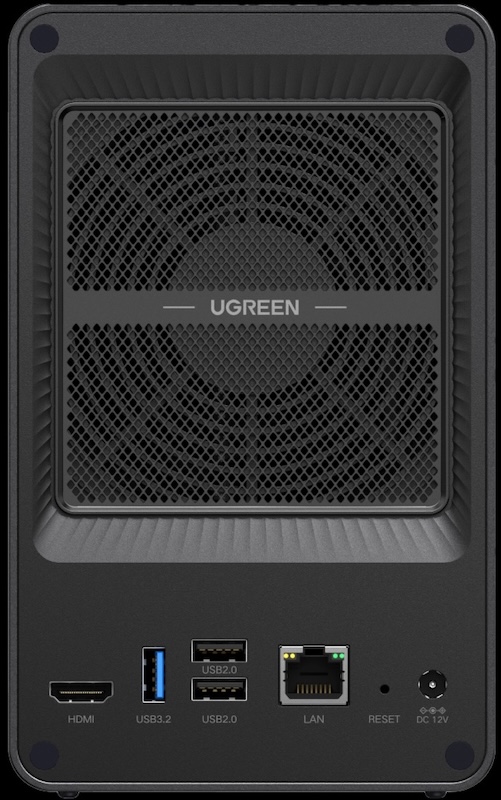
  • 1 sortie HDMI compatible 4K/60 Hz ;
  • 1 port Ethernet 1 Gb/s.

La sortie HDMI peut être utilisée pour diffuser des vidéos sur un téléviseur (via l’application mobile).

UGREEN DH2300 arriere zoom - UGREEN DH2300 : Test complet du NAS 2 baies abordable, silencieux et performant

Intérieur du DH2300

Le DH2300 est équipé d’un processeur Octo Core ARM Rockchip RK3576  cadencé à 2,2 GHz, accompagné de 4 Go de RAM DDR4 (non extensibles). Selon PassMark, il obtient un score de 3 871 points, largement suffisant pour les usages auxquels il est destiné.

Installation des disques et SSD

UGREEN propose ici un système vraiment simple. Pour accéder aux 2 chariots, il suffit de retirer la partie supérieure grise (chapeau). L’accès est facile. Par contre, il est nécessaire d’utiliser le tournevis pour installer les disques (vis fournies).

UGREEN DH2300 chariot - UGREEN DH2300 : Test complet du NAS 2 baies abordable, silencieux et performant

Les chariots sont en plastique rigide, avec des amortisseurs souples pour réduire les vibrations et donc le bruit.

Mise en route avec UGOS Pro

L’installation matérielle est rapide : on insère les disques, on connecte le RJ45, on branche l’alimentation, et c’est parti.

Pour l’installation et les premiers pas, nous vous recommandons de passer par un navigateur Web et d’aller à l’adresse : find.ugnas.com. UGREEN propose des applications mobiles (Android et iOS) et des logiciels (Windows et macOS).

etape 1 2025 - UGREEN DH2300 : Test complet du NAS 2 baies abordable, silencieux et performant etape 2 - UGREEN DH2300 : Test complet du NAS 2 baies abordable, silencieux et performant etape 3 - UGREEN DH2300 : Test complet du NAS 2 baies abordable, silencieux et performant

L’installation se déroule en 3 étapes et prend moins de 10 minutes. Cependant, malgré sa volonté de simplifier l’expérience, UGREEN demande encore à l’utilisateur de créer lui-même le volume de stockage (et le pool). L’assistant est clair, mais on aurait apprécié une automatisation complète pour éliminer toute friction.

installation ugreen 2025 - UGREEN DH2300 : Test complet du NAS 2 baies abordable, silencieux et performant

Rassurez-vous : même sans compétences techniques, la configuration reste très simple.

Mises à jour régulières

UGREEN déploie régulièrement des mises à jour pour corriger des bugs, améliorer les performances et ajouter des fonctionnalités. Un bon point pour la pérennité du produit.

Applications

L’interface UGOS Pro est épurée et fluide. Un Centre d’applications propose les services maison : sauvegarde de photos, streaming multimédia, synchronisation, etc.

L’écosystème logiciel est solide :

  • application mobile très complète ;
  • logiciel PC/Mac ;
  • application Android TV et tvOS.

Le lecteur multimédia Théâtre propose une expérience correcte pour lire des vidéos, mais en retrait face à Plex ou Jellyfin. L’application Photos est prometteuse, mais certaines fonctionnalités avancées manquent encore de stabilité (comme la reconnaissance d’objets). Rien d’insurmontable… UGREEN semble être sur la bonne voie.

Côté sécurité

Le DH2300 prend en charge plusieurs protocoles de chiffrement (TLS/SSL, RSA, AES). L’authentification à 2 facteurs est disponible. Un module Sécurité peut analyser les menaces en temps réel, envoyer des alertes et programmer des scans.

UGREEN DH2300 arrier - UGREEN DH2300 : Test complet du NAS 2 baies abordable, silencieux et performant

Performances

Dans la première partie de nos tests, nous allons évaluer les performances des transferts à travers un réseau 1 Gb/s (entre le NAS et des ordinateurs). Ensuite, nous regarderons les capacités du processeur, en analysant ses performances dans la virtualisation et le transcodage vidéo.

Vitesses dans les transferts

Depuis plusieurs années, nous avons mis en place un protocole de tests rigoureux fournissant des données fiables et comparables avec les performances des autres NAS. Pour cela, nous utilisons 4 applications de mesure différentes (2 sous macOS et 2 sous Windows) et réalisons en plus des transferts de fichiers de tailles variées dans les deux sens (NAS -> Ordinateur puis Ordinateur -> NAS) :

  • Petites tailles : 100 fichiers de 500 Ko à 12 Mo (MP3, photos, documents Office)
  • Tailles moyennes : 30 fichiers de 12 à 350 Mo (DivX, images RAW, archives ZIP)
  • Fichiers volumineux : 10 fichiers avec une taille comprise entre 4 et 10 Go (MKV, ISO)

À partir de ces tests, nous calculons une moyenne des transferts que nous représentons sous forme de graphiques, exprimée en mégaoctets par seconde. Plus le nombre est élevé, plus le NAS est rapide. Pour notre évaluation du F4-425, nous avons configuré un premier volume avec 2* SSD WD Red SA 500 en RAID 0, puis en RAID 1.

RAID 0

ugreen dh2300 RAID0 - UGREEN DH2300 : Test complet du NAS 2 baies abordable, silencieux et performant

Sans atteindre la limite théorique du Gigabit, les performances sont très bonnes, stables et régulières sur toutes les tailles de fichiers.

RAID 1

ugreen dh2300 RAID1 - UGREEN DH2300 : Test complet du NAS 2 baies abordable, silencieux et performant

Avec la protection RAID 1 activée, le DH2300 conserve d’excellents débits. C’est à la fois surprenant et rassurant. Une belle réussite !

Il n’y a toujours pas la possibilité de chiffrer un dossier. Cependant, il est possible de mettre en place un Coffre-fort à travers un paquet, mais cela restera à travers l’interface Web (inaccessible en SMB).

Performances générales

Ce NAS n’est pas conçu pour la virtualisation ou la conteneurisation, fonctions absentes sur ce modèle… et ce n’est clairement pas sa cible. UGREEN a privilégié la simplicité d’usage, et l’interface reste parfaitement fluide. En transcodage, même en 4K, nous n’avons pas réussi à mettre le processeur en difficulté.

UGREEN DH2300 main - UGREEN DH2300 : Test complet du NAS 2 baies abordable, silencieux et performant

Consommation électrique et nuisance sonore

Le ventilateur placé sous le boîtier est très discret, presque inaudible. Côté consommation, le DH2300 affiche entre 3 et 6 W en utilisation normale (avec les 2 SSD) et jusqu’à 8,5 W lors de tâches intensives. Des valeurs excellentes pour un NAS domestique.

CONCLUSION
Le UGREEN DH2300 confirme l’ambition du constructeur : offrir un NAS simple, accessible et efficace pour un usage grand public. Sans chercher à rivaliser avec les modèles professionnels, il se concentre sur l’essentiel et le fait bien : une installation rapide, une interface fluide, un écosystème logiciel déjà solide... et des performances réseau très correctes (même en RAID 1). Sa consommation faible, il ne fait quasi aucun bruit et son tarif est agressif. UGREEN aurait trouvé la formule magique ? On a ici un NAS particulièrement attractif pour centraliser ses données, sauvegarder ses photos ou héberger une bibliothèque multimédia. Il lui reste encore quelques points à améliorer côté applications, mais le DH2300 est une excellente base, avec des mises à jour régulières. Une belle surprise dans le segment des NAS d’entrée de gamme... Que lui manque-t-il ? Peut-être une prise réseau 2,5 Gb/s...
MATÉRIEL / DESIGN
9
OS & APPLICATIONS
7
PERFORMANCES
8.5
PRIX
10
8.6

UGREEN NAS Black Friday 2025 Deals

Par : Rob Andrews
25 novembre 2025 à 16:00

Black Friday 2025 NAS Deals – UGREEN NAS

Black Friday has brought some of the strongest discounts yet on UGREEN NASync systems, making it an ideal time for new users and homelab builders to step into the NAS ecosystem or upgrade to a more powerful and future proof setup. This year’s lineup ranges from compact and affordable 2-bay models for simple backups and family cloud storage to high performance all-flash and 10GbE systems aimed at media creators, home labs, and virtualisation workloads. Whether you need a quiet personal cloud, a fast Plex server, an NVMe-accelerated photo workflow, or a full 8-bay system capable of running containers, VMs, TrueNAS, or UnRAID, UGREEN’s NASync range covers every tier with significant holiday savings. Below is a detailed breakdown of each model on offer, including their best use cases and current Black Friday pricing.


UGREEN NASync DXP4800 Plus – $594.99 

Regular price$699.99

The UGREEN DXP4800 Plus is a 4 bay NAS running UGOS Pro and built around an Intel Pentium Gold 8505 processor with 5 cores and 6 threads, paired with 8GB DDR5 memory that can be expanded to 64GB. It includes a 128GB system SSD, 4 SATA bays, and 2 M.2 slots, allowing a maximum combined capacity of 136TB for mixed HDD and SSD storage. RAID options include JBOD, Basic, 0, 1, 5, 6, and 10, giving users flexible data protection choices. Connectivity is a strong point, with both 2.5GbE and 10GbE network ports, front USB C and USB A ports at 10Gb per second, additional rear USB ports, an SD 3.0 card reader, and 4K HDMI output for direct console access. With a compact footprint of 10.1 inches by 7.0 inches by 7.0 inches and power usage of 42.36W during disk access, the DXP4800 Plus is a high performance prosumer NAS that fits well into creative, home lab, and small business environments.


UGREEN 120W NAS UPS – 15% OFF, NOW $84.99


UGREEN NASync DH4300 Plus – $364.99 

Regular price$429.99

The UGREEN DH4300 Plus is a simple and affordable 4 bay NAS designed as a reliable backup hub and a private cloud alternative for homes and small offices. It uses an 8 core Rockchip ARM processor with 8GB LPDDR4X memory and a 32GB eMMC system disk, providing enough performance for file sync, photo and video backup, family cloud storage, and basic media streaming through UGOS Pro. The 4 SATA bays support up to 120TB with RAID options including JBOD, Basic, 0, 1, 5, 6, and 10, making it easy to choose between capacity and data protection. A single 2.5GbE port offers fast network transfers, while front USB 3.2 ports and 4K HDMI allow quick file import and local access when needed. With compact dimensions of 155 by 155 by 215.7 mm and low power draw of 22.89W during drive access, the DH4300 Plus is a cost effective way to move away from subscription cloud services and take full control of your own backup and storage system.


UGREEN NASync DXP480T Plus – $849.99 

Regular price$999.99

The UGREEN DXP480T Plus is a high speed 4 slot NVMe NAS built around the Intel Core i5 1235U processor, designed for users who want the performance benefits of full flash storage rather than traditional SATA drives. With 4 M.2 NVMe slots supporting up to 32TB, the system delivers extremely fast read and write speeds that are ideal for photo and video editing, virtual machines, database work, AI workloads, and low latency cloud sync tasks. UGOS Pro supports RAID modes including JBOD, Basic, 0, 1, 5, 6, and 10, allowing both performance and data protection on NVMe media. Connectivity is equally strong with a 10GbE port for high bandwidth transfers and dual Thunderbolt 4 ports that operate at 40Gb per second for fast external storage or workstation integration. The system includes 8GB DDR5 memory, expandable to 64GB, along with built in WiFi and 8K HDMI output for direct console use. With compact dimensions of 7.05 by 5.59 by 2.05 inches and efficient power consumption, the DXP480T Plus is a compelling option for anyone who wants the speed and responsiveness of an all flash NAS.


UGREEN DXP6800 PRO – 20% OFF, Now £799


UGREEN NASync DXP4800 – $499.99 

Regular price$549.99

The UGREEN DXP4800 is a 4 bay SATA NAS designed for users who want an affordable and straightforward media server for Plex, Jellyfin, or Emby. It runs on an Intel N100 processor with 8GB DDR5 memory and includes 2 M.2 slots for SSD caching, which helps speed up library scanning and artwork retrieval across large media collections. With space for up to 136TB and RAID options covering JBOD, Basic, 0, 1, 5, 6, and 10, it offers plenty of room and flexibility for growing libraries of movies, TV shows, and music. Dual 2.5GbE ports provide more than enough throughput for multiple streams on the local network, and the HDMI 4K output allows direct playback or simple setup without a separate computer. Front and rear USB ports make it easy to import media from external drives, while UGOS Pro supports popular self hosted media applications through containers or native apps. Compact dimensions of 10.1 by 7.0 by 7.0 inches and low power use make the DXP4800 a practical, quiet, and efficient platform for home media streaming with Plex, Jellyfin, or Emby.


UGREEN NASync DH2300 – $188.99 

Regular price$209.99

The UGREEN DH2300 is one of the most affordable and compact NAS options in the lineup, making it an ideal entry point for anyone who wants simple personal backups or a small private cloud without a large upfront cost. It runs on an efficient 8 core Rockchip A72 plus A53 processor with 4GB LPDDR4X memory and includes 2 SATA bays that support up to 60TB with JBOD, Basic, 0, or 1 for easy data protection. Despite its budget friendly price, it offers useful connectivity including 1GbE networking, front USB C and USB A ports for quick file import, and a 4K 60Hz HDMI output for local setup or direct playback. With a very small footprint at 151 by 98 by 213.7 mm and power use of only 13.72W during drive access, the DH2300 fits comfortably on a shelf or desk and provides a quiet, low cost alternative to cloud subscriptions for photos, documents, and home backups.


UGREEN DXP4800 PLUS – 20% OFF, NOW $559.99


UGREEN NASync DXP6800 Pro – $1,019.99 

Regular price$1,199.99

The UGREEN DXP6800 Pro is a powerful 6 bay NAS designed for photographers and media professionals who need fast ingest, responsive editing, and reliable large scale storage. It uses an Intel Core i5 1235U processor with 10 cores and 12 threads and includes 8GB DDR5 memory, expandable to 64GB, giving it enough performance for handling RAW photo workflows, large Lightroom or Capture One catalogs, and multi-stream media projects. With 6 SATA bays and 2 M.2 slots, the system can reach up to 196TB of combined storage, allowing long term archives, active project folders, and SSD cache acceleration for quicker preview loading. Dual 10GbE ports provide the bandwidth needed for teams or for editing directly from the NAS over a fast network, while the dual Thunderbolt 4 ports at 40Gb per second allow very rapid transfers from workstations or external drives. A front SD 4.0 card reader simplifies importing photos and footage, and the 8K HDMI output allows direct console access for quick management. Compact at 11.54 by 10.16 by 7.87 inches, the DXP6800 Pro is a high performance, creator focused storage solution that comfortably supports demanding photo and video workflows.


UGREEN NASync DXP4800 Plus + UPS Add On – $639.99 

Regular price$799.99

The UGREEN DXP4800 Plus is a powerful and flexible 4-bay NAS built on the Intel Pentium Gold 8505 with 5 cores and 6 threads, paired with 8GB DDR5 memory and support for up to 64GB. It includes a 128GB system SSD, 4 SATA bays, and 2 M.2 SSD slots, giving the system a maximum capacity of 136TB for mixed HDD and NVMe setups. Connectivity is strong with both 2.5GbE and 10GbE ports for high-speed file transfers, media streaming, and multi-user access on UGOS Pro. This Black Friday bundle also includes the UGREEN US3000 UPS, a compact 120W lithium-ion backup module with 0s transfer time, 43.2Wh rated energy, and 12,000mAh capacity. It protects the NAS from sudden power loss, prevents file system corruption, and enables safe shutdown during outages. With front 10Gbps USB-C and USB-A ports, an SD 3.0 card reader, 4K HDMI output, and a compact 10.1 × 7.0 × 7.0 inch chassis, the DXP4800 Plus and included UPS form a reliable, high-performance storage solution for home and professional users.


UGREEN NASync DXP2800 – $319.99 

Regular price$349.99

The UGREEN DXP2800 is one of the best value NAS options in the lineup, offering full access to all UGOS Pro software features while keeping hardware costs low. It runs on the Intel N100 processor with 4 cores and 4 threads, paired with 8GB DDR5 memory and support for up to 16GB, making it capable of running file sharing, photo backup, cloud sync, container apps, and media servers without difficulty. The system includes 2 SATA bays and 2 M.2 SSD slots, giving a maximum storage capacity of 76TB, which is more than enough for home backups or small office data. A 2.5GbE port provides fast transfers for laptops, desktops, and media players, while the front USB-C and USB-A ports at 10Gbps make external storage import easy. With 4K HDMI output for direct console access and a low power draw of only 16.38W during drive access, the DXP2800 delivers the full UGOS Pro experience, including AI photo sorting, mobile backup, cloud sync, and app store functionality, all within a compact 9.1 × 4.3 × 7.0 inch chassis. It is an affordable and highly capable entry point for anyone wanting full NAS functionality without the premium price.


UGREEN NASync DXP8800 Plus – $1,274.99 

Regular price$1,499.99

The UGREEN DXP8800 Plus is the ultimate UGREEN NAS server for users who want maximum power, flexibility, and room to grow. It runs on the Intel Core i5 1235U with 10 cores and 12 threads, paired with 8GB DDR5 memory and support for up to 64GB, making it ideal for large scale virtual machines, Docker workloads, and advanced homelab setups including TrueNAS or UnRAID installations. With 8 SATA bays and 2 M.2 SSD slots, the system supports up to 256TB of total storage, which is enough for professional video archives, multi user environments, and massive Plex libraries. Dual 10GbE ports provide extremely fast network throughput for direct editing from the NAS in applications like DaVinci Resolve or Adobe Premiere, while the 2 Thunderbolt 4 ports at 40Gb per second allow rapid offload and workstation integration. A front SD 4.0 reader simplifies media ingest for photographers and editors, and the 8K HDMI output allows direct console access when needed. With a compact 7.05 by 5.59 by 2.05 inch design and strong performance under UGOS Pro, the DXP8800 Plus is the most capable and full featured UGREEN NAS platform for creators, homelab users, virtualisation workloads, Plex servers, and demanding professional storage environments.


Amazon Deals


UGREEN NASync DXP6800 Plus 6-Bay NAS –  

The UGREEN DXP6800 Pro is a high performance 6 bay NAS aimed at creators and production teams who need fast ingest, smooth editing, and dependable storage for large projects. It runs on an Intel Core i5 1235U with 10 cores and 12 threads and includes 8GB DDR5 memory with support for up to 64GB, giving it the power required for RAW photo sets, large catalog libraries, and demanding video work. The 6 SATA bays and 2 M.2 SSD slots allow a total capacity of 196TB, making it suitable for long term archives, active project folders, and fast SSD caching to speed up preview generation and media scrubbing. Dual 10GbE ports enable direct editing over the network, while the 2 Thunderbolt 4 ports operating at 40Gb per second support extremely fast transfers from workstations or external storage. A front SD 4.0 card reader streamlines importing footage from cameras, and the 8K HDMI output provides simple local access for setup and management. With a compact footprint of 11.54 by 10.16 by 7.87 inches, the DXP6800 Pro delivers a powerful and efficient workflow platform for photographers, videographers, and studio environments.


UGREEN NASync DH4300 Plus Value Class NAS – $364.99


UGREEN NASync DXP2800 2-Bay NAS – 


UGREEN NASync DH2300 2-Bay Tiny Impact NAS – $188..99


📧 SUBSCRIBE TO OUR NEWSLETTER 🔔
[contact-form-7]
🔒 Join Inner Circle

Get an alert every time something gets added to this specific article!


Want to follow specific category? 📧 Subscribe

This description contains links to Amazon. These links will take you to some of the products mentioned in today's content. As an Amazon Associate, I earn from qualifying purchases. Visit the NASCompares Deal Finder to find the best place to buy this device in your region, based on Service, Support and Reputation - Just Search for your NAS Drive in the Box Below

Need Advice on Data Storage from an Expert?

Finally, for free advice about your setup, just leave a message in the comments below here at NASCompares.com and we will get back to you. Need Help? Where possible (and where appropriate) please provide as much information about your requirements, as then I can arrange the best answer and solution to your needs. Do not worry about your e-mail address being required, it will NOT be used in a mailing list and will NOT be used in any way other than to respond to your enquiry. [contact-form-7] TRY CHAT Terms and Conditions
If you like this service, please consider supporting us. We use affiliate links on the blog allowing NAScompares information and advice service to be free of charge to you.Anything you purchase on the day you click on our links will generate a small commission which isused to run the website. Here is a link for Amazon and B&H.You can also get me a ☕ Ko-fi or old school Paypal. Thanks!To find out more about how to support this advice service check HEREIf you need to fix or configure a NAS, check Fiver Have you thought about helping others with your knowledge? Find Instructions Here  
 
Or support us by using our affiliate links on Amazon UK and Amazon US
    
 
Alternatively, why not ask me on the ASK NASCompares forum, by clicking the button below. This is a community hub that serves as a place that I can answer your question, chew the fat, share new release information and even get corrections posted. I will always get around to answering ALL queries, but as a one-man operation, I cannot promise speed! So by sharing your query in the ASK NASCompares section below, you can get a better range of solutions and suggestions, alongside my own.

☕ WE LOVE COFFEE ☕


Test du NAS UGREEN DH2300 : le petit NAS pas cher qui fait tout bien

Par : Korben
25 novembre 2025 à 12:58
– Article invité, rédigé par Vincent Lautier, contient des liens affiliés Amazon –

Le UGREEN NASync DH2300 n’est clairement pas le boîtier le plus connu du marché, mais il a une mission simple : offrir une solution de stockage compacte, silencieuse et abordable pour ceux qui veulent centraliser leurs données ou monter un petit serveur multimédia sans se prendre la tête. UGREEN m’a envoyé le modèle DH2300 accompagné de deux disques durs de 4 To pour le mettre à l’épreuve. Pour ce test, j’ai choisi de l’utiliser comme “second NAS” branché à mon Mac mini M4 (via ma Livebox), uniquement dédié à Plex et au stockage de films en 4K. Et disons-le tout de suite : il a largement dépassé ce que j’attendais d’un NAS de cette taille.

Un NAS compact mais sérieux

Le DH2300 est un NAS 2 baies au format vraiment miniature. Son design reste sobre, silencieux et très élégant, avec une ventilation maîtrisée qui reste discrète même lorsqu’on le sollicite un peu, contrairement à mon NAS Synology. À l’intérieur, on trouve un processeur ARM quad-core associé à 4 Go de RAM, ce qui le place dans la catégorie des NAS “grand public” mais suffisamment musclés pour encaisser une utilisation quotidienne variée : sauvegardes Time Machine, petites VM, hébergement de fichiers ou serveur multimédia.

UGREEN met en avant son système “UGOS Pro”, une interface moderne, propre, qui n’essaie pas de singer Synology ou QNAP mais propose les fonctionnalités essentielles : gestion des dossiers partagés, snapshots, applications intégrées, accès à distance, partage de fichiers, et même des options avancées comme le montage NFS ou le support SMB multicanal. L’installation est rapide : on insère les deux disques, on lance l’initialisation, et on est opérationnel en moins de dix minutes. C’est simple, clair et rapide.

Mon cas d’usage : un NAS dédié à Plex sur Mac

Je voulais tester le DH2300 dans un cadre très précis : en faire un second NAS, dédié uniquement à Plex. Le Mac mini M4 fait tourner le serveur Plex, et le DH2300 contient la vidéothèque 4K. Résultat : aucun ralentissement, une navigation fluide, des transferts stables via le réseau 2,5 GbE, et une parfaite compatibilité avec macOS. Le NAS ne décode pas lui-même les vidéos (ce n’est pas sa vocation), mais il assure parfaitement l’accès aux fichiers lourds en 4K HDR. Pour un setup Plex simple et efficace, il coche vraiment toutes les cases.

D’autres usages (et pour qui ?)

Le UGREEN NASync DH2300 s’adresse aussi bien aux particuliers qu’aux indépendants et petites entreprises qui veulent une solution de stockage fiable sans se ruiner. Comme NAS familial, il gère parfaitement la sauvegarde, la synchronisation de documents, le partage photo/vidéo ou la création d’un espace collaboratif. Sur Windows ou macOS, l’intégration SMB est impeccable.

Pour un freelance, cela devient un petit hub centralisé pour projets, archives, clients et sauvegardes automatisées. Grâce aux snapshots, on peut même restaurer rapidement un dossier en cas d’erreur ou de fichier supprimé. Le NAS supporte également l’accès distant sécurisé, ce qui permet de récupérer des documents depuis n’importe où sans passer par un cloud externe.

Screenshot

Et pour les bidouilleurs, l’écosystème d’applications permet d’installer un serveur web, un conteneur ou des apps type Transmission pour une utilisation plus polyvalente. On n’est pas au niveau d’un Synology haut de gamme, mais à ce prix-là, la proposition est franchement solide, et simple d’accès.

Une très bonne affaire

Au passage, si vous lisez cet article avant le 1er décembre, bonne nouvelle : UGREEN propose –20 % sur le NASync DH2300 . Son prix descend à 167,99 € (ici par exemple , ce qui en fait probablement l’un des meilleurs rapports qualité-prix en NAS 2 baies actuellement. À ce tarif-là, difficile de trouver une solution aussi propre et aussi simple à prendre en main. Si vous avez des disques durs qui traînent chez vous, c’est l’occasion de les faire briller à nouveau.

Screenshot

Le UGREEN DH2300 n’a pas vocation à remplacer les NAS professionnels ou les machines très complètes du marché, mais il excelle dans ce pour quoi il est conçu : un NAS accessible, silencieux, efficace et très simple à utiliser. Pour un usage Plex, pour centraliser ses données à la maison ou pour un indépendant qui veut un stockage fiable sans aller chercher une usine à gaz, c’est un excellent choix. Et avec la promo actuelle, c’est une option franchement immanquable. Il est dispo ici , sur Amazon, par exemple.

Article invité publié par Vincent Lautier . Vous pouvez aussi faire un saut sur mon blog , ma page de recommandations Amazon , ou lire tous les tests que je publie dans la catégorie “Gadgets Tech” , comme cette liseuse Android de dingue ou ces AirTags pour Android !

NEW UGREEN DXP4800 PRO and DXP4800S NAS REVEALED

Par : Rob Andrews
14 novembre 2025 à 14:05

UGREEN Reveal Two New 4-Bay NAS – The DXP4800 Pro and DXP4800S

UGREEN has expanded its desktop NAS lineup with two additional models, the DXP4800S and the DXP4800 Pro. Both systems appear in regional listings alongside the existing DXP4800 and DXP4800 Plus rather than replacing them, which suggests a parallel product structure rather than a conventional generational refresh. These releases focus on incremental CPU and memory changes while retaining almost identical hardware layouts, storage options and connectivity. The result is a broader range of mid-tier NAS configurations targeted at users who want x86 processors with varying performance levels and memory support, while UGREEN continues to position its DH4300 series toward entry level users and larger capacity deployments. Let’s discuss these two new NAS devices, if/when they will be available, where they sit compared with the existing UGREEN NAS range, and where either of them deserve your money and your data?

UGREEN DXP4800S NAS Specifications

The DXP4800S is seemingly positioned as an updated variant of the original DXP4800, retaining the same core hardware layout while adopting Intel’s newer N150 processor and faster DDR5 memory. The shift to the N150 provides a modest frequency increase over the N100 but maintains identical core count, thread count and power behaviour. Memory remains user accessible through a single slot, with support for up to 16GB. The rest of the internal structure is unchanged, including four SATA bays, two NVMe slots and the same Gen three by one PCIe wiring. The system is intended as a compact x86 home server with improved AI-assisted photo indexing and modest efficiency gains over the standard model.

Externally, the device keeps the original USB layout, HDMI output and 2.5GbE gigabit LAN. The SD card reader remains SD 3.0 and the flash storage stays at 32GB. The overall focus of this model is small refinements rather than a re-engineered platform. Users familiar with the DXP4800 will find the same physical design and the same expandability, but with slightly higher supported memory frequency and a newer entry class processor that aligns with Intel’s Twin Lake manufacturing cycle.

Component DXP4800S
Processor Intel N150, four cores and four threads, up to 3.6Ghz
Architecture x86, Intel seven process
Memory 8GB DDR5 preinstalled, one slot, up to sixteen gigabytes, up to five thousand six hundred megahertz, ECC capable
SATA Bays Four, compatible with 2.5 inch and 3.5 inch drives
SATA Capacity Up to 30TB per bay
NVMe Slots Two M key NVMe 2280 slots, up to eight terabytes each
Flash Storage 32GB
Network 2x 2.5GbE
USB Front one USB three point two Gen two Type A and one USB three point two Gen two Type C. Rear one USB three point two Gen one
USB Two Two rear ports
SD Reader SD 3
HDMI Up to 4K at sixty hertz

UGREEN DXP4800 Pro NAS Specifications

The DXP4800 Pro introduces more substantial hardware changes than the S variant. It replaces the Pentium Gold processor found in the DXP4800 Plus with the Intel Core i3-1315U, which provides additional cores, higher thread count and improved frequency. This positions the Pro as the most capable four bay x86 model in UGREEN’s lineup. The system also upgrades its SD card reader to SD 4.0 and increases maximum supported memory to 96GB through two DDR5 slots. Internal storage layout remains unchanged, with four SATA drive bays and two NVMe slots, both fully accessible without modifying the chassis. Connectivity mirrors the Plus model by retaining 1x 10GbE and 1x 2.5GbE USB connectivity remains a mix of Gen two front ports and a Gen one rear port. HDMI output continues to support 4K at 60Hz. These choices maintain consistency with the previous model and allow the CPU upgrade to be the primary differentiator rather than a broader redesign of the platform.

Component DXP4800 Pro
Processor Intel Core i3 1315U, six cores and eight threads, up to 4.5Ghz
Architecture x86, Intel seven process
Memory E8GB DDR5 preinstalled, two slots, up to ninety six gigabytes, up to five thousand six hundred megahertz, ECC capable
SATA Bays Four, compatible with 2.5 inch and 3.5 inch drives
SATA Capacity Up to 30tb per bay
NVMe Slots Two M key NVMe 2280 slots, up to eight terabytes each
Flash Storage 128GB
Network 1x 10GbE + 2.5GbE
USB Front one USB three point two Gen two Type A and one USB three point two Gen two Type C. Rear one USB three point two Gen one
USB Two Two rear ports
SD Reader SD 4
HDMI Up to 4K at sixty hertz

UGREEN DXP4800S vs DXP4800 NAS Specifications

The DXP4800S is a small technical update to the original DXP4800. Both systems use the same chassis, the same storage layout and the same port arrangement, including four SATA bays, two NVMe slots, a single 2.5GbE network port and the same USB configuration. The primary distinction is the CPU. The older DXP4800 uses the Intel N100, while the DXP4800S switches to the Intel N150, which increases maximum frequency but retains the same four core and four thread structure. Memory configuration also remains largely the same but the S model supports up to 5600MHz DDR5 rather than 4800MHz. All other hardware behaviour is unchanged. Both systems include 32GB of onboard flash, HDMI with 4K60 output and an SD 3.0 card reader. Drive support continues to allow up to 30TB per SATA bay and up to 8TB per NVMe slot. Because of these similarities, the DXP4800S functions as a direct incremental revision of the DXP4800 rather than a new performance tier, and the difference in everyday workloads will be minimal outside of small frequency gains.

Component DXP4800 DXP4800S
Processor Intel N100, 4 cores and 4 threads, up to 3.4GHz Intel N150, 4 cores and 4 threads, up to 3.6GHz
Architecture x86, Intel 7 x86, Intel 7
Memory 8GB DDR5, 1 slot, up to 16GB, 4800MHz 8GB DDR5, 1 slot, up to 16GB, 5600MHz
SATA Bays 4, supports 2.5 inch and 3.5 inch drives 4, supports 2.5 inch and 3.5 inch drives
NVMe Slots 2 x M.2 NVMe 2280, up to 8TB each 2 x M.2 NVMe 2280, up to 8TB each
Flash Storage 32GB 32GB
Network 1 x 2.5GbE 1 x 2.5GbE
USB Front USB 3.2 Gen2 Type A and Type C, rear USB 3.2 Gen1 Same ports and speeds
USB2 2 rear ports 2 rear ports
SD Reader SD 3.0 SD 3.0
HDMI 4K60 4K60

UGREEN DXP4800 Pro vs DXP4800 Plus NAS Specifications

The DXP4800 Pro introduces a more significant hardware step forward compared with the DXP4800 Plus. The Plus model uses the Intel Pentium Gold 8505, while the Pro replaces it with the Intel Core i3 1315U which increases the number of cores, improves thread count and provides higher boost frequencies. Memory capacity also expands from a maximum of 64GB on the Plus to 96GB on the Pro, and the Pro continues to use DDR5 at 5600MHz as its upper supported speed. Flash storage capacity increases from 128GB on the Plus to the same 128GB on the Pro, and internal drive support remains unchanged with four SATA bays and two NVMe slots. Both units maintain the same network arrangement with one 10GbE port and one 2.5GbE port. USB connectivity also remains the same with front USB 3.2 Gen2 Type A and Type C ports and a rear USB 3.2 Gen1 port supplemented by two USB2 ports. The one external difference is the SD card reader which moves from SD 3.0 on the Plus to SD 4.0 on the Pro. The rest of the platform remains identical which makes the CPU, memory ceiling and SD reader the factors that separate the two models.

Component DXP4800 Plus DXP4800 Pro
Processor Intel Pentium Gold 8505, 5 cores and 6 threads, up to 4.4GHz Intel Core i3 1315U, 6 cores and 8 threads, up to 4.5GHz
Architecture x86, Intel 7 x86, Intel 7
Memory 8GB DDR5, 2 slots, up to 64GB, 4800MHz 8GB DDR5, 2 slots, up to 96GB, 5600MHz
SATA Bays 4, supports 2.5 inch and 3.5 inch drives 4, supports 2.5 inch and 3.5 inch drives
NVMe Slots 2 x M.2 NVMe 2280, up to 8TB each 2 x M.2 NVMe 2280, up to 8TB each
Flash Storage 128GB 128GB
Network 1 x 10GbE and 1 x 2.5GbE 1 x 10GbE and 1 x 2.5GbE
USB Front USB 3.2 Gen2 Type A and Type C, rear USB 3.2 Gen1 Same ports and speeds
USB2 2 rear ports 2 rear ports
SD Reader SD 3.0 SD 4.0
HDMI 4K60 4K60

UGREEN DXP4800 Pro and DXP4800S NAS Release and Price

Both the DXP4800 Pro and DXP4800S are currently listed only in selected Asian regions, with no confirmed schedules for North America, Europe or Australia. Early pricing shows the DXP4800S positioned above the original DXP4800 and the DXP4800 Pro positioned above the DXP4800 Plus, reflecting the newer processors and higher memory ceilings. Regional pricing is based on local currency and tax structures, and the values shown in early listings cannot be treated as indicators of final western pricing. Availability outside these regions is expected to depend on component inventory and on UGREEN’s wider rollout plans, and any potential release is unlikely before early 2026.

Interested in buying a UGREEN NAS, and want to support what me and Ed do at NASCompares easily? Use the links below and we get a small commission (and costs you nothing extra) and helps us  keep doing what we do!

UGREEN DH4300 NAS UGREEN DH4300 NAS UGREEN DH4300 NAS


📧 SUBSCRIBE TO OUR NEWSLETTER 🔔
[contact-form-7]
🔒 Join Inner Circle

Get an alert every time something gets added to this specific article!


Want to follow specific category? 📧 Subscribe

This description contains links to Amazon. These links will take you to some of the products mentioned in today's content. As an Amazon Associate, I earn from qualifying purchases. Visit the NASCompares Deal Finder to find the best place to buy this device in your region, based on Service, Support and Reputation - Just Search for your NAS Drive in the Box Below

Need Advice on Data Storage from an Expert?

Finally, for free advice about your setup, just leave a message in the comments below here at NASCompares.com and we will get back to you. Need Help? Where possible (and where appropriate) please provide as much information about your requirements, as then I can arrange the best answer and solution to your needs. Do not worry about your e-mail address being required, it will NOT be used in a mailing list and will NOT be used in any way other than to respond to your enquiry. [contact-form-7] TRY CHAT Terms and Conditions
If you like this service, please consider supporting us. We use affiliate links on the blog allowing NAScompares information and advice service to be free of charge to you.Anything you purchase on the day you click on our links will generate a small commission which isused to run the website. Here is a link for Amazon and B&H.You can also get me a ☕ Ko-fi or old school Paypal. Thanks!To find out more about how to support this advice service check HEREIf you need to fix or configure a NAS, check Fiver Have you thought about helping others with your knowledge? Find Instructions Here  
 
Or support us by using our affiliate links on Amazon UK and Amazon US
    
 
Alternatively, why not ask me on the ASK NASCompares forum, by clicking the button below. This is a community hub that serves as a place that I can answer your question, chew the fat, share new release information and even get corrections posted. I will always get around to answering ALL queries, but as a one-man operation, I cannot promise speed! So by sharing your query in the ASK NASCompares section below, you can get a better range of solutions and suggestions, alongside my own.

☕ WE LOVE COFFEE ☕


Ugreen DXP4800S et DXP4800 Pro : deux nouveaux NAS performants

Par : Fx
12 novembre 2025 à 07:00
UGREEN DXP4800S - Ugreen DXP4800S et DXP4800 Pro : deux nouveaux NAS performants

Ugreen continue d’étendre sa gamme de NAS avec l’annonce de 2 nouveaux modèles : les Ugreen DXP4800S et DXP4800 Pro. Ces deux NAS à 4 baies viennent compléter une série déjà bien accueillie par les utilisateurs en quête d’un stockage performant, compact et accessible. Pour l’instant réservés au marché chinois, ces modèles pourraient prochainement faire leur apparition en Europe. Faisons le point sur leurs caractéristiques techniques et leurs différences…

Ugreen DXP4800S, une petite évolution

Commençons par l’Ugreen DXP4800S. Ce nouveau NAS conserve la même base matérielle : 4 emplacements pour disques durs 3,5 pouces ou SSD SATA, ainsi que 2 logements M.2 NVMe pour des SSD ultra-rapides. Sous le capot, Ugreen a choisi un processeur quad-core Intel N150 (jusqu’à 3,6 GHz), une évolution face au Intel N100 du DXP4800. Cette mise à jour promet une légère hausse des performances, particulièrement visible sur les tâches multitâches ou les usages multimédias (transcodage, virtualisation légère…). Le boîtier embarque 8 Go de RAM DDR5, extensibles jusqu’à 16 Go.

DXP4800S - Ugreen DXP4800S et DXP4800 Pro : deux nouveaux NAS performants

Connectique

Côté connectique, le DXP4800S ne bouleverse pas la formule, mais reste très complet :

  • 2 ports USB 3.2 Gen 2 (dont 1 Type-C)
  • 1 port USB 3.0 Type-A
  • 1 port USB 2.0 Type-A
  • 1 lecteur de carte SD
  • 1 sortie HDMI 2.1
  • 2 ports Ethernet 2,5 Gb/s

La vraie nouveauté vient du support du Wi-Fi 6 grâce à l’intégration d’une carte AX1800 en option (apparemment celle-ci, mais cela reste à confirmer). Cette compatibilité sans fil ouvre la voie à une utilisation plus flexible, notamment pour les utilisateurs souhaitant exploiter leur NAS sans câblage Ethernet. Si Ugreen confirme cette intégration, il s’agirait d’un atout supplémentaire face aux concurrents, encore peu nombreux à proposer le Wi-Fi sur leurs NAS. Nul doute que les autres modèles Ugreen pourront également en profiter.

En résumé, le DXP4800S se présente comme une évolution douce mais pertinente du DXP4800 : un processeur plus moderne, une compatibilité réseau enrichie et toujours la même conception solide, à la fois silencieuse et efficace.

Ugreen DXP4800 Pro

Le second modèle annoncé, l’Ugreen DXP4800 Pro, vise un tout autre public : les utilisateurs avancés, les petites entreprises ou les créateurs de contenu exigeants. Ce NAS se positionne entre le DXP4800 Plus et le DXP6800 Pro, deux références déjà bien établies dans le catalogue Ugreen.

Ugreen DXP4800 Pro - Ugreen DXP4800S et DXP4800 Pro : deux nouveaux NAS performants

Le DXP4800 Pro repose sur un processeur hexa-core Intel Core i3-1315U capable de monter jusqu’à 4,5 GHz. Il est épaulé par 8 Go de RAM DDR5 (extensibles jusqu’à 64 Go). Ce NAS rentre dans une autre catégorie. Il est taillé pour des usages intensifs : hébergement de machines virtuelles, serveurs multimédias 4K/8K, environnements de développement…

Comme son petit frère, il dispose de 4 baies SATA et 2 emplacements M.2 NVMe, permettant de combiner grande capacité de stockage et très hautes vitesses de transfert.

Connectique

Ugreen soigne également la connectique du DXP4800 Pro, qui se veut plus orientée « pro ». On retrouve :

  • 2 ports USB 3.2 Gen 2 (dont 1 Type-C)
  • 1 port USB 3.0 Type-A
  • 2 ports USB 2.0 Type-A
  • 1 lecteur de carte SD
  • 1 sortie HDMI 2.1
  • 1 port Ethernet 2,5 Gb/s
  • 1 port Ethernet 10 Gb/s

La présence d’un port 10 Gb/s reste un atout majeur pour les professionnels et les particuliers exigeants. C’est idéal lorsque l’on doit manipuler de gros volumes de données, notamment en post-production vidéo ou dans les environnements de travail collaboratif. Cela permet d’exploiter pleinement les SSD NVMe et d’obtenir des débits réseau proches de ceux d’un SSD interne, à condition bien sûr d’avoir une infrastructure compatible.

Prix et disponibilité

Avec ces 2 nouveaux modèles, Ugreen confirme son ambition de s’imposer sur le marché du NAS, dominé depuis des années par Synology, QNAP et Asustor. Le constructeur mise sur des configurations récentes, une conception soignée et un bon rapport performances/prix.

Reste à connaître le prix de lancement et la date de disponibilité sur le marché européen. Officiellement, rien n’a fuité… Si Ugreen parvient à maintenir une tarification compétitive, le DXP4800S pourrait séduire les utilisateurs à la recherche d’un premier NAS performant, tandis que le DXP4800 Pro s’adresserait clairement aux utilisateurs professionnels ou aux créateurs de contenu exigeants.

source

UGREEN NASync vs UniFi UNAS – Which Should You Buy?

Par : Rob Andrews
29 octobre 2025 à 18:00

UGREEN NASync vs UniFi UNAS – Which Should You Buy?

In the evolving landscape of network-attached storage, the arrival of UGREEN and UniFi (Ubiquiti) marks one of the more interesting shifts in consumer and prosumer data management over the last two years. Both brands, previously recognised for their strength in peripheral hardware and networking respectively, officially entered the NAS sector around late 2023 to early 2024, each taking distinct approaches to design, functionality, and ecosystem integration. UGREEN, following a successful crowdfunding launch in early 2024, built its NASync series around desktop and SSD-based solutions for home, creative, and prosumer users seeking all-in-one local storage, virtualization, and multimedia platforms. Its portfolio now includes systems ranging from the ARM-based DXP2800 to the Intel-powered DXP8800 Plus, offering performance tiers from modest home use to compact workstation-class environments.

Meanwhile, UniFi, a brand with a long history in professional networking and surveillance infrastructure, released its UNAS family within the same timeframe, targeting users already invested in its ecosystem of routers, cameras, and switches. The UNAS lineup now spans from the compact UNAS 2 and UNAS 4 desktop units to the rackmount UNAS Pro 4 and Pro 8 systems, with each designed for straightforward deployment and remote integration within the UniFi Network and Protect platforms. Despite arriving from very different sectors, both companies have effectively lowered the cost of entry to reliable NAS storage while redefining how integrated ecosystems can extend storage functionality. This comparison explores their respective design choices, hardware capabilities, software environments, and operational scope to assess which platform is best suited to different user scenarios in 2025 and 2026.

UniFi vs UGREEN NAS – The TL;DR

In comparing the UniFi and UGREEN NAS platforms, it becomes clear that each brand represents a different vision of what modern network storage should be. UniFi’s UNAS series builds on the company’s heritage in networking and surveillance, delivering a range of efficient, ARM-powered NAS systems that integrate tightly within the UniFi ecosystem. Models such as the UNAS 2, UNAS 4, UNAS Pro 4, and UNAS Pro 8 prioritize reliability, centralized management, and long-term stability rather than raw compute power or expandability. Their hardware is deliberately fixed—non-upgradable memory, ARM Cortex-A55 or A57 CPUs, and limited caching support for NVMe drives—but balanced by advanced network connectivity, including dual 10G SFP+ ports, PoE+++ power options, and redundant power supplies. UniFi’s storage OS focuses on core NAS fundamentals: multiple RAID levels, snapshots, encryption, and secure remote access via the UniFi controller. It is intentionally simple, relying on integration with other UniFi products for extended functionality such as surveillance and automation. In contrast, UGREEN’s NASync line follows an open, performance-driven approach designed for flexibility and standalone capability.

Ranging from the DXP2800 with its 8-core ARM processor to the flagship DXP8800 Plus powered by Intel’s i5-1240P, these systems cover every segment from entry-level home use to prosumer and light enterprise workloads. UGREEN’s hardware offers user-upgradable DDR4/DDR5 memory, PCIe expansion, NVMe storage pooling, and multi-gig connectivity, with higher-end models adding dual 10GbE, Thunderbolt 4, and even GPU compatibility. Its UGOS Pro operating system transforms the NAS into a hybrid server capable of running Docker containers, virtual machines, and AI-based indexing, alongside comprehensive backup and synchronization tools across cloud and local environments. While UniFi emphasizes simplicity, low maintenance, and enterprise-grade network reliability, UGREEN delivers a richer feature set and greater hardware freedom at the expense of long-term enterprise validation. In essence, UniFi NAS suits users already invested in UniFi’s ecosystem who value cohesion, predictable performance, and integrated security, whereas UGREEN NAS appeals to those seeking raw performance, versatility, and independent control without ecosystem constraints.

Why Buy UniFi NAS?

Why Buy UGREEN NAS?

Want to support us NASCompares? Use the links/buttons below, and anything you purchase results in a small commission coming to me and Eddie @NASCompares. It really is just the two of us doing everything, and purchasing things via these links will allow you to passively support creators like us (as well as allow us to keep making videos, providing support, running the forum, making tutorials and more) at no extra cost to yourself!
  • Ecosystem Integration: Seamlessly integrates with UniFi Network, Protect, and Access systems, allowing unified management through a single controller interface.

  • Centralized Management: Designed for administrators managing multiple UniFi sites or devices, providing consistent firmware, remote access, and monitoring from one dashboard.

  • Reliable, Efficient Design: ARM-based architecture ensures low power draw, cool operation, and stable long-term performance with minimal maintenance.

  • Enterprise-Grade Networking: Equipped with up to dual 10G SFP+ and 10GBase-T ports, plus USP-RPS redundancy for professional deployments.

  • Proven Security Framework: Benefits from Ubiquiti’s mature network security infrastructure, signed firmware updates, and NDAA-compliant hardware.

  • Superior Hardware Performance: Offers a full range from ARM to Intel Core i5 CPUs, with upgradable RAM, NVMe storage pools, and optional PCIe expansion.

  • Versatile Software (UGOS Pro): Supports Docker, virtual machines, AI photo indexing, and multi-platform backups out of the box.

  • All-in-One Standalone System: Functions independently without relying on an external ecosystem, ideal for users wanting a complete server in one unit.

  • Advanced Connectivity: Includes 2.5 GbE and 10 GbE networking, USB 4/Thunderbolt 4, and support for direct-attached workflows like video editing or large-file transfer.

  • Rapid Development and Updates: Frequent firmware releases continually add new features, broader hardware support, and improved backup and security options.


UniFi vs UGREEN NAS – Design, Storage and Range

When comparing UGREEN and UniFi’s NAS portfolios, the first and most visible difference lies in how each brand approaches system design and deployment environment. UGREEN’s NASync series is focused entirely on desktop enclosures, reflecting the brand’s consumer electronics background and intent to cater primarily to home users, prosumers, and creative professionals. Each model, such as the DXP2800, DXP4800 Plus, and DXP8800 Plus, follows a compact, upright chassis layout with attention to quiet cooling and minimal footprint. The aesthetic is consistent across the range—metallic finishes, clear drive bay accessibility, and understated branding—intended to fit easily on a desk or in a studio environment. By contrast, UniFi’s UNAS range adopts both desktop and rackmount designs, depending on model class. The UNAS 2 and UNAS 4 are designed for smaller workspaces and integrate PoE+++ power options to simplify installation, while the UNAS Pro 4 (1U) and UNAS Pro 8 (2U) are full rackmount systems made from SGCC steel, reflecting their professional and data-center-friendly construction standards.

UGREEN’s systems emphasize flexibility and user-level expandability within their desktop footprint. Most models in the NASync line support 2.5-inch or 3.5-inch SATA drives, dual NVMe SSD slots, and optional PCIe or Thunderbolt expansion, allowing them to function as both storage servers and active editing platforms. The DXP480T Plus, for example, is an all-SSD NAS with four M.2 NVMe bays that appeals to users seeking maximum I/O performance for tasks such as 4K video editing or database caching. The DXP8800 Plus, the flagship, extends this design language with eight SATA bays, dual Gen 4 M.2 SSD slots, dual 10 GbE networking, and Thunderbolt 4 connectivity, making it one of the most powerful turnkey NAS options in the consumer space. In comparison, UniFi’s UNAS systems prioritize structural consistency and network integration over expandability. Even though all models provide dual or single NVMe slots, these are limited to caching duties. Drive capacity across the lineup scales more linearly, from two to eight 3.5-inch bays, maintaining a clear size-to-performance progression while focusing on rack density and cooling efficiency.

From a usability perspective, UGREEN’s design philosophy focuses on standalone versatility. Each NASync model is built to function independently as a complete storage and application host, with optional integration through standard network protocols. Physical accessibility is a clear design consideration, with quick-release trays, front USB ports, and in some models, SD card readers for direct media offload. The visual and acoustic design is optimized for open environments, with whisper-quiet fan systems and smart temperature management, making them suitable for use beside workstations or in living spaces. UniFi’s design philosophy, however, centers on infrastructure harmony rather than isolation. The rackmount models are designed to slide directly into existing UniFi network installations, using standard 1U or 2U spacing and consistent power integration with UniFi’s USP-RPS redundant supply network. Even the desktop UNAS 4 maintains visual continuity with UniFi routers and switches, using similar matte finishes, front-facing status LEDs, and clean ventilation lines.

In terms of product range, UGREEN currently offers at least seven NASync models, each targeting a specific performance segment. These include the DXP2800 (2-bay ARM), DXP4800 (4-bay N100), DXP4800 Plus (4-bay N305), DXP6800 Pro (6-bay N305), DXP480T Plus (SSD-only, N305), DH4300 Plus (4-bay ARM), and DXP8800 Plus (8-bay i5-1240P). Each generation introduces more advanced CPUs, faster interfaces, and expanded media capabilities. UniFi’s current UNAS range, while smaller, has diversified rapidly since its launch. The confirmed models include the UNAS 2, UNAS 4, UNAS Pro 4, UNAS Pro 8, and the earlier UNAS Pro 7-Bay, all of which use ARM-based processors and fixed memory configurations. A larger ENAS 16-Bay ZFS system is already in development, targeting enterprise and datacenter deployments in 2026. Compared with UGREEN’s more gradual tiered approach, UniFi’s product scaling is defined by form factor and network bandwidth rather than by CPU class or user workload.

Price segmentation further highlights their opposing strategies. UniFi’s UNAS line is priced aggressively to attract users into its broader ecosystem, starting at $199 for the UNAS 2, rising to $799 for the Pro 8, and including mid-tier models like the UNAS 4 ($379) and Pro 4 ($499). The pricing aligns with UniFi’s established model of offering capable hardware at low margins to encourage ecosystem investment across switches, cameras, and controllers. UGREEN, by contrast, positions its NASync devices as feature-rich all-rounders, with prices reflecting performance class: from $279 for the DXP2800 to around $1,299 for the DXP8800 Plus. The difference in pricing structure is significant but reflects how each company defines value—UniFi through integrated ecosystem scaling, and UGREEN through standalone hardware strength and included functionality.

Brand Model Range Form Factor Drive Bays NVMe Slots Networking Power Design Typical Price Range
UniFi (Ubiquiti) UNAS 2, UNAS 4, UNAS Pro 4, UNAS Pro 8, UNAS Pro 7-Bay Desktop / Rackmount (1U–2U) 2 – 8 × 3.5″/2.5″ 2 × M.2 (cache only) Up to 3 × 10 GbE (SFP+ + RJ45) Internal + RPS / Dual hot-swap PSU $199 – $799
UGREEN NASync DXP2800, DXP4800(+), DXP6800 Pro, DXP480T Plus, DH4300 Plus, DXP8800 Plus Desktop only 2 – 8 × 3.5″/2.5″ + SSD variants 2 × M.2 (cache + storage) 2.5 GbE / 10 GbE / TB4 / USB 4 External or internal PSU


UniFi vs UGREEN NAS – Hardware Range

The internal hardware philosophy of UniFi and UGREEN reflects two distinct interpretations of what a modern NAS should prioritize: efficiency and integration versus performance and versatility. UniFi’s UNAS series relies entirely on ARM-based architecture, a deliberate decision aligned with the company’s emphasis on low power consumption, predictable thermal characteristics, and embedded system reliability. Every model in the current UNAS lineup, including the UNAS 2, UNAS 4, UNAS Pro 4, and UNAS Pro 8, is built around a quad-core ARM processor—the A55 at 1.7 GHz for the smaller systems and the A57 at 2.0 GHz for the rackmount models. These CPUs deliver modest compute performance but strong stability and power efficiency, allowing for sustained 24/7 operation without requiring active thermal management beyond standard fan arrays. This design philosophy mirrors UniFi’s broader network device ecosystem, where embedded ARM SoCs dominate routers, gateways, and cameras, ensuring unified firmware management and hardware compatibility across all product categories.

UGREEN’s NASync architecture takes the opposite route, aiming to deliver workstation-grade power in compact form factors. The entry-level DXP2800 features an octa-core ARM CPU, already outpacing UniFi’s top models in raw processing capability, while the remainder of the series transitions to x86 platforms from Intel’s latest low-power and mid-tier lines. The DXP4800 uses Intel’s N100 processor, the DXP4800 Plus and DXP6800 Pro adopt the more capable N305 with improved iGPU performance, and the flagship DXP8800 Plus integrates the 12th Gen Intel Core i5-1240P, offering hybrid performance and support for hardware transcoding, virtualization, and PCIe Gen 4 NVMe. This variation in processor choice underlines UGREEN’s strategy of providing scalable compute resources for different workloads, from basic backup operations to multi-user virtualization and AI-assisted indexing. Unlike UniFi, UGREEN’s systems can operate as full Linux servers, running multiple containers or virtual machines without external dependencies.

Memory and expansion options further highlight the divergence in hardware scope. UniFi’s systems employ fixed memory configurations—ranging from 4 GB on the UNAS 2 and 4 to 16 GB on the Pro 8—with no user-accessible upgrade paths. This aligns with their embedded design approach, where firmware optimization and unified memory management are prioritized over modularity. In contrast, UGREEN’s NASync devices all support user-upgradable SO-DIMM DDR4 or DDR5 modules, typically allowing capacities between 8 GB and 64 GB, depending on the model. This flexibility benefits users running memory-intensive services such as Docker containers, Plex transcoding, or AI indexing. Moreover, many of UGREEN’s x86 systems support PCIe expansion cards, offering pathways to add 10 GbE NICs, NVMe storage adapters, or GPU accelerators, while UniFi’s systems are intentionally non-upgradable to maintain uniform hardware control and firmware consistency across the UNAS ecosystem.

Networking and connectivity options serve as another key point of differentiation. UniFi has leaned on its networking pedigree, offering up to three 10 GbE connections (two SFP+ and one RJ45) on the UNAS Pro 8, with lower-tier models still providing 2.5 GbE or Gigabit connectivity. Power integration is also a hallmark of their design. The UNAS 2 and UNAS 4 use PoE+++, allowing single-cable deployment through UniFi switches, while the Pro series employs redundant power via USP-RPS or hot-swappable PSUs, reducing downtime in managed networks. UGREEN, on the other hand, focuses on local performance flexibility, providing multi-interface options like 10 GbE, 2.5 GbE, USB 4, and Thunderbolt 4, depending on model class. This allows their systems to double as direct-attached storage (DAS) for editors or content creators, particularly when used via Thunderbolt, an option not present in any UniFi NAS. Power designs in UGREEN systems are conventional but efficient, ranging from compact external adapters on smaller models to integrated supplies on higher-end devices.

The overall hardware comparison reveals two clear user archetypes. UniFi’s hardware suits IT administrators and network professionals seeking dependable, uniform, low-maintenance appliances that integrate natively with UniFi controllers and services. UGREEN’s NASync hardware, meanwhile, targets prosumers, creative professionals, and small business users requiring computational headroom and direct system control. Where UniFi builds closed but predictable infrastructure devices, UGREEN delivers open and adaptable machines capable of serving as both NAS and lightweight servers. The contrast is not one of quality but of philosophy—UniFi favoring consistency and system management efficiency, UGREEN focusing on flexibility and computational breadth.

Brand Model CPU Architecture Memory Upgrade Options Networking Expansion Power Design
UniFi (Ubiquiti) UNAS 2 / UNAS 4 ARM Cortex-A55, 1.7 GHz (Quad-Core) 4 GB Non-upgradable 1 × 2.5 GbE, PoE+++ USB-C (5 Gbps) PoE+++ or external PSU
UNAS Pro 4 ARM Cortex-A57, 2.0 GHz (Quad-Core) 8 GB Non-upgradable 2 × 10G SFP+, 1 × 1G RJ45 None Internal PSU + RPS support
UNAS Pro 8 ARM Cortex-A57, 2.0 GHz (Quad-Core) 16 GB Non-upgradable 2 × 10G SFP+, 1 × 10G RJ45 None Dual hot-swap 550 W PSU
UGREEN NASync DXP2800 ARM Octa-Core 8 GB Limited 2.5 GbE USB 3.2 External PSU
DXP4800 / 4800 Plus Intel N100 / N305 8–16 GB (up to 64 GB) Yes 2.5 GbE / 10 GbE PCIe Gen 3 Internal PSU
DXP6800 Pro Intel N305 16 GB (expandable) Yes Dual 10 GbE PCIe Gen 3 Internal PSU
DXP8800 Plus Intel Core i5-1240P 16–64 GB Yes Dual 10 GbE + Thunderbolt 4 PCIe Gen 4 Internal PSU

UniFi vs UGREEN NAS – Software, Services and Apps

The most significant distinction between UGREEN and UniFi’s NAS platforms lies in their software ecosystems and the broader intent behind their development. UniFi’s UNAS software mirrors the brand’s overarching approach to product design: lightweight, efficient, and designed to integrate seamlessly into the UniFi Network and Protect ecosystems. The UNAS interface focuses almost exclusively on storage management and file security. It provides the fundamental NAS feature set, including multiple RAID configurations, volume encryption, snapshot management, and user-based permission control. Files can be accessed through SMB, NFS, with remote management possible via the UniFi portal or mobile app. However, beyond core storage functionality, UniFi’s NAS software remains deliberately minimal. It lacks support for virtual machines, Docker containers, or app installation frameworks, relying instead on integration with other UniFi devices for broader capabilities such as video surveillance, network management, or cloud relay services.

UGREEN’s UGOS Pro platform adopts a far more expansive, multifunctional design. The software is built on a modern Linux kernel and supports both ARM and x86 architectures, allowing for a full-featured environment with native support for containers, virtual machines, and AI-enhanced media indexing. Out of the box, users can deploy Docker, Portainer, Kubernetes-compatible containers, and KVM-based virtual machines, enabling workloads that go far beyond traditional NAS operations. Backup and synchronization options are also more diverse, with support for rsync, S3, WebDAV, iSCSI, OneDrive, Google Drive, Dropbox, and two-way synchronization across multiple NAS units. The interface emphasizes transparency and customization, giving users direct access to system-level configuration that UniFi’s more streamlined interface omits. Features such as storage tiering (using both HDD and NVMe), application sandboxing, and external GPU detection on select models position UGREEN’s UGOS Pro as one of the most open and flexible NAS operating systems currently available outside of enterprise-class environments.

In client and access support, the contrast continues. UniFi’s ecosystem is designed for centralized control and consistent performance across its product range. The UNAS systems can be monitored via the same UniFi Controller interface used for switches, gateways, and access points, creating a single-pane-of-glass environment that appeals to IT administrators managing multiple UniFi sites. Remote access and firmware updates are handled automatically through UniFi Cloud, and security is strengthened by integration with two-factor authentication, device certificates, and network isolation policies inherited from the company’s professional networking hardware. UGREEN, conversely, provides a more conventional NAS interface that supports multiple access clients and cross-platform tools. In addition to browser access and mobile apps for Android and iOS, users can mount shared drives directly within macOS, Windows, and Linux, while also leveraging a dedicated UGREEN Drive application for photo management and AI-based face/object recognition. Where UniFi’s UNAS feels like an extension of a larger network ecosystem, UGREEN’s software operates as a complete standalone server environment.

Security and maintenance are handled very differently between the two brands. UniFi benefits from a mature background in network device hardening, employing signed firmware, rolling updates, and extensive beta testing through its large enterprise user base. Features such as encrypted storage volumes, HTTPS enforcement, and VLAN isolation come preconfigured with minimal user intervention. However, the trade-off for this controlled environment is reduced user autonomy, as firmware customization and software-side experimentation are discouraged. UGREEN, while newer to the enterprise security space, implements encryption standards such as AES-256, offers built-in 2FA, and continues to expand its ransomware prevention and snapshot recovery tools. Updates arrive frequently and often include feature additions alongside security patches, though the brand still lacks a formal bug bounty or transparency reporting system comparable to UniFi’s. Overall, UGREEN’s software offers greater flexibility and control, while UniFi’s remains more mature and hardened within its controlled network framework.

Brand OS Name Core Focus App/Container Support Virtualization Backup & Sync Remote Access Security & Maintenance
UniFi (Ubiquiti) UniFi OS (Storage Module) File storage, snapshots, ecosystem integration No app store or containers None Local, NFS, SMB, UniFi Cloud Via UniFi Network / Protect Encrypted volumes, 2FA, managed firmware updates
UGREEN NASync UGOS Pro Multi-purpose NAS, hybrid storage & compute Docker, Portainer, Linux apps KVM VM support Rsync, S3, WebDAV, iSCSI, cloud sync Browser, mobile app, direct share AES-256 encryption, 2FA, frequent OTA updates


UniFi vs UGREEN NAS – Verdict and Conclusion

Both UGREEN and UniFi have entered the NAS sector from distinct starting points and continue to move in different directions, each targeting a particular type of user. UniFi’s UNAS series delivers consistency, predictable performance, and dependable integration with the broader UniFi ecosystem. Its software is stable, lightweight, and well-suited to users who prioritize straightforward storage management, reliable data handling, and unified control across routers, switches, and surveillance systems. While the hardware is limited to fixed ARM configurations and non-expandable memory, it is efficient, quiet, and designed for continuous operation with minimal maintenance. For organizations already invested in UniFi infrastructure, the UNAS systems provide a logical expansion that keeps management centralized and operational risk low. However, their value depends heavily on ecosystem synergy; outside of that environment, the systems remain competent but relatively inflexible standalone NAS options.

UGREEN’s NASync platform, on the other hand, appeals to users seeking broader performance capability and independence. Its x86-based models, upgradable memory, and open software environment allow it to serve as a hybrid between NAS and compact server, capable of running applications, containers, and virtual machines alongside storage tasks. The design language is more suited to individual or small business use than datacenter deployment, but the hardware range—from ARM to Core i5—covers a far wider performance spectrum than UniFi’s. Software maturity continues to evolve quickly, with new features added frequently, and the systems provide extensive compatibility with third-party clients and backup services. The trade-off is that long-term reliability and enterprise-level security validation are still developing.

Ultimately, UniFi NAS suits users who already rely on UniFi’s networking ecosystem and value simplicity, predictability, and centralized management, while UGREEN NAS caters to those prioritizing flexibility, compute power, and open software capability. Both brands have lowered the entry barrier into reliable NAS ownership, but they embody opposing philosophies: UniFi focuses on integration and control, whereas UGREEN emphasizes capability and independence.

Why Buy UniFi NAS?

Why Buy UGREEN NAS?

  • Ecosystem Integration: Seamlessly integrates with UniFi Network, Protect, and Access systems, allowing unified management through a single controller interface.

  • Centralized Management: Designed for administrators managing multiple UniFi sites or devices, providing consistent firmware, remote access, and monitoring from one dashboard.

  • Reliable, Efficient Design: ARM-based architecture ensures low power draw, cool operation, and stable long-term performance with minimal maintenance.

  • Enterprise-Grade Networking: Equipped with up to dual 10G SFP+ and 10GBase-T ports, plus USP-RPS redundancy for professional deployments.

  • Proven Security Framework: Benefits from Ubiquiti’s mature network security infrastructure, signed firmware updates, and NDAA-compliant hardware.

  • Superior Hardware Performance: Offers a full range from ARM to Intel Core i5 CPUs, with upgradable RAM, NVMe storage pools, and optional PCIe expansion.

  • Versatile Software (UGOS Pro): Supports Docker, virtual machines, AI photo indexing, and multi-platform backups out of the box.

  • All-in-One Standalone System: Functions independently without relying on an external ecosystem, ideal for users wanting a complete server in one unit.

  • Advanced Connectivity: Includes 2.5 GbE and 10 GbE networking, USB 4/Thunderbolt 4, and support for direct-attached workflows like video editing or large-file transfer.

  • Rapid Development and Updates: Frequent firmware releases continually add new features, broader hardware support, and improved backup and security options.

Want to support us NASCompares? Use the links/buttons below, and anything you purchase results in a small commission coming to me and Eddie @NASCompares. It really is just the two of us doing everything, and purchasing things via these links will allow you to passively support creators like us (as well as allow us to keep making videos, providing support, running the forum, making tutorials and more) at no extra cost to yourself!

📧 SUBSCRIBE TO OUR NEWSLETTER 🔔
[contact-form-7]
🔒 Join Inner Circle

Get an alert every time something gets added to this specific article!


Want to follow specific category? 📧 Subscribe

This description contains links to Amazon. These links will take you to some of the products mentioned in today's content. As an Amazon Associate, I earn from qualifying purchases. Visit the NASCompares Deal Finder to find the best place to buy this device in your region, based on Service, Support and Reputation - Just Search for your NAS Drive in the Box Below

Need Advice on Data Storage from an Expert?

Finally, for free advice about your setup, just leave a message in the comments below here at NASCompares.com and we will get back to you. Need Help? Where possible (and where appropriate) please provide as much information about your requirements, as then I can arrange the best answer and solution to your needs. Do not worry about your e-mail address being required, it will NOT be used in a mailing list and will NOT be used in any way other than to respond to your enquiry. [contact-form-7] TRY CHAT Terms and Conditions
If you like this service, please consider supporting us. We use affiliate links on the blog allowing NAScompares information and advice service to be free of charge to you.Anything you purchase on the day you click on our links will generate a small commission which isused to run the website. Here is a link for Amazon and B&H.You can also get me a ☕ Ko-fi or old school Paypal. Thanks!To find out more about how to support this advice service check HEREIf you need to fix or configure a NAS, check Fiver Have you thought about helping others with your knowledge? Find Instructions Here  
 
Or support us by using our affiliate links on Amazon UK and Amazon US
    
 
Alternatively, why not ask me on the ASK NASCompares forum, by clicking the button below. This is a community hub that serves as a place that I can answer your question, chew the fat, share new release information and even get corrections posted. I will always get around to answering ALL queries, but as a one-man operation, I cannot promise speed! So by sharing your query in the ASK NASCompares section below, you can get a better range of solutions and suggestions, alongside my own.

☕ WE LOVE COFFEE ☕


Test de la multiprise UGREEN : bien plus sympa que vos multiprises moches

Par : Korben
27 octobre 2025 à 16:38
– Article invité, rédigé par Vincent Lautier, contient des liens affiliés Amazon –

J’ai déménagé récemment, et je me suis très vite rendu compte que je manquais de multiprise, rapport que je suis un Geek avec un bureau franchement très encombré de produits tech divers et variés qui ont besoin d’énergie. L’ami Korben a eu la gentillesse de me dépanner d’une multiprise, mais franchement, elle fait un peu peur, dans son jus bien vintage. Du coup je suis parti à la recherche de multiprises un peu sympa, et comme souvent, je me suis arrêté sur une proposions de la marque UGREEN

Donc UGREEN, j’en parle souvent, vous connaissez sûrement pour leurs câbles et leurs chargeurs GaN de qualité, a sorti une multiprise 10-en-1 . Et franchement, après quelques jours de test, j’en suis bien content.

Le concept n’a rien d’original, un seul bloc qui offre dix sorties. D’abord, vous avez six prises AC (les bonnes vieilles prises 220V). Le point crucial ? Le bloc encaisse une puissance totale de 3680W. En gros, vous pouvez y brancher votre PC gaming avec son alim de 1000W, votre écran 4K, votre imprimante 3D et même la bouilloire pour le café sans foutre le feu à votre baraque.

Mais le vrai plus, ce qui fait la différence avec la rallonge moche que Korben m’a filé (punaise mais je suis d’une ingratitude moi…), c’est la partie chargeur intégrée. On se retrouve avec trois ports USB-A pour les accessoires, et surtout, un port USB-C. Et là, UGREEN n’a pas fait les choses à moitié. Ce port USB-C n’est pas un gadget anémique ; il envoie 20W en Power Delivery. Traduction : il recharge votre iPhone (compatible 17, 16, 15…) ou votre Galaxy (S25, S24…) franchement rapidement, et c’est très bien.

Alors vous allez me dire que des multiprises avec des ports USB et même USB-C ça existe déjà, mais en général ils sont franchement lents. Alors que là, non. Le bloc est équipé d’une puce GaN. Le Nitrure de Gallium, pour les intimes. C’est plus petit, ça chauffe beaucoup moins qu’un chargeur silicium classique, et c’est bien plus efficace énergétiquement. C’est ce qui permet au bloc de ne pas se transformer en radiateur d’appoint tout en délivrant sa puissance. On valide fort.

Au-delà de la puissance, c’est sobre, c’est noir, ça fait “pro” sur un bureau. Les prises sont bien espacées, on peut enfin brancher ces satanés adaptateurs secteur sans jouer à Tetris. UGREEN a même pensé à un interrupteur indépendant (avec un petit clic satisfaisant) pour tout couper d’un coup. Des petits patins en silicone sous le bloc l’empêchent de glisser sur le bureau. C’est bête, mais ça évite de tout arracher en tirant sur un câble.

Niveau sécurité, c’est du solide. Ce n’est pas une simple rallonge, c’est un bloc parafoudre et surtension. Il embarque aussi toutes les protections habituelles (surcharge, court-circuit, etc.). Vos précieux joujoux sont à l’abri. Le câble de 1,3m est bien épais, on sent que c’est fait pour durer.

Franchement, pour un setup propre, que ce soit au bureau, derrière la TV du salon ou sous la table de chevet, c’est parfait. On branche tout, on recharge tout (rapidement !), et on le fait en sécurité, et on limite un peu le “cable management” de l’enfer et la multiplication des blocs chargeurs.

Et le meilleur pour la fin : le prix. D’habitude, ce genre de bestiole bien finie avec du GaN et du Power Delivery 20W tourne autour de 40€, c’est d’ailleurs son prix habituel, mais en ce moment sur Amazon, elle est à moins de 30 euros . Je viens d’en commander deux de plus, et c’est la raison pour laquelle je pense à vous rédiger ce petit test :p

Article invité publié par Vincent Lautier . Vous pouvez aussi faire un saut sur mon blog , ma page de recommandations Amazon , ou lire tous les tests que je publie dans la catégorie “Gadgets Tech” , comme cette liseuse Android de dingue ou ces AirTags pour Android !

UGREEN DH2300 : un NAS simple, sécurisé et accessible

Par : Fx
16 octobre 2025 à 07:00
ugreen DH2300 - UGREEN DH2300 : un NAS simple, sécurisé et accessible

UGREEN poursuit sa stratégie de simplification du stockage en réseau avec l’arrivée d’un nouveau NAS : DH2300. Disponible depuis hier, ce nouveau produit est conçu pour rendre la gestion locale des données plus accessibles. Son prix de lancement : 209,99€

ugreen DH2300 - UGREEN DH2300 : un NAS simple, sécurisé et accessible

UGREEN DH2300, un NAS pensé pour le grand public

Après un lancement en toute discrétion du DH4300 Plus, UGREEN nous revient avec ce nouveau modèle. Le DH2300 s’adresse aux utilisateurs de disques durs externes ou de services cloud souhaitant reprendre le contrôle de leurs données. Ce modèle à 2 baies supporte jusqu’à 60 To de stockage, permettant d’héberger sans effort des vidéos Ultra HD/4K, photos en haute résolution ou documents professionnels. Il est construit autour d’un processeur huit cœurs ARM Rockchip RK3576 cadencé à 2,2 GHz et épaulé par 4 Go de RAM DDR4 (non extensible).

Connectique

connectique DH2300 - UGREEN DH2300 : un NAS simple, sécurisé et accessible

Côté interface de connexion, le DH2300 dispose de :

  • 1* port USB 3.0 (Type-C) en façade ;
  • 2* port USB 3.0 (Type-A) à l’arrière ;
  • 1* sortie HDMI Ultra HD/4K 60Hz ;
  • 1 port réseau 1 Gb/s.

Petite déception, nous aurions préféré qu’il embarque directement du 2,5 Gb/s comme le modèle 4 baies. On notera également la présence d’une puce NFC en façade, permettant de simplifier l’accès ou le partage de documents.

Système

Le NAS fonctionne avec UGOS Pro, le système propriétaire de la marque, déjà utilisé sur les autres modèles UGREEN. Ce dernier propose les mêmes applications maison. Le fabricant met en avant une installation guidée en moins de dix minutes et une application mobile tout-en-un (gestion de fichiers, sauvegarde automatique des photos, etc.). Voila qui devrait plaire à ceux qui doute des capacités d’UGREEN.

UGREEN met l’accent sur la sécurité locale : stockage entièrement privé, chiffrement TLS/SSL, RSA et AES, authentification à deux facteurs et certifications TÜV et TRUSTe. Un « Security Manager » serait intégré dont le rôle est d’assurer une surveillance en continu et des analyses programmées contre les menaces.

En synthèse

Avec le NASync DH2300, UGREEN adresse un besoin croissant de disposer d’un espace de stockage personnel, performant et indépendant des grandes plateformes. Avec un tarif de lancement de 209,99€, nul doute que ce produit va trouver son public.

UGREEN DH2300 NAS Review

Par : Rob Andrews
15 octobre 2025 à 15:00

UGREEN DH2300 NAS Review – Cloud Subscription Killer

The UGREEN DH2300 is a compact two-bay NAS system positioned within the company’s value-focused lineup, intended for users moving away from cloud-based storage platforms toward affordable private solutions. Priced around the $200 mark, it is aimed at those who prioritize simplicity and convenience over raw performance or enterprise-level control. Designed for users who typically rely on Google Drive, iCloud, or Dropbox subscriptions, the DH2300 seeks to provide a self-contained alternative with no recurring fees, offering scheduled backups, remote file synchronization, and integrated media access through UGREEN’s proprietary UGOS Pro operating system. Internally, the system is built around an ARM-based processor combining a quad-core Cortex-A72 and quad-core Cortex-A53 architecture, clocked at up to 2.2GHz, with 4GB of LPDDR4 memory and a built-in 32GB eMMC for the OS. This hardware places the DH2300 in direct competition with entry-level models such as the Synology DS223 and QNAP TS-233, though its Rockchip RK3576 processor, G52 MC3 GPU, and 6 TOPS NPU give it a modest edge in AI-assisted photo recognition, multimedia indexing, and energy efficiency. As a compact, preconfigured NAS designed for first-time adopters, the DH2300’s real focus is not to replace professional systems but to bridge the gap between mainstream cloud users and personal storage ownership, reflecting UGREEN’s broader strategy of simplifying NAS technology for general consumers.

UGREEN DH2300 NAS Review – Quick Conclusion

The UGREEN DH2300 is a compact, affordable two-bay NAS designed to bridge the gap between cloud storage and local data ownership for everyday users. Built around the Rockchip RK3576 processor—featuring two quad-core clusters of Cortex-A72 and A53 cores at up to 2.2GHz—and paired with 4GB of LPDDR4X memory, the system offers reliable ARM-level performance with efficient thermals and low noise output. Its design prioritizes simplicity, with vertical drive insertion, a single rear cooling fan, and a dedicated 32GB eMMC for UGOS Pro, which separates the OS from user data. Connectivity includes a 1GbE port, multiple USB 3.2 Gen 1 ports, and HDMI 4K60 output, while the software delivers key NAS essentials such as RAID management, snapshot recovery, cloud and USB backups, Docker support, and AI-powered photo indexing via its 6 TOPS NPU. Power consumption remains low at 9–13W depending on workload, and noise levels stay within 31–45 dBA under varying fan speeds. Although the fixed memory, single LAN port, and ambiguous CPU marketing reduce its appeal for enthusiasts, the DH2300 stands out as an efficient, straightforward, and well-priced solution for users seeking a dependable private cloud alternative without technical complexity.

SOFTWARE - 7/10
HARDWARE - 8/10
PERFORMANCE - 7/10
PRICE - 10/10
VALUE - 9/10


8.2
PROS
👍🏻Efficient Rockchip RK3576 processor (dual quad-core ARM design) provides strong performance for a low-power NAS.
👍🏻Integrated 6 TOPS NPU enables local AI functions such as face, text, and object recognition without cloud reliance.
👍🏻UGOS Pro offers an intuitive, user-friendly interface with features like RAID management, snapshots, Docker, and backups.
👍🏻Low noise output (31–45 dBA) and excellent power efficiency (9–13W typical use) suit 24/7 home operation.
👍🏻Dedicated 32GB eMMC system drive keeps the OS separate from data volumes for better reliability.
👍🏻HDMI 2.0 4K60 output allows direct media playback and display management.
👍🏻Competitive pricing around $200 makes it a strong entry-level NAS alternative to subscription cloud storage.
CONS
👎🏻Single 1GbE LAN port limits transfer speeds and network scalability.
👎🏻Fixed 4GB memory restricts heavy multitasking or Docker use.
👎🏻Spending just $100-150 more gets you much, much more capable x86 powered systems

Buy the UGREEN DH300 on Amazon @209 Buy the UGREEN DH2300 on UGREEN.COM Buy the UGREEN DH2300 on B&H

STORE

UGREEN DH2300 NAS Review – Design and Storage

The UGREEN DH2300 adopts a clean, vertical form factor made entirely of plastic, emphasizing practicality and low cost over premium materials. The enclosure is lightweight yet well-ventilated, featuring a magnetic plastic top panel with slotted air channels that promote consistent airflow across both drive bays. The overall construction favors simplicity, with drive access positioned vertically rather than through traditional caddies. This layout helps minimize the unit’s footprint, making it suitable for desktop environments where noise and vibration are key considerations. While the plastic frame lacks the rigidity of aluminum enclosures seen in higher-end NAS models, it contributes to lower noise resonance and reduced amplification of mechanical drive vibration. The minimalist aesthetic, consistent with UGREEN’s other recent NAS releases, reflects its target audience: users seeking a consumer-friendly device that blends into a home office or living space rather than a server rack.

Internally, the DH2300 supports two 3.5-inch or 2.5-inch SATA drives, each connecting directly to fixed SATA connectors mounted on the board. The drive trays are basic but functional, requiring manual screw installation rather than tool-less mechanisms. Although UGREEN has not explicitly advertised hot-swapping as an official feature, testing showed that it is technically possible to replace drives without powering down, though such actions are not recommended without confirmation from official documentation. The NAS supports standard RAID configurations, including JBOD, RAID 0, and RAID 1, as well as individual drive modes, providing adequate flexibility for redundancy or performance-based setups. Storage initialization is straightforward within UGOS, with pool creation and volume setup guided by a wizard interface that fits the product’s “set-and-forget” philosophy.

Cooling is handled by a single rear-mounted fan positioned behind the drive bays, ensuring that heat generated by mechanical disks is efficiently extracted from the enclosure. The system’s vertical drive layout assists in natural convection, drawing air from the lower portion and expelling it from the top and rear. Despite being a plastic chassis, thermal management remains effective due to the extensive side and rear ventilation grilles, which circulate air across both drives and the mainboard components. In long-term use, the design demonstrated stable internal temperatures under typical file access and synchronization loads, maintaining drive and board thermals within an expected operational range even during extended testing periods.

From a functional standpoint, the DH2300 includes an internal 32GB eMMC module reserved for UGOS, preventing users from needing to dedicate part of their main storage array to system files. This separation simplifies setup and improves reliability by isolating the operating system from data drives. However, there are no M.2 or NVMe expansion slots available, meaning caching or SSD-tiered storage cannot be implemented. This is consistent with UGREEN’s entry-level positioning for the model, and the omission helps reduce production cost while keeping the power footprint low. The 32GB internal storage performs adequately for OS updates, indexing data, and temporary system operations.

The device’s storage capacity can reach up to two 30TB drives, allowing a maximum theoretical total of 60TB raw capacity, though most users will likely configure it in RAID 1 for redundancy. This makes the DH2300 a practical fit for home backup, photo archiving, and small-scale media libraries, especially when paired with the system’s built-in applications for photos, video, and document management. Overall, the DH2300’s design and storage layout reflect its goal of balancing ease of use with functional flexibility, providing just enough configurability to support typical home NAS workloads without introducing complexity that would deter less technical users.

UGREEN DH2300 NAS Review – Internal and External Hardware

Internally, the UGREEN DH2300 is powered by the Rockchip RK3576 processor, a hybrid 8-core ARM SoC that combines four high-performance Cortex-A72 cores with four efficiency-focused Cortex-A53 cores, running at up to 2.2GHz. While UGREEN markets this configuration as an “8-core processor,” it is technically composed of two separate quad-core clusters, something the company’s documentation does not clearly explain. This lack of clarity can mislead users into expecting a single unified 8-core design, whereas in practice the chip functions as two 4-core groups optimized for different workloads. The RK3576, built on an 8nm process, delivers a solid balance between efficiency and multitasking, keeping thermals low while maintaining adequate throughput for home NAS tasks. Its integrated ARM G52 MC3 GPU supports up to 8K H.265/H.264 decoding and HDR rendering through Rockchip’s dedicated Picture Quality Engine, which also supports ACM and DCI color profiles. These capabilities allow the DH2300 to output 4K60 video via HDMI, offering lightweight media playback directly from the system interface—an uncommon inclusion in this price class. Additionally, the CPU’s built-in 6 TOPS NPU enables AI-assisted indexing and face recognition within UGOS Pro, processing such tasks locally instead of relying on cloud services.

Memory allocation on the DH2300 is fixed at 4GB of LPDDR4X, soldered to the mainboard with no expansion slot available. This restriction aligns with the model’s consumer-grade purpose, though it naturally caps Docker container and multitasking potential. The onboard memory is sufficient for file serving, indexing, and moderate background services, while the 32GB eMMC 5.1 storage is dedicated to UGOS Pro and ensures stable OS operations without user intervention. There are no NVMe or UFS storage options, which simplifies the hardware layout but limits potential caching or high-speed data tiers. Nevertheless, the RK3576’s low power draw and balanced architecture ensure consistent operation under typical workloads, even during prolonged use, with minimal heat output and silent operation under idle conditions.

Externally, the NAS presents a modest selection of connectivity options suitable for its market position. The rear hosts a single 1GbE LAN port—adequate for most home users but a notable downgrade from the 2.5GbE interface found on UGREEN’s larger models like the DH4300 PLUS. File transfers, backups, and streaming functions remain well within the limits of 1GbE for single-user environments, though network saturation can occur during multi-user access. Peripheral connectivity is handled by two USB-A 3.2 Gen 1 ports and one USB-C 3.2 Gen 1 port, all operating at 5Gbps, supporting external drives, UPS communication, or backup targets. An HDMI 2.0 port on the rear supports 4K60 output for local playback or display configuration, while system LEDs provide visual feedback for drive activity, system status, and network connection. Power is supplied by a 50W external adapter that connects via a barrel plug, keeping internal temperatures and noise low by externalizing the PSU.

The inclusion of HDMI output in such a budget-focused system underscores UGREEN’s attempt to merge NAS and home entertainment functions. Although the RK3576 chipset supports a wider range of display interfaces—including DisplayPort, MIPI, and eDP—these are not implemented in the DH2300’s design, reflecting deliberate simplification for cost and usability. The absence of multi-gigabit networking, PCIe expansion, or additional LAN redundancy limits its potential for advanced setups, yet for its intended audience the configuration remains practical. In short, the DH2300’s internal layout, despite its simplified design and some ambiguous marketing around the CPU, delivers an efficient and capable platform for mainstream home users seeking affordable private storage.

Component Specification
CPU Rockchip RK3576 – Quad-Core Cortex-A72 + Quad-Core Cortex-A53, up to 2.2GHz
GPU ARM Mali-G52 MC3
NPU 6 TOPS (RKNN)
Fabrication Process 8nm
Memory 4GB LPDDR4X (non-expandable)
System Storage 32GB eMMC 5.1
Drive Bays 2 x 3.5″/2.5″ SATA
Maximum Capacity Up to 30TB per drive (60TB total)
RAID Support JBOD, RAID 0, RAID 1
LAN 1 x 1GbE RJ-45
USB Ports 2 x USB-A 3.2 Gen 1, 1 x USB-C 3.2 Gen 1
HDMI Output 1 x HDMI 2.0 (4K60 supported)
Power Supply External 50W Barrel Adapter
Chassis Material Plastic (ventilated top and sides)

UGREEN DH2300 NAS Review – UGOS NAS Software and Services

UGREEN’s DH2300 runs the company’s proprietary UGOS Pro, a Linux-based operating system tailored for simplicity and everyday use. The interface mirrors the design language of mainstream consumer cloud platforms, featuring a desktop-style environment with drag-and-drop file management, live system monitoring, and user account controls. Although UGOS Pro shares much of its design and functionality with that found on UGREEN’s larger DH4300 PLUS model, a few service limitations appear due to the ARM-based architecture of the DH2300. These include the absence of virtual machine support and limited resource capacity for multiple Docker containers, stemming from the 4GB of fixed memory. Nonetheless, the software remains fully featured for file storage, synchronization, multimedia management, and light AI applications, and receives regular over-the-air updates that refine usability and security. The desktop and mobile clients also synchronize settings seamlessly, allowing users to manage their NAS both locally and remotely.

From a user management perspective, UGOS provides fine-grained control of accounts, permissions, and network access. Administrators can create user groups, apply password complexity policies, and define shared-folder privileges with ease. The system supports multiple file transfer protocols, including SMB, AFP, NFS, and Rsync, as well as optional WebDAV and FTP for broader compatibility. Remote access can be configured either through UGREEN’s own relay service or via LAN-only mode for tighter network security. The security dashboard consolidates features such as auto-block for repeated failed logins, two-factor authentication, firewall configuration, and selective port access rules. SSH and Telnet access are disabled by default, a responsible design choice for less experienced users, but can be enabled manually for advanced administration. These features bring the DH2300 close in functionality to entry-level NAS systems from Synology or QNAP, even though it remains less configurable overall.

Storage management is one of UGOS Pro’s more mature components. Users can create storage pools and volumes in JBOD, RAID 0, or RAID 1, with scheduled drive tests, SMART diagnostics, and Seagate IronWolf Health integration for supported drives. The storage manager also includes rebuild and repair settings that allow users to prioritise either RAID reconstruction speed or system performance during rebuilds. Snapshot protection is integrated at the folder level, with both versioned and scheduled snapshots available for data recovery. Although the system does not offer full OS-level backups, users can schedule NAS-to-NAS, NAS-to-USB, and NAS-to-Cloud synchronisation tasks using Rsync or proprietary tools. These backups can include filters for file type, size, and modification date, making them adaptable to both personal and small office usage. In practice, the storage controls are intuitive and well-implemented for a first-generation NAS platform, with sufficient safeguards for casual users who might otherwise rely on third-party cloud apps.

Application availability has steadily improved since UGREEN’s NAS debut in 2023 (at least, in the ‘west’, as they have been a NAS name in the east since 2020/2021). The App Center now includes a range of first-party utilities such as a file manager, photo station, video station, and music library, as well as third-party options like Plex, Jellyfin, and Docker containers. AI-based features such as face, text, and object recognition are supported thanks to the 6 TOPS NPU in the RK3576, though performance varies depending on workload size. The integrated Vault app provides encrypted storage areas secured by password or downloadable key, which can be auto-locked on reboot for privacy. Meanwhile, the mobile companion app mirrors almost every desktop function, from user and storage administration to Docker control and media playback. Having all management tasks accessible within a single unified mobile app, rather than separate applications for photos or video, demonstrates UGREEN’s streamlined approach to usability, positioning UGOS Pro as a consumer-friendly OS that hides most of the NAS complexity from first-time users. However, I cannot stress enough that this software is still a decent way behind long-established players such as Synology DSM and QNAP QTS in terms of features, maturity and client support. Additionally, as one of the newest names in the world of NAS, the brand has yet to be truly ‘tested’ when it comes to security strength and how they handle/respond to a larger scale security incident. So wheat we find here is good enough for hte price point, but is only a small step or two above what users have come to expect from privately owned NAS nonetheless in 2025/2026.

UGREEN DH2300 NAS Review – Heat, Noise and Power Consumption Tests

Thermal and acoustic performance on the UGREEN DH2300 is generally stable and consistent with expectations for a low-power ARM-based NAS. The system uses a single rear-mounted fan that automatically adjusts its RPM in response to internal temperature sensors, aided by the ventilated top and side panels. During extended operation, the fan demonstrated smooth, gradual speed transitions rather than abrupt cycling, which helped minimize background noise. With two 4TB Seagate IronWolf drives installed, the system recorded approximately 31–32 dBA in idle mode with the fan set to “Low” in UGOS. When switched to “Auto,” and under light file activity, readings rose to 33–35 dBA, while heavier read and write operations increased noise levels to 38–41 dBA. Under maximum fan speed, levels peaked at 44–45 dBA, making the fan audible but still within acceptable limits for a desktop environment. The use of plastic housing reduces the resonance that typically amplifies drive vibration in metal enclosures, although some low-frequency hum remains during heavy disk access.

Temperature readings taken over a 24-hour mixed-use test period show that the chassis maintains good internal thermal balance, aided by vertical airflow and efficient low-wattage components. The NAS was powered down overnight before the test, then reactivated for hourly upload and backup tasks, simulating intermittent real-world usage. During idle periods, the drives stabilized at 35–37°C, while moderate access cycles pushed them to 42°C. The motherboard and surrounding airflow remained at approximately 34–35°C, with rear exhaust temperatures registering slightly higher. Despite the passive nature of some cooling zones, heat accumulation around the CPU remained minimal, peaking around 50–60°C during sustained transfer activity. These figures suggest that UGREEN’s internal airflow design, while basic, is sufficient for continuous operation with standard HDDs. Users in warmer climates or those employing higher-RPM drives might consider increasing fan control sensitivity via UGOS to maintain consistent thermals.

Power consumption results were equally conservative. With two 4TB mechanical drives installed and the system idle at below 5% CPU utilization, the DH2300 drew roughly 9.5W, a competitive figure for a two-bay NAS. During typical data transfers and 50% CPU load, draw increased modestly to 12–13W, remaining far below that of comparable x86-based systems. The external 50W power adapter ensures the NAS operates efficiently while reducing internal heat buildup. Users employing SSDs instead of HDDs could expect overall consumption to drop by an additional 4–5W, further improving energy efficiency. These results confirm the DH2300’s suitability for continuous operation, including 24/7 use as a network backup target or low-impact media server.

Its minimal noise and low thermal footprint make it a non-intrusive addition to a home or small office environment, aligning with its purpose as a budget, always-on NAS solution.

Test Condition Fan Mode Noise Level CPU Temp Drive Temp Power Draw
Idle (Low Fan) Low 31–32 dBA 45°C 35–37°C 9.5W
File Activity (Auto Fan) Auto 33–35 dBA 50°C 39–41°C 12W
Sustained Read/Write High 38–41 dBA 55°C 42°C 13W
Max Load (Fan Max) Max 44–45 dBA 60°C 43°C 13W
SSD Configuration (Est.) Auto 30–32 dBA 48°C 33–35°C 8W

UGREEN DH2300 NAS Review – Verdict and Conclusion

The UGREEN DH2300 represents a carefully positioned step in the company’s ongoing effort to make private storage approachable for non-technical users. Its hardware configuration, led by the Rockchip RK3576 processor and 4GB of fixed memory, provides solid baseline performance for a two-bay ARM-powered NAS at this price point. Although its single 1GbE network port may limit throughput for larger file transfers, the system compensates with a highly efficient power profile, quiet operation, and full support for common RAID configurations. The inclusion of a dedicated 32GB eMMC system drive, HDMI 4K60 output, and an NPU capable of AI-based photo indexing places it above most similarly priced entry-level alternatives from QNAP and Synology. However, certain aspects of UGREEN’s marketing—particularly the way the dual quad-core CPU clusters are presented as a single 8-core design—could be clearer. Likewise, the absence of upgradeable memory or faster networking options limits its long-term scalability for users seeking to expand their NAS environment beyond basic media and backup tasks.

From a broader standpoint, the DH2300’s strongest appeal lies in its simplicity and low operational overhead. UGOS Pro, though still developing in maturity, has evolved into a competent, user-friendly platform offering the key features needed for home data management, multimedia access, and scheduled backups. The OS’s stability, combined with efficient hardware and lightweight design, makes this NAS a practical alternative to annual cloud subscriptions for users who simply want local control over their data. It is not a system aimed at enthusiasts or professionals demanding virtual machines, multi-gig networking, or broad third-party OS support, but rather those seeking a self-contained, reliable, and low-maintenance device. Within that niche, the DH2300 delivers strong value and performs consistently well for the intended demographic—serving as an accessible first step into local storage ownership.


Buy the UGREEN DH300 on Amazon @209 Buy the UGREEN DH2300 on UGREEN.COM Buy the UGREEN DH2300 on B&H

STORE

PROs of the UGREEN DH2300 NAS CONs of the UGREEN DH2300 NAS
  • Efficient Rockchip RK3576 processor (dual quad-core ARM design) provides strong performance for a low-power NAS.

  • Integrated 6 TOPS NPU enables local AI functions such as face, text, and object recognition without cloud reliance.

  • UGOS Pro offers an intuitive, user-friendly interface with features like RAID management, snapshots, Docker, and backups.

  • Low noise output (31–45 dBA) and excellent power efficiency (9–13W typical use) suit 24/7 home operation.

  • Dedicated 32GB eMMC system drive keeps the OS separate from data volumes for better reliability.

  • HDMI 2.0 4K60 output allows direct media playback and display management.

  • Competitive pricing around $200 makes it a strong entry-level NAS alternative to subscription cloud storage.

  • Single 1GbE LAN port limits transfer speeds and network scalability.

  • Fixed 4GB memory restricts heavy multitasking or Docker use.

  • Spending just $100-150 more gets you much, much more capable x86 powered systems

📧 SUBSCRIBE TO OUR NEWSLETTER 🔔
[contact-form-7]
🔒 Join Inner Circle

Get an alert every time something gets added to this specific article!


Want to follow specific category? 📧 Subscribe

This description contains links to Amazon. These links will take you to some of the products mentioned in today's content. As an Amazon Associate, I earn from qualifying purchases. Visit the NASCompares Deal Finder to find the best place to buy this device in your region, based on Service, Support and Reputation - Just Search for your NAS Drive in the Box Below

Need Advice on Data Storage from an Expert?

Finally, for free advice about your setup, just leave a message in the comments below here at NASCompares.com and we will get back to you. Need Help? Where possible (and where appropriate) please provide as much information about your requirements, as then I can arrange the best answer and solution to your needs. Do not worry about your e-mail address being required, it will NOT be used in a mailing list and will NOT be used in any way other than to respond to your enquiry. [contact-form-7] TRY CHAT Terms and Conditions
If you like this service, please consider supporting us. We use affiliate links on the blog allowing NAScompares information and advice service to be free of charge to you.Anything you purchase on the day you click on our links will generate a small commission which isused to run the website. Here is a link for Amazon and B&H.You can also get me a ☕ Ko-fi or old school Paypal. Thanks!To find out more about how to support this advice service check HEREIf you need to fix or configure a NAS, check Fiver Have you thought about helping others with your knowledge? Find Instructions Here  
 
Or support us by using our affiliate links on Amazon UK and Amazon US
    
 
Alternatively, why not ask me on the ASK NASCompares forum, by clicking the button below. This is a community hub that serves as a place that I can answer your question, chew the fat, share new release information and even get corrections posted. I will always get around to answering ALL queries, but as a one-man operation, I cannot promise speed! So by sharing your query in the ASK NASCompares section below, you can get a better range of solutions and suggestions, alongside my own.

☕ WE LOVE COFFEE ☕


UGREEN US3000 NAS UPS Review

Par : Rob Andrews
26 septembre 2025 à 18:00

Review of the UGREEN NAS UPS – Is the US3000 120W UPS Any Good?

The UGREEN US3000 is a 120 W DC uninterruptible power supply developed specifically for UGREEN NAS devices that rely on an external DC power brick. Unlike conventional UPS systems that convert AC to DC, this model outputs direct 12 V DC power with a zero-second transfer time, ensuring there is no interruption during a power loss. It is equipped with a 12,000 mAh lithium-ion battery pack made up of four 3000 mAh cells, providing a rated energy of 43.2 Wh and up to around ten minutes of backup time depending on workload. Measuring 120.6 × 80.5 × 29.6 mm and weighing approximately 439 g, the US3000 is compact enough for desktop environments where space is limited. Beyond supplying short-term emergency power, it integrates with UGOS Pro software via a USB communication cable, allowing automated shutdown, timed standby, and restart once power is restored. This focus on seamless hardware and software compatibility makes the US3000 notable for users running UGREEN NAS systems that need to mitigate risks of data corruption caused by sudden outages.

UGREEN US3000 UPS Review – Quick Conclusion

The UGREEN US3000 is a purpose-built DC UPS that prioritizes seamless integration with UGREEN NAS systems over broad flexibility. Its compact aluminum chassis houses a 12,000 mAh lithium-ion battery pack capable of delivering 120 W output with zero-second transfer time, ensuring that a connected NAS continues running long enough to perform a safe shutdown. Unlike traditional AC-based UPS units, it avoids conversion inefficiency by supplying direct DC power, while its USB link with UGOS Pro enables automatic shutdown, timed standby, and restart functions. Testing confirmed reliable operation across scenarios from immediate power loss to scheduled shutdowns, with system logs capturing events in under two seconds. However, its design is deliberately narrow in scope: it supports only one NAS at a time, does not extend to routers or switches, and offers limited runtime of around ten minutes under load. For users operating within the UGREEN ecosystem, it provides an efficient and well-integrated safeguard against data corruption during outages. For those needing multi-device protection or long-duration backup, its constrained design and compatibility limit its broader applicability.

BUILD QUALITY - 9/10
HARDWARE - 9/10
EASE OF USE - 10/10
PRICE - 9/10
VALUE - 9/10


9.2
PROS
👍🏻Zero-second transfer time ensures uninterrupted NAS operation during outages.
👍🏻Compact and lightweight aluminum chassis with integrated heat dissipation.
👍🏻Direct DC pass-through eliminates inefficient AC/DC conversion.
👍🏻Full integration with UGOS Pro, including shutdown automation and restart control.
👍🏻Lithium-ion battery pack provides higher energy density than lead-acid designs.
👍🏻Purpose-built for UGREEN NAS systems with native USB communication support
CONS
👎🏻Limited compatibility, works only with UGREEN NAS models that use external DC input.
👎🏻Short runtime and single-device capacity make it unsuitable for extended or multi-system protection.

Check Amazon for the UGREEN US3000 UPS

Check AliExpress for the UGREEN US3000 UPS

Why the UGREEN US3000 UPS is Important/Interesting

Uninterruptible power supplies are not new, but most consumer models are designed for general computing and rely on bulky lead-acid batteries with AC pass-through. The UGREEN US3000 differs by offering a DC-to-DC solution that matches the external power design of UGREEN NAS units. This means it eliminates the inefficiency of double conversion and avoids the audible transfer delays that can occur with traditional UPS hardware. With a 120 W output ceiling, it is tailored for single-device use rather than multiple systems, but that specificity ensures closer integration with the NAS’s power and shutdown controls. From a technical perspective, its lithium-ion battery pack offers greater energy density than lead-acid, allowing the device to remain compact while still covering several minutes of safe system operation during an outage.

The importance of this UPS becomes clearer when examining how it interacts with UGOS Pro. Unlike generic solutions, the US3000 communicates directly with the NAS operating system via a USB connection, exposing monitoring and automation options in the control panel. Users can configure automatic shutdown after a set period, trigger standby to conserve remaining charge, or enable auto-restart once mains power returns. These features are not just convenient but directly address the risks of corrupted writes, incomplete backups, or damaged RAID arrays during sudden power loss. Given that UGREEN NAS systems are designed for small offices and home use, where environments may not include larger enterprise-grade UPS equipment, the US3000 effectively bridges that gap by offering a purpose-built, compact, and integrated safeguard.

UGREEN US3000 UPS Review – Design

The UGREEN US3000 follows a compact, rectangular form factor with dimensions of 120.6 mm in length, 80.5 mm in width, and 29.6 mm in thickness. Its weight of just under 440 g makes it relatively lightweight for a UPS, reflecting its focus on portability and single-device deployment rather than large-scale power protection. The outer chassis is made from anodized and sandblasted aluminum alloy, which gives it improved durability compared with plastic housings and also aids in passive heat dissipation. The choice of materials ensures a consistent finish that aligns visually with UGREEN’s NAS enclosures, providing an integrated appearance when the two devices are used together on a desktop.

Connectivity is handled entirely through DC and USB ports positioned on a single side of the device. The panel includes a DC input, a DC output, a USB-C port for data communication, and a power button. The fixed DC cable has a length of approximately 28 cm, while the included USB-A to USB-C cable measures around 53 cm, allowing flexible placement next to a NAS system without excess cabling. Each port and control is clearly labeled with printed icons, reducing the likelihood of incorrect setup. Unlike conventional UPS systems that feature multiple AC sockets, the US3000 focuses on a single dedicated output, reflecting its intended role as a companion unit for UGREEN NAS models rather than a general-purpose UPS.

The packaging of the device mirrors UGREEN’s approach with its NAS line, offering clear product imagery and specification highlights on the box exterior. Inside, the unit is provided with a base stand for stable positioning, the aforementioned data cable, and basic documentation. This is a minimalist package compared to conventional UPS units, which often include multiple adaptors or accessories, but the streamlined approach ensures that setup remains straightforward for the intended NAS integration. The inclusion of a stand is particularly useful given the slim design, as it helps keep the UPS stable in vertical placement while maintaining airflow around the chassis.

From a design perspective, the emphasis is on simplicity and integration rather than flexibility. The device does not feature multiple voltage outputs, nor does it support powering unrelated devices such as routers or switches. Instead, its DC pass-through design, small footprint, and single-device orientation mark it as a specialized tool. This aligns with UGREEN’s approach of building a controlled ecosystem around its NAS systems, where accessories are engineered for direct compatibility. The US3000 therefore sits between consumer-grade battery packs and enterprise UPS units, offering a focused solution that fits into a narrow but clearly defined usage scenario.

UGREEN US3000 UPS Review – Internal Power Design

Inside the UGREEN US3000 is a straightforward but carefully constructed layout built around a 12,000 mAh lithium-ion battery pack. The pack consists of four SunPower INR18650-3000 cells, each rated at 3000 mAh and 11.1 Wh, connected in series to deliver a combined rated energy of 43.2 Wh at 14.4 V. The cells are wrapped in foam insulation and secured with adhesive to minimize movement, with spot-welded nickel strips linking them. Additional barley paper insulation is applied around the terminals for added protection. This design choice allows the UPS to maintain compact dimensions while ensuring sufficient runtime for controlled NAS shutdowns.

Battery management is handled by a Chipsea CBM8580KV6NT protection IC. This chip monitors voltage, current, and temperature across the pack, ensuring safe charging and discharge cycles. It communicates with the system host via SMBus 3.1, which enables the UPS to relay real-time status to the NAS when connected through USB. Supporting components include current sense resistors, thermistors, and MOSFETs for switching and power regulation. Together, these ensure not only that the battery operates safely but also that the UPS can reliably deliver 120 W maximum output without voltage instability.

Voltage conversion is performed by a dual-stage arrangement. A Texas Instruments TPS55289 synchronous buck-boost converter handles a wide input range up to 30 V and can output between 0.8 V and 22 V. Alongside this, a SouthChip SC8002 synchronous buck controller manages current limiting and efficiency across dual channels. Power MOSFETs from CR MICRO and NCEPower are used for pass-through control and output switching, while a GigaDevice GD32F303RCT6 Cortex-M4 microcontroller coordinates the overall system, including communication with the NAS. Passive cooling, adhesive reinforcement on inductors and capacitors, and fuses at both input and battery ends further underline the design focus on stability and safety.

Component Details
Model UGREEN US3000
Input 12 V ⎓ 10 A / 19 V ⎓ 7.9 A / 20 V ⎓ 7 A
Output 12 V ⎓ 10 A, 120 W Max
Battery Type Lithium-ion (4 × INR18650-3000)
Battery Capacity 12,000 mAh
Rated Energy 43.2 Wh (14.4 V 3000 mAh)
Transfer Time 0 s (DC pass-through)
Controller MCU GigaDevice GD32F303RCT6, Cortex-M4, 120 MHz
Protection IC Chipsea CBM8580KV6NT (fuel gauging and protection)
Converters TI TPS55289 (buck-boost), SouthChip SC8002 (buck)
MOSFETs CR MICRO CRTM025N03L, CRSM060N06L2, NCEPower NCEP40PT15G
Dimensions 120.6 × 80.5 × 29.6 mm
Weight ~439 g
Communication USB-C data interface (SMBus)


UGREEN US3000 UPS Review – Testing with UGREEN NASync Systems

To evaluate the UGREEN US3000, three operational scenarios were simulated: immediate power loss with continued operation, automatic shutdown under UPS control, and timed shutdown with automatic restart when power returned. In each case, the NAS was connected to the UPS using both the DC input and USB communication cable to ensure full integration with UGOS Pro. The first test involved disconnecting mains power to replicate an outage. The NAS continued running without interruption, with the transfer to battery occurring instantly. System logs registered the event in under two seconds, and normal file access, media playback, and downloads remained available until the battery level dropped to the configured threshold.

In the second test, the system was configured to shut down automatically as soon as the UPS switched to battery mode. Once power was removed, the NAS immediately began its shutdown process. This test showed that the UPS integration with UGOS Pro allowed a fast and orderly shutdown sequence, preventing data corruption or incomplete writes. The reaction time was near instantaneous, and the system was powered down safely without user intervention. This mode may be best suited for environments where uptime during an outage is less critical than ensuring rapid data protection.

A third test focused on timed shutdown, with the UPS set to keep the NAS running for five minutes before initiating a safe power-off. Once mains power was disconnected, the NAS continued operating for the specified period, then shut down as configured. After power was restored, the UPS automatically triggered a restart of the NAS, returning it to full operation within a few minutes. This confirmed the UPS’s ability not only to handle outages but also to manage recovery without manual restart, which is beneficial for users who may not be present during a power failure.

During all tests, the device’s limitations became apparent. With a 120 W maximum output and battery capacity limited to 43.2 Wh, it cannot sustain extended operation. Its role is restricted to ensuring controlled shutdowns and short bridging periods rather than providing long-term backup. Furthermore, it supports only one NAS system via DC pass-through, so it cannot protect additional hardware such as routers or switches. Nevertheless, within its defined parameters, the UPS consistently delivered seamless transitions and executed software-triggered events reliably, confirming that its functionality matches its intended scope.

UGREEN US3000 UPS Review – Conclusion & Verdict

The UGREEN US3000 fills a specific role: protecting UGREEN NAS devices from sudden power loss. Its design avoids the bulk and inefficiency of conventional AC-based UPS units by delivering DC pass-through power with zero transfer time. In practice, it provides just enough runtime for the NAS to perform a controlled shutdown, while its software integration ensures automation of both power-off and restart processes. With lithium-ion cells, a compact aluminum chassis, and close alignment with UGOS Pro features, it is engineered as a dedicated accessory rather than a universal power backup solution.

As a result, its usefulness is limited to scenarios where a single UGREEN NAS is the priority. It does not offer multiple outputs or extended backup duration, making it unsuitable for wider network coverage or enterprise requirements. Instead, the US3000 should be viewed as a narrowly focused safeguard that addresses one problem reliably: preventing data corruption and incomplete writes during outages. For users within the UGREEN ecosystem, it is an effective solution, but for broader applications, its scope remains intentionally constrained.

Check Amazon for the UGREEN US3000 UPS

Check AliExpress for the UGREEN US3000 UPS

PROs of the UGREEN US3000 UPS CONs of the UGREEN US3000 UPS
  • Zero-second transfer time ensures uninterrupted NAS operation during outages.

  • Compact and lightweight aluminum chassis with integrated heat dissipation.

  • Direct DC pass-through eliminates inefficient AC/DC conversion.

  • Full integration with UGOS Pro, including shutdown automation and restart control.

  • Lithium-ion battery pack provides higher energy density than lead-acid designs.

  • Purpose-built for UGREEN NAS systems with native USB communication support

  • Limited compatibility, works only with UGREEN NAS models that use external DC input.

  • Short runtime and single-device capacity make it unsuitable for extended or multi-system protection.


📧 SUBSCRIBE TO OUR NEWSLETTER 🔔
[contact-form-7]
🔒 Join Inner Circle

Get an alert every time something gets added to this specific article!


Want to follow specific category? 📧 Subscribe

This description contains links to Amazon. These links will take you to some of the products mentioned in today's content. As an Amazon Associate, I earn from qualifying purchases. Visit the NASCompares Deal Finder to find the best place to buy this device in your region, based on Service, Support and Reputation - Just Search for your NAS Drive in the Box Below

Need Advice on Data Storage from an Expert?

Finally, for free advice about your setup, just leave a message in the comments below here at NASCompares.com and we will get back to you. Need Help? Where possible (and where appropriate) please provide as much information about your requirements, as then I can arrange the best answer and solution to your needs. Do not worry about your e-mail address being required, it will NOT be used in a mailing list and will NOT be used in any way other than to respond to your enquiry. [contact-form-7] TRY CHAT Terms and Conditions
If you like this service, please consider supporting us. We use affiliate links on the blog allowing NAScompares information and advice service to be free of charge to you.Anything you purchase on the day you click on our links will generate a small commission which isused to run the website. Here is a link for Amazon and B&H.You can also get me a ☕ Ko-fi or old school Paypal. Thanks!To find out more about how to support this advice service check HEREIf you need to fix or configure a NAS, check Fiver Have you thought about helping others with your knowledge? Find Instructions Here  
 
Or support us by using our affiliate links on Amazon UK and Amazon US
    
 
Alternatively, why not ask me on the ASK NASCompares forum, by clicking the button below. This is a community hub that serves as a place that I can answer your question, chew the fat, share new release information and even get corrections posted. I will always get around to answering ALL queries, but as a one-man operation, I cannot promise speed! So by sharing your query in the ASK NASCompares section below, you can get a better range of solutions and suggestions, alongside my own.

☕ WE LOVE COFFEE ☕


Why is 10GbE STILL NOT Everywhere (especially on NAS)?

Par : Rob Andrews
15 septembre 2025 à 18:00

Why are NAS Systems not 10GbE as Standard Right Now?

It is 2025, yet the majority of NAS systems on the market continue to ship with 1GbE or, at best, 2.5GbE networking, leaving many users questioning why 10GbE has not become a standard feature. Over the past decade, the cost of 10GbE networking equipment, including switches, NICs, and adapters, has steadily declined, and the technology has long since moved from being an enterprise-only option into mainstream availability. Home labs, creative professionals, and small businesses are increasingly working with 4K and 8K media, large VM environments, and multi-terabyte datasets, all of which can easily saturate a 1GbE or even 2.5GbE connection. Despite this shift, when browsing the portfolios of Synology, QNAP, Asustor, TerraMaster, or even newer DIY-friendly NAS brands, the entry-level and mid-tier systems remain locked at bandwidth speeds that are already dwarfed by modern SSD arrays and multi-bay RAID configurations.

asdasd

This gap between user expectations and manufacturer offerings has become more striking as affordable consumer motherboards and even some mini-PCs now integrate 5GbE or 10GbE as standard. By contrast, NAS vendors still tend to position 10GbE as a high-end add-on or restrict it to flagship models, often requiring costly proprietary NIC upgrades. For the average buyer, this creates the perception that NAS devices are lagging behind broader networking trends and are artificially constrained to maintain price tiers. The reality is more complex. The question of why 10GbE has not become universal in NAS hardware cannot be answered solely by pointing to falling market prices of controllers and switches. Instead, the explanation lies in a mix of economics, hardware design limitations, CPU lane allocations, and the fact that networking itself is evolving beyond 10GbE into alternatives like 25GbE and USB4. All of these factors together show why the integration of 10GbE into NAS devices remains more complicated than it may first appear.

Discussing the Issue / Barriers to Manufacturers

One of the most persistent barriers to universal 10GbE adoption in NAS systems is the economic reality of how these devices are positioned. Vendors like Synology, QNAP, and Asustor operate in a layered product ecosystem, where each tier is designed to push customers toward more expensive models. Entry-level devices often compete on affordability rather than raw performance, meaning that features like 10GbE are deliberately held back to differentiate mid-range and enterprise systems. The actual bill of materials (BOM) cost for including 10GbE hardware is lower than it was five years ago, but manufacturers still view it as a premium feature that justifies higher price points. By holding 10GbE in reserve for upper tiers, vendors protect their margins, avoid cannibalising sales of more profitable models, and keep upgrade paths clear for customers as their needs grow. This is not simply technical gatekeeping but a conscious market segmentation strategy.

A second, more technical challenge comes from CPU and chipset design. The processors used in affordable NAS devices are almost always low-power embedded models—Intel Celeron, Atom, or entry-level AMD Ryzen Embedded chips—which provide only a limited number of PCIe lanes. These lanes must be distributed across storage controllers, NVMe slots, expansion slots, and network interfaces. Introducing 10GbE requires not only dedicating at least two, and often four, PCIe lanes, but also ensuring that the CPU can handle the higher throughput without becoming the bottleneck. If a vendor reallocates lanes to add 10GbE, they may have to reduce the number of NVMe slots, cut down on SATA ports, or compromise expansion card bandwidth. For many manufacturers, it is simpler to leave 10GbE out of the base design than to risk producing a system that looks good on paper but struggles to deliver in practice.

Beyond lane allocation, there is also the issue of power, thermals, and board layout. 10GbE controllers typically draw more power and generate more heat than 1GbE or 2.5GbE chips. In compact NAS enclosures designed for low-noise operation, this can force more aggressive cooling solutions or tighter thermal management. For brands already working within strict acoustic and energy efficiency limits, especially in home or small office NAS devices, the integration of 10GbE becomes a balancing act between speed and stability. Higher thermal load can also reduce the overall lifespan of components or require larger enclosures, both of which erode the appeal of entry-level systems where buyers expect compact and efficient designs.

Another factor that discourages widespread 10GbE adoption is ecosystem alignment. NAS vendors are keenly aware that a large percentage of their target audience does not yet operate in 10GbE-ready environments. Even though 10GbE switches and NICs are more affordable in 2025, many households and small offices still rely on routers and switches with 1GbE or 2.5GbE uplinks. For these users, the inclusion of 10GbE would have little practical benefit, since the rest of the network infrastructure cannot support it. From the manufacturer’s perspective, bundling 10GbE into a device that will simply be throttled by the customer’s network backbone risks making the feature look pointless, or worse, “non-functional.” As such, 10GbE tends to be reserved for prosumer and enterprise segments, where it is more likely that users already have or are willing to invest in compatible infrastructure.

Finally, there is a subtle but important business factor at play: vendor ecosystems and upsell opportunities. Many NAS brands sell proprietary 10GbE upgrade cards or branded NICs, which can only be used with their systems. By omitting onboard 10GbE but providing expansion slots, vendors create an additional revenue stream while giving customers flexibility to upgrade later. This model also ensures that users who truly require 10GbE end up spending more within the brand’s ecosystem, while casual buyers stick to lower-cost systems that do not overdeliver. In this sense, the absence of 10GbE on affordable NAS units is not only about technical limitations, but also about preserving a staged upgrade model that aligns with each brand’s long-term revenue strategy.

The Solution – How Can 10GbE Be More Accessible?

The landscape for 10GbE networking hardware has improved significantly in the last few years, with controllers becoming cheaper, more efficient, and easier to integrate into consumer systems. Early 10GbE relied heavily on costly Intel or Mellanox chipsets designed primarily for enterprise servers, often priced in the hundreds of dollars per card. Today, vendors such as Realtek, Aquantia (now under Marvell), and Broadcom produce consumer-focused 10GbE controllers that are smaller, run cooler, and consume less power. These newer chipsets are also designed to integrate more smoothly with mainstream CPUs and motherboards, reducing the need for complex PCB layouts. The result has been a marked reduction in the cost of standalone NICs and USB-to-10GbE adapters, which now frequently sell for under $100, making them accessible even for home users experimenting with faster networking.

Even with this progress, manufacturers remain hesitant to make 10GbE a baseline feature across all NAS devices. Part of the reason lies in how modern NAS systems must juggle limited resources. As CPUs have shifted to PCIe Gen 4 and Gen 5, the available bandwidth has increased, but vendors are also using these lanes to expand NVMe storage pools, enable GPU acceleration, or add AI-focused co-processors for surveillance, indexing, or media analysis. In many cases, vendors see greater value in offering more M.2 slots, dual PCIe expansion options, or flexible NIC bays than in permanently dedicating space to 10GbE. This explains why hybrid designs are now common: devices shipping with 2.5GbE or 5GbE onboard, with a dedicated slot for an optional 10GbE card. Such configurations give users a faster-than-gigabit baseline, but also keep upgrade paths open for power users who truly need multi-gigabit networking.

The state of 10GbE is also being influenced by the rapid adoption of adjacent technologies. 2.5GbE has become the de facto standard in new consumer motherboards and mid-tier switches, offering a cheap and widely compatible upgrade path for everyday users who want more than 1GbE without changing their cabling. At the other end of the spectrum, higher-speed networking such as 25GbE or 40GbE is filtering down from data centres to advanced prosumer setups, while direct-connect solutions like Thunderbolt 4 and USB4 offer bandwidth well beyond 10GbE with less CPU overhead and simpler plug-and-play deployment. Software optimisation is also playing a role: modern NAS operating systems increasingly support IP over Thunderbolt or USB4, which provides a parallel path to multi-gigabit performance without the traditional reliance on Ethernet standards. As a result, 10GbE finds itself squeezed in the middle—too expensive to be a no-brainer at the entry level, but increasingly overshadowed by faster alternatives at the top end. It remains a critical sweet spot for small businesses and creative professionals, but its window of dominance is being challenged by the pace of networking innovation.

Verdict and Conclusion – Buy a 10GbE NAS Now or Wait?

The question of why 10GbE has not become a standard feature across NAS devices in 2025 does not have a single answer, but rather a convergence of factors. Manufacturers face technical challenges in CPU lane allocation, thermal management, and system design, while also making deliberate market choices to protect product segmentation and encourage upsell opportunities. At the same time, 10GbE sits in an awkward position within the networking landscape: cheaper and more efficient than ever, yet increasingly bypassed by the widespread adoption of 2.5GbE on the low end and the emergence of 25GbE, Thunderbolt, and USB4 on the high end. For now, this means that 10GbE remains reserved for higher-tier NAS systems where the hardware can genuinely sustain its throughput and where the user base is prepared to invest in compatible infrastructure. While prices will continue to fall and adoption will grow, it is unlikely that every NAS will adopt 10GbE as standard before other technologies begin to replace it as the next performance baseline.

5 affordable Turnkey 10GbE NAS Solutions (Between $499 and $699)

For years, 10GbE networking has been seen as a premium feature reserved for high-end or enterprise-grade NAS devices, often pushing total system costs well beyond the reach of home users and small businesses. However, as controller prices have dropped and demand for faster data transfers has grown, a new wave of affordable NAS solutions has started to appear with built-in 10GbE. These systems no longer require expensive proprietary upgrade cards or third-party NICs, and many sit comfortably below the $699 / £599 price point. They cover a range of use cases, from compact SSD-based NAS devices to rackmount storage appliances and versatile desktop units. Below is a selection of some of the most notable options currently available, each offering a balance of performance, connectivity, and affordability for users who want to move beyond 1GbE or 2.5GbE without breaking the bank.

UniFi UNAS Pro (7-Bay, Rackmount)

I keep coming back to two words for the UniFi UNAS Pro—fundamentals and consistency. UniFi has clearly focused on making this system a strong addition to their ecosystem, prioritizing the essential storage needs of a NAS. They’ve succeeded in this, but comparisons with long-established competitors are inevitable. While solid, reliable, and stable, the UniFi UNAS Pro will take time to be competitive on the software front. If you’re deeply invested in the UniFi ecosystem, you’ll appreciate its ease of use and integration. However, outside of a UniFi network, it may feel feature-light compared to alternatives. The pricing is competitive for a launch product at $499, and while it’s not the best NAS on the market, it’s the most user-friendly and UniFi-ready. It will likely satisfy many users’ needs. I can certainly see this being integrated into existing UniFi networks as a 2nd stage backup alongside their already existing 3rd party NAS solution, with the potential to graduating to their primary storage as Ubiquiti continue to evolve this platform above and beyond the fundamentals their have nailed down in the UNAS Pro system.

  • Approx. Price: $499 / £400

  • Specs: ARM Cortex-A57 quad-core CPU, 8 GB RAM, seven 2.5″/3.5″ SATA bays, 1×10GbE SFP+ and 1×1GbE.

  • Why It Stands Out: Exceptional price-to-performance for pure storage needs. Lacks advanced multimedia or container apps but ideal for high-speed backups in a rackmount setup.

BUILD QUALITY - 10/10
HARDWARE - 7/10
PERFORMANCE - 7/10
PRICE - 9/10
VALUE - 8/10


8.2
PROS
👍🏻Nails down the fundamentals of NAS Storage very well
👍🏻Easy to use GUI and well suited in the UniFi Ecosystem/UX
👍🏻Complete Offline Use is supported
👍🏻Use of a UI account is NOT compulsory
👍🏻Excellently deployed Snapshot Features
👍🏻10GbE out-the-box
👍🏻Open HDD Compatibility, but also 1st party options too
👍🏻Backup and Restoration Options Nailed down perfectly
👍🏻Very power efficient and CPU/, Memory utilization rarely high
👍🏻Compact, Quite and well designed chassis
👍🏻The LCD controls are completely \'different level\' compared to other brands in the market
👍🏻Promised competitive pricing
👍🏻FAST deployment (3-5mins tops)
👍🏻Reactive Storage expandability and easy-to-understand storage failover options
👍🏻Mobile app deployment is intuitive/fast
👍🏻Feels stable, secure and reliable at all times
👍🏻Performance is respectable (considering SATA Bay count and CPU) but also sustained performance is very good
👍🏻Single screen dashboard is clear and intuitive
👍🏻Ditto for the native file explorer
CONS
👎🏻7 Bays is a bit unusual, plus feels like the existing UNVR with different firmware
👎🏻Additional App installation (eg. \'Protect\') not currently supported. So no container support for 3rd party apps
👎🏻Network Controls are limited
👎🏻Works at it\'s best in an existing UniFi managed network, feels a little limited in \'standalone\'
👎🏻Multiple storage pools not supported (nor is RAID 0)
👎🏻Lack of Scheduled On/Off
👎🏻Lack of redundant PSU
👎🏻Only 1 10Gb port and 1x 1GbE, no USBs for expanded storage or an expansion


Asustor Flashstor 12 Gen 1 (Compact NVMe NAS)

The Asustor Flashstor Gen 2 12-Bay NAS is a robust and versatile solution for users with demanding storage needs. Its combination of high-performance hardware, extensive connectivity options, and compact design makes it a standout choice for content creators, small businesses, and enthusiasts. With dual 10GbE ports, USB 4.0 connectivity, and support for up to 12 M.2 NVMe drives, it offers exceptional speed and scalability. While the device has a few quirks, such as its mixed PCIe slot speeds and lack of M.2 heat sinks, these are manageable with proper planning and aftermarket solutions. The Flashstor Gen 2 excels in raw performance, handling intensive workflows with ease and maintaining low noise levels even under load. Its power efficiency and robust thermal management further enhance its appeal for 24/7 operation. For users prioritizing hardware capabilities and performance, the Flashstor Gen 2 delivers on its promises. While its complexity may deter less experienced users, those with the technical expertise to configure and optimize the system will find it a valuable addition to their workflow.

  • Approx. Price: $750 / £600

  • Specs: Intel Celeron N5105, 12×M.2 NVMe slots, single 10GbE port, compact form factor.

  • Notable Traits: High-density SSD storage in a small desktop chassis. Excellent value for SSD-heavy builds.

SOFTWARE - 6/10
HARDWARE - 9/10
PERFORMANCE - 10/10
PRICE - 7/10
VALUE - 8/10


8.0
PROS
👍🏻Exceptional Performance: Dual 10-Gigabit Ethernet ports and USB 4.0 connectivity deliver fast and reliable data transfer speeds, ideal for 4K editing and collaborative environments.
👍🏻Extensive Storage Options: Supports up to 12 M.2 NVMe SSDs, allowing for large-scale, high-speed storage arrays.
👍🏻ECC Memory Support: Includes 16GB of DDR5-4800 ECC memory (expandable to 64GB), ensuring data integrity for critical applications.
👍🏻Compact Design: Small footprint makes it perfect for workspaces with limited room.
👍🏻Quiet Operation: Dual-fan system keeps noise levels low, even under heavy loads.
👍🏻Flexible Connectivity: Features two USB 4.0 Type-C ports and three USB 3.2 Gen 2 Type-A ports for direct storage access and peripheral integration.
👍🏻Power Efficiency: Low power consumption (32.2W idle, 56W under load) makes it economical to run, even for 24/7 operation.
👍🏻Thermal Management Enhancements: Dual fans and copper heat pipes efficiently dissipate heat, ensuring stable performance.
👍🏻Support for Third-Party Operating Systems: Compatible with platforms like TrueNAS and Unraid for advanced customization.
CONS
👎🏻Mixed PCIe Slot Speeds: Inconsistent PCIe bandwidth across M.2 slots complicates unified RAID configurations.
👎🏻Lack of M.2 Heat Sinks: NVMe slots do not include heat sinks, requiring aftermarket cooling solutions for intensive workloads.
👎🏻No Integrated Graphics: The AMD Ryzen V3C14 processor lacks integrated graphics, limiting hardware transcoding and multimedia capabilities.
👎🏻Steep Price: The 12-bay model’s cost ($1,300–$1,400) and the six-bay version’s lack of ECC memory make them expensive compared to alternatives.


UGREEN NASync DXP4800 Plus

BOTTOM LINE – The UGREEN NASYnc DXP4800 Plus does not feel ‘finished’ yet and still needs more time in the over, but UGREEN have been very clear with me that this product is not intended for release and fulfilment till summer 2024 and improvements, optimization and product completion is still in progress. Judging the UGREEN NAS systems, when what we have is a pre-release and pre-crowdfunding sample, was always going to be tough. The DXP4800 PLUS is a very well put-together NAS solution, arriving with a fantastic launching price point (arguably even at its RRP for the hardware on offer). UGREEN has clearly made efforts here to carve out their own style, adding their own aesthetic to the traditional 4-bay server box design that plagues NAS boxes at this scale. Equally, although they are not the first brand to consider Kickstarter/Crowdfunding for launching a new product in the NAS/personal-cloud sector, this is easily one of the most confident entries I have seen yet. The fact that this system arrives on the market primarily as a crowdfunded solution (though almost certainly, if successful, will roll out at traditional retail) is definitely going to give users some pause for thought. Equally, the UGREEN NAS software, still in beta at the time of writing, although very responsive and nailing down the basics, still feels like it needs more work to compete with the bigger boys at Synology and QNAP. Hardware architecture, scalability, and performance are all pretty impressive, though the performance of the Gen 4×4 M.2 NVMe slots didn’t seem to hit the numbers I was expecting. Perhaps a question of PCIe bottlenecking internally, or a need for further tweaking and optimization as the system continues development. Bottom line, with expected software updates to roll out closer to launch and fulfillment, such as an expanded App center and mobile client, the UGREEN DXP4800 Plus is definitely a device worth keeping an eye on in the growing Turnkey and semi-DIY NAS market. As an alternative to public cloud services, this is a no-brainer and worth the entry price point. As an alternative to established Turnkey NAS Solutions, we will hold off judgment till it is publicly released.

  • Approx. Price: $595 / £475

  • Specs: Intel Pentium Gold 8505 (6-thread), 8 GB DDR5, 4×SATA + 2×M.2 slots, 1×10GbE and 1×2.5GbE, plus HDMI, USB-C, USB-A, and SD reader.

  • Why It’s Attractive: Well-rounded design with rich connectivity and media support, undercuts most rivals on price and features.

SOFTWARE - 6/10
HARDWARE - 9/10
PERFORMANCE - 6/10
PRICE - 9/10
VALUE - 8/10


7.6
PROS
👍🏻Exceptional Hardware for the Price
👍🏻4 HDDs + 2x Gen 4x4 M.2 in 1 box under $400
👍🏻Good Balanced CPU choice in the Pentium Gold 8505
👍🏻10GbE and 2.5GbE as standard
👍🏻An SD Card Slot (wielrd rare!)
👍🏻10/10 Build Quality
👍🏻Great Scalability
👍🏻Fantastic Mobile Application (even vs Synology and QNAP etc)
👍🏻Desktop/Browser GUI shows promise
👍🏻Established Brand entering the NAS Market
👍🏻Not too noisy (comparatively)
👍🏻Very Appealing retail package+accessories
CONS
👎🏻10GbE Performance was underwhelming
👎🏻Crowdfunding choice is confusing
👎🏻Software (still in Beta) is still far from ready 22/3/24
👎🏻non-UGREEN PSU is unexpected
👎🏻


TerraMaster F4-424 Max / F6-424 Max

The TerraMaster F4-424 Max is a robust 4-bay NAS system that offers a powerful mix of features and flexibility for a wide range of tasks. Powered by the Intel i5-1235U CPU with 10 cores and 12 threads, the F4-424 Max excels at resource-intensive applications such as Plex media streaming, 4K hardware transcoding, and virtual machine hosting. Its dual M.2 NVMe slots running at PCIe Gen 4 speeds significantly improve storage performance, especially when used for caching, while the two 10GbE ports offer high-speed networking environments, allowing for 20Gbps throughput via link aggregation.

In terms of software, TOS 6 brings notable improvements, although it still lags behind the more polished ecosystems of Synology DSM and QNAP QTS. That said, TerraMaster’s continuous software evolution with each new version of TOS ensures that users have access to more robust tools and security features. For its price point of $899.99, the F4-424 Max is a compelling option for those seeking high-performance NAS solutions with scalability in mind. While the Pro model offers competitive performance, the Max takes it a step further with advanced networking, making it ideal for environments where speed is a priority.

  • Approx. Price: $675 / £550 (F4-424 Max, during sale) – $899 / £700 (F6-424 Max, regular)

  • Specs: Intel Core i5-1235U (10-core), 8 GB RAM, dual 10GbE ports, dual M.2, with 4 or 6 SATA bays depending on model.

  • Why It Helps: The F4-424 Max frequently drops below the $800 mark in promotions, offering unusually strong CPU performance and dual 10GbE at a mid-range price point.

Where to Buy?

Terramaster F4-424 Max ($899 Amazon)HERETerramaster F4-424 Max ($799 Aliexpress) – HERE

SOFTWARE - 6/10
HARDWARE - 9/10
PERFORMANCE - 9/10
PRICE - 9/10
VALUE - 8/10


8.2
PROS
👍🏻Powerful Hardware: Intel i5-1235U with 10 cores and 12 threads for resource-heavy tasks.
👍🏻Dual 10GbE Ports: High-speed networking capabilities with link aggregation for up to 20Gbps, ideal for large file transfers.
👍🏻PCIe Gen 4 NVMe Support: Two M.2 NVMe slots offering exceptional performance for caching or additional high-speed storage.
👍🏻Efficient Cooling: The large 120mm fan ensures quiet and effective cooling, making it suitable for home and office environments.
👍🏻Improved TOS 6 Software: Enhancements in GUI, backup tools, and overall security bring TOS closer to its competitors.
CONS
👎🏻Higher Price Tag: At $899.99, it’s more expensive than TerraMaster’s other models, which may deter budget-conscious buyers.
👎🏻No PCIe Expansion: Lack of a PCIe slot limits potential for future upgrades, such as adding 10GbE cards or more M.2 drives.
👎🏻Presentation: The software has improved a lot, but still feels inconsistent in places compared with alternatives from brands such as Synology and QNAP.


Summary Table


Model 10GbE Ports Price (USD) Under $800? Highlights
UniFi UNAS Pro 1×10GbE SFP+ ~$499 Yes Rackmount, high bay count, pure storage
Asustor Flashstor 12 Gen 1 1×10GbE ~$750 Yes 12×M.2 NVMe, SSD-focused design
UGREEN DXP4800 Plus 1×10GbE + 1×2.5GbE ~$595 Yes Versatile ports, compact and affordable
QNAP TS-332X 1×10GbE SFP+ ~$600–700 Yes Entry-level 10GbE desktop NAS
TerraMaster F4-424 Max 2×10GbE ~$675 (sale) Yes Strong CPU, 4-bay, Plex-friendly
TerraMaster F6-424 Max 2×10GbE ~$899 No 6-bay version, exceeds budget


📧 SUBSCRIBE TO OUR NEWSLETTER 🔔
[contact-form-7]
🔒 Join Inner Circle

Get an alert every time something gets added to this specific article!


Want to follow specific category? 📧 Subscribe

This description contains links to Amazon. These links will take you to some of the products mentioned in today's content. As an Amazon Associate, I earn from qualifying purchases. Visit the NASCompares Deal Finder to find the best place to buy this device in your region, based on Service, Support and Reputation - Just Search for your NAS Drive in the Box Below

Need Advice on Data Storage from an Expert?

Finally, for free advice about your setup, just leave a message in the comments below here at NASCompares.com and we will get back to you. Need Help? Where possible (and where appropriate) please provide as much information about your requirements, as then I can arrange the best answer and solution to your needs. Do not worry about your e-mail address being required, it will NOT be used in a mailing list and will NOT be used in any way other than to respond to your enquiry. [contact-form-7] TRY CHAT Terms and Conditions
If you like this service, please consider supporting us. We use affiliate links on the blog allowing NAScompares information and advice service to be free of charge to you.Anything you purchase on the day you click on our links will generate a small commission which isused to run the website. Here is a link for Amazon and B&H.You can also get me a ☕ Ko-fi or old school Paypal. Thanks!To find out more about how to support this advice service check HEREIf you need to fix or configure a NAS, check Fiver Have you thought about helping others with your knowledge? Find Instructions Here  
 
Or support us by using our affiliate links on Amazon UK and Amazon US
    
 
Alternatively, why not ask me on the ASK NASCompares forum, by clicking the button below. This is a community hub that serves as a place that I can answer your question, chew the fat, share new release information and even get corrections posted. I will always get around to answering ALL queries, but as a one-man operation, I cannot promise speed! So by sharing your query in the ASK NASCompares section below, you can get a better range of solutions and suggestions, alongside my own.

☕ WE LOVE COFFEE ☕


QNAP Qu405, Qu605 and Qu805 NAS Revealed

Par : Rob Andrews
9 septembre 2025 à 10:17

QNAP Qu405, Qu605 and Qu805 NAS Coming Soon for Home and SMB Users

QNAP has officially launched the QuX05 series in the Eastern market, introducing three new desktop NAS systems: the Qu405 (4-bay), Qu605 (6-bay), and Qu805 (8-bay). Designed to refresh QNAP’s mid-range portfolio, these models target home users seeking centralised storage, creative professionals handling large-scale multimedia, and small to medium-sized businesses in need of reliable file servers with room to grow. Hardware configurations are offered in two processor options, with the Intel Core 3 N355 eight-core chip running up to 3.9 GHz for higher performance workloads, and the Intel N150 quad-core option at up to 3.6 GHz for cost-conscious deployments. All units adopt DDR5 memory, available in 8 GB or 16 GB SKUs, with support capped at 16 GB via a single slot, which while modest, still provides a step up in bandwidth over DDR4 used in older NAS systems. Storage capacity scales with the number of bays, from four in the Qu405 to eight in the Qu805, and each model also includes two M.2 PCIe Gen3 slots that can be assigned for cache acceleration or used as part of the storage pool. Connectivity has been modernised with dual 2.5GbE ports supporting SMB Multichannel and Port Trunking, USB 3.2 Gen2 across Type-A and Type-C, and a dedicated HDMI output capable of 4K60 playback or VM projection, ensuring these systems can function as both storage appliances and multimedia platforms.

The QuX05 series also benefits from QNAP’s dual operating system approach, allowing users to deploy either the established QTS software environment or the QuTS hero ZFS-based platform for improved data protection, inline deduplication, and snapshot functionality. Integrated AI-powered tools such as QuMagie for photo organisation, Qsirch for semantic search, and Qfiling for automated archiving further extend the usability of the series, making it suitable for both consumer and business applications. The timing of this release is notable, as QNAP’s TS-x64 and TS-x53E systems, including the TS-264, TS-464, and TS-664, are now over three years old, and while still supported, they increasingly feel dated in comparison to more recent offerings. At the same time, competition has intensified with new entrants such as UGREEN, Minisforum and Aoostar, which has gained traction in the NAS sector with aggressive pricing and updated hardware designs, underlining the demand for innovation. Against this backdrop, the Qu405, Qu605, and Qu805 arrive as QNAP’s latest response, bringing updated architecture, refined airflow and thermal design, modernised connectivity, and versatile system features to a market that is both more competitive and more demanding than before.

QNAP Qu405, Qu605 and Qu805 NAS Hardware Specifications

The Qu405, Qu605, and Qu805 are built around the latest Intel processors, with each model available in two distinct variants. The high-performance option uses the Intel Core 3 N355, an eight-core processor with a maximum turbo frequency of 3.9 GHz, paired with Intel UHD Graphics supporting 32 execution units. This CPU is part of Intel’s Twin Lake platform and offers a modest set of PCIe Gen3 lanes, sufficient for supporting dual 2.5GbE controllers, two M.2 NVMe slots, and other onboard I/O. The Lite models, intended for users with lighter requirements or stricter budgets, adopt the Intel N150 quad-core processor running at up to 3.6 GHz, paired with a reduced integrated graphics configuration and fewer available PCIe lanes overall. Both CPU options support AES-NI hardware-accelerated encryption, ensuring data security is handled with minimal performance impact, while the choice between N355 and N150 provides a balance between performance scaling and affordability across the QuX05 range.

Model Qu405

Qu605

Qu805

Drive Bays 4 × 3.5″ SATA (hot-swappable, also supports 2.5″ SATA SSDs) 6 × 3.5″ SATA (hot-swappable, also supports 2.5″ SATA SSDs) 8 × 3.5″ SATA (hot-swappable, also supports 2.5″ SATA SSDs)
M.2 Slots 2 × M.2 2280 NVMe PCIe Gen3 ×1 2 × M.2 2280 NVMe PCIe Gen3 ×1 2 × M.2 2280 NVMe PCIe Gen3 ×1
CPU Options Intel® Core™ 3 N355 (8-core, up to 3.9 GHz) or Intel® N150 (4-core, 3.6 GHz) Intel® Core™ 3 N355 (8-core, up to 3.9 GHz) or Intel® N150 (4-core, 3.6 GHz) Intel® Core™ 3 N355 (8-core, up to 3.9 GHz) or Intel® N150 (4-core, 3.6 GHz)
Graphics Intel UHD Graphics (32 EU for N355, reduced EU for N150) Intel UHD Graphics (32 EU for N355, reduced EU for N150) Intel UHD Graphics (32 EU for N355, reduced EU for N150)
Memory DDR5 SODIMM: 8 GB or 16 GB (1 slot, max 16 GB) DDR5 SODIMM: 8 GB or 16 GB (1 slot, max 16 GB) DDR5 SODIMM: 8 GB or 16 GB (1 slot, max 16 GB)
Flash 8 GB eMMC NAND 8 GB eMMC NAND 8 GB eMMC NAND
Networking 2 × 2.5 GbE RJ45 (supports SMB Multichannel, Link Aggregation) 2 × 2.5 GbE RJ45 (supports SMB Multichannel, Link Aggregation) 2 × 2.5 GbE RJ45 (supports SMB Multichannel, Link Aggregation)
USB Ports 1 × USB 3.2 Gen2 Type-C (front, one-touch copy) + 2 × USB 3.2 Gen2 Type-A (rear) 1 × USB 3.2 Gen2 Type-C (front, one-touch copy) + 2 × USB 3.2 Gen2 Type-A (rear) 1 × USB 3.2 Gen2 Type-C (front, one-touch copy) + 2 × USB 3.2 Gen2 Type-A (rear)
HDMI 1 × HDMI (2.0 or 2.1 depending on SKU, up to 4K 60 Hz) 1 × HDMI (2.0 or 2.1 depending on SKU, up to 4K 60 Hz) 1 × HDMI (2.0 or 2.1 depending on SKU, up to 4K 60 Hz)
Cooling Redesigned airflow with improved heat dissipation Redesigned airflow with improved heat dissipation Redesigned airflow with improved heat dissipation
Power Supply 96 W external adapter, typical ~63 W under load 120 W external adapter, typical ~84 W under load 150 W external adapter, typical ~103 W under load
Dimensions 165 × 217 × 168 mm 165 × 217 × 226 mm 165 × 217 × 285 mm
Weight Net 2.15 kg / Gross 4.1 kg Net 2.52 kg / Gross 4.82 kg Net 3.1 kg / Gross 5.7 kg
Operating System QTS or QuTS hero (ZFS-based, supports inline deduplication, compression, snapshots) QTS or QuTS hero (ZFS-based, supports inline deduplication, compression, snapshots) QTS or QuTS hero (ZFS-based, supports inline deduplication, compression, snapshots)
Other Features AES-NI encryption, hot-swap support, RAID protection, QuFirewall, 2FA, Malware Remover, Qsirch/Qfiling AI search, QuMagie photo AI, QVR Pro with 8 free camera channels Same as Qu405 Same as Qu405
Ports Image

Memory is standardised across the series, with all three devices supporting DDR5 SODIMM modules operating at up to 4800 MHz. SKUs are available with either 8 GB or 16 GB preinstalled, and although only a single memory slot is provided, limiting maximum capacity to 16 GB, the use of DDR5 brings notable improvements in throughput and responsiveness compared to the DDR4 used in older generations. The memory arrangement also highlights the target audience of the QuX05 series: home and SMB users who need fast but manageable workloads rather than large-scale enterprise deployments that require extensive memory pools. The systems also include 8 GB of onboard eMMC NAND for essential system functions, ensuring that firmware and OS-level features remain responsive even during heavy storage activity. Unlike some higher-end SMB-focused NAS devices, there is no dedicated PCIe expansion slot for upgrades such as 10GbE, HBAs, or GPU cards. This omission is likely linked to the reduced lane count of the N150 and N355 processors, which restricts available bandwidth for add-in cards. Instead, QNAP has chosen to distribute available lanes across built-in features such as dual 2.5GbE ports and dual NVMe slots, a trade-off that prioritises out-of-the-box functionality over modular expansion.

Storage options are one of the main areas where the QuX05 series differentiates itself by bay count. The Qu405 provides four 3.5-inch SATA bays, the Qu605 six, and the Qu805 eight, with each also capable of accommodating 2.5-inch SATA SSDs for flexible configurations. All bays support hot-swapping, allowing drives to be replaced without shutting down the system. Alongside the main drive bays, every model includes two M.2 2280 NVMe slots running at PCIe Gen3 x1. While not offering the bandwidth of Gen3 x4 or Gen4, these slots are sufficient for cache acceleration or tiered storage, with QNAP’s Qtier software automatically balancing frequently accessed files between SSDs and hard drives. This approach provides both capacity and performance, especially for environments that mix multimedia storage with frequent small file access.

Connectivity is consistent across all three models. Networking is based on dual 2.5GbE RJ45 ports, supporting link aggregation for bandwidth scaling and redundancy as well as SMB Multichannel for improved multi-session performance. Local I/O includes two USB 3.2 Gen2 Type-A ports at the rear, a front-facing USB 3.2 Gen2 Type-C port with one-touch copy, and HDMI output capable of 4K at 60 Hz. Most SKUs list HDMI 2.1, while some Lite versions list HDMI 2.0, so capabilities vary depending on configuration. Power requirements scale with chassis size, from a 96 W adapter for the Qu405, to 120 W for the Qu605, and 150 W for the Qu805, with reported average consumption under full drive load measured at approximately 63 W, 84 W, and 103 W respectively. Additional features include system buzzers for hardware alerts, Kensington lock slots for physical security, and redesigned airflow systems that improve cooling efficiency compared to older QNAP mid-range hardware. Together, these specifications establish the QuX05 series as a modernised platform that balances capacity, performance, and power efficiency across three scalable sizes.

Comparison Between the QuX05 Series and TS-x64 & TS-x53E Series

The arrival of the QuX05 range marks a generational update in QNAP’s mid-tier NAS catalog, directly inviting comparison with the company’s established TS-x64 series (TS-264, TS-464, TS-664) and the TS-x53E line (TS-253E, TS-453E). While the older models remain capable and still receive firmware updates, they are now over three years old and show their age in several areas. The TS-x64 units rely on Intel Celeron N5095/N5105 processors, DDR4 memory, and single 1GbE networking as standard, with expansion slots required for faster networking or NVMe storage. The TS-x53E series, launched in 2022, provided an alternative path with dual 2.5GbE ports and built-in M.2 NVMe slots, though they were capped at DDR4 memory and lacked PCIe upgrade slots, restricting long-term flexibility. In contrast, the QuX05 systems use Intel’s newer N355 and N150 processors, move to DDR5 memory, and integrate features such as dual 2.5GbE, NVMe SSD caching, and HDMI 4K output directly into the base platform, reducing the reliance on add-in cards or optional upgrades.


Another major distinction lies in how QNAP has approached expandability. The TS-x64 devices maintain a traditional PCIe slot for upgrades such as 10GbE networking or storage accelerators, something absent from both the QuX05 and TS-x53E series. In the QuX05 range, the limited PCIe lanes of the chosen Intel processors have been redistributed to provide onboard dual NVMe slots and dual 2.5GbE networking, effectively prioritising out-of-the-box functionality over modular expansion. For many home users and SMBs, this built-in approach is practical, but for environments needing high-speed networking or specialised PCIe hardware, the TS-x64 remains more adaptable. Overall, the QuX05 line represents QNAP’s attempt to modernise its mainstream desktop NAS range by integrating features previously seen only in higher-end or expansion-reliant models, offering a balance of performance, efficiency, and simplified setup against the backdrop of older but more expandable TS systems.

Feature / Model QuX05 Series (Qu405 / Qu605 / Qu805)

TS-x64 Series (TS-264 / TS-464 / TS-664)

TS-x53E Series (TS-253E / TS-453E)

CPU Intel Core 3 N355 (8-core, up to 3.9 GHz) or N150 (4-core, up to 3.6 GHz) Intel Celeron N5095/N5105 (4-core, up to 2.9 GHz) Intel Celeron J6412 (4-core, up to 2.6 GHz)
Memory DDR5 SODIMM, 8 GB or 16 GB, single slot (max 16 GB) DDR4 SODIMM, up to 16 GB (dual-slot) 8 GB DDR4 onboard, not expandable
Network Interfaces Dual 2.5 GbE built-in with SMB Multichannel and Port Trunking Dual 2.5GbE , PCIe upgrade needed for 5/10 GbE Upgrades Dual 2.5 GbE built-in
Drive Bays (SATA 3.5″) Qu405:4 Qu605:6 Qu805:8, hot-swappable
M.2 NVMe Slots 2 × M.2 PCIe Gen3 x1 slots built-in Requires optional PCIe card 2 × M.2 PCIe Gen3 x2 built-in
Ports
PCIe Expansion Slot None (lanes redirected to onboard features) 1 PCIe slot for network/storage cards None
USB Connectivity USB 3.2 Gen2: 1 front Type-C (one-touch), 2 rear Type-A USB 3.2 Gen1 ports, front/rear, no one-touch copy USB 3.2 Gen2 Type-A ports
HDMI Output HDMI 2.0/2.1, 4K60 depending on SKU HDMI 2.0 or none (model dependent) Dual HDMI 1.4b, 4K30
Cooling / Design Redesigned airflow and thermal efficiency Traditional chassis design Traditional chassis design
Power Consumption (Typical) Qu405 ~63 W; Qu605 ~84 W; Qu805 ~103 W (fully populated) TS-464 ~44 W, TS-664 ~70 W (approximate) TS-453E ~36 W typical

QNAP Qu405, Qu605 and Qu805 NAS

Early reports from Eastern markets suggest that QNAP intends to position the QuX05 series at a highly competitive level, targeting the same price bracket traditionally occupied by mid-range consumer and SMB NAS devices. Instead of focusing on premium pricing, QNAP appears to be bundling enterprise-class features such as DDR5 memory, dual 2.5GbE connectivity, and built-in NVMe caching into systems expected to fall within the reach of prosumers and small studios. This approach contrasts with past strategies where certain features were locked behind higher-end models or optional expansion cards. The Qu405 and Qu605 are anticipated to scale more affordably due to their lower bay counts, while the Qu805 represents the higher-capacity option. All systems ship with QNAP’s standard two-year warranty, with the option to extend coverage to five years, which remains an important consideration for business users seeking predictable long-term support. Early indications also point to launch bundles or promotional packages, including potential accessories or service benefits, underlining QNAP’s intention to add value in a market that has become crowded with alternatives from newer NAS vendors.

In terms of release timing, the Qu405, Qu605, and Qu805 have already been introduced to the Eastern region, with wider international distribution expected before the close of 2025. Based on QNAP’s established release cycle, this typically means North American and European availability will follow within one or two months of the initial rollout. The timing reflects both market demand and competitive pressure, as the TS-x64 and TS-x53E families are now over three years old, and users have been increasingly vocal about the need for refreshed hardware. With rival solutions from UGREEN, Asustor, and other consumer-oriented NAS makers gaining attention, QNAP’s scheduling suggests an urgency to reassert its role in the mainstream NAS segment. The QuX05 series therefore not only modernises QNAP’s desktop lineup but also aims to arrive quickly enough to counter competing releases, ensuring it remains a viable choice for prosumers, creative teams, and small business deployments into 2026 and beyond.

Feature / Model QuX05 Series (Qu405 / Qu605 / Qu805)

TS-x64 Series (TS-264 / TS-464 / TS-664)

TS-x53E Series (TS-253E / TS-453E)

Check Amazon
Check AliExpress
Check B&H


📧 SUBSCRIBE TO OUR NEWSLETTER 🔔
[contact-form-7]
🔒 Join Inner Circle

Get an alert every time something gets added to this specific article!


Want to follow specific category? 📧 Subscribe

This description contains links to Amazon. These links will take you to some of the products mentioned in today's content. As an Amazon Associate, I earn from qualifying purchases. Visit the NASCompares Deal Finder to find the best place to buy this device in your region, based on Service, Support and Reputation - Just Search for your NAS Drive in the Box Below

Need Advice on Data Storage from an Expert?

Finally, for free advice about your setup, just leave a message in the comments below here at NASCompares.com and we will get back to you. Need Help? Where possible (and where appropriate) please provide as much information about your requirements, as then I can arrange the best answer and solution to your needs. Do not worry about your e-mail address being required, it will NOT be used in a mailing list and will NOT be used in any way other than to respond to your enquiry. [contact-form-7] TRY CHAT Terms and Conditions
If you like this service, please consider supporting us. We use affiliate links on the blog allowing NAScompares information and advice service to be free of charge to you.Anything you purchase on the day you click on our links will generate a small commission which isused to run the website. Here is a link for Amazon and B&H.You can also get me a ☕ Ko-fi or old school Paypal. Thanks!To find out more about how to support this advice service check HEREIf you need to fix or configure a NAS, check Fiver Have you thought about helping others with your knowledge? Find Instructions Here  
 
Or support us by using our affiliate links on Amazon UK and Amazon US
    
 
Alternatively, why not ask me on the ASK NASCompares forum, by clicking the button below. This is a community hub that serves as a place that I can answer your question, chew the fat, share new release information and even get corrections posted. I will always get around to answering ALL queries, but as a one-man operation, I cannot promise speed! So by sharing your query in the ASK NASCompares section below, you can get a better range of solutions and suggestions, alongside my own.

☕ WE LOVE COFFEE ☕


UGREEN US3000 : onduleur compact pour NAS à 99,99 €

Par : Fx
21 août 2025 à 07:00
UGREEN US3000 NAS - UGREEN US3000 : onduleur compact pour NAS à 99,99 €

UGREEN vient d’annoncer la disponibilité de l’US3000, un onduleur (UPS) spécialement conçu pour ses NAS. Derrière ce petit boîtier compact se cache une solution pensée pour protéger vos données en cas de coupure ou de surtension électrique. Mais si l’idée est séduisante, le produit présente aussi quelques limites…

UGREEN US3000 NAS - UGREEN US3000 : onduleur compact pour NAS à 99,99 €

UGREEN pour NAS US3000

Depuis un peu plus d’un an, UGREEN a fait une entrée remarquée sur le marché des NAS. Si le nouvel entrant n’arrive pas encore au niveau d’un Synology ou Qnap, il séduit de plus en plus d’utilisateurs grâce à un rapport qualité/prix agressif et un design travaillé.

Dans cette logique, l’US3000 vient compléter l’écosystème du fabricant avec un accessoire indispensable : l’onduleur. En effet, tout utilisateur de NAS sait combien il est important de protéger ses données des aléas électriques. Ce dernier permet de sécuriser le matériel face aux surtensions, aux micro-coupures ou autres pannes de courant. L’onduleur communique avec le NAS pour transmettre des informations clés (via une prise USB ou à travers le réseau) comme le niveau de batterie ou la durée d’autonomie restante… et l’appareil connecté peut déclencher l’extinction automatique du système pour éviter toute perte de données.


UGREEN US3000

UGREEN US3000 - UGREEN US3000 : onduleur compact pour NAS à 99,99 €

Mais revenons à notre actualité… L’US3000 surprend d’abord par son format ultra-compact : 12 × 8 × 3 cm pour seulement 439 g. Avec son châssis en aluminium reprenant le design des NAS UGREEN, il s’intègre parfaitement à la gamme.

Conçu pour être inséré entre l’alimentation externe (hors modèles DXP6800 et DXP8800) et le NAS, il n’est toutefois pas compatible avec la plupart des modèles. C’est une première limitation à prendre en compte. Le fabricant a fait le choix de l’USB Type C pour la communication avec le NAS (le câble est fourni).

Sur le plan technique, l’US3000 dispose :

  • Une capacité de batterie de 12 000 mAh ;
  • Une puissance maximale délivrée de 120 W ;
  • Une autonomie annoncée d’environ 10 minutes.

Autrement dit, il est conçu pour protéger un seul appareil à la fois (ici le NAS). L’autonomie est faible, mais suffisante pour permettre au système de se mettre en sécurité et de s’éteindre proprement. Rien n’indique si le boitier émet un son ou autre alerte lorsqu’il entre en fonction.

Prix et disponibilité

L’UGREEN US3000 peut séduire par son format miniature et sa simplicité d’intégration avec les NAS de la marque. Toutefois, son autonomie réduite et son tarif limitent son intérêt face à des solutions plus polyvalentes.

L’US3000 est disponible dès maintenant sur la boutique officielle de la marque au prix de 99,99 €. Un tarif qui peut sembler élevé, puisqu’il existe sur le marché des onduleurs plus complets et moins cher (ou pour quelques euros supplémentaires).

Néanmoins, pour les utilisateurs déjà séduits par l’écosystème UGREEN et à la recherche d’une solution compacte, ce produit reste une option pratique pour sécuriser leurs données.

Pour en savoir plus, rendez-vous sur la page officielle

Are Chinese NAS Devices Safe? Let’s Discuss…

Par : Rob Andrews
21 juillet 2025 à 18:00

Are Chinese DIY NAS Devices Worth Your Time, Money, and Data?

Over the last 2 years, I have discussed at length multiple different Chinese-built NAS solutions in one form or another. From DIY NAS motherboards from brands like Topton and CWWK to pre-built solutions arriving both with and without NAS software from brands like Ugreen, Terramaster, Aoostar, and more. Thanks to the miniaturisation and power efficiency improvements in a multitude of different kinds of PC hardware, a lot of brands originally developing mini PCs, tablets, and laptops have started including developments towards NAS systems in their portfolios. Some brands, like Ugreen and Terramaster, have gone into this with significantly more energy than others, including and further developing their very own NAS software that is included with the hardware. But regardless of whether you are looking at a Chinese DIY NAS that does or does not include its software, it still raises the question of whether these solutions are worth your time and money. Are they as reliable as some of the long-established players providing solutions from Taiwan or the US? Can you trust it with your data? Let’s discuss.

Chinese NAS Brands That I Recommend

These are the brands I would personally recommend if you are considering a China-based NAS brand. These are 6 brands that I have used many of their products (NAS and others) that I have found the best experiences with, as well as, on balance,e the best online support and communication. No brand is perfect, and look hard enough and you will find good and bad on any brand, really, but these are six examples of brands that stand out from the others.

Buy Here on AmazonVisit Their Own Store

Buy Here on AmazonVisit Their AliExpress Store

Buy Here on AmazonVisit Their AliExpress Store

Buy Here on AmazonVisit Their AliExpress Store

Buy Here on AmazonVisit Their AliExpress Store

Buy Here on Amazon


The TL;DR – Are Chinese DIY NAS Devices Worth It?

  • Chinese NAS popularity is rising due to affordability, broader hardware variety, and greater accessibility in Asia.

  • Brands like Ugreen and Terramaster have built their own NAS software, adding credibility to their name in the eyes of consumers and long-term support potential that a lot of other options seem to tangebly lack.

  • Mini PC brands (e.g., Minisforum, GMKTec) are repurposing their platforms into NAS devices, leveraging existing consumer trust.

  • Many Chinese NAS systems are hardware-only, allowing users to install platforms like TrueNAS or UnRAID.

  • DIY-friendly: Chinese NAS devices often support third-party OS installs without voiding warranty—unlike many Western brands.

  • Hardware value: You can expect up to 25–30% lower prices compared to similar US/Taiwan/Japan-made systems.

  • Tech culture: China has a more tech-literate consumer market, visible in high street and airport advertising.

  • Security concerns exist, largely due to past incidents of spyware or malware embedded in hardware from some Chinese vendors.

  • Using trusted open-source OS platforms can reduce risks—but can’t fully eliminate them if vulnerabilities are in firmware/hardware.

  • Not all Chinese brands are equal—research brand background, online presence, and operational transparency.

  • Some no-name brands just rebrand OEM hardware (e.g., from CWWK), but offer poor support and minimal warranty backing.

Support issues include:

  • No regional presence

  • Language/cultural barriers

  • Long RMA turnaround

  • Tax/import delays for returns

Brands with better reputations for support include: CWWK, Jonsbo, and Terramaster.
Be wary of AliExpress-only brands with no official website or global support—these often lack accountability.

Ultimately: Yes, you can buy a NAS from China—just stick to reputable brands, do your research, and stay security-conscious.

$169 n150 4x M.2 NVMe SSD NAS – The GMKTek G9


Why Have Chinese NAS Systems Rapidly Grown in Popularity?

The easy answer to this would be to say that they tend to be a lot cheaper than NAS products that are built in the US, Europe, or surrounding Eastern countries like Taiwan or Japan. Indeed, that is true, and you tend to find that NAS systems made in China are typically offered at great value price points and hardware value compared to anywhere else in the world. However, the popularity of Chinese NAS systems is actually a little bit more nuanced and about a lot more than simply money.

The UGREEN DXP NASync Series Now Globally Available

For a start, some of the brands that are currently moving into providing their own network-attached storage solutions are brands that already had a well-established presence in homes and offices around the globe for other peripherals. A great example of this would be Ugreen. Ugreen has provided accessories for PCs, power adaptors, and portable docking stations for quite a few years and is probably one of the most recognisable names for this kind of technology from China around the world.

The Aoostar WTR N305 4 Bay NAS Drive

Therefore, in early 2024, when the brand announced it was entering the world of NAS in the Western world, the brand already had a fairly solid and well-documented audience in place. That is likely why the brand, although still pretty good value, is actually slightly more expensive than the majority of other Chinese NAS brands.

The Terramaster F6-424 Max NAS – 2x 10GbE, 2x Gen 4×4 M.2 NVMe & Intel i5 CPU

Alternatively, you have brands like Terramaster, who have been in the network-attached storage industry for over half as long as the likes of QNAP and Synology, and during that time have built up a fairly solid audience base long before the arguably heavy influx of smaller, lesser-known brands entering the world of NAS from China.

The Terramaster F6-424 Max NAS – 2x 10GbE, 2x Gen 4×4 M.2 NVMe & Intel i5 CPU

Chiefly purchased for its hardware until now, Terramaster is a brand that has a fairly comprehensive and well-detailed software platform in TOS. Of course, both of these brands provide much better value for money than alternatives in the market from other countries, but in a lot of cases, people are purchasing these solutions for more than just the bottom-line price.

The Lincplus Lincstation N1 & N2 4x M.2 and 10GbE NAS

Alternatively, there is the now heavily saturated market of mini PC vendors who have modified a lot of their existing production and systems to now leverage towards storage. In many cases, some of these brands—such as Minisforum and GMKTec—already have a healthy relationship with consumers thanks to their mini PCs, and that brand awareness has clearly transferred over to NAS products.

The Minisforum N5 Pro NAS – AMD i9 HX370 / ECC Memory / 10+5GbE / 5 SATA and 3 M.2 NVMe

The other thing that makes these Chinese NAS products very appealing to new and even old NAS buyers is that a lot of them arrive without software included. This allows users to get just the hardware at a lower price and then go ahead and install software such as TrueNAS or UnRAID, because they want to take advantage of those more flexible (if slightly more intimidating) platforms. The majority of NAS products that arrive from other countries tend to arrive with their own NAS software included and, more often than not, do not allow the warranty to continue being supported if you install a third-party operating system. Whereas practically all NAS products that are developed in China tend to allow you to use third-party operating systems—even when they include their own OS (again, see Terramaster and Ugreen).


What Are the Benefits of Chinese NAS Systems?

Ultimately—and it’s kind of a shame that this is the headline here—but it is, of course, that NAS systems from China will generally give you much better hardware at a lower price tag. That isn’t to say that these systems are always going to be universally the lowest price, but it is simply that the average price tag of the system configuration and hardware, compared across multiple regions, will generally always end in the product being cheaper when it is manufactured in China.

UGREEN DXP8800 PLUS NAS – 10GbEx2, Intel i5 CPU, Gen 4×4 NVMe

More often than not, whether you’re looking at a fairly modest entry-level Intel Celeron / Intel Alder Lake / Intel Twin Lake-based NAS system or scaling it up all the way towards Intel Core and AMD Ryzen systems, you will tend to find that NAS solutions built in China are as much as 25 to 30% lower in price than those made in the rest of the world.

The UnifyDrive UP6 6x NM.2 NVMe SSD Portable NAS

I guess you could also add that if you are based in the Eastern part of the world, there are also tremendous benefits to these solutions being so readily available and accessible. Indeed, on a recent trip to Shenzhen, I noticed how there were significantly more DIY NAS solutions available on the high street and in the tech malls than anywhere else in the world. A big part of this is that the general average standard understanding of tech hardware is higher out there than in a lot of Western regions. That isn’t to say that we don’t have a tremendously high volume of users who understand this kind of technology in the US and Europe, but the way it is framed to the consumer is notably different.

So, for example, if you walk around an airport in China, Hong Kong, or Taiwan, you will often see advertisements of a pretty technical nature with regard to CPUs and graphics cards on the back of trolleys, billboards, and on the sides of public vehicles. Whereas in America and Europe—although this is still not completely absent—adverts are much more focused on the end product, such as phones, tablets, laptops, and domestic client hardware.


Why Are People So Concerned About Chinese NAS System Security?

It is a pretty bloody valid concern! In recent years, tensions between large countries with regards to trade have been on the rise—one of the biggest being the US–China trade war, which, although it has ebbed and flowed over the last seven or eight years, is actually something that has existed for a few decades now. It largely boils down to the import and export of this kind of technology. However, the breaking point came when several Chinese products were found to contain spyware and malware that was hard-baked into the hardware and allowed for remote collection of user data. Numerous brands were implicated, and the fact that there is a degree of ambiguity between numerous Chinese brands in the eyes of the world—regarding how many of them cross over at the point of manufacture and how many of them are on the same production line filtering toward various brands—all added up to increased tensions and, eventually, several companies and organisations being barred from sale in the US.

Sourcehttps://www.computerweekly.com/news/366622023/NCSC-issues-warning-over-Chinese-Moonshine-and-BadBazaar-spyware/

How much this has been respected by certain Chinese players in the past—I am not going to blanket-tarnish all Chinese brands with this, as that would be both unfair and hugely incorrect. Nevertheless, a small group of bad apples has certainly soured the mood for many when it comes to purchasing Chinese NAS products in terms of security, especially when it is noted that these systems will be on 24/7, contain all of your data, and, in many cases, are directly or indirectly connected to the internet depending on your own personal setup.

Source: https://www.security.com/threat-intelligence/us-china-espionage/

This is one of the main reasons why a lot of users will purchase a Chinese NAS product specifically if it does not arrive with any kind of included operating system. A lot of users would rather trust established and Western-orientated NAS brands such as TrueNAS and UnRAID, as these have a proven track record of firmware updates and security tools, but also have recognised vulnerability and security disclosure programs that they work with to be held accountable in the event of any security incident being recognised. Nevertheless, on numerous occasions, it has been noted that security vulnerabilities—and the aforementioned spyware, when it has been recognised—have been hard-baked into the hardware components and physical controllers, which means that regardless of the NAS software you use, some of these devices still have the potential to contain security vulnerabilities.

Now, playing devil’s advocate, it could actually be possible for any hardware manufacturer in any country in the world to implement these kinds of security breach methodologies into their hardware. When you really break it down, the architecture of a NAS device—regardless of where it is built in the world—is going to be largely similar to that of a standard PC, and therefore the opportunities for exploitation and manipulation are still going to be on the table. Nevertheless, although it has been recognised that different regions of the world have had their own bad actors who have introduced vulnerable devices into the market unbeknownst to end users, there is still no avoiding that the lion’s share of the manufacturers found culpable for this have been based in China.

However, we also have to be slightly reasonable in that, given the larger share of hardware that is manufactured and distributed from China, then statistically, they are always going to have the larger number of incidents. The propaganda machine of numerous nations will always be at play to present a particular picture of the safety of imported devices, but all that aside, it does still seem that—despite instances of systems with inbuilt vulnerabilities decreasing all the time—they do crop up more frequently in products made in China than anywhere else in the world.

Herehttps://www.tomshardware.com/desktops/mini-pcs/mini-pc-maker-ships-systems-with-factory-installed-spyware-acemagic-says-issue-was-contained-to-the-first-shipment/

Should this be a reason to completely disregard purchasing a NAS solution from China? No, I don’t think so. I think it is a good reason to investigate the brand or organisation that you’re choosing to purchase from. I think it is a good reason to investigate how long a company has been in operation and to find out more about their offices and operations before making a purchase. And I do think it is all the more reason why organisations should not automatically assume that any piece of hardware from anywhere in the world is automatically the most secure out of the box, and should be implementing their own firewalls, VPNs, authentication methods, and security protocols regardless.


Remote Accessing My Chinese NAS – Alternatives to the Host OS

If you’re hesitant to use the default remote access features provided by your Chinese-made NAS due to privacy, transparency, or security concerns, you’re not alone—and thankfully, there are much safer and more trusted options available.

One of the most popular and user-friendly tools in this space is Tailscale, a modern mesh VPN built on WireGuard. Tailscale allows you to securely access your NAS (or any other device on your network) from anywhere in the world—without the need for risky port forwarding, dynamic DNS, or vendor cloud logins. With just a few clicks, you can create a private, end-to-end encrypted network between your NAS, phone, tablet, and computers, all managed via a clean web dashboard. It works across firewalls, NAT, and even CGNAT (carrier-grade NAT), which makes it ideal for less technical users looking for peace of mind when accessing their files remotely.

For those who want more customization or are working in slightly more advanced environments, there are other powerful self-hosted or cloud-assisted VPN solutions worth considering. Tools like ZeroTier allow for flexible, programmable virtual networks with global peer-to-peer routing. Meanwhile, OpenVPN and WireGuard (standalone) offer rock-solid, time-tested security for users comfortable with deploying and managing their own VPN servers. These services can be installed directly on your NAS or hosted on another home server or Raspberry Pi on the same network, offering complete control over who gets access and how. If you’re running TrueNAS, UnRAID, or even Debian/Ubuntu-based DIY NAS software, many of these can be installed natively or through Docker containers. This means you can completely bypass the vendor-supplied cloud services, eliminating a major attack surface while retaining secure access from anywhere.

Here are some of the most reliable and widely recommended remote access alternatives:

  • 🔒 Tailscale – Simple, secure mesh VPN using WireGuard; ideal for non-technical users

  • 🌐 ZeroTier – Virtual network overlay with programmable access control and P2P routing

  • 🔐 WireGuard (standalone) – Lightweight, fast, and secure VPN for advanced users

  • 🧰 OpenVPN – A well-established, highly configurable VPN solution

  • 🐳 Dockerized Access Tools – Solutions like Headscale (Tailscale self-hosted), PiVPN, or Cloudflare Tunnel

  • ☁ Cloudflare Tunnel (Argo Tunnel) – Secure reverse proxy with public access protection

  • 🧠 FRP (Fast Reverse Proxy) – Lightweight self-hosted tunnel service often used in Chinese networks

  • 📱 Syncthing – Peer-to-peer file sync tool for remote file access without VPN (for specific folders)

Using any of these tools, you can confidently disable or ignore the default remote access features provided by your NAS vendor and instead implement a hardened, trusted, and fully auditable solution. In doing so, you’re minimizing potential exposure, maintaining privacy, and ensuring that your remote access setup is under your control—not in the hands of a third-party vendor.


Should Users Be Concerned About Support?

Alongside the ever-present concerns around security, the other big issue that users tend to mention about purchasing Chinese NAS products is to do with support. It’s not unusual for a product or solution that you purchase in the market to not have a local or regional office that you can talk to in the event of hardware faults or software difficulties. Just because a product is manufactured in China doesn’t mean it’s the only one that suffers from the geographical hurdles of purchasing a system built in a completely different country than your own.

For example, there are plenty of American manufacturers that do not have any regional offices in Europe, and most support is provided remotely. In those cases, what puts support for products made in China into a different category for many is:

  1. Language and cultural differences in communication between end users and the brand, and

  2. The logistical difficulties of replacing a malfunctioning device with a replacement or repair.

Most of us are quite familiar with—and are happy to accept—that issues occur in the day-to-day operations of most large-scale mass manufacturing production lines. Even high production lines with a 0.01% failure rate, once you break into the million units, are still going to result in a handful of users who might receive a unit that is less than fully operational. But alongside the delays of swapping a bad device for a good one, other hurdles such as time zone differences and potential tax issues upon devices travelling internationally need to be considered. Many of these issues are not any one country’s fault and are just part and parcel of global trade that’s ever-present in any technology. However, it is how certain Chinese brands negotiate these many hurdles when selling goods to the US and Europe that very quickly sets apart the good organisations from the bad ones.

In my years reviewing and installing different Chinese NAS solutions, some brands have definitely stood out more than others in terms of their support. For example, in the past 2 years, I have heard significantly more positive warranty/repair threads for CWWK, Jonsbo, and Terramaster than I have for brands like GMKtec, B-Link, or pretty much any brand that only seems to exist on AliExpress and Alibaba but has practically no in-house website or Western presence. That isn’t to say that those first few companies I mentioned have a 100% success rate—definitely not. Some simple Googling will always find you both good and bad instances. However, broadly, I’ve had better feedback from people I have provided support for and from numerous NAS subreddits for those brands than I have for some of the lesser-known and far more isolated organisations.

Another point to highlight is that some of the lesser-known brands are simply reusing existing designs and hardware architecture provided by an original manufacturer and relabelling it as their own. For example, CWWK manufactures a large amount of the hardware solutions you may see in the market, but it just so happens that they are sold to contractors and lesser-known providers who then apply their own manufacturer’s badge.

Where this becomes a problem with support is that if you encounter an issue with your hardware, the relabelled and rebadged name that’s been applied to that CWWK product can only provide limited support and even weaker hardware repair, as they are heavily reliant on the original manufacturer and their own production lines.

In these cases, I once again heavily recommend that if you are going to purchase any Chinese NAS product, that you go to the source. And circling back to the issue of security I mentioned earlier on, you tend to find that when spyware has been found on some hardware systems, it has been due to software that was applied to the hardware after it left the original manufacturer—more often than not, applied within an .exe found autoloading in the included copy of Windows.

So once again, double-check that the brand you’re talking to is the original manufacturer before you purchase a Chinese NAS solution, and double-check that they have some kind of Western presence first. It may seem almost obvious and naïve to say this, but ultimately, a lot of these organisations operate on tremendously thin profit margins. This means that the cost of manpower and hiring sufficiently skilled people to create these Western websites and English-understood points of sale is often left by the wayside by the less scrupulous organisations, as they simply do not have a clear enough print-to-profit or long-term strategy to provide solutions they can trust in order to engage with this.

Should I Buy a NAS from China?

The short answer? Yes, I think you can. You should be as security-aware as (frankly) you should be with any NAS product—as any 24/7 data storage solution is only one vulnerability away from being compromised. But as long as you know the risks and understand that support is not going to be as “next day” as it would be if you purchased a local product, I do genuinely think that you are okay to buy a Chinese NAS solution from the more well-known and reputable brands in the market. If the brand doesn’t have much of an online presence outside of China—even doesn’t really have much of its own website outside of AliExpress, Amazon, or Alibabaavoid them like the plague! Because those brands that aren’t prepared to make even the token effort to have much of an online presence outside of a retail website have certainly not got the profit margin to provide any kind of meaningful support and are more likely to cut corners. Worse still, it is those organisations that have such slim profit margins that are almost certainly going to be the ones that may be more susceptible to influence in installing exploitative or malware software components on their systems for an additional backhand payment.

Chinese NAS Brands That I Recommend

These are the brands I would personally recommend if you are considering a China-based NAS brand. These are 6 brands that I have used many of their products (NAS and others) that I have found the best experiences with, as well as, on balance,e the best online support and communication. No brand is perfect, and look hard enough and you will find good and bad on any brand, really, but these are six examples of brands that stand out from the others.

Buy Here on AmazonVisit Their Own Store

Buy Here on AmazonVisit Their AliExpress Store

Buy Here on AmazonVisit Their AliExpress Store

Buy Here on AmazonVisit Their AliExpress Store

Buy Here on AmazonVisit Their AliExpress Store

Buy Here on Amazon

📧 SUBSCRIBE TO OUR NEWSLETTER 🔔
[contact-form-7]
🔒 Join Inner Circle


Get an alert every time something gets added to this specific article!


Want to follow specific category? 📧 Subscribe

This description contains links to Amazon. These links will take you to some of the products mentioned in today's content. As an Amazon Associate, I earn from qualifying purchases. Visit the NASCompares Deal Finder to find the best place to buy this device in your region, based on Service, Support and Reputation - Just Search for your NAS Drive in the Box Below

Need Advice on Data Storage from an Expert?

Finally, for free advice about your setup, just leave a message in the comments below here at NASCompares.com and we will get back to you. Need Help? Where possible (and where appropriate) please provide as much information about your requirements, as then I can arrange the best answer and solution to your needs. Do not worry about your e-mail address being required, it will NOT be used in a mailing list and will NOT be used in any way other than to respond to your enquiry. [contact-form-7] TRY CHAT Terms and Conditions
If you like this service, please consider supporting us. We use affiliate links on the blog allowing NAScompares information and advice service to be free of charge to you.Anything you purchase on the day you click on our links will generate a small commission which isused to run the website. Here is a link for Amazon and B&H.You can also get me a ☕ Ko-fi or old school Paypal. Thanks!To find out more about how to support this advice service check HEREIf you need to fix or configure a NAS, check Fiver Have you thought about helping others with your knowledge? Find Instructions Here  
 
Or support us by using our affiliate links on Amazon UK and Amazon US
    
 
Alternatively, why not ask me on the ASK NASCompares forum, by clicking the button below. This is a community hub that serves as a place that I can answer your question, chew the fat, share new release information and even get corrections posted. I will always get around to answering ALL queries, but as a one-man operation, I cannot promise speed! So by sharing your query in the ASK NASCompares section below, you can get a better range of solutions and suggestions, alongside my own.

☕ WE LOVE COFFEE ☕

 
❌
❌