Synology continue de mettre à jour la branche 7.3.2 de DSM avec la sortie de l’Update 4. Il s’agit d’une mise à jour importante au niveau sécurité et nous vous encourageons à mettre à jour votre NAS. Regardons de plus près cette nouvelle version…
Synology DSM 7.3.2 Update 4
Le journal des modifications officiel de DSM 7.3.2 Update 4 tient en une ligne, mais ne vous laissez pas tromper… elle corrige un lot important de vulnérabilités de sécurité référencées sous l’identifiant Synology-SA-26:06.
En regardant de plus près, on constate que cette version vient corriger 12 CVE, avec des niveaux de sévérité allant de faible à important :
7 vulnérabilités (CVE-2026-40530, CVE-2026-4036, CVE-2026-40531, CVE-2026-40532, CVE-2026-40534, CVE-2026-40536 et CVE-2026-40537) permettent à des utilisateurs distants authentifiés de lire ou d’écrire des fichiers arbitraires, de mener des attaques par déni de service et d’obtenir des informations sensibles ;
3 failles (CVE-2026-40533, CVE-2026-40535 et CVE-2026-40538) permettent à des attaquants distants d’obtenir des informations non sensibles, de lire ou écrire des fichiers et de mener des attaques par déni de service ;
1 vulnérabilité (CVE-2026-40539) autorise des attaquants (man-in-the-middle) à lire ou écrire des fichiers arbitraires et à mener des attaques par déni de service.
Deux vulnérabilités ont un score CVSS élevé :
CVE-2026-40530 : score CVSS3 de 8.0 (sévérité importante), une injection CRLF (CWE-93) ;
CVE-2026-40539 : score CVSS3 de 7.1 (sévérité importante), un défaut de validation de certificat (CWE-295).
Faut-il installer la mise à jour ?
Oui et nous vous recommandons de ne pas trop tarder… que votre NAS soit accessible depuis l’extérieur ou non.
Comment télécharger et installer DSM 7.3.2 Update 4
Voici comment installer manuellement cette nouvelle version du logiciel interne :
DSM 7.4 vient de débarquer avec 3 nouveautés majeures : un assistant IA intégré (DSM Agent), des outils de collaboration on-premise et la déduplication HDD. Mais toutes ces fonctionnalités ne sont pas accessibles à tous les NAS Synology. Voici la réponse directe à la question que tout le monde se pose : mon NAS est-il compatible et lequel acheter pour en profiter pleinement ? Nous avons déjà détaillé toutes les nouveautés de DSM 7.4 dans cet article…
Mon NAS est-il compatible avec DSM 7.4 ?
La bonne nouvelle, c’est que DSM 7.4 maintient les mêmes exigences de compatibilité que DSM 7.3, contrairement à ce qui avait été annoncé initialement. Ouf ! Mais tout n’est pas rose…
Modèles pour lesquels DSM 7.4 sera la dernière version supportée (fin de vie) :
Série Plus : DS918+, DS718+, DS218+, DS1819+, DS2419+, RS2418+, RS2418RP+, RS818+, RS818RP+, DS1618+, RS1219+, DS916+, DS716+, DS1817+, DS1517+…
Série XS : DS3617xs, DS3018xs, RS18016xs+, RS4017xs+…
Séries Value et J : DS416, DS216, DS418play, DS418j, DS218j…
Si vous avez un modèle de cette liste… DSM 7.4 s’installera, mais ce sera la dernière mise à jour majeure. Certaines fonctionnalités seront inaccessibles faute de puissance. C’est peut-être le moment pour envisager un remplacement…
Les modèles pleinement compatibles et évolutifs sont ceux à partir de la génération 20 (DS220+, DS420+, DS720+, DS920+…) et les générations suivantes 23, 24, 25.
Nos recommandations par profil
Vous souhaitez juste profiter de DSM 7.4 sans vous ruiner DS225+ : 2 baies, J4125, le minimum pour profiter de DSM 7.4 complet sans les fonctions IA avancées. Idéal pour un usage maison (lire notre test)
Vous voulez DSM 7.4 + Docker + petite IA locale DS425+ : 4 baies, J4125 également, mais avec la capacité de stockage pour faire tourner des conteneurs sérieux et stocker suffisamment pour alimenter une IA locale.
Vous souhaitez le plein potentiel de DSM Agent DS925+ : notre recommandation principale. AMD Ryzen V1500B, RAM ECC, 2,5 GbE, extensible à 9 baies. C’est le NAS que Synology a clairement conçu pour DSM 7.4 dans son intégralité (lire notre test)
Vous avez un usage professionnel ou intensif DS1823xs+ ou DS1825+ : pour les parcs de données importants, la déduplication HDD de DSM 7.4 prend tout son sens sur ces modèles (lire notre test)
« Mon NAS arrive en fin de vie ? »
Vous avez un DS918+, DS718+ ou DS218+ ? DSM 7.4 est disponible, mais ce sera la dernière version majeure. Pour continuer à recevoir les mises à jour de sécurité et profiter des prochaines évolutions, voici les remplaçant naturels :
DSM 7.4 est une mise à jour qui creuse l’écart entre les anciens et les nouveaux NAS Synology. Si votre modèle figure dans la liste de fin de vie, pas d’inquiétude pour le moment Cependant, il est peut-être temps de réfléchir à une migration… pas dans l’urgence, mais avec méthode.
Synology Prime Day Deals – 10-25% OFF (DS925+, DS1525+, DS425+ and MORE) Synology has really gone big on these latest deals for Prime Day 2026, which is a massive surprise after years of them being incredibly restrained and conservative at these sales events. With HDD and SSD prices steadily increasing throughout 2026, most users have […]
Amazon Prime Day 2026 Bargains on Synology, QNAP, UGREEN, Terramaster, Seagate and More to Watch That’s right, it’s that time of the year again—Amazon Prime Day 2026 is officially here! The mid-summer mega sale is rolling out across the globe, and for those of us whose Prime subscriptions have been quietly ticking over all year, […]
Synology vient de mettre en ligne DSM 7.4. Il s’agit d’une mise à jour importante de son système pour NAS sur 3 axes majeurs : un assistant IA intégré directement dans l’interface DSM, des outils de collaboration d’entreprise entièrement hébergés en local et une nouvelle couche d’efficacité du stockage par déduplication et compression post-traitement. Le journal des modifications révèle également d’autres informations importantes…
Synology DSM 7.4
Aussi tôt présenté lors du Computex 2026 (pas de phase Beta), le fabricant met à disposition de tous DSM 7.4.
DSM Agent : l’IA qui conseille depuis l’intérieur
La nouveauté la plus structurante de DSM 7.4 est sans doute DSM Agent. Il s’agit d’un assistant IA intégré nativement dans DSM, à travers un paquet. Vous n’êtes en aucun cas obligé d’installer le paquet. Pas de paquet, pas d’IA… Son rôle est de fournir des recommandations adaptées à la situation en cours (configuration, dépannage, gestion proactive) sans avoir besoin de quitter le système ni de consulter une documentation externe.
C’est une approche différente des intégrations IA qu’on voit chez la concurrence… Ici, l’assistant est ancré dans l’environnement DSM et réagit au contexte de l’utilisateur. Pour les administrateurs non experts ou les petites structures sans DSI, c’est une aide concrète pour franchir le seuil de la configuration avancée.
La chose curieuse, c’est que le paquet DSM Agent 1.0 n’est accessible qu’en version Beta. En effet, il faut ouvrir le Centre de paquet, puis cliquez sur le bouton Paramètres et enfin dans l’onglet Général (tout en bas) cochez la case Oui, je veux voir les versions bêta ! afin de pouvoir le télécharger.
Attention, il s’agit de l’IA de Synology hébergé chez le fabricant : « En utilisant notre AI Advisor, vous consentez à ce que Synology collecte et traite votre conversation ».
Synology annonce déjà une future version DSM Agent 2.0, qui ira plus loin avec des workflows agentiques : surveillance de la santé système, vérification des sauvegardes, édition de documents, automatisation de tâches complexes… le tout pilotable en langage naturel à travers l’ensemble de l’écosystème Synology. Pas de date précise pour cette évolution, mais la direction est claire.
ChatPlus et Meet : la suite collaborative 100% on-premise
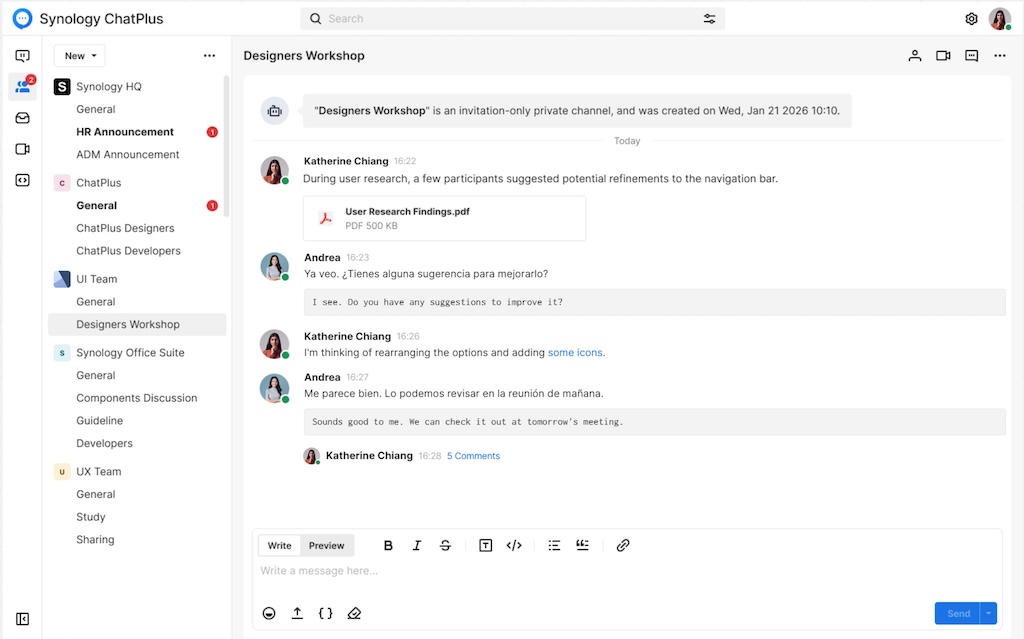
Synology annonce également les bêtas ouvertes de ChatPlus et Meet… Curieusement, nous n’y avons pas encore accès. Il s’agit de 2 outils de communication orientés entreprise. ChatPlus est une messagerie d’équipe avec gestion fine des permissions et Meet est une solution de visioconférence. Ils sont conçus pour fonctionner entièrement en local, sans dépendance à un Cloud tiers.
Meet intègre une traduction en temps réel alimentée par l’IA, une fonctionnalité utile pour les équipes multisites ou multinationales qui cherchent à collaborer sans sacrifier la souveraineté de leurs données (contrairement à Teams ou Slack).
Synology Drive bénéficie également d’une mise à jour avec l’ajout de la recherche IA, réservée aux systèmes équipés d’un GPU compatible. La recherche devient sémantique : on décrit ce qu’on cherche en langage naturel, et le moteur remonte les fichiers correspondants (y compris en reconnaissant le contenu des images et des documents). Une fonctionnalité qui restera réservée aux configurations haut de gamme pour l’instant.
Déduplication et compression post-traitement… sous conditions
La troisième brique de DSM 7.4 concerne l’efficacité du stockage pour les volumes (disque dur). Synology introduit la déduplication et la compression post-traitement, 2 mécanismes permettant de réduire l’espace occupé sur le disque en éliminant les blocs redondants et en compressant les données après leur écriture. Pas mal, non ?
Les opérations sont planifiables (la nuit par exemple) pour ne pas impacter les performances du système. Cependant, cette fonctionnalité est exclusivement compatible avec les disques durs Synology. Les utilisateurs équipés de disques tiers ne pourront pas en bénéficier.
Mais aussi…
Côté améliorations, DSM 7.4 affiche désormais les méthodes d’authentification SMB supportées lors de la jonction à un serveur LDAP (NTLM, CIFS plaintext, Kerberos) et ajoute l’affichage des informations GPU dans l’Info Center.
Côté correctifs, la mise à jour règle plusieurs problèmes : une boucle de redirection infinie en configuration SSO, des échecs d’authentification avec des noms d’utilisateur contenant des caractères spéciaux, un dysfonctionnement du Link Aggregation 802.3ad apparu avec DSM 7.3, des accès réseau externes persistants après suppression des passerelles et des failles de sécurité dont CVE-2023-43115 (Ghostscript).
À noter également la mise à jour de plusieurs paquets comme PHP 8.2, Antivirus Essential, Node.js, High Availability… et PHP 8.1, Mail Station et Synology Mail Server ne sont plus supportés à partir de cette version.
Le noyau Linux reste en version 4.4 et Docker en version 24.0.2.
Modèles concernés et fins de vie
DSM 7.4 est la dernière version supportée pour un grand nombre de modèles comme les DS918+, DS718+, DS218+, DS1819+, DS2419+, RS2418+ (ainsi que les plus anciens modèles). A noter que les modèles de la série 16 sont encore compatibles avec cette nouvelle version… contrairement à l’annonce qui avait été faite avec DSM 7.3.
DSM 7.4 est disponible depuis la page téléchargement du site officiel ou directement le site archive. Le fichier pèse environ 400 Mo et compter environ 10 minutes pour l’installation avec redémarrage.
Cette nouvelle version apporte DSM Agent (assistant IA contextuel), les bêtas de ChatPlus et Meet (collaboration on-premise avec traduction IA), la recherche sémantique dans Synology Drive (GPU requis) et la déduplication/compression post-traitement (disques Synology uniquement).
Alors qu’ils ne sont pas encore officiellement annoncés en Europe, il est déjà possible d’en savoir plus sur les prochains NAS rack RS826+ et RS826RP+ au format 1U. En effet, sur la version taïwanaise du site officiel de Synology, toutes les informations sont déjà disponibles, visuels inclus. Voici ce que l’on sait sur ces 2 nouveaux modèles…
Synology RS826+ et RS826RP+
Les Synology RS826+ et RS826RP+ viennent remplacer les RS822+ et RS822RP+. Les boîtiers disposent de 4 emplacements en façade, compatibles avec des disques durs 3,5 pouces ou des SSD. Il est possible d’ajouter 4 emplacements supplémentaires via une unité d’expansion compatible (la RX426, pas encore annoncée officiellement). Les 2 NAS sont animés par un processeur AMD Ryzen V1500B (le même que les modèles de 2020) épaulé par 4 Go de RAM DDR4 ECC, extensible jusqu’à 32. Pour rappel, le modèle RS826RP+ dispose d’une double alimentation.
On est donc exactement sur la même architecture processeur que la génération précédente, sans aucune évolution de ce côté.
Connectique
Du côté des interfaces, les RS826+ et RS826RP+ disposent chacun de :
4 ports réseau 1 Gb/s en RJ45 ;
2 ports USB 3.0 ;
1 port USB Type-C dédié à l’unité d’expansion.
On notera également la présence d’un emplacement PCIe Gen3 x8 et c’est tout… Force est de constater que la connectique est elle aussi quasi identique à la génération précédente. Il est difficile de comprendre qu’en 4 ans, Synology propose une fiche technique aussi similaire, surtout au regard de ce que propose la concurrence. La seule évolution reste le port d’expansion, qui passe de l’eSATA à l’USB-C.
Prix et disponibilité
Ces nouveaux boîtiers sont en tout point identiques à la génération précédente, à l’exception du connecteur arrière dédié à l’unité d’expansion. On peut légitimement s’interroger sur les choix stratégiques de Synology avec ces nouveaux produits.
Comme indiqué en introduction, ces modèles ne sont pas encore officiellement lancés en Europe. Ce n’est qu’une question de jours. Concernant les tarifs, il est encore trop tôt pour se prononcer.
ZimaCube 2 NAS Review – The Difficult ‘Second Album’… The ZimaCube 2 is IceWhale’s latest desktop NAS and self-hosting system, and this review is focused specifically on the standard non-Pro model priced at $799. It follows on from the original ZimaCube and ZimaCube Pro, but it arrives in a very different context. IceWhale is no […]
Synology DSM 7.4 – What Is Included and Should You Upgrade? UPDATE – Synology has reached out to me to correct a presentation point regarding the supported devices for DSM 7.4 and one that I covered at 04:01 . DSM 7.4 will continue to support the 20-series models; it’s specifically the new Storage Efficiency feature […]
Is Synology Moving Away From Routers? Synology is still best known for NAS hardware, DSM, backup software, private cloud storage, surveillance, and business data management, but its router range has always been an interesting side branch of the wider ecosystem and one that I have genuinely enjoyed reviewing. Products such as the RT2600ac, MR2200ac, WRX560 […]
Synology a profité du Computex 2026 pour dévoiler sa nouvelle feuille de route autour de trois axes : nouvelle génération de DiskStation Manager orientée IA privée, refonte complète de sa plateforme de protection des données et l’élargissement de sa suite de productivité entreprise.
DSM 7.4 : IA privée
Alors que nous attendions DSM 8.0, c’est finalement DSM 7.4 qui devrait se profiler sous 2 semaines… La prochaine génération de DSM ne se présente plus comme un simple OS pour NAS. Synology le positionne clairement comme une plateforme de données intelligente, pensée pour faire tourner de l’IA entièrement chez vous, sans rien envoyer dans le Cloud.
Le principe est simple : vos données existantes, vos logs système et vos métriques deviennent une base de connaissances locale sur laquelle des agents IA peuvent travailler. Pour ça, Synology introduit DSM Agent, un agent natif capable d’orchestrer des tâches complexes en langage naturel. L’assistant IA de Synology Office s’appuie sur la même infrastructure. Les serveurs rack GPU (de Synology) les appliances IA dédiées gèrent l’inférence en local rien ne sort.
Pour les parcs de machines, Cluster Manager regroupe tous vos systèmes Synology sous une interface unique, avec gestion de la QoS, migration de charges de travail et politiques de protection centralisées. Le déploiement massif via Active Insight facilite le provisionnement sur plusieurs sites. Le tout est complété par un RBAC plus granulaire, un Centre des journaux repensé et une certification FIPS 140-3 en cours pour les environnements qui en ont besoin.
C’est aussi l’occasion de noter que Synology Drive et AI Console sont officiellement intégrés à cette roadmap IA, la brique AI Console, déjà disponible pour Office et MailPlus, continue donc d’évoluer.
ActiveProtect Manager 2.0
ActiveProtect Manager 2.0 a également annoncé lors du Computex. Pour rappel, il s’agit du système pour les boitiers DP. Il étend la couverture de sauvegarde à Azure VM, Amazon EC2, Nutanix AHV, Proxmox VE et Google Workspace, avec restauration multiplateforme, y compris de Cloud à Cloud. Les sauvegardes vers Azure Blob Storage sont également supportées.
Mais le plus intéressant est ailleurs. APM 2.0 intègre un moteur de détection d’anomalies basé sur du machine learning, qui analyse les versions historiques de sauvegarde pour repérer les comportements suspects : pics d’entropie (données aléatoires), suppressions massives, taux de changement anormal. Les fichiers douteux sont mis en quarantaine automatiquement. Si un point de restauration compromis est détecté, la fonction Auto Fallback revient d’elle-même à la dernière version saine. L’intégration avec des antivirus tiers complète le tout.
On passe d’une logique de restauration après l’incident, à une logique de détection et d’isolation avant que ça empire.
ChatPlus, Meet et Bee Series
Synology Office intègre deux nouvelles plateformes : ChatPlus pour la messagerie d’entreprise et Meet pour la visioconférence, avec transcription et traduction IA, permissions granulaires et données 100 % en local. Rien de révolutionnaire sur le papier, mais ça comble un angle mort dans la suite Synology par rapport aux ténors du marché.
Côté grand public, la gamme BeeStation s’élargit avec BeeCamera pour la surveillance domestique et Synology Deep Search apporte une recherche locale par IA sur vos fichiers personnels sous macOS et Windows… sans Cloud.
En synthèse
Synology a fait du Computex 2026 une vitrine IA : DSM nouvelle génération embarque DSM Agent pour l’automatisation on-premise, tandis que Synology Drive et AI Console s’inscrivent pleinement dans cette roadmap.
Une grosse partie de DSM 7.4 sera donc autour de l’IA, à tous les niveaux de l’écosystème… Aucune information n’a en revanche été communiquée sur l’évolution du noyau Linux ou des composants système. La déduplication arriverait également sur disque dur, mais uniquement ceux de Synology.
ActiveProtect Manager 2.0 complète le tableau avec une détection d’anomalies par machine learning et un Auto Fallback automatique, faisant enfin passer la sauvegarde d’une logique réactive à une défense proactive. Les dates de disponibilité restent à confirmer.
Synology Free License and Subscription C2 Charge Changes AGAIN??? Here is Everything Affected Synology has announced a set of changes to several of its online services, including Active Insight, C2 Storage, C2 Object Storage, C2 Identity, C2 Password, and C2 Transfer. Some of these changes are simple pricing or license adjustments, while others are larger […]
C’est en toute discrétion que Synology vient de faire évoluer son offre C2. Les changements ne sont pas encore visibles pour tous, mais voici un résumé de ce qui se prépare : révision des conditions tarifaires, disparition de services et mise à jour des conditions générales. C’est aussi la fin des plans gratuits sur l’ensemble de l’écosystème C2. Explications…
Synology C2 évolue
Avant toute chose, faisons rapide retour en arrière. L’offre Synology C2 a vu le jour en 2018, initialement centrée sur le stockage. Deux à trois ans plus tard, le fabricant de NAS a étoffé son catalogue avec des fonctionnalités supplémentaires : C2 Password, C2 Transfer, C2 Backup, C2 Identity… en lien avec la sortie de DSM 7. Plus récemment, Synology a également introduit C2 Object Storage (stockage objet) et C2 Backup for Surveillance (pour Surveillance Station). Dans l’ensemble, ces services formaient un écosystème cohérent, couvrant un large spectre d’usages en complément du NAS.
Les changements à venir
C2 OneStorage : fusion du stockage classique et objet
Synology introduit un nouveau plan baptisé C2 OneStorage, dont l’objectif est de regrouper C2 Storage et C2 Object Storage au sein d’une offre unifiée. Cette consolidation s’accompagne, sans surprise, d’une révision des paliers tarifaires à la hausse, présentée comme nécessaire pour soutenir le développement de la plateforme et l’ajout de nouvelles fonctionnalités.
C2 Password & C2 Transfer : fin de service
La mauvaise nouvelle concerne deux services qui disparaissent totalement : C2 Password et C2 Transfer. Les offres gratuites et payantes seront définitivement supprimées en juin 2027. Synology accorde néanmoins une période de transition d’un an. Ces deux services n’ont jamais vraiment décollé, ce qui n’est guère surprenant : le marché est déjà saturé par des alternatives très compétitives, voire 100% gratuites.
C2 Identity : restructuration
C2 Identity perd son plan gratuit ainsi que son offre Business. En remplacement, une nouvelle licence Standard fait son apparition au tarif de 49,99 €/an. Cette nouvelle formule semble bien positionnée pour les petites et moyennes entreprises. Vous l’aurez compris,, elle n’inclut plus C2 Password Business.
Active Insight : la fin du gratuit
Synology modifie également la tarification d’Active Insight. Pour rappel, il s’agit d’un outil centralisant la surveillance, les alertes et les diagnostics de performance pour un ou plusieurs NAS depuis un tableau de bord unique, avec des analyses proactives et des recommandations (ndlr : je n’ai jamais été fan de cette solution). Les licences gratuites permettaient jusqu’alors de surveiller jusqu’à 3 NAS. Elles seront supprimées et remplacées par des plans exclusivement payants. À titre de repère, le tarif par NAS est passé de 9,99 €/an au lancement, à 19,99 €, puis à 23,99 € aujourd’hui.
En synthèse
Synology fait évoluer ses offres C2 et en profite pour supprimer l’ensemble de ses plans gratuits. Si le fabricant laisse du temps pour trouver des alternatives, ces changements marquent aussi une rupture dans sa philosophie. On peut légitimement supposer que derrière les arguments de maintenabilité se cachent des contraintes économiques bien réelles : hausse des prix de l’énergie, rareté des composants mémoire, etc. Les premiers à en pâtir seront malheureusement les particuliers et les petites entreprises.
Synology élargit son offre avec 2 nouvelles caméras IP : BC510 et TC510. Selon le fabricant, ces dernières sont conçues pour répondre aux besoins des entreprises et organisations à la recherche d’une solution flexible, intelligente et compatible avec différents environnements réseau. Mais une information, discrètement glissée dans leur fiche produit, mérite qu’on s’y arrête…
Synology BC510 & TC510
Ces nouvelles caméras viennent remplacer les BC500 et TC500 lancées en 2023. L’objectif ici est de proposer des produits combinant analyses IA, stockage et gestion dans le Cloud au sein d’une même architecture. Les BC510 et TC510 sont pensées pour fonctionner aussi bien avec l’environnement natif Synology qu’avec des systèmes tiers via le protocole standard ONVIF.
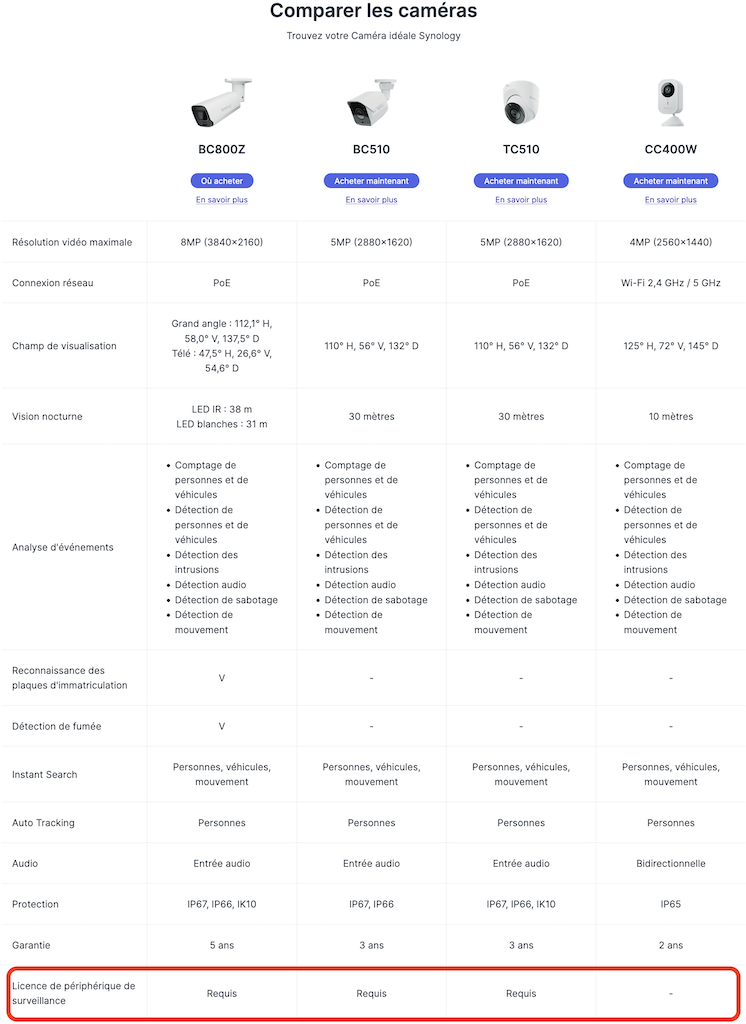
Sur le plan technique, les 2 modèles partagent les mêmes caractéristiques : capteur offrant une résolution de 2880 x 1620 px à 30 images par seconde, angle de vision horizontal de 110° et vision nocturne portant jusqu’à 30 mètres. Elles sont certifiées IP66 et IP67, garantissant une résistance élevée à la poussière, à la pluie et aux conditions extérieures difficiles. Des spécifications globalement similaires à celles des modèles précédents.
L’un des principaux arguments reste l’intégration de fonctions IA directement en périphérie, au niveau de la caméra elle-même. Cette approche permet de traiter les analyses localement plutôt que sur le serveur, avec pour objectif une meilleure réactivité et une réduction de la charge côté NAS.
Parmi les fonctionnalités annoncées : comptage de personnes et de véhicules, reconnaissance des plaques d’immatriculation, détection d’intrusion ainsi qu’Instant Search (système pour accélérer la recherche dans les archives vidéo). Ces outils s’adressent aux entreprises, commerces, sites industriels ou collectivités souhaitant automatiser une partie de leur surveillance sans multiplier les ressources matérielles.
Enfin, Synology anticipe déjà l’avenir en annonçant la compatibilité de ces modèles avec sa future plateforme de surveillance cloud VSaaS. Une façon de positionner les BC510 et TC510 comme des solutions évolutives, capables d’accompagner les besoins des organisations sur le long terme.
Le retour des licences
Contrairement aux précédentes générations de caméras du fabricant, les nouvelles Synology BC510 et TC510 nécessitent une licence Surveillance Station. Oui, vous avez bien lu… Jusqu’à présent, les caméras Synology intégraient directement leur licence, permettant une utilisation sans coût supplémentaire dans son écosystème de vidéosurveillance. C’était d’ailleurs un avantage concurrentiel clairement différenciateur.
Cliquez pour agrandir
Pour rappel, chaque NAS Synology inclut par défaut 2 licences caméra pour Surveillance Station. Au-delà, l’ajout de nouvelles caméras impose l’achat de licences supplémentaires. Concrètement, une installation comprenant 4 caméras nécessite l’achat de 2 licences additionnelles, les 2 premières étant fournies avec le NAS.
Jusqu’ici, les caméras Synology échappaient à cette règle grâce à une licence embarquée directement dans le matériel. Avec les BC510 et TC510 (et également la BC800Z), ce fonctionnement semble définitivement abandonné. Ces nouveaux modèles nécessitent désormais une licence dédiée pour être exploitée dans Surveillance Station, au même titre que des caméras tierces Axis, Reolink, Sony, Foscam, etc.
anciennes générations
Pour l’heure, Synology n’a pas détaillé les raisons de ce changement. Difficile toutefois de ne pas y voir une évolution stratégique et commerciale autour de son activité de vidéosurveillance. Nous avons contacté le fabricant afin d’obtenir des éclaircissements. Cet article sera mis à jour dès que nous aurons de plus amples informations.
Prix et disponibilité
Les 2 caméras sont déjà disponibles à la commande. Il faudra débourser 299,95€ pour chacune des caméras (oui, elles sont au même prix). Un prix identique au lancement de la génération précédente.
Synology Cameras Now Need a License for Surveillance Station Synology has changed the licensing position for selected cameras in its 2026 surveillance camera range, with the newly listed BC510, TC510, and BC800Z now requiring a Surveillance Device License when used with Synology Surveillance Station. This marks a notable shift from the previous value proposition of […]
UGREEN NASync Celebrates 2 Years – But Is UGREEN Ready for the Big Leagues? Two years ago, the popular battery and PC accessory company UGREEN, launched their Kickstarter campaign for the NASync personal NAS series of devices. The brand already had a steadily growing foothold in China with their DX series of NAS devices, but […]
Aujourd’hui nous recevons sur Cachem, Chad CHIANG, Directeur Général de Synology France. Il a pris ses fonctions en janvier de cette année au siège de Paris La Défense et supervise la France, le Benelux, l’Europe du Sud et l’Afrique.
Cachem : Bonjour Chad, merci de prendre quelques minutes pour répondre à nos questions. Vous arrivez dans un contexte un peu particulier pour Synology. Comment abordez-vous cette prise de fonction ?
Chad : J’aborde cette mission avec la volonté de donner la priorité à l’écoute. Prendre mes fonctions de directeur général pour l’Europe implique de trouver un équilibre entre les attentes élevées d’une base d’utilisateurs très avertis en matière de technologie et notre expansion rapide dans le secteur B2B. Mon objectif est de veiller à ce que, malgré notre croissance, nous ne perdions pas « l’ADN de Synology », cette alliance parfaite entre un matériel abordable et des logiciels intuitifs.
Cachem : Les équipes en France continuent de grandir. Pouvez-vous nous en dire plus ?
Chad : La France est l’un de nos marchés les plus dynamiques. Nous renforçons significativement notre présence locale à Paris afin d’offrir un meilleur support technique et un accompagnement dédié à nos partenaires entreprises. La croissance ne se limite pas aux ventes : il s’agit aussi d’avoir des experts sur le terrain capables d’accompagner une PME française comme une grande institution dans la définition de leur stratégie de résilience des données.
Cachem : Synology reste un acteur majeur du NAS, mais certains utilisateurs évoquent une forme de stagnation ces dernières années, tant sur le matériel que sur DSM. Partagez-vous ce constat ?
Chad : Je comprends cette perception, mais je ne pense pas que nous soyons à l’arrêt. Notre priorité a évolué : nous sommes passés d’une logique de “spécifications pour le simple plaisir de spécifications” à un focus sur la stabilité et la fiabilité des systèmes. Dans l’univers des NAS, être “ennuyeux” est souvent une qualité : cela signifie que vos données sont en sécurité. Cela dit, nous continuons d’innover, notamment sur les volumes NVMe et les réseaux à haut débit sur une plus large gamme de produits.
Cachem : Justement, parlons d’un sujet qui a fait beaucoup réagir en 2025 : la politique autour des disques durs et SSD. Synology a d’abord imposé ses propres disques sur les modèles Plus, avant de faire partiellement machine arrière avec DSM 7.3. Beaucoup d’utilisateurs ont parlé d’un écosystème fermé, voire d’un “DRM matériel”. Que s’est-il passé ?
Chad : L’objectif était, et reste, de garantir un niveau maximal de disponibilité et de fiabilité en utilisant des disques dont le firmware est validé par nos équipes. Cela dit, nous avons bien entendu les retours de la communauté. Avec DSM 7.3sorti en octobre dernier, nous avons réintroduit plus de flexibilité. Notre intention n’est pas d’enfermer les utilisateurs, mais de proposer une offre “sans compromis” pour ceux qui ont besoin d’une fiabilité 24/7. Pour les autres, l’écosystème reste ouvert. Nous apprécions les retours de la communauté, et c’est une bonne leçon pour nous.
Cachem : Plus globalement, ce changement de cap a pu fragiliser la confiance des utilisateurs historiques, qui appréciaient justement la flexibilité de Synology. Comment comptez-vous la regagner ?
Chad : La confiance se regagne par la transparence et la performance. Nous réaffirmons notre engagement envers le segment “prosumer”. Cela se traduira dans nos prochaines évolutions matérielles et logicielles, en prenant en compte les retours sur des éléments comme les ports 2.5GbE ou la mémoire extensible. Nous voulons démontrer qu’il n’est pas nécessaire de choisir entre un outil professionnel et un système flexible.
Cachem : Autre sujet : les routeurs. Synology avait suscité beaucoup d’intérêt avec sa gamme RT, mais depuis plusieurs années, les évolutions sont quasi inexistantes. Le segment est-il toujours stratégique ? Certains utilisateurs ont le sentiment d’un abandon progressif face à une concurrence très dynamique… Peut-on attendre du nouveau à court terme ?
Chad : La plateforme SRM (Synology Router Manager) n’est pas abandonnée. La concurrence est forte, mais notre force réside dans la sécurité et la gestion des VPN. Nous ne sortons pas cinq routeurs par an, car nous voulons que ceux que nous lançons restent pertinents pendant plusieurs années. Nous continuons également à publier des mises à jour régulières et la dernière date de février 2026. https://www.synology.com/fr-fr/releaseNote/SRM
Cachem : Parlons maintenant de DSM. La version 7.3 a apporté des ajustements, mais reste relativement modeste en termes de nouveautés. Où en est DSM 8 ? Peut-on s’attendre à une vraie rupture ou simplement à une continuité de DSM 7 ?
Chad : Si DSM 7.x était axé sur le perfectionnement et l’hybridation avec le cloud (C2), la prochaine version marquera une avancée majeure avec l’intégration de l’IA dans la gestion. Nous travaillons sur des systèmes capables de s’auto-optimiser et sur une déduplication des données plus intelligente. L’objectif est clair : rendre le NAS plus autonome et réduire les interventions manuelles.
Cachem : Synology s’est fortement orienté vers les entreprises. Quels sont vos avantages face à des acteurs comme Dell EMC ou NetApp ?
Chad : Notre principal avantage réside dans le coût total de possession (TCO) et la simplicité d’utilisation. Il n’est pas nécessaire de suivre une formation spécialisée pendant une semaine pour gérer un cluster Synology. Nous proposons des fonctionnalités de niveau entreprise (snapshots, réplication, sauvegarde, etc) sans les coûts de licences élevés souvent pratiqués par nos concurrents.
Cachem : Synology développe également ses activités dans la vidéosurveillance. Où en êtes-vous aujourd’hui ?
Chad : La vidéosurveillance est l’un de nos piliers de croissance les plus rapides. En intégrant nos propres caméras Synology à Surveillance Station, nous avons mis au point une solution d’analyse avec IA prête à l’emploi. Nous ne sommes plus seulement un espace de stockage de vidéos ; nous sommes désormais une plateforme qui les analyse en temps réel pour fournir des informations concrètes en matière de sécurité.
Cachem : Le BeeStation avait surpris lors de son lancement. La frontière entre le BeeStation (version Plus) et un NAS est assez étroite. Quelle est sa place aujourd’hui ?
Chad : BeeStation est une porte d’entrée vers l’écosystème Synology. Il s’adresse aux particuliers ou aux créatifs sans expertise IT, qui trouvent le NAS encore trop complexe mais qui ont dépassé les limites du stockage cloud classique. Il ne remplace pas le cloud, il le complète en apportant un stockage local, intelligent et rapide.
Cachem : Cet interview touche à sa fin, souhaitez-vous adresser un dernier mot à nos lecteurs ?
Chad : Aux lecteurs de Cachem et à la communauté tech française : merci d’être nos critiques les plus exigeants. Vos retours nous empêchent de devenir un acteur figé. Nous entrons dans une ère où la souveraineté des données est plus importante que jamais, et Synology s’engage à vous redonner le contrôle, que vous soyez freelance ou une grande entreprise du CAC 40. Synology ne propose pas seulement des produits, mais une véritable alternative de confiance sur le marché.
The Synology BeeStation BST151-4T is a 4 TB single drive personal cloud device that sits somewhere between an external hard drive and a traditional NAS, targeting users who want centralized storage, photo backup, file syncing, and remote access without dealing with a conventional multi bay server setup. It follows the original BST150-4T BeeStation, first released in February 2024, and appears to be a light refresh of that earlier model rather than a full redesign. As with the first version, the focus is on quick deployment, simple management, and a more consumer friendly software experience, using Synology’s BeeStation platform instead of the broader and more configurable DSM system found on the company’s standard NAS lineup.
At a hardware level, the BST151-4T remains a very compact single bay network storage appliance with a fixed 4 TB hard drive, built around the Realtek RTD1619B platform and a 1GbE network connection. Physical connectivity is unchanged from the earlier BeeStation, with 1 x USB-A 3.2 Gen 1 port, 1 x USB-C 3.2 Gen 1 port, and 1 x RJ-45 LAN port, all housed in the same 148.0 x 62.6 x 196.3 mm enclosure weighing 820 g.
That hardware profile makes clear where the BeeStation sits in Synology’s lineup. This is not a flexible NAS chassis with room for drive upgrades, SSD cache, multi bay expansion, or faster networking. The internal disk is part of the appliance design, so there is no meaningful path to RAID redundancy, easier drive level recovery, or long term capacity scaling in the way there is on a conventional 2 bay or 4 bay NAS.
Power and thermals are also modest, which is consistent with a low power, always on personal cloud device. Synology lists power consumption at about 7.85 W during access and 1.65 W in HDD hibernation, with a 36 W external power adapter. The system continues to use a single HAT3300-4T drive, and Synology’s current 4 TB HAT3300 model is a 5400 RPM class disk rather than a faster 7200 RPM unit.
The one specification that requires care is memory. Synology’s March 30, 2026 product specification PDF and the current BeeStation comparison page both list the BST151-4T with 1 GB DDR4, but Synology’s newer BST151-4T datasheet, published later in March 2026 and mirrored across multiple regional versions, lists 2 GB DDR4 instead. On balance, the later datasheet appears to reflect the intended refresh specification, but Synology’s own published material is not yet fully consistent. (UPDATE – RAM on the BST151-4T is CONFIRMED as 2GB)
Assuming the 2 GB figure in the later datasheet is the correct final spec, the BST151-4T is best understood as a minimal revision of the BST150-4T rather than a new hardware generation. The enclosure, CPU, ports, networking, and drive class are effectively the same, while the main change is the move from the predecessor’s 1 GB memory configuration to 2 GB. That could simply reflect practical component economics as much as performance tuning, since lower density memory packages can become less cost effective over time as supply shifts. In either case, this still appears to be fixed onboard memory, not a user upgradeable SO-DIMM arrangement, so the platform remains closed in the same way as the original model.
Specification
Synology BeeStation BST151-4T
Capacity
4 TB
Drive type
Synology HAT3300-4T
Processor
Realtek RTD1619B
Memory
2 GB DDR4 listed in the newer datasheet; 1 GB DDR4 still appears on some Synology product spec pages
LAN
1 x 1GbE RJ-45
USB
1 x USB-A 3.2 Gen 1, 1 x USB-C 3.2 Gen 1
Dimensions
148.0 x 62.6 x 196.3 mm
Weight
820 g
Power adapter
36 W
Power consumption
7.85 W access, 1.65 W HDD hibernation
Operating temperature
0°C to 35°C
Warranty
3 years
Synology BeeStation in 2026 – What can it do?
In 2026, the BeeStation platform is no longer limited to basic remote file access. Synology positions it as a consumer focused private cloud for storing, syncing, and sharing files and photos, with web, desktop, and mobile access, support for sign in via Google Account, Apple ID, or Synology Account, and shared access for up to 8 users on a single device. It is designed to pull together data from phones, computers, external drives, and selected cloud services into one managed location rather than acting only as a simple networked hard drive.
Photo handling is one of the more developed parts of the platform. Synology states that BeeStation can back up mobile photos, import content from sources such as Google Photos and iCloud Photos, and organize images with local AI based recognition for people, subjects, and places. The software also supports timeline and map based browsing, album creation, and controlled photo sharing, which places the BST151-4T closer to a private cloud photo hub than to a basic USB backup box.
Its data protection features have also expanded since launch. BeeStation now supports internal restore points based on snapshots, backups to BeeProtect, Synology NAS, and external drives, plus a 3 year Acronis True Image Essentials license for 1 computer. BeeStation OS 1.5 also added BeeCamera support, but Synology limits that feature to BeeStation Plus models rather than the standard 4 TB unit, so the BST151-4T does not currently gain the surveillance role that the higher tier model has started to take on.
Where the BeeStation still differs from a DSM based NAS such as the DS124 or DS223 is in breadth and flexibility. Synology’s DS124 and DS223 product pages explicitly advertise broader DSM functions including Synology Drive based private cloud workflows, Btrfs snapshot features, ShareSync between Synology systems, full Surveillance Station support, and the wider DSM application platform. By contrast, BeeStation remains a curated appliance with a narrower software stack, no general DSM Package Center environment, no broad package driven expansion path, and on the standard 4 TB model no BeeCamera surveillance support either. In other words, it can cover the main personal cloud tasks, but it still does not replace the wider role of even Synology’s entry level DSM NAS systems.
The BST151-4T looks like a modest revision of the original BeeStation rather than a substantially new product. Its appeal remains the same: a preconfigured, low friction private cloud for users who want basic file storage, photo backup, syncing, sharing, and remote access without moving into a full DSM based NAS environment. The hardware envelope is still narrow, with a fixed internal 4 TB drive, 1GbE networking, and no real upgrade path for storage expansion or RAID style redundancy, but that is consistent with its role as an entry level turnkey appliance rather than a general purpose NAS. Synology’s own later datasheet points to 2 GB of RAM on the new model, which would make the BST151-4T a small but practical refresh of the BST150-4T rather than a platform shift. Pricing is the main unknown at the time of writing. Synology’s support status page already lists the BST151-4T as generally available, but public retail pricing is still not clearly established. On that basis, the safest expectation is that it will land close to the earlier 4 TB BeeStation, which launched around $199 in the US and about £209 in the UK, while more recent BST150-4T retail listings have also appeared higher depending on seller and region, sat around $309 without TAX. That likely places the BST151-4T will land in excess of $300 and maybe closer to $350 when factoring the RAM increase.
This description contains links to Amazon. These links will take you to some of the products mentioned in today's content. As an Amazon Associate, I earn from qualifying purchases. Visit the NASCompares Deal Finder to find the best place to buy this device in your region, based on Service, Support and Reputation - Just Search for your NAS Drive in the Box Below
Need Advice on Data Storage from an Expert?
Finally, for free advice about your setup, just leave a message in the comments below here at NASCompares.com and we will get back to you.Need Help?
Where possible (and where appropriate) please provide as much information about your requirements, as then I can arrange the best answer and solution to your needs. Do not worry about your e-mail address being required, it will NOT be used in a mailing list and will NOT be used in any way other than to respond to your enquiry.
[contact-form-7]
TRY CHAT Terms and Conditions
If you like this service, please consider supporting us.
We use affiliate links on the blog allowing NAScompares information and advice service to be free of charge to you.Anything you purchase on the day you click on our links will generate a small commission which isused to run the website. Here is a link for Amazon and B&H.You can also get me a Ko-fi or old school Paypal. Thanks!To find out more about how to support this advice service checkHEREIf you need to fix or configure a NAS, check FiverHave you thought about helping others with your knowledge? Find Instructions Here
Or support us by using our affiliate links on Amazon UK and Amazon US
Alternatively, why not ask me on the ASK NASCompares forum, by clicking the button below. This is a community hub that serves as a place that I can answer your question, chew the fat, share new release information and even get corrections posted. I will always get around to answering ALL queries, but as a one-man operation, I cannot promise speed! So by sharing your query in the ASK NASCompares section below, you can get a better range of solutions and suggestions, alongside my own.
Immich a beaucoup évolué depuis mon premier tutoriel publié avec la version Bêta… L’application a énormément évolué et elle est aujourd’hui nettement plus mature, stable et complète. Si vous installez Immich pour la première fois sur votre NAS Synology, suivez ce guide étape par étape…
En revanche, si votre installation actuelle fonctionne correctement, ne changez rien. Les mises à jour majeures peuvent nécessiter des ajustements techniques.
Qu’est-ce que Immich ?
Immich est un logiciel de gestion et sauvegarde de photos et vidéos lancé en 2022. L’interface est fluide, les fonctionnalités sont riches et l’expérience utilisateur est clairement au niveau des solutions cloud grand public, sans dépendre d’un GAFAM.
Alternative à Google Photos, Immich offre une approche axée sur la confidentialité et l’auto-hébergement.
Pourquoi choisir Immich plutôt que Google Photos ?
Contrairement à Google Photos :
Vos données restent chez vous, sur votre NAS
Aucun accès par un tiers
Traitement local des données (IA incluse)
Aucune compression forcée
Clairement, Immich est aujourd’hui une solution plus avancée pour un usage personnel maîtrisé.
Fonctionnalités principales d’Immich (2026)
La liste des fonctionnalités est très longue, mais voici les principales :
Gestion photo et vidéo :
Support des formats classiques et RAW
Live Photos / Motion Photos
Zoom vidéo
Prise en charge des panoramas 360°
Sauvegarde automatique :
Synchronisation en arrière-plan
Détection des doublons
Sauvegarde en Wi-Fi, 4G/5G ou uniquement pendant la charge
Libération d’espace :
Suppression automatique des fichiers déjà sauvegardés
Nettoyage manuel par lots
Recherche avancée :
Tags, EXIF, lieux, objets
Reconnaissance faciale locale
Vue carte :
Intégration OpenStreetMap
Géolocalisation automatique
Édition non destructive : le fichier original reste intact
Partage simplifié : Liens personnalisés, même depuis un téléphone
Sécurité et confidentialité :
Dossier verrouillé (code PIN)
Corbeille avec suppression différée
Authentification OAuth2 / OIDC
Support certificats auto-signés
À cela s’ajoutent : mode hors ligne, Chromecast, multi-utilisateurs, Memories, etc.
Combien coûte Immich ?
Immich est open source et 100% gratuit si vous l’installer sur votre NAS (ou sur un ordinateur). Les applications Android et iOS sont également gratuites. Les développeurs proposent un système de licence payante, elles n’offrent aucun fonctionnalité ou service complémentaire.
Installer Immich sur un NAS Synology
L’installation repose sur 4 conteneurs Docker :
immich_server : cœur de l’application ;
immich_machine_learning : IA (visages, objets) ;
immich_postgres : base de données ;
immich_redis : cache et performance.
Ce guide est basé sur la documentation officielle, adaptée aux NAS Synology.
Préparation des dossiers
Ouvrez File Station
Allez dans le dossier docker
Créez un sous-dossier nommé Immich
Dans ce nouveau dossier, créez 3 sous-dossier : library, model-cache et postgres
Création du conteneur Docker
Ouvrez Container Manager
Allez dans Projet → Créer
Renseignez :
Nom du projet : immich
Chemin : docker/Immich
Source : Créer un fichier docker-compose.yml
Collez ensuite le contenu suivant :
services:
  # Immich : https://immich.app/
  immich-server:
    container_name: immich_server
    image: ghcr.io/immich-app/immich-server:v2
    # Si votre NAS a un processeur Intel, décommentez les 2 lignes ci-dessous "# "
    # devices:
    #  - /dev/dri:/dev/dri
    environment:
      TZ: Europe/Paris
      DB_HOSTNAME: database
      DB_PORT: 5432
      DB_USERNAME: postgres
      DB_PASSWORD: PasswordCachem123$  # A changer par un mot de passe fort
      DB_DATABASE_NAME: immich
      REDIS_HOSTNAME: redis
      REDIS_PORT: 6379
    volumes:
      # Stockage des fichiers (adaptez le chemin à votre NAS)
      - ./library:/usr/src/app/upload
      # - "/volume1/Mes Archives/:/mnt/media/MesArchives"  # Exemple d'ajout d'un dossier de votre NAS
      - /etc/localtime:/etc/localtime:ro
    ports:
      - "2283:2283"
    depends_on:
      - database
      - redis
    restart: always
    healthcheck:
      disable: false

  # Immich Machine Learning
  immich-machine-learning:
    container_name: immich_machine_learning
    image: ghcr.io/immich-app/immich-machine-learning:v2
    environment:
      TZ: Europe/Paris
      DB_HOSTNAME: database
      DB_PORT: 5432
      DB_USERNAME: postgres
      DB_PASSWORD: PasswordCachem123$  # A changer par un mot de passe fort
      DB_DATABASE_NAME: immich
      REDIS_HOSTNAME: redis
      REDIS_PORT: 6379
    volumes:
      - ./model-cache:/cache
    restart: always
    healthcheck:
      disable: false

  # Immich Redis
  redis:
    container_name: immich_redis
    image: docker.io/valkey/valkey:9
    healthcheck:
      test: redis-cli ping || exit 1
    restart: always

  # Immich PostgreSQL
  database:
    container_name: immich_postgres
    image: ghcr.io/immich-app/postgres:14-vectorchord0.4.3-pgvectors0.2.0
    environment:
      TZ: Europe/Paris
      POSTGRES_PASSWORD: PasswordCachem123$  # A changer par un mot de passe fort
      POSTGRES_USER: postgres
      POSTGRES_DB: immich
      POSTGRES_INITDB_ARGS: "--data-checksums"
      # Décommentez la ligne suivante si la base est sur un disque dur (HDD)
      # DB_STORAGE_TYPE: "HDD"
    volumes:
      - ./postgres:/var/lib/postgresql/data
    shm_size: 128mb
    restart: always
    healthcheck:
      test: ["CMD-SHELL", "pg_isready -U postgres -d immich"]
      interval: 10s
      timeout: 5s
      retries: 3
      start_period: 30s
N’hésitez pas à utiliser un éditeur de texte pour changer les paramètres si besoin. Pensez à changer les mots de passe.
Appuyez sur le bouton Suivant (2 fois), puis le bouton Effectué. Container Station va télécharger les images (cela peut prendre quelques minutes selon votre connexion Internet) puis démarrer les conteneurs…
Attendez encore une à deux minutes le temps que tout démarre correctement.
Appuyez sur le bouton Commencer et laissez-vous guider par les premières étapes :
Créez votre compte administrateur (adresse email, mot de passe et nom d’utilisateur)
Configurez :
Thème (mode sombre / mode clair)
Langue (par défaut en Français)
Confidentialité serveur (faites vos choix)
Paramètres utilisateur
Modèle de stockage (recommandé : activé et laissé par défaut)
Sauvegarde (rappel de la stratégie 3-2-1)
Installez l’application mobile et lancez vos premières sauvegardes !
Optimisations et paramètres avancés
Modifier le dossier par défaut
Par défaut, Immich utilise : docker/Immich/library
Ce n’est pas idéal si vous souhaitez une organisation propre et j’avoue que j’utilise un dossier à la racine de mon NAS. Je préfère que les bibliothèques photos et vidéos ne soient dans le dossier docker.
Ajouter une bibliothèque externe
Un exemple a été donné ci-dessus. Vous aurez remarqué que le fichier compose.yaml a été créé automatiquement dans le dossier docker/Immich. Arrêter votre projet immich puis vous ajoutez le/les dossiers contenant vos photos et vidéos. C’est la ligne :
Vous pouvez bloquer la possibilité de modifier ou supprimer les fichiers du dossier en ajoutant :ro à la fin (pour notre exemple : - "/volume1/Vacances 2024/:/mnt/media/Archives2024:ro". Par défaut, c’est en lecture et écriture (:rw).
Si vous avez déjà installé Immich et que vous modifiez le fichier compose.yaml, pour prendre en compte les modifications, il faut recréer le projet (sans perte d’information). Voici ce que vous devez faire :
Ouvrez Container Manager
Allez dans Projet et faites un clic droit sur immich et choisissez Nettoyer
Le Terminal s’affiche et attendez de voir Exit Code: 0 puis appuyez sur le bouton Fermer
Toujours dans Projet et faites un clic droit sur immich et choisissez Créer
Ensuite, depuis l’interface d’administration d’Immich (pensez à relancer votre projet), allez dans Administration > Bibliothèque externe pour ajouter le dossier à un utilisateur.
Synology Container Manager n’interroge que Docker Hub pour vérifier les mises à jour et ignore les autres registres comme ghcr.io. Voici comment mettre à jour facilement Immich :
Ouvrez Container Manager
Allez dans Projet et faites un clic droit sur immich et choisissez Nettoyer
Le Terminal s’affiche et attendez de voir Exit Code: 0 puis appuyez sur le bouton Fermer
Allez dans Images, chercher les images commençant par ghcr.io/immich-app faites clic droit dessus et choisissez Supprimer
Retourner dans Projet et faites un clic droit sur immich et choisissez Créer
Par défaut, j’ai bloqué la configuration sur la dernière version de la branche 2.x uniquement. Si vous souhaitez la dernière version publiée, alors vous mettrez :release à la place de :2 dans le fichier compose.yaml.
FAQ – Immich sur NAS Synology
Immich est-il stable ?
Oui. Immich a bien évolué depuis ses débuts. L’application est stable pour un usage quotidien, y compris avec de grandes bibliothèques photo. Des mises à jour fréquentes continuent d’améliorer les performances et les fonctionnalités.
Peut-on remplacer Google Photos par Immich ?
Oui, dans la majorité des cas. Immich propose :
Sauvegarde automatique
Reconnaissance faciale
Recherche avancée
Partage de fichiers
La principale différence : vos données restent sur votre NAS, sans dépendre d’un service Cloud.
Peut-on importer ses photos depuis Google Photos ?
Oui, il est possible d’importer vos données via Google Takeout, puis de les intégrer dans Immich. Selon la taille de votre bibliothèque, l’indexation (visages, objets) peut prendre du temps.
Quelle configuration minimale pour faire tourner Immich ?
NAS avec Docker (paquet Container Manager)
6 Go de RAM minimum (8 Go recommandés)
CPU x86 recommandé pour de meilleures performances
Update on the ZimaCube 2 NAS + Your Questions Answered
Following the original ZimaCube and ZimaCube Pro, IceWhale is now preparing the ZimaCube 2 range as a more mature follow-up to its first desktop NAS platform, combining the same broad idea of a compact, open, software-defined personal cloud with clearer attention paid to refinement, validation, and retail readiness. Based on the specifications revealed so far, the standard $799 ZimaCube 2, the $1,299 ZimaCube 2 Pro, and the $2,499 Creator Pack continue to target users who want a turnkey system that still leaves room for alternative operating systems, PCIe expansion, direct Thunderbolt 4 or USB4 connectivity, and mixed storage workloads, but the second generation also arrives in the shadow of the first model’s early issues around cooling, power handling, and hardware compatibility, all of which IceWhale now says informed the redesign. Rather than presenting the ZimaCube 2 as a radically different product category, the company appears to be positioning it as a more stable and better validated version of the same formula, with a stronger base model, revised cooling, closer hardware and software integration, and a retail launch path instead of another crowdfunding campaign.
Remember to use the NASCompares Channel Discount Code: ‘NASCOMPARES50’
Zimacube 2 First Look at the Design
In physical terms, the ZimaCube 2 remains very close to the original system. The listed chassis dimensions are still 240 x 221 x 220 mm, and the overall layout continues to center on a compact desktop enclosure with 6 front-facing drive bays, a removable front panel, and a secondary internal sled for the 7th-bay M.2 storage section. That means this is not a major departure in footprint or format, but rather a continuation of the same small-tower NAS concept that IceWhale introduced with the first ZimaCube generation.
The external build also keeps the same broad industrial approach, with an all-metal enclosure and a design that is intended to be visible on a desk rather than hidden away. Based on the Shenzhen hands-on material, the finish has been revised to a silver tone rather than the darker look associated with earlier models, and there are still decorative touches such as copper-coloured screws and RGB lighting. The magnetic front cover also remains part of the design language, although the hands-on notes suggest that removability is still not especially refined, with no obvious front handle to make access easier.
Internally, the most significant design revision appears to be in thermals rather than structure. The original ZimaCube family drew recurring criticism over cooling behaviour and fan noise, and IceWhale itself later issued optimisation guidance and revised cooling components for early units. On the ZimaCube 2, the cooling assembly appears to have been reworked substantially, with a much larger vapor-chamber style module, extended heatpipe routing, and a direct airflow path toward a rear-mounted fan. In practical terms, this is one of the clearest visible signs that the company is treating thermal control as a first-order design issue rather than a secondary adjustment.
The storage layout remains one of the most recognisable elements of the platform. At the front are 6 SATA bays for 3.5-inch and 2.5-inch drives, while the separate 7th-bay board carries 4 M.2 slots. What has changed is the clarification around performance tiers. Following the post-video corrections, both the standard and Pro use PCIe Gen 4 for the 7th-bay architecture, but the actual throughput differs because of the ASMedia bridge hardware: the standard model is rated for 800MB/s R/W, while the Pro and Creator Pack are rated for 3200MB/s R/W. So although the physical design remains familiar, the storage subsystem is now segmented more clearly by model.
Taken together, the ZimaCube 2’s design changes are best understood as a revision rather than a clean-sheet rethink. The enclosure, bay structure, general scale, and visual concept are all recognisably derived from the earlier ZimaCube, but the thermal hardware, finish, and some of the internal implementation details suggest a product that has been adjusted in response to first-generation feedback. From a design perspective, the main story is not reinvention. It is that IceWhale appears to have revisited the same chassis idea with greater emphasis on cooling headroom, validation, and long-term use as a retail product rather than a first-wave crowdfunded device.
Zimacube 2 Internal Hardware Confirmation
The internal hardware changes are more substantial than the exterior suggests, particularly at the lower end of the range. The standard ZimaCube 2 now moves from the original ZimaCube’s Intel N100 to a 12th Gen Intel Core i3-1215U, giving the base model 6 cores, 8 threads, and a much stronger starting point for mixed storage and application workloads.
The ZimaCube 2 Pro and Creator Pack both use the 12th Gen Intel Core i5-1235U with 10 cores and 12 threads, which keeps the Pro class in the same broad processor tier as the earlier ZimaCube Pro, but still gives the second-generation lineup a more balanced split between entry and higher-tier models. Memory has also shifted upward in platform terms, with DDR5 SODIMM support and upgradeable slots rather than fixed memory, allowing the standard model to start at 8GB, the Pro at 16GB, and the Creator Pack at 64GB.
One of the more important details here is that IceWhale is not presenting the hardware purely as a NAS board with attached storage, but as a compact compute platform that also happens to handle large-scale local storage. The system still uses an internal NVMe SSD for the operating system, with 256GB on the standard and Pro and 1TB on the Creator Pack, while retaining dual PCIe slots on a Mini-ITX based custom board. That means the core platform is still built around expandability, and not just in a theoretical sense. IceWhale continues to point toward GPU cards, AI accelerators, network cards, and SSD-focused upgrades as intended use cases, which places the ZimaCube 2 somewhere between a traditional NAS, a compact home server, and a turnkey prosumer workstation-style storage appliance.
At the same time, the scale of the internal upgrade depends on which earlier model is being used as the reference point. Against the original non-Pro ZimaCube, the jump is obvious: newer CPU class, higher memory ceiling, improved internal segmentation, and a platform that appears better prepared for virtualization, media handling, and direct-attached workloads. Against the original ZimaCube Pro, however, the advance is more limited, because the Pro remains on the same Core i5-1235U family and much of the underlying capability was already present in some form. So while the internal hardware is clearly stronger overall, especially in the standard model, this still reads more as a focused revision of the existing architecture than a complete hardware reset.
Zimacube 2 Final Ports and Connectivity
Externally, the ZimaCube 2 continues to position itself as something broader than a conventional NAS, and the port layout reflects that. On the rear, the standard model includes 2 x 2.5GbE network ports alongside 2 x Thunderbolt 4 or USB4-capable USB-C connections, which gives it both networked and direct-attached workflow options. That matters because IceWhale is still treating direct host connection as one of the platform’s defining features, particularly for users who want local high-speed access without routing everything through standard Ethernet alone. It also keeps the ZimaCube 2 distinct from many turnkey NAS systems that rely almost entirely on network connectivity as the primary access path.
The separation between the standard and Pro models is more visible in networking than in external appearance. The standard ZimaCube 2 is limited to 2 x 2.5GbE, while the ZimaCube 2 Pro adds an additional 10GbE port. That makes the Pro the more complete option for users intending to deploy the system as shared high-speed network storage, while the standard model leans more heavily on its direct-connect Thunderbolt 4 or USB4 story to offset the absence of 10GbE. In practical terms, this is an important distinction, because although both systems look closely related on paper, the network capabilities create a clear difference in how they are likely to be used in creative or multi-user environments.
The rest of the I/O remains relatively conventional but still useful for a system of this class. IceWhale lists 4 x USB-A 3.0 ports, 1 x USB-C 3.0 port, DisplayPort 1.4, HDMI 2.0, and a 3.5mm audio jack, while the internal platform also keeps 2 PCIe expansion slots available for broader configuration. None of these ports alone are unusual, but taken together they reinforce the same point as the rest of the hardware: this is not being framed as a sealed appliance. It is being framed as a turnkey system with room for local expansion, direct attachment, and mixed workload deployment, even if the actual value of that depends on whether the buyer is choosing the standard model’s lower-cost balance or the Pro model’s more complete network specification.
Next, I spent some time with the founder of Icewhale (the company behind the Zimacube and ZimaOS, as well as the popular Zimaboard and Zimablade) and put forward a few questions about the current development of Zimacube 2 and their recent pricing changes to ZimaOS.
What is the ZimaCube 2 bringing to the market that your previous ZimaCube/ZimaCube Pro does not?
Based on the hands-on session and Lauren Pan’s comments, IceWhale is not presenting the ZimaCube 2 as a completely new product category, but rather as a more refined and better balanced version of the same idea. The biggest practical difference is that the standard model is no longer a clearly compromised entry point in the way the original N100-based ZimaCube often appeared next to the first Pro. The move to a Core i3-1215U, DDR5 memory, dual Thunderbolt 4 or USB4, 6 SATA bays, 4 M.2 slots, 2 PCIe slots, and upgradeable SODIMM memory means the base model now looks much closer to the wider prosumer NAS and compact server market, instead of acting mainly as the cheaper route into the ecosystem. That gives the range a stronger starting point and makes the standard unit a more serious option in its own right.
The second major difference is maturity rather than raw specification. IceWhale is tying the ZimaCube 2 more directly to the lessons learned from the first generation, especially around cooling, stability, hardware validation, and closer coordination between hardware and software development. The revised thermal module, the stronger emphasis on compatibility testing, the claim of more OS-level control over system parameters such as fans, and the move away from crowdfunding toward direct retail all suggest that the ZimaCube 2 is intended to arrive as a more settled product. So while the overall concept remains familiar, what IceWhale appears to be bringing to market this time is a more fully developed turnkey platform, not just in hardware terms, but in how the product is being prepared, sold, and supported.
What lessons were learnt in the development of the original ZimaCube that are going to be applied in the development of ZimaCube 2?
The clearest lesson appears to have been that the original ZimaCube needed tighter coordination between hardware and software from the outset. According to Lauren Pan, one of the main internal changes for the second generation is that both teams now work far more closely together, discussing hardware and software details in the same development cycle rather than treating them as separate tracks. In practical terms, that matters because the first-generation platform showed that a NAS or personal cloud product is not defined by hardware alone. It also depends heavily on how well thermals, fan control, storage behaviour, connectivity, and OS-level management are integrated into a single system.
A second lesson concerns validation and first-batch readiness. The original ZimaCube attracted feedback around cooling, fan behaviour, drive compatibility, and power-related issues, and IceWhale now appears to be treating those areas much more seriously in the ZimaCube 2. Pan specifically pointed to a redesigned thermal module, more extensive compatibility testing, and additional work with drive manufacturers such as Seagate and Western Digital after earlier issues emerged. The broader implication is that ZimaCube 2 is being developed less like an experimental first-generation product and more like a revision intended to reduce the kind of early hardware and integration problems that affected the first release.
What was the biggest challenge that you have faced in the development of ZimaCube 2?
According to Lauren Pan, the biggest challenge in developing the ZimaCube 2 was production cost. That answer fits the wider context of the current hardware market, where CPU, memory, SSD, and other component pricing has remained a significant pressure on system builders. In the case of the ZimaCube 2, IceWhale appears to have been trying to hold onto several features that are often reduced or removed in competing products at this price level, including upgradeable SODIMM memory, bundled system storage, dual Thunderbolt 4 or USB4 connectivity, PCIe expansion, and a more substantial cooling solution. So the challenge was not simply making a new box, but doing so while keeping the product within a price band that still looked competitive against other turnkey and semi-DIY NAS systems in 2026.
That issue appears especially relevant to the standard model. IceWhale is trying to position the $799 ZimaCube 2 as a stronger base platform than the original non-Pro unit, while still including a Core i3-1215U, 8GB of DDR5, 256GB of NVMe storage, 6 SATA bays, 4 M.2 slots, and full ZimaOS licensing as part of the package. In that respect, the development challenge seems to have been balancing specification, manufacturability, and margin without moving the product out of reach of the same buyers it is trying to attract. The result is that cost control appears to have shaped not just pricing, but also the way IceWhale talks about the ZimaCube 2 as a price versus performance compromise rather than an attempt to maximise specifications at any cost.
What has the user response been to your switch towards a free/paid $29 model of your ZimaOS software since the announcement?
According to Lauren Pan, the response to the move from a fully free model to the current free tier plus $29 lifetime ZimaOS+ model has been mixed, but not unexpected. Some community members were confused by the change or felt the software should have remained fully free, while others accepted that the platform needed a sustainable business model if development was going to continue over the long term.
That split is fairly typical for software that begins as a no-cost offering and later introduces paid licensing, particularly when it has built much of its reputation through community use, testing, and feedback. In IceWhale’s case, the company’s position is that the low-cost lifetime fee is intended to make the software commercially sustainable without undermining its accessibility.
IceWhale has also tried to frame the pricing change as part of a broader community model rather than just a revenue switch. Pan said the company had explained the reasoning publicly in late 2025 and described a plan under which 33% of license revenue would be directed back toward community contributors, including moderators, app maintainers, and users helping support the wider ZimaOS and CasaOS ecosystem.
Whether that model proves sustainable over time remains to be seen, but the immediate point is that IceWhale does not appear to be treating the $29 fee as a traditional software upsell. Instead, it is presenting it as a low-cost, lifetime contribution intended to keep development active while maintaining a relatively low barrier to entry compared with other paid NAS software platforms.
Will ZimaCube 2 be headed for crowdfunding, or direct to traditional retail?
IceWhale says the ZimaCube 2 is going direct to traditional retail rather than returning to crowdfunding. In Lauren Pan’s explanation, Kickstarter is something the company now sees as useful in 2 specific cases: either when a product concept still needs market validation, or when production costs are high enough that outside funding is needed to get the first batch built. IceWhale’s position is that the original ZimaCube fit that earlier stage of the company, when the product was more expensive to bring to market and the business itself was still proving demand for this kind of home server and personal cloud hardware. With the ZimaCube 2, the company appears to believe it no longer needs crowdfunding for either of those reasons.
That change is also part of the wider message around the second generation. Moving straight to store-based pre-orders gives the impression that IceWhale wants the ZimaCube 2 to be seen less as an experimental or community-funded device and more as a normal retail product. Pan also described the early response as active, with roughly 200 to 300 community applications tied to testing and usage scenarios, suggesting that demand discovery is now happening around a product that already exists, rather than one still needing crowdfunding to justify its creation. In practical terms, the retail-first approach supports IceWhale’s broader attempt to position the ZimaCube 2 as a more mature follow-up to the first generation.
The NASCompares Conclusion and Verdict so Far on ZimaCube 2
Taken as a whole, the ZimaCube 2 looks less like a dramatic reinvention of the original platform and more like a deliberate correction and refinement of it. The overall chassis concept, storage layout, and broader product identity remain familiar, but IceWhale appears to have focused this second generation on the areas that mattered most after the first release: a stronger base model, revised thermals, closer hardware and software coordination, more validation around compatibility, and a direct retail launch rather than another crowdfunding cycle. That means the scale of change is uneven depending on which earlier model it is compared against, but the direction is clear enough. The ZimaCube 2 does not appear to be trying to replace the original with a wholly different vision. Instead, it looks like IceWhale is trying to turn the ZimaCube formula into a more complete and commercially mature turnkey platform, with ZimaOS, direct Thunderbolt 4 or USB4 connectivity, PCIe expansion, and hybrid storage still forming the core of its appeal.
Remember to use the NASCompares Channel Discount Code: ‘NASCOMPARES50’
This description contains links to Amazon. These links will take you to some of the products mentioned in today's content. As an Amazon Associate, I earn from qualifying purchases. Visit the NASCompares Deal Finder to find the best place to buy this device in your region, based on Service, Support and Reputation - Just Search for your NAS Drive in the Box Below
Need Advice on Data Storage from an Expert?
Finally, for free advice about your setup, just leave a message in the comments below here at NASCompares.com and we will get back to you.Need Help?
Where possible (and where appropriate) please provide as much information about your requirements, as then I can arrange the best answer and solution to your needs. Do not worry about your e-mail address being required, it will NOT be used in a mailing list and will NOT be used in any way other than to respond to your enquiry.
[contact-form-7]
TRY CHAT Terms and Conditions
If you like this service, please consider supporting us.
We use affiliate links on the blog allowing NAScompares information and advice service to be free of charge to you.Anything you purchase on the day you click on our links will generate a small commission which isused to run the website. Here is a link for Amazon and B&H.You can also get me a Ko-fi or old school Paypal. Thanks!To find out more about how to support this advice service checkHEREIf you need to fix or configure a NAS, check FiverHave you thought about helping others with your knowledge? Find Instructions Here
Or support us by using our affiliate links on Amazon UK and Amazon US
Alternatively, why not ask me on the ASK NASCompares forum, by clicking the button below. This is a community hub that serves as a place that I can answer your question, chew the fat, share new release information and even get corrections posted. I will always get around to answering ALL queries, but as a one-man operation, I cannot promise speed! So by sharing your query in the ASK NASCompares section below, you can get a better range of solutions and suggestions, alongside my own.

 Connexion