What is the UniFi Travel Router LR? The UniFi Travel Router Long-Range, or UTR-LR, is a compact $99 travel router designed to provide a private, managed network when using hotel, rental property, office or other shared internet connections. It joins the existing $79 UniFi Travel Router rather than replacing it, retaining the same general platform […]
Après avoir testé le puissant Flint 2, nous restons aujourd’hui chez GL.iNet mais avec un changement radical de format. Place au Brume 3 (GL-MT5000), une passerelle de sécurité et routeur de poche qui fait un choix audacieux : se passer totalement de Wi-Fi.
Actuellement installé, depuis 8 mois environ, comme routeur principal sur mon infrastructure, ce petit boîtier promet de concentrer toute la puissance de routage et de chiffrement VPN dans un format lilliputien. Tient-il toutes ses promesses au quotidien ? C’est ce que nous allons voir.
De bêta-testeur à routeur principal : les coulisses de mon installation
Pour la petite histoire, j’ai eu l’opportunité de participer à une sélection de profils pour devenir bêta-testeur de ce Brume 3, et mon profil a été retenu. Reçu début décembre 2025, l’appareil est arrivé accompagné d’une feuille de route bien précise : une liste d’éléments à éprouver scrupuleusement, consignée dans un fichier Excel à remplir et à renvoyer aux équipes de développement de GL.iNet.
Au départ, l’intégration de ce petit routeur dans mon architecture réseau m’a laissé perplexe. Mon installation était déjà bien rôdée autour du Flint 2, qui était caché dans un caisson du meuble TV dans mon salon, pour gérer à la fois le routage et le Wi-Fi. Cette configuration m’imposait d’ailleurs une petite gymnastique de câblage : deux câbles Ethernet devaient faire l’aller-retour entre mon salon et mon sous-sol (où arrive ma box opérateur). Le premier remontait le flux Internet vers le Flint 2, tandis que le second redescendait le réseau filtré vers mon switch 2.5G principal, chargé d’arroser les NAS, les mini-PC Geekom et les prises des chambres et bureaux.
L’arrivée du Brume 3 a bousculé cette routine. Taillé pour le routage pur et nativement pensé pour le VPN, ce petit boîtier méritait logiquement de prendre la place de tête de réseau. J’ai donc sauté le pas : le Brume 3 a pris ses quartiers au sous-sol pour piloter l’infrastructure, tandis que le Flint 2 a été rétrogradé au rôle de simple point d’accès Wi-Fi (récemment installé dans mon bureau après changement de meuble TV, WAF non compatible). Ce jeu de chaises musicales m’a permis d’optimiser mon câblage dans le salon : j’ai ainsi libéré un câble réseau pour relier ma box TV directement à la Bbox du sous-sol, le second restant dédié à mon Apple TV. En clair, j’allie désormais le meilleur des deux mondes : la puissance de routage et du VPN pour le Brume 3, et la couverture Wi-Fi pour le Flint 2.
Le matériel : Un concentré de puissance sous le capot
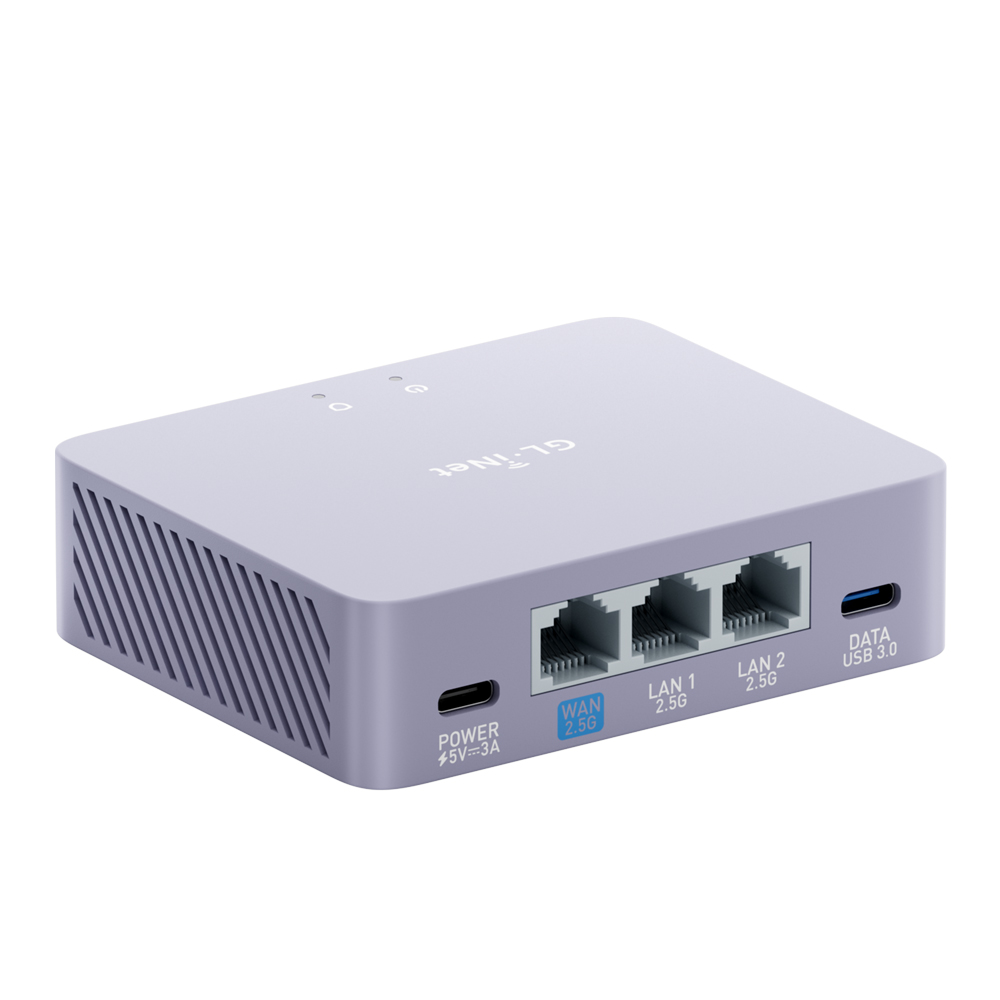
Si le Flint 2 impressionnait par ses antennes et son volume, le Brume 3 (GL-MT5000) surprend par l’extrême inverse. C’est un boîtier compact, léger, discret, conçu pour se faire oublier dans une baie réseau ou s’isoler derrière une box opérateur avec ses petites dimensions de : 75 x 92 x 25 mm. Et pour seulement une masse de 148 g, ce routeur format mini peut se transporter facilement en voyage pour bénéficier du client VPN intégré ou pour partager une connexion mobile en filaire sur plusieurs ordinateurs.
Ayant eu la chance de participer au programme de bêta-test de l’appareil, j’avais initialement noté quelques petits défauts de jeunesse sur les finitions du boîtier. Force est de constater que GL.iNet est une marque à l’écoute de sa communauté : sur la version commerciale finale, le marquage des ports USB-C est désormais parfaitement lisible et la luminosité de la LED a été ajustée pour ne pas transformer votre bureau en boîte de nuit.
Côté caractéristiques techniques, le Brume 3 ne fait pas semblant et s’intègre parfaitement dans une topologie réseau moderne en 2,5 Gb/s pour maximiser les débits filaires. Il embarque :
Processeur : MediaTek, Quad-core @2.0GHz (il s’agit d’un SoC performant capable d’encaisser le routage et surtout le chiffrement lourd).
Mémoire : 1 Go de DDR4 et un eMMC de 8 Go. C’est une configuration solide en RAM (bien qu’un peu léger en quantié de RAM) et en stockage Flash pour faire tourner l’OS maison et ajouter des packages.
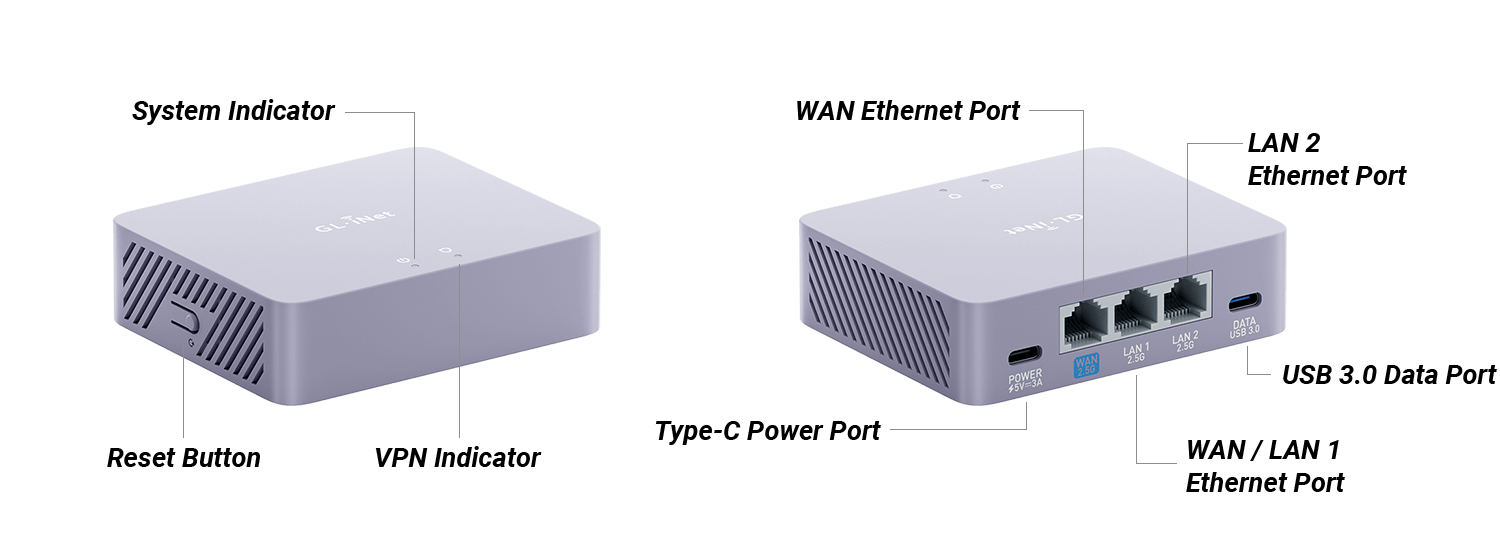
Image GL.iNet
Connectique :
1 x port ethernet WAN en 2,5 Gb/s
2 x ports Ethernet LAN en 2,5 Gb/s également (dont un qui peut servir en WAN supplémentaire)
1 x port USB 3.0 Type-C
1 x port USB Type-C d’alimentation (uniquelent) en 5V/3A
1 x bouton reset
Ce brume 3 possèdes des ports à la hauteur de nos exigences actuelles (bien qu’un port LAN ou deux supplémentaires n’auraient pas été de refus), complétés par un port USB indispensable pour y coupler une clé 4G/5G en backup, ou encore y brancher un smarphone pour faire du thethering (partage de connexion), ou enfin pour y brancher un périphérique de stockage USB (clé USB, disque-dur USB…).
Contenu du colis
1 x Brume 3 (GL-MT5000)
1 x Adaptateur secteur
1 x Câble Ethernet
1 x Manuel d’utilisation
1 x Carte de remerciement
1 x Convertisseur (selon le pays de livraison)
Installation et premier démarrage
Fidèle à la réputation de la marque, la mise en route est un modèle du genre. On branche l’alimentation (via USB-C), on s’y connecte en filaire, et l’assistant nous guide à travers les premières étapes indispensables :
Choix de la langue et définition du mot de passe administrateur.
Détection et configuration de l’accès Internet (DHCP, PPPoE ou IP fixe).
Mise à jour immédiate du firmware (une étape essentielle pour la sécurité).
Il existe au besoin un guide d’utilisation et de configuration disponible sur le site de GL.iNet.
Le système d’exploitation et les fonctionnalités
L’interface logicielle de GL.iNet, propulsée ici par une version stable et récente du firmware v4.9.0 (disponible depuis le 27 juillet 2026, loin de la version v4.8.4beta2 de mes premiers essais en décembre 2025), reste un modèle du genre pour concilier simplicité et fonctionnalités avancées.
Voici quelques captures d’écrans de cette interface de gestion :
La gestion des flux : le DPI (Deep Packet Inspection)
Une nouvelle fonctionnalité introduite dans la version 4.8.4 bêta du firmware du Brume3 est la gestion des flux via le DPI (Deep Packet Inspection) avec filtrage de contenu, ainsi que la QoS (Quality of Service) et le SQM (Smart Queue Management). Le contrôle parental, quant à lui, est arrivé avec la version 4.9.
Cette nouvelle fonctionnalité avait suscité quelques craintes lors de la bêta car le DPI (Deep Packet Inspection), qui affichait initialement des mentions de « Free Trial » ou de licence à obtenir. Rassurez-vous, il n’en est rien. Cette brique d’analyse réseau est aujourd’hui totalement gratuite et disponible sans surcoût. Il est bon de noter que cette fonctionnalité est encore en version bêta et donc toujours en développement.
Techniquement, cette fonctionnalité s’appuie sur le moteur tiers Netify (nDPI) (voir la documentation à ce sujet). Ce dernier utilisant un modèle de double licence (commerciale et open-source), cela explique les lignes de code et les mentions de licence qui s’étaient glissées dans l’interface de test. C’est désormais de l’histoire ancienne, et l’outil s’avère redoutable pour identifier précisément la nature du trafic qui transite sur votre réseau.
Les fonctionnalités suivantes sont disponible à la configuration :
Comme sur les grands modèles, l’intégration native d’AdGuard Home (AdGH) permet de bloquer les publicités, les trackers et les domaines malveillants directement à la racine du réseau, sans installer la moindre extension sur vos appareils. (Ayant une instance dans un LXC dédié, j’ai activé l’application sur le routeur pour faire les captures.)
Les autres applications préinstallées
D’autres applications sont préinstallées avec le firwmare GL.iNet :
OpenWRT (LuCI) dans l’ombre
Pour les utilisateurs avancés, un simple clic permet de basculer sur l’interface LuCI classique d’OpenWRT (après l’avoir installé via un clic également). C’est ici que l’on peut configurer des règles de pare-feu complexes, des VLANs ou installer des paquets supplémentaires via opkg (la version d’Openwrt 21 sur laquelle est basée le firmware GL.iNet est vieille et est encore avec le gestionnaire de paquet opkg, c’est probablement le seul reproche que je ferais sur ce routeur).
Serveur et Client VPN : Le gros point fort
C’est précisément sur ce terrain que le Brume 3 (GL-MT5000) était attendu au tournant, d’autant plus en position de routeur principal sur une infrastructure 2,5 Gb/s. Les tests de performance brute en situation réelle avec des fournisseurs comme Windscribe et Mullvad sous le protocole WireGuard confirment la puissance de la machine.
Mode Client VPN : Le processeur encaisse le chiffrement WireGuard sans sourciller, permettant d’exploiter d’excellents débits sans saturer le CPU du routeur. Grâce aux politiques de routage, vous décidez à la carte quelles machines (comme votre NAS ou votre PC principal) passent par le tunnel chiffré de Mullvad ou Windscribe, et lesquelles sortent en direct sur votre connexion classique.
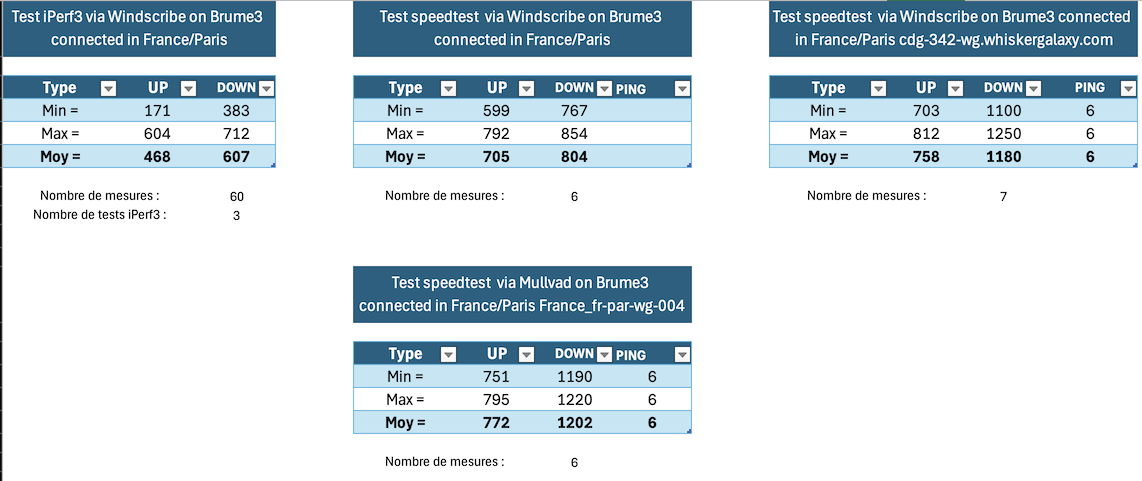
Voici quelques résultats (benchmarks) fait lors de la phase de beta-test (via mon Macbook Air M2 avec un adaptateur USB-TJ45 Asustor AS-U2.5G2) :
Ces résultats sont vraiment très bons compte tenu que ma connexion internet est à 2000 Mbps en téléchargement et 900 Mbps en envoi.
Mode Serveur VPN : Idéal pour configurer un accès distant sécurisé vers votre domicile. Même à l’extérieur, vous vous connectez en WireGuard sur le Brume 3 et vous accédez à vos services locaux à pleine vitesse. Je n’ai pas pu réaliser de benchmarks car je n’ai jamais pu avoir une connexion en dehors de chez moi assez rapide pour que le test ait une vraie valeur. Mais en ce qui me concerne, j’utilise quasi quotidiennement la connexion wireguard sur mon brume3, surtout en 4G/5G. J’ai également le serveur OpenVPN en secours.
Performances et Consommation électrique
N’ayant pas de Wi-Fi à tester, l’accent a été mis sur les capacités de routage pur et la tenue en charge des tunnels chiffrés.
Débits et Stabilité : En routage classique, le Brume 3 sature les liaisons sans ciller. Lors des transferts intensifs à travers le tunnel WireGuard, le processeur encaisse la charge sans montrer de signes de faiblesse ni provoquer de latence sur le reste du réseau.
Consommation et Température : Le boîtier chauffe modérément en charge intensive. Côté consommation, elle reste dérisoire par rapport à un routeur classique ou un mini-PC, ce qui en fait un excellent candidat pour tourner H24 sans impacter la facture d’électricité.
Test du GL.iNet Brume 3 (GL-MT5000)
Pour conclure
Le GL.iNet Brume 3 est une belle surprise. En reprenant les atouts du Flint 2 côté logiciel et optimisation VPN, mais dans un format ultra-compact et sans module Wi-Fi, GL.iNet livre un produit redoutable. Utilisé comme routeur principal, il se révèle être une passerelle de sécurité fiable, performante et très agile pour centraliser la gestion de serveurs et clients VPN, à condition de ne pas avoir besoin du Wi-Fi ou de disposer d’un point d’accès dédié.
Le Brume3 reste en tête de mon réseau et fonctionne à merveille. J’en suis vraiment satisfait.
Desgin
10
Focntionnalités
10
Performances
10
Caractéristiques techniques
10
Version d'OpenWrt
6
Performances WireGuard excellentes (validées sur Mullvad et Windscribe)
Connectique adaptée aux réseaux 2.5GbE
Fonctionnalité DPI (Netify) puissante et finalement 100% gratuite
Une marque à l’écoute qui a corrigé les défauts matériels de la bêta (LED, marquages USB-C)
Interface stable, accessible et puissance d’OpenWRT en arrière-plan
Absence de Wi-Fi intégré (un choix assumé, mais à rappeler selon vos besoins)
Le moteur DPI peut demander un temps d’adaptation pour en exploiter toutes les finesses
UniFi Travel Router UTR 6 Months Later Review When the UniFi Travel Router, or UTR, first arrived around 6 months ago, it was Ubiquiti’s first proper attempt at a dedicated travel router. It was a small, USB-C powered device designed to sit between your devices and whatever internet connection was available at the time, whether […]
GL.iNet Flint 4 First Look: What Has Emerged So Far I first saw the GL.iNet Flint 4 at CES 2026, but information about the router became relatively limited in the months that followed. GL.iNet has now formally presented the Flint 4, also known as the GL-BE14000, as an upcoming tri-band Wi-Fi 7 router aimed at […]
Don’t Buy the WRONG Hardware KVM – Use This Guide To Get it Right, First Time! Remote access is often treated as a software problem, but there are situations where software alone is not enough. A physical remote KVM sits between you and the target computer at the hardware level, giving remote access to the […]
GL.iNet Comet X KVM Early Review, Teardown and Testing The GL.iNet Comet X GL-RM4PE is a 4-port hardware KVM designed to manage several computers or servers from 1 central device. It connects directly to the HDMI and USB interfaces of up to 4 client systems, allowing the user to switch between them remotely through a […]
Gl.iNet Reveal a Multi-Client KVM Management Device – the Comet X GL.iNet has added the Comet X to its expanding Comet KVM range, with this model taking a more rack-focused approach than the earlier single-system units. Rather than being built around remote access to 1 machine, the Comet X is aimed at users who need […]
Gl.iNet MUDI 7 – The FIRST 48 HOURS! The Good, the Bad and the Surprising I have been using the GL.iNet Mudi 7 almost non stop for the past 48 hours, putting it through a range of real-world scenarios including mobile data via SIM and eSIM, WiFi repeating from public hotspots, and handling multiple connected […]
What is the Gl.iNet Comet Q KVM? The Gl.iNet Comet Q is a compact KVM-over-IP device built around a different kind of deployment than most existing entries in this category. Instead of focusing on HDMI-connected desktops, servers, or rack hardware, the Comet Q is designed around a direct USB-C connection, allowing it to interface with […]
FINALLY, A REAL WiFI 7 Travel Router? Is the Gl.iNet Slate 7 Pro for you?
The Slate 7 Pro (GL-BE10000) is the latest travel router from GL.iNet, and it exists largely because the original Slate 7 (GL-BE3600) did not go quite far enough. The earlier model carried Wi Fi 7 branding but lacked 6GHz support, which for many users felt like a limitation rather than a stepping stone. The Slate 7 Pro corrects that by moving to full tri band Wi Fi 7, adding a dedicated 6GHz radio, expanding wireless bandwidth, and upgrading the touchscreen. It keeps the dual 2.5GbE ports and USB C powered design, but pushes the hardware and feature set further into premium territory.
I have reviewed and evaluated ALOT of travel routers over the years, and today I want to focus specifically on the pros and cons of the Slate 7 Pro (full detailed review still in progress, but this article will serve as the main focus good and bad bits). Rather than listing specifications alone, it looks at what those changes actually mean day to day, especially for travelers, remote workers, and users who rely heavily on VPN, captive portal access, and flexible networking. Some areas are clear improvements over the previous model, while others remain imperfect or introduce new trade offs. The goal here is to outline both sides clearly, without overselling what the device does well or ignoring where it still falls short.
Buy the Gl.iNet Slate 7 Pro Here for 169 (Early Bird Price) – HERE
The Slate 7 Pro (GL-BE10000) is a full tri band Wi Fi 7 travel router from GL.iNet that corrects the biggest limitation of the earlier Slate 7 by adding dedicated 6GHz support and 320MHz channel capability, delivering combined theoretical wireless bandwidth of 688Mbps on 2.4GHz, 2882Mbps on 5GHz, and 5764Mbps on 6GHz. It pairs this with dual 2.5GbE ports, high speed VPN performance up to 1100Mbps via WireGuard, integrated Deep Packet Inspection, a larger 2.8 inch touchscreen for on device management, and an optional active cooling system that engages only when thermals demand it. The OpenWrt based firmware remains one of the most flexible in the travel router space, supporting multi WAN failover, advanced traffic rules, plugin expansion, and remote management. However, it draws more power than the previous model, retains only 1 USB C data port with unreliable hub expansion, cannot handle captive portal login pages directly on the touchscreen, and implements single radio MLO rather than full multi radio aggregation. For users who want full spectrum Wi Fi 7 in a portable form, stronger VPN throughput, and granular network control while traveling or working remotely, it is a technically stronger and more complete option than the non 6GHz Slate 7, but it comes with higher power demands and a price premium that may not suit those who only need basic travel connectivity.
SOFTWARE - 10/10
HARDWARE - 9/10
PERFORMANCE - 9/10
PRICE - 7/10
VALUE - 8/10
8.6
PROS
Full tri band Wi Fi 7 with dedicated 6GHz support and 320MHz channel capability Combined theoretical wireless bandwidth of 688Mbps (2.4GHz), 2882Mbps (5GHz), and 5764Mbps (6GHz) Dual 2.5GbE ports with configurable WAN/LAN and multi WAN failover support High speed VPN performance up to 1100Mbps via WireGuard and 1000Mbps via OpenVPN DCO 2.8 inch color touchscreen for direct device level control and monitoring Integrated Deep Packet Inspection for advanced traffic visibility and filtering Active cooling system that engages only when required OpenWrt based firmware with full customization, plugin support, and remote management
CONS
Touchscreen cannot handle captive portal login pages directly Higher baseline power consumption compared to the earlier Slate 7 Only 1 USB C data port for storage or tethering USB hub expansion remains unreliable for multi device use MLO implementation is single radio coordination rather than full multi radio aggregation
Buy the Gl.iNet Slate 7 Pro Here for 169 (Early Bird Price) – HERE
Buy the Gl.iNet Slate 7 Pro from the Official Store Below:
6GHz Support Finally Brings Full Tri Band Wi Fi 7 to the Slate 7 Pro
One of the most significant changes in the Slate 7 Pro compared with the earlier Slate 7 is the addition of a dedicated 6GHz band. The previous model operated only on 2.4GHz and 5GHz, which meant it technically supported Wi Fi 7 features but did not deliver the full tri band experience many users associate with the standard. By adding 6GHz, the Slate 7 Pro increases total theoretical wireless throughput to 688Mbps on 2.4GHz, 2882Mbps on 5GHz, and 5764Mbps on 6GHz. More importantly, it allows access to wider 320MHz channels, which are not available on 5GHz in most regulatory regions.
In practical terms, 6GHz provides a cleaner spectrum with less congestion, particularly in dense environments such as hotels, conferences, or apartment buildings. When combined with Multi Link Operation, the router can distribute traffic more effectively across three bands rather than two. This does not automatically guarantee higher real world speeds for every client, but it does increase headroom and flexibility for multiple active devices. For users who dismissed the original Slate 7 due to its lack of 6GHz, this update addresses that limitation directly and aligns the Pro model more closely with what most would consider a complete Wi Fi 7 implementation.
Active Cooling in a Travel Router, but Only When It Is Needed
One of the more unusual additions in the Slate 7 Pro is the inclusion of an internal cooling fan. Most travel routers rely entirely on passive cooling due to their compact size and relatively low power processors. Under moderate use this is usually sufficient, but in warmer climates or during sustained high load activity such as heavy VPN use, multi device streaming, or extended 6GHz operation, temperatures can rise enough to cause throttling or instability. The Slate 7 Pro addresses this by integrating active cooling, which is not common in this category.
Importantly, the fan does not run continuously. It can be configured to activate only once the CPU reaches a defined temperature threshold. In standard operation, the device remains silent. The fan engages only when sustained workload or environmental conditions demand additional cooling. This approach attempts to balance reliability and acoustics, reducing the risk of heat related slowdowns without introducing constant background noise. For users who travel to high humidity or high temperature regions, this is a practical addition, though it also reflects the higher performance hardware and increased power demands of the Pro model.
Strong Wired and Physical Connectivity Without Additional Accessories
The Slate 7 Pro continues to offer dual 2.5GbE ports, with 1 configurable WAN and 1 LAN port, providing multi gig wired connectivity in a compact travel router form factor. This allows users to connect to high speed wired internet sources where available, while also supporting local high bandwidth transfers across a wired network. The ports can be reassigned depending on deployment needs, and multi WAN failover remains supported through combinations of wired, wireless repeater, and tethered connections. For users who frequently move between hotel networks, offices, or temporary workspaces, this flexibility remains one of the defining strengths of the device.
In addition to Ethernet, the Slate 7 Pro replaces the previous USB Type A data port with a USB C 3.0 data port, aligning it more closely with modern devices and accessories. This port supports storage devices and USB tethering, while power is delivered through a separate USB C PD input. The programmable hardware toggle button is retained for quick VPN or feature switching, and the reset button remains accessible. Overall, the physical connectivity is broad for a travel router, and the Pro model maintains compatibility with high speed wired networks while modernizing the data interface.
The Larger 2.8 Inch Touchscreen Adds Real Practical Control
The Slate 7 Pro includes a 2.8 inch color touchscreen on the front panel, replacing the smaller and more limited display found on the earlier Slate 7. While the previous model did introduce touchscreen control to the travel router category, the Pro version expands both the size and usability of the interface.
From the screen, users can view network status, generate QR codes for Wi Fi sharing, toggle VPN connections, monitor connection modes, and manage basic wireless settings without needing to open a browser or mobile app.
For short term or ad hoc setups, this makes a noticeable difference. When arriving at a new location, it is possible to power on the router, assign a Wi Fi password, enable or disable a VPN, and confirm connectivity directly from the device itself. It also provides real time visibility of WAN, repeater, tethering, and LAN states through clear indicators. The screen does not replace the full web interface for advanced configuration, but for quick adjustments and monitoring, it reduces reliance on a secondary device and simplifies routine tasks.
The OpenWrt Based Software Platform Remains One of the Strongest in This Category
The Slate 7 Pro continues to run the customized OpenWrt based firmware developed by GL.iNet, and this remains one of the defining advantages of the platform. The interface provides a structured and accessible front end for everyday tasks such as WAN configuration, repeater mode, VPN management, and client monitoring, while still allowing full access to the underlying OpenWrt environment for advanced users. This dual layer approach means the device can operate as a simple travel router for casual users, or as a highly configurable networking tool for those comfortable with deeper control.
Beyond standard routing functions, the firmware includes integrated VPN client and server options, multi WAN failover, traffic rules per SSID, and application support through an app center. The Pro model also introduces built in Deep Packet Inspection, adding another layer of visibility and filtering capability.
Users can assign the physical toggle button to trigger specific actions, switch to raw OpenWrt if desired, and manage the device remotely through GoodCloud. In terms of flexibility and feature depth within a travel form factor, the software stack remains one of the most complete available.
The Touchscreen Still Cannot Handle Captive Portal Logins
While the 2.8 inch touchscreen adds useful control and monitoring features, it does not eliminate the need for a secondary device when dealing with captive portals. In environments such as hotels, cafés, airports, or in flight Wi Fi systems, users often encounter web based login pages that must be completed before internet access is granted. The Slate 7 Pro cannot display or interact with these login portals directly on its screen. As a result, a phone, tablet, or laptop is still required to complete the authentication process.
This limitation reduces some of the independence that the touchscreen otherwise provides. In scenarios where the goal is to connect once and share access with multiple devices through the router, the expectation might be that everything could be handled directly on the unit itself. Instead, the workflow still requires connecting a client device to trigger and complete the portal login. Given that the hardware includes a capable display and processing power, the absence of even a basic embedded browser feels like a missed opportunity rather than a technical constraint.
Increased Power Consumption Compared to the Previous Model
The Slate 7 Pro draws more power than the earlier Slate 7, which is not unexpected given the addition of 6GHz, a larger LCD, integrated DPI processing, and an active cooling system. Even under light usage with a single wireless client connected and no wired WAN active, the Pro model typically operates above 5W. By comparison, the earlier Slate 7 generally sat between 3W and 4W under similar conditions. While these figures are not high in absolute terms, they are noticeably different when measured side by side.
For most users powering the router from a standard USB C PD adapter, this increase will not present an issue. However, in travel scenarios where power is sourced from lower output USB ports on buses, trains, aircraft seats, or compact power banks, the higher baseline draw could matter.
It also reflects the broader shift in the Pro model toward higher performance hardware. The device remains portable and reasonably efficient, but it is less power conservative than its predecessor.
Single USB Port Continues to Limit Expansion and Hub Compatibility
Despite moving to a USB C 3.0 data port, the Slate 7 Pro still provides only 1 USB data interface for peripherals. This means users must choose between connecting external storage, tethering a smartphone, or attaching another USB based device. In practical travel use, it is common to want both tethering and storage active at the same time, particularly when using the router as a small file sharing hub or media server. With only a single port, that flexibility remains constrained.
Attempts to expand the port using USB hubs continue to produce inconsistent results. While some powered hubs may partially function, stable multi device operation is not guaranteed. This mirrors behavior seen in earlier models and suggests that the limitation is architectural rather than cosmetic. For users who rely heavily on USB expansion, especially for simultaneous tethering and storage, this remains a practical restriction rather than a minor inconvenience.
MediaTek Platform Instead of Qualcomm Hardware
The Slate 7 Pro is powered by a MediaTek quad core processor running at 2.0GHz, rather than a Qualcomm chipset. In previous generations, Qualcomm based platforms were often associated with stronger power efficiency and broader upstream driver maturity within certain networking ecosystems. The move to MediaTek is not uncommon in this segment, but it does represent a shift in hardware positioning compared with devices that have relied on Qualcomm silicon.
From a performance perspective, the 2.0GHz MediaTek CPU provides the necessary headroom for tri band Wi Fi 7, high throughput VPN, and DPI processing. However, MediaTek platforms are generally viewed as slightly less power efficient than comparable Qualcomm solutions, which ties back to the higher baseline power draw observed in the Pro model. For most users, the practical difference will center on efficiency rather than raw capability, but it remains a consideration for those who closely follow chipset selection in networking hardware.
Multi Link Operation Is Present, but Not Full Multi Radio Aggregation
The Slate 7 Pro supports Wi Fi 7 Multi Link Operation across its 2.4GHz, 5GHz, and 6GHz bands, allowing compatible clients to establish links over multiple frequencies. In practice, this improves connection stability and can help balance traffic dynamically between bands. However, it is important to clarify that this implementation follows the more common single radio MLO model, where traffic is coordinated across bands rather than fully aggregated simultaneously through independent radio chains.
This means the router does not deliver true parallel multi radio throughput in the way some marketing descriptions of Wi Fi 7 may imply. Instead, it prioritizes stability, latency reduction, and intelligent band switching. At present, very few consumer or travel routers implement full multi radio MLO aggregation, and the Slate 7 Pro is not an exception to that wider market reality. For most users, the benefit will be smoother performance under load rather than a simple multiplication of peak speeds.
Should You Buy the Gl.iNet Slate 7 Pro Travel Router? Conclusion and Verdict
The Slate 7 Pro builds directly on the foundation of the earlier Slate 7 by addressing its most discussed limitation, namely the absence of 6GHz. With full tri band Wi Fi 7 support, dual 2.5GbE ports, a larger 2.8 inch touchscreen, integrated DPI, high throughput VPN capabilities up to 1100Mbps via WireGuard, and optional active cooling, it positions itself as a more complete and performance oriented travel router. For users who were hesitant about the original model due to clipped wireless capability, the Pro version resolves that concern and expands overall functionality in a meaningful way.
That said, it is not without compromises. Power draw is higher than before, USB expansion remains limited to a single port with inconsistent hub support, the touchscreen cannot handle captive portal logins directly, and its MLO implementation reflects the broader limitations of current consumer Wi Fi 7 hardware rather than a fully parallel multi radio design. The MediaTek platform delivers the required performance, but it does not prioritize efficiency to the same degree as some Qualcomm based alternatives. For buyers deciding between the Slate 7 and the Slate 7 Pro, the Pro model is the technically stronger device, provided the increased price and power requirements align with their intended use case.
Buy the Gl.iNet Slate 7 Pro Here for 169 (Early Bird Price) – HERE
This description contains links to Amazon. These links will take you to some of the products mentioned in today's content. As an Amazon Associate, I earn from qualifying purchases. Visit the NASCompares Deal Finder to find the best place to buy this device in your region, based on Service, Support and Reputation - Just Search for your NAS Drive in the Box Below
Need Advice on Data Storage from an Expert?
Finally, for free advice about your setup, just leave a message in the comments below here at NASCompares.com and we will get back to you.Need Help?
Where possible (and where appropriate) please provide as much information about your requirements, as then I can arrange the best answer and solution to your needs. Do not worry about your e-mail address being required, it will NOT be used in a mailing list and will NOT be used in any way other than to respond to your enquiry.
[contact-form-7]
TRY CHAT Terms and Conditions
If you like this service, please consider supporting us.
We use affiliate links on the blog allowing NAScompares information and advice service to be free of charge to you.Anything you purchase on the day you click on our links will generate a small commission which isused to run the website. Here is a link for Amazon and B&H.You can also get me a Ko-fi or old school Paypal. Thanks!To find out more about how to support this advice service checkHEREIf you need to fix or configure a NAS, check FiverHave you thought about helping others with your knowledge? Find Instructions Here
Or support us by using our affiliate links on Amazon UK and Amazon US
Alternatively, why not ask me on the ASK NASCompares forum, by clicking the button below. This is a community hub that serves as a place that I can answer your question, chew the fat, share new release information and even get corrections posted. I will always get around to answering ALL queries, but as a one-man operation, I cannot promise speed! So by sharing your query in the ASK NASCompares section below, you can get a better range of solutions and suggestions, alongside my own.
New Cost-Effective USB4, M.2 and PCIe Adapters from IOCREST/Lekuo for 2026 Revealed
IOCREST, also marketed under the Lekuo name for consumer channels, is preparing a broader range of USB4, M.2, and PCIe expansion products aimed at users who need higher speed networking, storage expansion, or more flexible external PCIe connectivity. Based on the product information provided and the accompanying interview material, the current lineup combines shipping devices with several products still in development or not yet formally listed on the company’s official product pages, reflecting a portfolio that spans compact 10GbE adapters, SFP+ connectivity, multi-drive enclosures, and USB4 based PCIe breakout designs.
The Lekuo DTB3R61 is a compact USB4 hub that combines 10GbE networking with basic peripheral and removable media expansion in a single enclosure. It is built around a USB4 upstream connection and is intended for hosts that support USB4 or Thunderbolt 3/4/5, rather than older USB 3.x only systems. In practical terms, this positions it as a multi function dock for users who need wired 10GbE, a small number of USB ports, and SD or TF card access without moving to a larger desktop class dock.
The port layout is relatively simple, consisting of 1x 10GbE RJ45 port, 3x 5Gbps USB Type A ports, and a TF/SD 3.0 card reader. The supplied specifications list a 40Gbps host link, support for Windows, macOS, and Linux, and a compact metal chassis. Although your transcript refers to a fanless design, the specification sheet provided here states an aluminum alloy casing with fan assisted cooling, so that distinction should be treated carefully in the article unless you want to frame it as pre release versus final spec variation.
This unreleased Lekuo adapter is one of the more bandwidth focused products discussed in the interview material, built around a USB4 host connection and 2x 25GbE network ports. Based on the information provided, the design uses an SFP based approach rather than RJ45, which is consistent with the higher thermal and signal demands of 25GbE. It is positioned as a compact external network adapter for systems that need significantly more throughput than 10GbE, while still relying on USB4 as the host side connection.
The transcript also indicates several design details that help distinguish this unit from more common USB or Thunderbolt network adapters. It is described as a silent design with no active fan, includes an external barrel power input, and features a physical power button on the enclosure. The company indicated that the product was expected around Q2 and priced below $200 at the time of filming, but as it is not yet listed on the official product page, those details should be treated as pre release guidance rather than final retail specification.
The Lekuo DTB3F21 is a dual port USB4 network adapter designed around 2x 10GbE SFP+ connections. Unlike simpler USB to Ethernet devices that target single port RJ45 connectivity, this model is positioned for users who need higher density fibre or DAC based networking from a single external enclosure. The supplied specifications identify the Intel 82599 controller, placing it closer to a traditional server class 10GbE design than a lower cost USB NIC.
From the product information and transcript, this adapter is part of Lekuo’s broader push into USB4 based external networking, especially for systems that lack internal expansion but still need multi port high speed network access. The enclosure is described as compact and externally connected over USB Type C, with support across Windows, Windows Server, Linux distributions, and several enterprise networking features such as VLAN support, jumbo frames, interrupt moderation, and virtual machine queue support. In the transcript, a dual 10GbE version is also discussed alongside the dual 25GbE model as part of the same general product family.
Specification
Details
Product Name
Lekuo USB4 to Dual 10Gb Fiber SFP+ Ports Network Adapter
Lekuo is also developing an M.2 to 10G SFP+ adapter, extending the same general idea seen in its M.2 to 10GbE RJ45 products toward fibre based networking. In the transcript, this product is described as a refined version of an existing concept rather than a completely new direction, aimed at compact systems that only have an M.2 slot available for expansion. That makes it relevant for small servers, mini PCs, and embedded platforms where a full PCIe slot is not available but higher speed network connectivity is still required.
The main distinction here is the move from copper 10GbE to SFP+, which allows use of fibre modules or DAC cabling depending on deployment requirements. That gives the adapter a different role from the RJ45 version, particularly in longer distance links or environments already using SFP+ switching infrastructure. Based on your notes, this product is not yet available on the official product page, so the current information is limited to what was shown and discussed during the visit rather than a finalized retail specification sheet.
Specification
Details
Product Name
Lekuo M.2 to 10G SFP+ Adapter
Model
Not provided in supplied materials
Host Interface
M.2
Network Interface
1x 10G SFP+
Port Type
SFP+
Intended Use
Adds 10GbE fibre connectivity to systems with available M.2 slot
This unreleased Lekuo USB4 expansion box is designed to expose 2x PCIe slots from a single external USB4 connection, using the same basic enclosure approach shown on the company’s 8x 1GbE adapter. In the transcript, the unit is described as a small PCIe dock originally used internally for testing, with the USB4 connection bridging to 2 separate PCIe paths inside the enclosure. The concept is straightforward: rather than delivering fixed networking or storage, it provides a more flexible external PCIe breakout for users who want to install their own cards.
That flexibility is the main point of interest here. The transcript suggests use cases such as network cards, SATA cards, and other compact PCIe devices, with bus power available over USB4 and a barrel power input included for cards that need more power than the host connection can provide on its own. Since this product is not yet listed on the official product page, the available information is still limited and some details remain unconfirmed. The requested naming of this section as a PCIe Gen4 x1 slot box reflects the intended lane configuration you provided, but that specific wording was not fully documented in the supplied official specification text, so it should be treated as based on your product notes.
Lekuo is also preparing a multi drive USB4 enclosure that combines 4 HDD bays with a single PCIe Gen4 M.2 NVMe slot in the same chassis. Based on the transcript, this is a DAS rather than a NAS, so it is intended to provide direct attached storage expansion over USB4 instead of functioning as a self contained network appliance. The inclusion of the M.2 slot adds a layer of flexibility beyond a standard 4 bay enclosure, allowing for SSD caching, a dedicated fast volume, or a separate high speed workspace alongside the hard drive array.
The product is described as relying on software RAID rather than including a hardware RAID controller, and the transcript also notes a dual port TB4 style design for daisy chaining. At the same time, the core concept is clear: this is an external storage enclosure aimed at users who want a mix of larger capacity HDD storage and faster NVMe storage within a single USB4 connected device. As with several of the other products shown during the visit, this unit does not yet appear on the official product page, so the available details should be treated as pre release rather than final retail specifications.
Specification
Details
Product Name
Lekuo USB4 to 4 HDD and 1x Gen4 M.2 Box
Model
Not provided in supplied materials
Host Interface
USB4
Drive Bays
4x HDD bays
SSD Slot
1x PCIe Gen4 M.2 NVMe slot
Product Type
DAS
RAID
Software RAID
Hardware RAID Controller
No
Daisy Chain Support
Dual port TB4 style connectivity mentioned in transcript
Intended Use
Direct attached storage expansion with mixed HDD and NVMe storage
Lekuo is also developing a PCIe expansion card that combines USB and storage connectivity on a single board, aimed at systems where slot space is limited and adding multiple separate controller cards is not practical. In the transcript, the card is shown with 2x USB Type C ports, 1x USB Type A port, 4x SATA ports, and an integrated 2.5GbE network connection. Rather than focusing on a single function, it is intended as a compact multi purpose expansion card for small form factor systems, embedded builds, or storage focused PCs that still need additional external connectivity.
The card is described as operating over a PCIe Gen4 x1 connection, giving it a total host side bandwidth of 20Gbps to allocate across its various controllers. That does not mean every port can run at maximum speed simultaneously, but it does make the board suitable for mixed duty use where SATA connectivity, modest USB expansion, and basic 2.5GbE networking need to be consolidated into one slot. Based on the material you provided, this product was shown during the visit rather than backed by a full standalone specification sheet, so some lower level details remain unspecified.
Specification
Details
Product Name
Lekuo USB Expansion PCIe Card
Model
Not provided in supplied materials
Host Interface
PCIe
PCIe Link
PCIe Gen4 x1
Total Host Bandwidth
20Gbps
USB Ports
2x USB Type C, 1x USB Type A
Storage Ports
4x SATA
Network Port
1x 2.5GbE
Intended Use
Multi function expansion for compact systems
Example Deployments
Small servers, small form factor PCs, embedded systems
Additional Connectivity
Extra output cable mentioned for further USB expansion depending on case layout
Official Product Page Status
Not specified in supplied materials
Retail Status
Shown in transcript / development status not fully confirmed
Lekuo is also expanding its external 10GbE range with a USB4 to 10G SFP+ adapter, offering an alternative to the more common RJ45 based 10GbE designs already associated with the brand. In the transcript, this model is presented as a silent SFP based version of the company’s existing copper 10GbE adapter, intended for users who want fibre or DAC connectivity instead of 10GBASE T. That makes it more relevant for rackmount environments, structured fibre deployments, and users already working with SFP+ switching infrastructure.
The product appears to share the same broader design language as the other newer USB4 network adapters shown during the visit, including a compact metal enclosure, ventilation at each end, and an external power option. The transcript also notes a physical power button on this family of devices, which is relatively uncommon on compact external network adapters. As this specific single port USB4 to 10G SFP+ model is not included in the supplied formal product specification sheets, the current information is based on what was shown and described in the video rather than a final retail listing.
Specification
Details
Product Name
Lekuo USB4 to 10G SFP+ Adapter
Model
Not provided in supplied materials
Host Interface
USB4
Host Compatibility
USB4 / Thunderbolt host systems
Network Interface
1x 10G SFP+
Port Type
SFP+
Cooling
Passive / silent design, based on transcript
Chassis
Metal enclosure with ventilation at each end
Power Input
Barrel power input mentioned in transcript
Power Control
Physical on/off button mentioned in transcript
Intended Use
External 10GbE fibre or DAC connectivity over USB4
Official Product Page Status
Not yet listed in supplied materials
Retail Status
Shown during visit / pre release context
Who Are IOCREST/Lekuo?
IOCREST and Lekuo are effectively 2 market facing identities used by the same company. Based on the interview material, the business was founded in 2000 and has operated for more than 20 years in adapter, connectivity, and expansion hardware design. IOCREST appears more closely associated with the company’s long standing OEM and B2B activity, while Lekuo is the branding now being pushed more directly toward end users and consumer retail channels.
A key point from the interview is that the company states that most of its products are designed in house, including the internal engineering and development work behind its USB, USB4, M.2, and PCIe based solutions. It also describes its product planning as being driven by practical gaps in the market, particularly in compact systems where users need to add networking, storage, or expansion features that are not available on the base hardware. That helps explain why many of its products focus on niche but increasingly relevant use cases such as M.2 to 10GbE, USB4 to multi port networking, and external PCIe breakout designs.
The other defining part of the company’s position is that much of its historical business has been behind the scenes. In the interview, Lekuo states that before its more recent consumer push, most of its sales were B2B, with products often sold through partners, distributors, or other companies without prominent IOCREST or Lekuo branding on the product listing itself. The current shift appears to be less about changing what it makes and more about putting its own name in front of products that were previously sold in a more anonymous OEM style model.
This description contains links to Amazon. These links will take you to some of the products mentioned in today's content. As an Amazon Associate, I earn from qualifying purchases. Visit the NASCompares Deal Finder to find the best place to buy this device in your region, based on Service, Support and Reputation - Just Search for your NAS Drive in the Box Below
Need Advice on Data Storage from an Expert?
Finally, for free advice about your setup, just leave a message in the comments below here at NASCompares.com and we will get back to you.Need Help?
Where possible (and where appropriate) please provide as much information about your requirements, as then I can arrange the best answer and solution to your needs. Do not worry about your e-mail address being required, it will NOT be used in a mailing list and will NOT be used in any way other than to respond to your enquiry.
[contact-form-7]
TRY CHAT Terms and Conditions
If you like this service, please consider supporting us.
We use affiliate links on the blog allowing NAScompares information and advice service to be free of charge to you.Anything you purchase on the day you click on our links will generate a small commission which isused to run the website. Here is a link for Amazon and B&H.You can also get me a Ko-fi or old school Paypal. Thanks!To find out more about how to support this advice service checkHEREIf you need to fix or configure a NAS, check FiverHave you thought about helping others with your knowledge? Find Instructions Here
Or support us by using our affiliate links on Amazon UK and Amazon US
Alternatively, why not ask me on the ASK NASCompares forum, by clicking the button below. This is a community hub that serves as a place that I can answer your question, chew the fat, share new release information and even get corrections posted. I will always get around to answering ALL queries, but as a one-man operation, I cannot promise speed! So by sharing your query in the ASK NASCompares section below, you can get a better range of solutions and suggestions, alongside my own.

 Connexion