Synology Release the RS1226+ 8-Bay Rackstation NAS Synology has now formally introduced the RackStation RS1226+ and RS1226RP+, its latest compact 2U, 8-bay rackmount NAS systems for small and medium-sized businesses, branch offices, communications cabinets and other deployments where rack space is limited. Released in July 2026, these are not intended to be large, full-depth enterprise […]
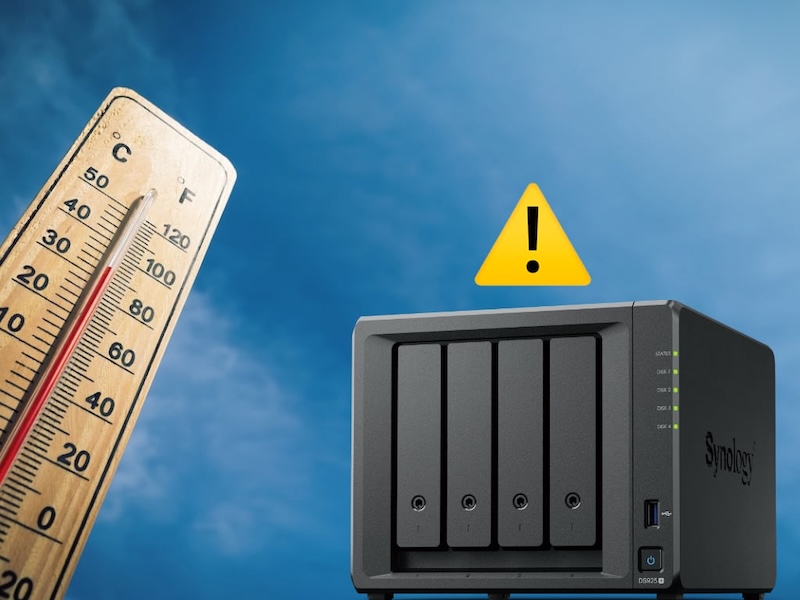
La canicule est le pire ennemi d’un NAS qui tourne 24h/24. Contrairement à un PC qu’on éteint le soir, le NAS continue de travailler pendant les nuits (parfois très chaude) où la température ambiante ne redescend jamais vraiment. Résultat : des disques souffrent en silence, des ventilateurs saturés de poussière et dans les cas les plus graves, une panne thermique en pleine écriture.
Ce guide combine les 2 actions essentielles de l’été : protéger son NAS de la chaleur et en profiter pour faire un nettoyage.
Pourquoi le NAS souffre plus que les autres
Un PC s’arrête quand vous fermez la session. Un NAS, non… Il indexe vos photos, tourne vos conteneurs Docker, répond aux requêtes Plex/Jellyfin et exécute des tâches planifiées, y compris à 2h du matin quand la pièce affiche encore 29°C.
En 2026, les NAS sont aussi plus puissants et plus denses qu’il y a quelques années. Les modèles équipés de processeurs AMD Ryzen, de slots NVMe PCIe 4.0 ou de GPU intégré génèrent beaucoup plus de chaleur que l’ancienne génération. Les NAS full-flash ont un comportement thermique radicalement différent des NAS avec disques durs (HDD) classiques… Les SSD NVMe réduisent leur vitesse (termal throttle) silencieusement en cas de surchauffe, sans déclencher d’alerte visible dans l’interface.
Les seuils à connaître par type de composant de votre NAS
Composant
Température normale
Seuil d’alerte
Seuil critique
HDD 3,5″
30 – 50°C
60°C
65°C+
SSD SATA
25 – 45°C
55°C
65°C+
SSD NVMe M.2
40 – 60°C
70°C
80°C+
Processeur
50 – 70°C
80°C
90°C+
Pour les NAS fanless : Quand la température ambiante dépasse 35°C, il faut être extrêmement vigilant.
Surveiller les températures avec les outils natifs
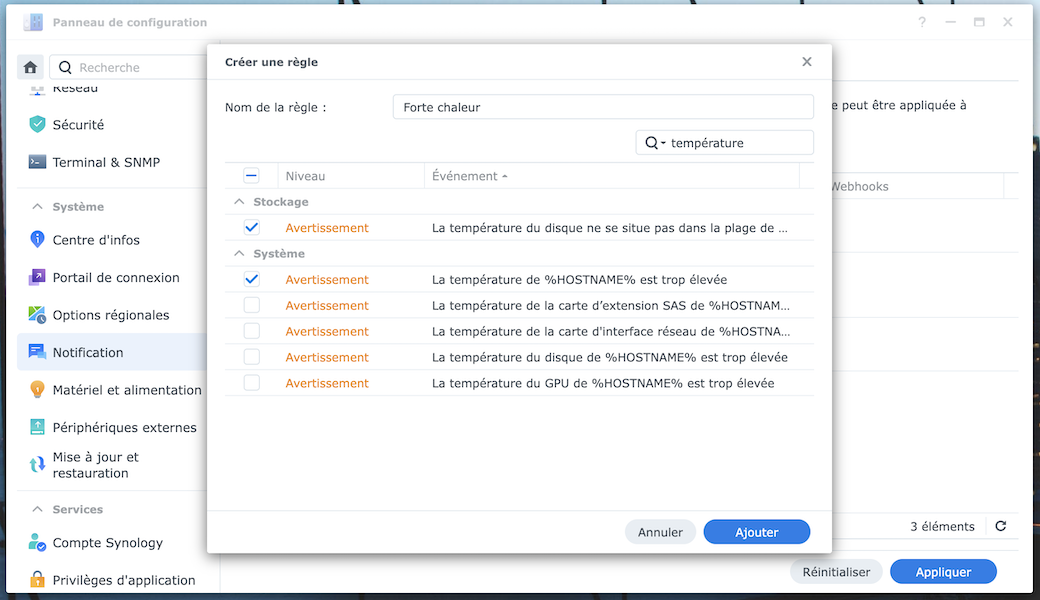
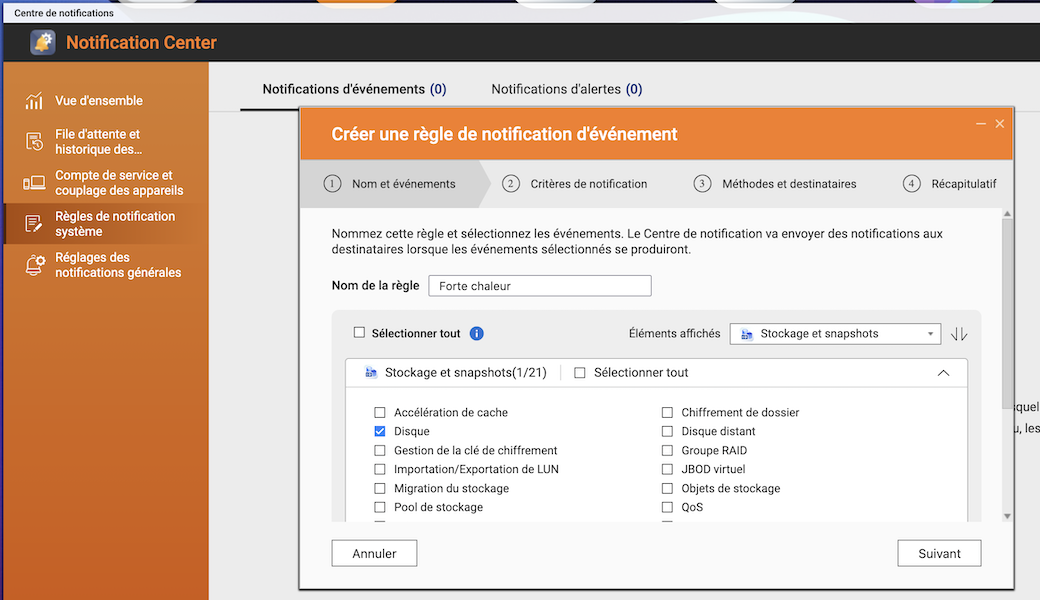
Avant de parler de ventilateurs et d’emplacement, la première action est de configurer des alertes thermiques dans l’interface de votre NAS. Beaucoup d’utilisateurs découvrent le problème trop tard, quand le NAS s’arrête de lui-même ou quand un disque lâche.
Synology DSM
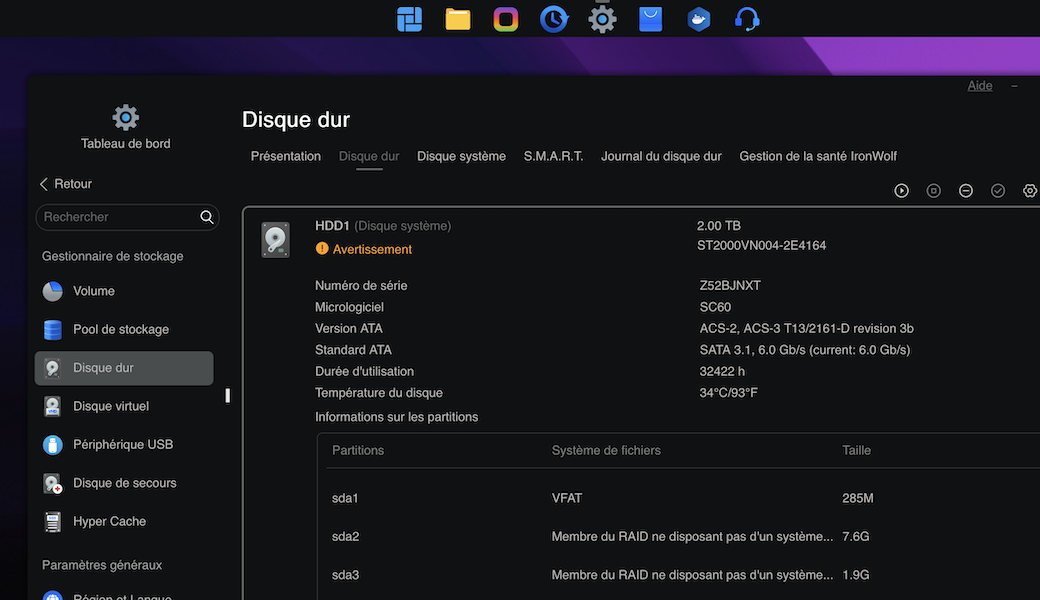
Vous trouverez la température de chaque disque dur et SSD dans Gestionnaire de stockage→HDD/SSD et cliquez sur la petite flèche vers le bas (à droite) pour chacun.
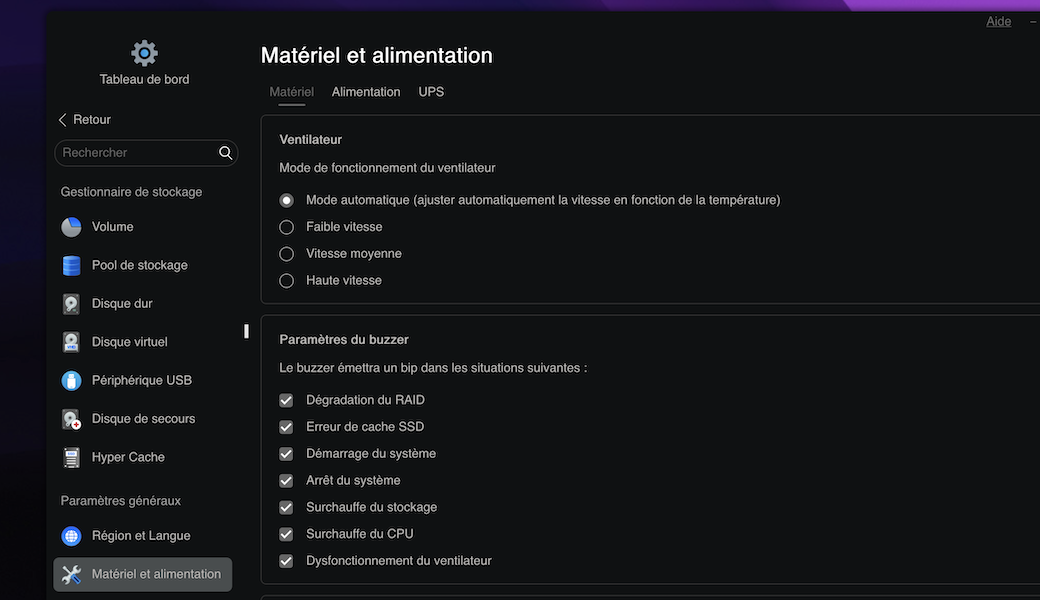
Rendez-vous dans Panneau de configuration → Matériel & alimentation → section Mode de vitesse du ventilateur pour vérifier qu’il est bien en mode frais (réactif à la chaleur) et pas en mode calme.
Pour les alertes : Panneau de configuration → Notification → Alertes, activez les notifications par e-mail et mobile pour les événements liés à la température disque et température système au niveau de l’onglet Règles.
QNAP QTS
Allez dans Stockage & Snapshots → Disques pour afficher les températures pour chaque disque.
Les alertes se configurent dans Centre de notifications → Règles de notification système → Disque.
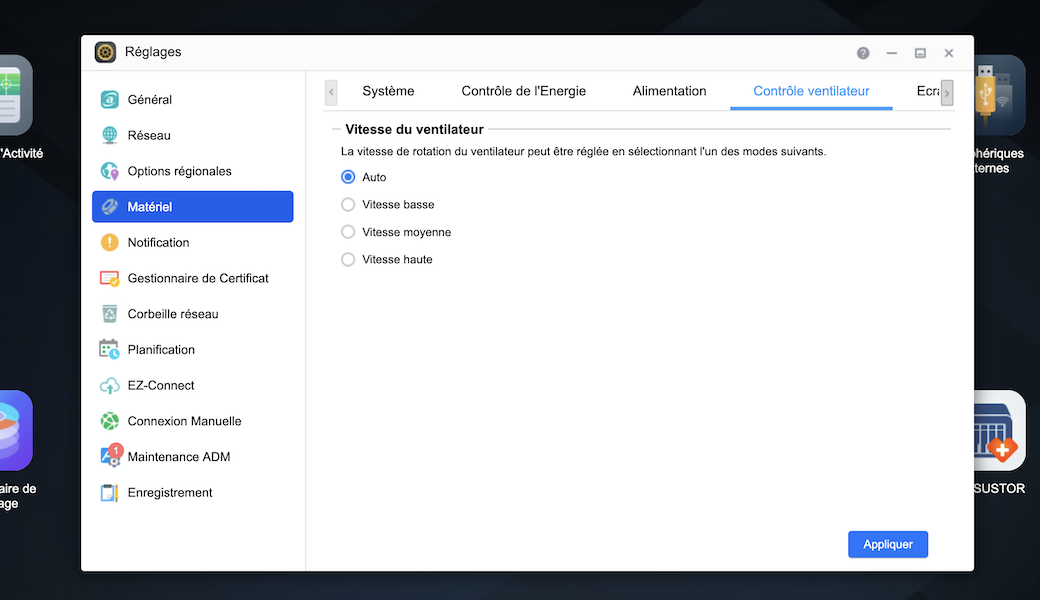
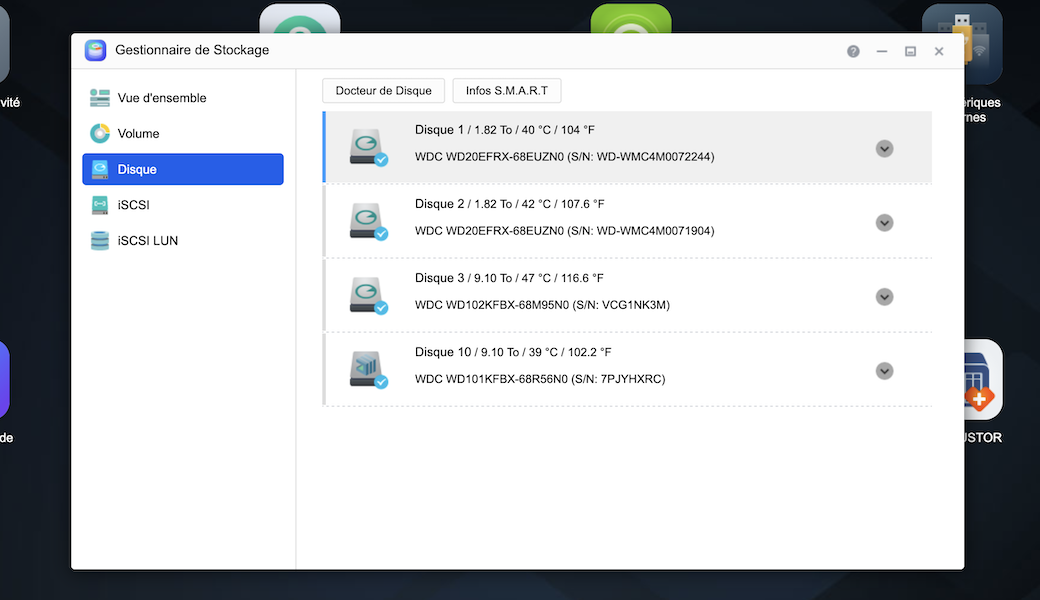
ASUSTOR ADM
Rendez-vous dans Réglages →Matériels → onglet Contrôle Ventilateur pour vérifier que la vitesse est sur Auto.
Allez dans Gestionnaire de stockage → onglet Disques pour visualiser la température en temps réel de chaque disque installé. Pour les alertes : Réglage → Notifications → Avancés.
TerraMaster TOS 6
Pour le ventilateur, rendez-vous dans Tableau de bord → Matériel et alimentation puis sélectionnez Mode automatique dans la section Ventilateur.
Accédez à Tableau de bord → Santé du système. TOS 7 affiche la température de chaque emplacement et envoie des alertes par e-mail si vous avez configuré un compte SMTP dans les paramètres.
NAS DIY
Unraid : Tableau de bord → températures CPU et disques en temps réel. Ajoutez le plugin Dynamix System Temperature pour une vue plus complète et des alertes configurables.
TrueNAS SCALE : Reporting → CPU et Disk → graphiques de température sur 24h. Les alertes se configurent dans System → Alert Settings.
OpenMediaVault : installez le plugin openmediavault-sensors via le gestionnaire de plugins pour activer la surveillance.
Emplacement et ventilation : les erreurs fréquentes
L’emplacement du NAS est souvent la cause principale de la surchauffe en été… avant la poussière ou la charge du processeur.
Le placard fermé
Un placard avec un NAS, un switch, une box et un onduleur peut facilement atteindre 45 à 50°C en été même si la pièce est climatisée, car l’air chaud produit par les appareils n’est pas évacué. La solution, c’est de percer ou laisser entrouverte la porte, voire installer un ventilateur d’extraction en haut du placard (l’air chaud monte).
Le bureau face au soleil
Un NAS posé sur un bureau exposé au soleil l’après-midi peut recevoir un rayonnement direct et augmenter sa température de 5 à 10°C. Déplacez-le ou interposez un rideau pendant les heures chaudes.
Le NAS posé contre un mur ou par terre
Les grilles d’aération ont besoin d’espace pour respirer (minimum 15 cm derrière et 10 cm sur les côtés). Un NAS calé dans un angle ou contre un mur empêche l’air de circuler (il utilise son propre air chaud extrait).
L’armoire réseau fermée
Si vous avez une baie, l’air froid doit entrer par le bas et sortir par le haut. Un ventilateur de panneau en entrée basse + extraction en haut suffit dans la grande majorité des cas…
Que faire selon la température ?
La surveillance ne suffit pas si on ne sait pas quoi faire quand les seuils sont franchis. Voici le protocole à suivre selon la température constatée.
Situation normale : HDD < 45°C / NVMe < 65°C
Soyez tranquille, il n’y a rien à faire. Surveiller, maintenez la pièce ventilée…
Attention : HDD 45 – 60°C / NVMe 65 – 72°C
Vérifiez que les grilles d’aération ne sont pas obstruées
Suspendez les tâches lourdes : nettoyage du RAID (scrubbing), indexation médiathèque, transcodage vidéo
Ajoutez un flux d’air
Urgence : HDD 60 – 75°C / NVMe 72 – 80°C
Chaque degré supplémentaire réduit la durée de vie des disques
Suspendez toutes les tâches non critiques
Ventilateur direct sur les grilles d’air
Lancez une vérification SMART dès que la situation repasse à la normale
Si la température ne redescend pas en 15 minutes malgré les actions : arrêt propre du NAS
Arrêt immédiat : HDD 75°C+ / NVMe 80°C+
Procédez à un arrêt propre sans attendre ! Un arrêt vaut mieux qu’une panne thermique en pleine écriture, qui peut provoquer une corruption de volume et une perte de données.
Ne redémarrez qu’après refroidissement complet de la pièce et résolution de la cause de la surchauffe.
Profitez-en pour nettoyer votre NAS
Si votre NAS monte en température, il y a de bonnes chances que la poussière y soit pour quelque chose. Un ventilateur obstrué peut perdre 30 à 50% de son efficacité sans que vous le remarquiez.
Important : utilisez le souffleur ou la bombe à l’extérieur ou dans un espace dégagé !
Procédure en 5 étapes
Arrêt propre via l’interface : ne jamais tirer le câble. Attendez que les voyants s’éteignent complètement.
Retirer et numéroter les disques : sortez chaque disque et notez sa position (Baie 1, Baie 2…). Pour les NAS avec slots NVMe, retirez également les SSD si vous comptez nettoyer l’intérieur.
Nettoyage extérieur : utilisez la bombe d’air comprimé sur les grilles avant et arrière (voire au-dessous) en maintenant la bombe à 15–20 cm. La brosse douce permet de déloger les amas de poussière coincés. Essuyez la façade et le dessus avec le chiffon microfibre légèrement humide (pas mouillé).
Nettoyage intérieur : ouvrez la façade et soufflez délicatement sur le ventilateur principal, les connecteurs SATA et la carte mère visible. Ne touchez pas aux composants avec les doigts. Ne soufflez pas directement dans les roulements du ventilateur de manière prolongée.
Remontage et vérification : réinsérez les disques dans l’ordre exact. Rebranchez et démarrez le NAS…
Fréquence recommandée : 2 fois par an. Si le NAS est dans un environnement poussiéreux (atelier, cave non filtrée), 3 à 4 fois par an.
Orages et coupures : un risque sous-estimé de l’été
Les vagues de chaleur s’accompagnent souvent d’orages violents avec des micro-coupures électriques. Pour un NAS en cours d’écriture, une coupure de courant non gérée est l’une des causes les plus fréquentes de corruption de volume.
Parafoudre ou onduleur
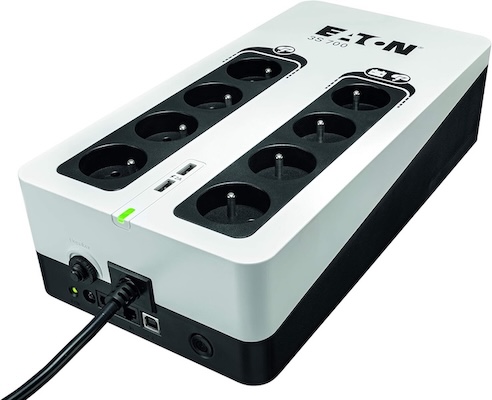
Un parafoudre protège contre les surtensions (foudre proche, variations de réseau), mais il ne fait rien en cas de coupure franche. Un onduleur fait les deux : il absorbe les surtensions ET fournit quelques minutes d’autonomie sur batterie pour permettre un arrêt propre.
Quelques onduleur performants avec connexion USB (obligatoire) :
Pour un NAS domestique, une autonomie de 5 à 10 minutes suffit. L’objectif n’est pas de tenir toute une nuit, mais d’avoir le temps pour l’arrêt automatique. Vous pourrez également brancher un switch, une box, etc.
Configurer l’arrêt automatique via USB
La plupart des onduleurs (APC et Eaton) communiquent via USB. Une fois branché :
QNAP QTS : Panneau de configuration → Système → Appareil externe → UPS
Asustor ADM : Périphériques externes → Onduleurs
TerraMaster TOS 7 : Tableau de bord → Matériels et alimentaiton → UPS
Unraid : Paramètres → Paramètres de l’onduleur
TrueNAS : Services → UPS
Nous vous recommandons de configurer le délai d’arrêt à 2 minutes après détection de coupure. Une fois configuré, testez en débranchant l’onduleur du secteur. Le NAS doit détecter la coupure et lancer l’arrêt automatique dans le délai configuré.
La checklist de l’été… à faire cette semaine
Voici les actions à cocher dès que possible :
Checklist
☐ Alertes température configurées dans DSM / QTS / ADM / TOS
☐ Mode ventilateur en automatique (pas en mode silencieux permanent)
☐ NAS dans un endroit ventilé, grilles dégagées (15 cm minimum derrière)
☐ Tâches lourdes suspendues pendant la vague de chaleur (scrubbing, indexation, transcodage)
☐ Nettoyage des grilles fait (ou planifié ce week-end)
☐ Onduleur connecté et arrêt automatique configuré
☐ Vérification SMART lancée
☐ Sauvegarde externe à jour (si le NAS lâche, les données survivent)
En Synthèse
La canicule est un test de résilience pour votre NAS, mais c’est aussi une opportunité. Quelques minutes consacrées à la surveillance, au nettoyage et à la vérification de votre onduleur peuvent vous éviter une panne coûteuse en plein été. Les dommages thermiques sont cumulatifs : un disque qui a encaissé plusieurs épisodes à 55°C ne le montre pas immédiatement, mais sa durée de vie risque d’en prendre un coup.
Si vous avez un doute sur l’état de vos disques après une vague de chaleur, lancez un test SMART étendu dans la nuit. C’est un des meilleur indicateur disponible…
Certains liens de cet article sont des liens affiliés, ce qui signifie que nous touchons une petite commission si vous achetez un produit via ces liens. Cela nous permet de financer le site et de vous proposer du contenu de qualité. Cela ne change rien au prix d’achat pour vous et vous pouvez ainsi nous soutenir. Merci de votre confiance !
UGREEN NASync Celebrates 2 Years – But Is UGREEN Ready for the Big Leagues? Two years ago, the popular battery and PC accessory company UGREEN, launched their Kickstarter campaign for the NASync personal NAS series of devices. The brand already had a steadily growing foothold in China with their DX series of NAS devices, but […]
Seagate Shows Off It’s 44TB Hard Drive at NAB 2026
At the 2026 NAB Show 2026, Seagate Technology formally introduced its latest generation of high-capacity enterprise hard drives built on the Mozaic 4+ platform. These drives, (model ID ST4400NM002M) reaching up to 44TB, represent the current peak of commercially deployed hard disk capacity and are already being shipped to select hyperscale cloud providers. The announcement reflects ongoing demand for higher-density storage as data generation continues to accelerate, particularly in artificial intelligence and large-scale cloud environments.
Rather than targeting general consumers, these drives are designed specifically for hyperscale data centres where efficiency, density, and cost per terabyte are critical considerations. The Mozaic 4+ platform is also notable for its reliance on heat-assisted magnetic recording (HAMR), a technology that has moved from experimental development into production-scale deployment. With broader qualification underway, the 44TB model serves as both a milestone in current storage capabilities and a step toward projected capacities approaching 100TB in future generations.
Everything we know about the Seagate 44TB Hard Drives
The 44TB drives are built on Seagate’s Mozaic 4+ platform, which represents the company’s production-ready implementation of heat-assisted magnetic recording (HAMR). Unlike earlier perpendicular magnetic recording approaches, HAMR uses localized heating via a nanophotonic laser to temporarily reduce the coercivity of the disk surface, allowing data to be written at much higher densities. This enables significantly greater areal density without requiring a complete redesign of the underlying hard drive architecture, allowing Seagate to scale capacity incrementally across generations.
At a physical level, the drives use a multi-platter design, widely understood to consist of 10 platters, each delivering over 4TB of capacity. This results in the total 44TB figure within a standard 3.5-inch enterprise form factor. The spindle speed is expected to remain at 7200 RPM, consistent with other enterprise-capacity drives, balancing throughput, reliability, and power consumption. Early estimates suggest sustained transfer rates in the region of 300 MB/s, though final performance characteristics depend on deployment conditions and firmware tuning. I think we are likely much more liekly to hit 280MB/s or so, such as you find in the 30TBs.
A key aspect of the Mozaic 4+ design is its vertically integrated photonics system. Seagate has developed its own laser components in-house, embedding them directly into the recording head. This allows precise, nanosecond-scale heating during write operations, which is critical for maintaining data integrity at such high densities. Vertical integration also gives Seagate tighter control over manufacturing consistency, yield, and long-term reliability, all of which are essential when deploying drives at hyperscale volumes.
The recording stack itself incorporates several advanced components. These include a Gen 2 superlattice platinum-alloy media designed for improved magnetic stability, a Gen 2 plasmonic writer responsible for delivering the heat-assisted write process, and a Gen 8 spintronic reader that improves read accuracy from increasingly smaller data bits. Together, these components enable higher density while maintaining error rates and durability within enterprise requirements.
Supporting these physical advancements is a 7nm integrated controller, which manages drive operations with improved precision. This controller enhances servo control, allowing the read/write heads to maintain accurate positioning over narrower tracks. It also contributes to improved power efficiency, reducing watts per terabyte and helping data centres optimize energy usage at scale. These gains are particularly relevant in large deployments where power and cooling costs scale with capacity.
From a manufacturing perspective, the Mozaic platform is designed to scale without requiring disruptive architectural changes between generations. Each iteration builds on existing processes, allowing Seagate to increase per-platter capacity over time. The company has indicated a roadmap toward 10TB per platter, which would enable drives approaching 100TB within a similar physical footprint. This approach prioritizes continuity in deployment while steadily increasing storage density.
Specification
Details
Platform
Mozaic 4+
Recording Technology
HAMR (Heat-Assisted Magnetic Recording)
Maximum Capacity
44TB
Form Factor
3.5-inch
Number of Platters
10
Capacity per Platter
4TB+
Spindle Speed
7200 RPM (expected)
Recording Method
CMR
Estimated Throughput
~300 MB/s (speculative)
Target Market
Hyperscale data centres
Controller
7nm integrated SoC
Seagate 44TB HDDs – SMR or CMR?
Despite the push toward higher capacities, the 44TB drives based on the Mozaic 4+ platform use conventional magnetic recording (CMR) rather than shingled magnetic recording (SMR). This distinction is relevant because SMR typically achieves higher capacities by overlapping data tracks, which can negatively impact rewrite performance and latency in certain workloads. By retaining CMR, Seagate is prioritising predictable performance characteristics, particularly for enterprise environments where consistent throughput and low latency are required.
This approach also differentiates Seagate’s offering from competing high-capacity drives, such as those being developed by Western Digital, which have explored SMR and related technologies like UltraSMR to reach similar capacity points. While SMR can be effective for archival or sequential workloads, CMR remains better suited to mixed or write-intensive applications commonly found in hyperscale deployments. In this context, the use of HAMR allows Seagate to increase density without relying on SMR trade-offs, maintaining compatibility with existing data centre workloads and software stacks.
The introduction of 44TB hard drives based on the Mozaic 4+ platform reflects a continued focus on increasing storage density within the constraints of existing data centre infrastructure. By combining HAMR with incremental architectural improvements, Seagate Technology has demonstrated that higher capacities can be achieved without fundamental changes to form factor or deployment models. The emphasis remains on scaling capacity per rack and per watt, which aligns with the operational priorities of hyperscale environments.
At the same time, these drives remain firmly positioned within enterprise and cloud use cases, with limited relevance to consumer or small-scale storage in the near term. Factors such as cost, workload requirements, and integration complexity restrict their adoption outside large data centres. However, as with previous generations, advancements at this level are likely to influence broader storage markets over time, particularly as manufacturing scales and newer technologies mature.
This description contains links to Amazon. These links will take you to some of the products mentioned in today's content. As an Amazon Associate, I earn from qualifying purchases. Visit the NASCompares Deal Finder to find the best place to buy this device in your region, based on Service, Support and Reputation - Just Search for your NAS Drive in the Box Below
Need Advice on Data Storage from an Expert?
Finally, for free advice about your setup, just leave a message in the comments below here at NASCompares.com and we will get back to you.Need Help?
Where possible (and where appropriate) please provide as much information about your requirements, as then I can arrange the best answer and solution to your needs. Do not worry about your e-mail address being required, it will NOT be used in a mailing list and will NOT be used in any way other than to respond to your enquiry.
[contact-form-7]
TRY CHAT Terms and Conditions
If you like this service, please consider supporting us.
We use affiliate links on the blog allowing NAScompares information and advice service to be free of charge to you.Anything you purchase on the day you click on our links will generate a small commission which isused to run the website. Here is a link for Amazon and B&H.You can also get me a Ko-fi or old school Paypal. Thanks!To find out more about how to support this advice service checkHEREIf you need to fix or configure a NAS, check FiverHave you thought about helping others with your knowledge? Find Instructions Here
Or support us by using our affiliate links on Amazon UK and Amazon US
Alternatively, why not ask me on the ASK NASCompares forum, by clicking the button below. This is a community hub that serves as a place that I can answer your question, chew the fat, share new release information and even get corrections posted. I will always get around to answering ALL queries, but as a one-man operation, I cannot promise speed! So by sharing your query in the ASK NASCompares section below, you can get a better range of solutions and suggestions, alongside my own.
The Synology RS1626xs+ is a 1U 4 bay rackmount NAS aimed at business and enterprise environments that need high performance in a short-depth footprint. It succeeds the RS1619xs+ after a notably long refresh gap and introduces a more modern hardware platform, including a newer Intel Xeon D processor, 16 GB of ECC memory as standard, dual 10GbE networking, integrated M.2 NVMe slots, and PCIe Gen4 expansion. On paper, this is a more substantial update than some recent Synology refreshes, particularly in areas that affect throughput, caching, and expansion flexibility. At the same time, the RS1626xs+ arrives within the current Synology enterprise strategy, which places tighter control around validated components and supported media. That means the hardware changes need to be considered alongside platform restrictions, expected pricing movement, and the wider value proposition of DSM in the business rackmount market. As a result, the RS1626xs+ looks positioned as a compact but capable SMB and enterprise rack NAS, though its appeal will likely depend as much on Synology’s ecosystem policies as on the hardware itself.
Synology RS1626xs+ Hardware Specifications
At the core of the RS1626xs+ is an Intel Xeon D-1726 processor, a 6-core, 12-thread CPU with a 2.9 GHz base clock and up to 3.5 GHz turbo. This is a clear step up from the previous generation Xeon D-1527 found in the RS1619xs+, increasing both core count and clock speed. Although it is not the newest server CPU architecture available in 2026, it is a more current platform than its predecessor and brings PCIe Gen4 support, which has a direct effect on overall system bandwidth for expansions and attached components.
Memory has also been increased, with the RS1626xs+ arriving with 16 GB of DDR4 ECC RDIMM as standard across 4 memory slots, with support for up to 64 GB total. That doubles the default memory provision of the older model and should better align with virtualization, backup indexing, active collaboration workloads, and larger multi-service deployments in DSM. Synology continues to recommend its own validated memory for upgrades, and as with other current business systems in its portfolio, warranty and support are tied closely to approved components.
In terms of storage, the system retains a 4 bay SATA drive architecture and supports expansion up to 16 total bays through the RX1225RP expansion unit. Alongside the main bays, Synology has included 2 internal M.2 2280 NVMe slots for SSD caching without consuming the PCIe expansion slot or front storage bays. This allows the RS1626xs+ to support flash-assisted performance acceleration out of the box, while preserving the rear PCIe slot for network or storage upgrades. Official support covers 3.5-inch SATA HDDs, 2.5-inch SATA SSDs, and M.2 NVMe SSDs, though deployment flexibility will still depend on Synology’s compatibility policies.
Networking is one of the more significant changes in this generation. The RS1626xs+ includes 2 built-in 10GbE RJ-45 ports, compared with the 4 x 1GbE arrangement of the RS1619xs+. There is also a dedicated out-of-band management port, 2 USB 3.2 Gen 1 ports, and a Mini-SAS HD expansion connector for the external shelf. For additional connectivity, the system includes 1 PCIe Gen4 x8 slot that can be used for 10GbE, 25GbE, or Fibre Channel upgrades, giving it more flexibility for storage networks and higher-bandwidth business environments than the previous model’s Gen3 slot.
Physically, the RS1626xs+ remains a 1U rack system but is notably deeper and heavier than the older unit, measuring 44 x 481.9 x 668.5 mm and weighing 9.5 kg. It also moves to a 250 W redundant power design, compared with the earlier 150 W arrangement, which reflects the higher performance profile and expanded integrated feature set. Synology rates the unit at 97.59 W during access and 56.19 W during HDD hibernation, with a quoted noise level of 52.6 dB(A). Cooling is handled by 4 x 40 mm fans, and the system includes standard enterprise features such as dual hot-swappable PSUs, scheduled power controls, auto-restart after power loss, and a 5-year warranty.
Synology RS1626xs+ Software Specifications
On the software side, the RS1626xs+ is positioned as a full DSM business platform rather than a storage-only rackmount. It supports up to 32 storage pools, a maximum single volume size of 108 TB by default, 200 TB with at least 32 GB of memory, and up to 1 PB in specific RAID 6 configurations with 64 GB of memory. Supported RAID modes include Basic, JBOD, RAID 0, RAID 1, RAID 5, RAID 6, RAID 10, and RAID F1, with SSD read/write cache and SSD TRIM also supported. File system support includes Btrfs internally, with a broad range of external file systems and network protocols including SMB, NFS, FTP, WebDAV, Rsync, iSCSI, and Fibre Channel.
DSM on this platform is also designed to support heavier service consolidation. Synology rates the RS1626xs+ for up to 1,900 SMB connections, 2,048 local user accounts, 512 shared folders, and 12 shared folder sync tasks. In application terms, the system is listed with support for up to 3,100 Synology Drive users, 3,000 Synology Office users, 3,600 MailPlus users, and 400 Synology Chat users, depending on memory configuration and workload type. Virtualization support includes VMware vSphere, Microsoft Hyper-V, Citrix XenServer, and OpenStack, while Virtual Machine Manager is rated for 12 virtual machines and 12 Virtual DSM instances.
Beyond file serving, the RS1626xs+ includes Synology’s wider business software stack for backup, surveillance, synchronization, and centralized administration. It supports Synology High Availability, Hyper Backup, Active Backup workloads, Snapshot Replication with up to 4,096 system snapshots, SAN Manager with up to 256 iSCSI targets and 512 LUNs, and Surveillance Station with 2 camera licenses included and support for up to 75 IP cameras at 1080p. Synology also positions the platform for hybrid cloud workflows, centralized fleet management through CMS and Active Insight, and newer AI-assisted functions within its collaboration suite, making the RS1626xs+ a software-heavy platform where DSM remains a major part of the system’s overall value.
Category
Specification
OS
DSM
Max Volume Size
108 TB, 200 TB with 32 GB RAM, up to 1 PB with 64 GB RAM and RAID 6
Max Storage Pools / Volumes
32
RAID Support
Basic, JBOD, RAID 0, 1, 5, 6, 10, F1
SSD Features
Read/write cache, TRIM
Internal File System
Btrfs
External File Systems
Btrfs, ext4, ext3, FAT32, NTFS, HFS+, exFAT
File Protocols
SMB, AFP, NFS, FTP, WebDAV, Rsync
Max SMB Connections
1,900
User / Folder Limits
2,048 users, 512 groups, 512 shared folders
Shared Folder Sync Tasks
12
Hybrid Share Folder Limit
15
High Availability
Yes
Hyper Backup
Yes
Snapshot Replication
256 snapshots per shared folder, 64 per LUN, 4,096 per system
Third-party AI model integration, de-identification up to 1,700 words
Synology RS1626xs+ vs RS1619xs+ NAS
Compared with the RS1619xs+, the RS1626xs+ is a more substantial hardware refresh than the model gap alone might suggest. The older system used an Intel Xeon D-1527, a 4-core, 8-thread processor running at 2.2 GHz base and 2.7 GHz turbo, whereas the RS1626xs+ moves to a Xeon D-1726 with 6 cores, 12 threads, 2.9 GHz base, and 3.5 GHz turbo. The newer model also doubles the default memory from 8 GB DDR4 ECC UDIMM to 16 GB DDR4 ECC RDIMM, while retaining the same 64 GB maximum ceiling across 4 slots. At the platform level, the move from PCIe Gen3 x8 to PCIe Gen4 x8 is also relevant, as it increases available expansion bandwidth for modern network or storage upgrades.
The networking and storage configuration also show a clearer shift in priorities. The RS1619xs+ arrived with 4 x 1GbE ports and required expansion for faster networking, whereas the RS1626xs+ includes 2 x 10GbE RJ-45 ports as standard, alongside a dedicated management port. Both systems support expansion to 16 bays with a 1 unit expansion shelf and both include 2 M.2 slots, but the RS1626xs+ is more focused on NVMe caching with integrated flash support alongside newer expansion options such as 10GbE, 25GbE, and Fibre Channel via the Gen4 slot. In practical terms, the newer system is much better aligned with modern high-throughput business environments straight out of the box.
That said, the RS1626xs+ is not an across-the-board improvement in every operational metric. It is larger, deeper, heavier, and significantly noisier on paper, moving from 518.6 mm depth and 39.3 dB(A) on the RS1619xs+ to 668.5 mm depth and 52.6 dB(A) on the newer model. Power consumption is also higher, rising from 68.68 W active usage on the older unit to 97.59 W on the newer platform. So while the RS1626xs+ is clearly the more capable and modern system in CPU, networking, memory, and expansion, it also reflects a more demanding enterprise profile in acoustics, power draw, and likely total deployment cost.
Category
Synology RS1626xs+
Synology RS1619xs+
CPU
Intel Xeon D-1726
Intel Xeon D-1527
CPU Cores / Threads
6 cores / 12 threads
4 cores / 8 threads
CPU Clock Speed
2.9 GHz base / 3.5 GHz turbo
2.2 GHz base / 2.7 GHz turbo
Architecture
64-bit
64-bit
Hardware Encryption
Yes
Yes
Default Memory
16 GB DDR4 ECC RDIMM
8 GB DDR4 ECC UDIMM
Memory Slots
4
4
Maximum Memory
64 GB
64 GB
Drive Bays
4
4
Maximum Bays with Expansion
16
16
Expansion Unit
RX1225RP
RX1217 / RX1217RP
M.2 Slots
2 x NVMe
2 x NVMe / SATA
Supported Drives
3.5″ SATA HDD, 2.5″ SATA SSD, M.2 NVMe SSD
3.5″ SATA HDD, 2.5″ SATA HDD, 2.5″ SATA SSD, M.2 NVMe / SATA SSD
Hot Swap Support
Yes
Yes
Built-in Network Ports
2 x 10GbE RJ-45
4 x 1GbE RJ-45
Management Port
1 x out-of-band management port
No dedicated management port listed
USB Ports
2 x USB 3.2 Gen 1
2 x USB 3.2 Gen 1
Expansion Port
1 x Mini-SAS HD
1 x Infiniband
PCIe Slot
1 x PCIe Gen4 x8
1 x PCIe Gen3 x8
Form Factor
1U rackmount
1U rackmount
Dimensions
44 x 481.9 x 668.5 mm
44 x 480 x 518.6 mm
Weight
9.5 kg
8.16 kg
System Fans
4 x 40 mm
2 x 40 mm
Fan Modes
Full speed, low temperature, silent
Full-speed, cool, quiet
Noise Level
52.6 dB(A)
39.3 dB(A)
Power Supply
250 W
150 W
Redundant PSU
Yes
Yes
Power Consumption
97.59 W access / 56.19 W hibernation
68.68 W access / 34.78 W hibernation
Operating Temperature
5°C to 35°C
5°C to 35°C
Warranty
5 years
5 years
Synology RS1626xs+ Price and Release
At the time of writing, Synology has revealed the RS1626xs+ on regional product pages, but wider global availability still appears to be pending. The system has already appeared in official marketing materials and product specification pages, indicating that the hardware and software position are now largely defined, even if retail rollout is not yet universal across all regions. Based on that, the RS1626xs+ should be treated as officially revealed, but not yet fully launched in every market. Release timing is notable because the RS1626xs+ arrives after a long gap following the RS1619xs+, which was introduced in the 2018 to 2019 period. That makes this a delayed but more meaningful refresh than some of Synology’s shorter product cycles, particularly given the changes to CPU generation, default memory, built-in networking, PCIe bandwidth, and integrated NVMe support. It is therefore not simply a minor refresh of the previous 1U 4 bay platform, even if the overall product class remains the same.
Pricing has not yet been formally confirmed in the materials provided, so any figure at this stage remains estimate rather than specification. The earlier RS1619xs+ was commonly seen around the $2,400 range earlier in its lifecycle, but later pricing in some regions moved closer to or above $3,000. Given the RS1626xs+ includes 16 GB ECC memory as standard, dual 10GbE onboard, a newer Xeon D platform, PCIe Gen4, and redundant 250 W power supplies, it would be reasonable to expect a higher launch price than its predecessor rather than price parity. The main issue for buyers will likely be total platform cost rather than base chassis cost alone. This system is aimed at business and enterprise deployment, and that means the final spend may also include validated Synology drives, NVMe media, memory upgrades, rail kits, network cards, and the RX1225RP expansion shelf where needed. Until Synology confirms full regional rollout and channel pricing, the RS1626xs+ should be viewed as a higher-tier compact rackmount NAS with an expected premium position in the current RackStation portfolio.
This description contains links to Amazon. These links will take you to some of the products mentioned in today's content. As an Amazon Associate, I earn from qualifying purchases. Visit the NASCompares Deal Finder to find the best place to buy this device in your region, based on Service, Support and Reputation - Just Search for your NAS Drive in the Box Below
Need Advice on Data Storage from an Expert?
Finally, for free advice about your setup, just leave a message in the comments below here at NASCompares.com and we will get back to you.Need Help?
Where possible (and where appropriate) please provide as much information about your requirements, as then I can arrange the best answer and solution to your needs. Do not worry about your e-mail address being required, it will NOT be used in a mailing list and will NOT be used in any way other than to respond to your enquiry.
[contact-form-7]
TRY CHAT Terms and Conditions
If you like this service, please consider supporting us.
We use affiliate links on the blog allowing NAScompares information and advice service to be free of charge to you.Anything you purchase on the day you click on our links will generate a small commission which isused to run the website. Here is a link for Amazon and B&H.You can also get me a Ko-fi or old school Paypal. Thanks!To find out more about how to support this advice service checkHEREIf you need to fix or configure a NAS, check FiverHave you thought about helping others with your knowledge? Find Instructions Here
Or support us by using our affiliate links on Amazon UK and Amazon US
Alternatively, why not ask me on the ASK NASCompares forum, by clicking the button below. This is a community hub that serves as a place that I can answer your question, chew the fat, share new release information and even get corrections posted. I will always get around to answering ALL queries, but as a one-man operation, I cannot promise speed! So by sharing your query in the ASK NASCompares section below, you can get a better range of solutions and suggestions, alongside my own.

 Connexion
 60°C
60°C 65°C+
65°C+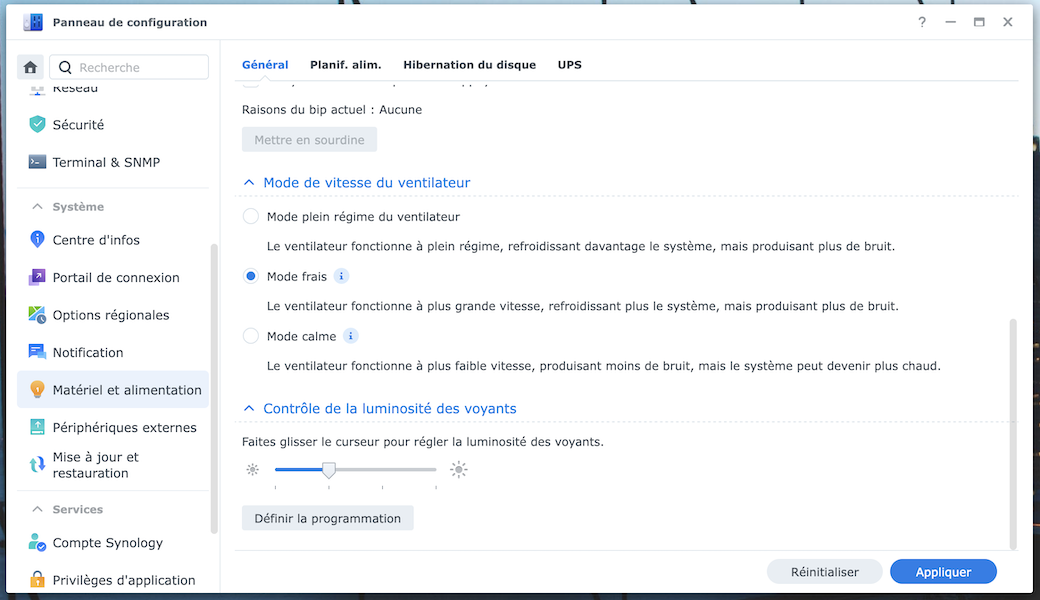
 Situation normale : HDD < 45°C / NVMe < 65°C
 Attention : HDD 45 – 60°C / NVMe 65 – 72°C
 Urgence : HDD 60 – 75°C / NVMe 72 – 80°C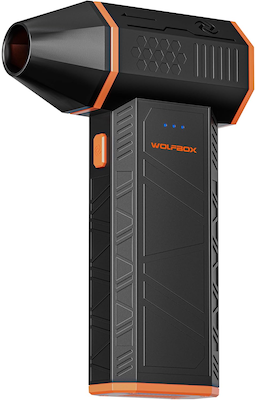

 Checklist


 SUBSCRIBE TO OUR NEWSLETTER


 TRY CHAT