Vue lecture

Il y a de nouveaux articles disponibles, cliquez pour rafraîchir la page.

I tried Lenovo's latest rollable laptop concept, and it's the first one that feels like something people might actually buy

Nobody can accuse Lenovo of lacking imagination.

Over the last several years, the company has become the PC industry's unofficial concept lab, routinely showing off hardware that seems pulled from science fiction. We've seen rollable displays that grow taller, gaming laptops that transform into ultrawide displays, foldable PCs, attachable screens, rotating displays, and enough unusual form factors to make even the most adventurous laptop enthusiast pause for a moment.

Some of those ideas have remained concepts. Others have eventually become real products. The ThinkBook Plus Gen 6 Rollable (yes, they actually ship some of these!) is perhaps the best example, evolving from an eye-catching prototype into an actual shipping device. But even as Lenovo's concepts have become increasingly impressive from an engineering perspective, I've often found myself wondering how many of them actually solve a problem that regular laptop buyers have. Making a display expand is certainly cool. Convincing people they need it is the harder challenge.

That's why Project Swan immediately stood out to me.
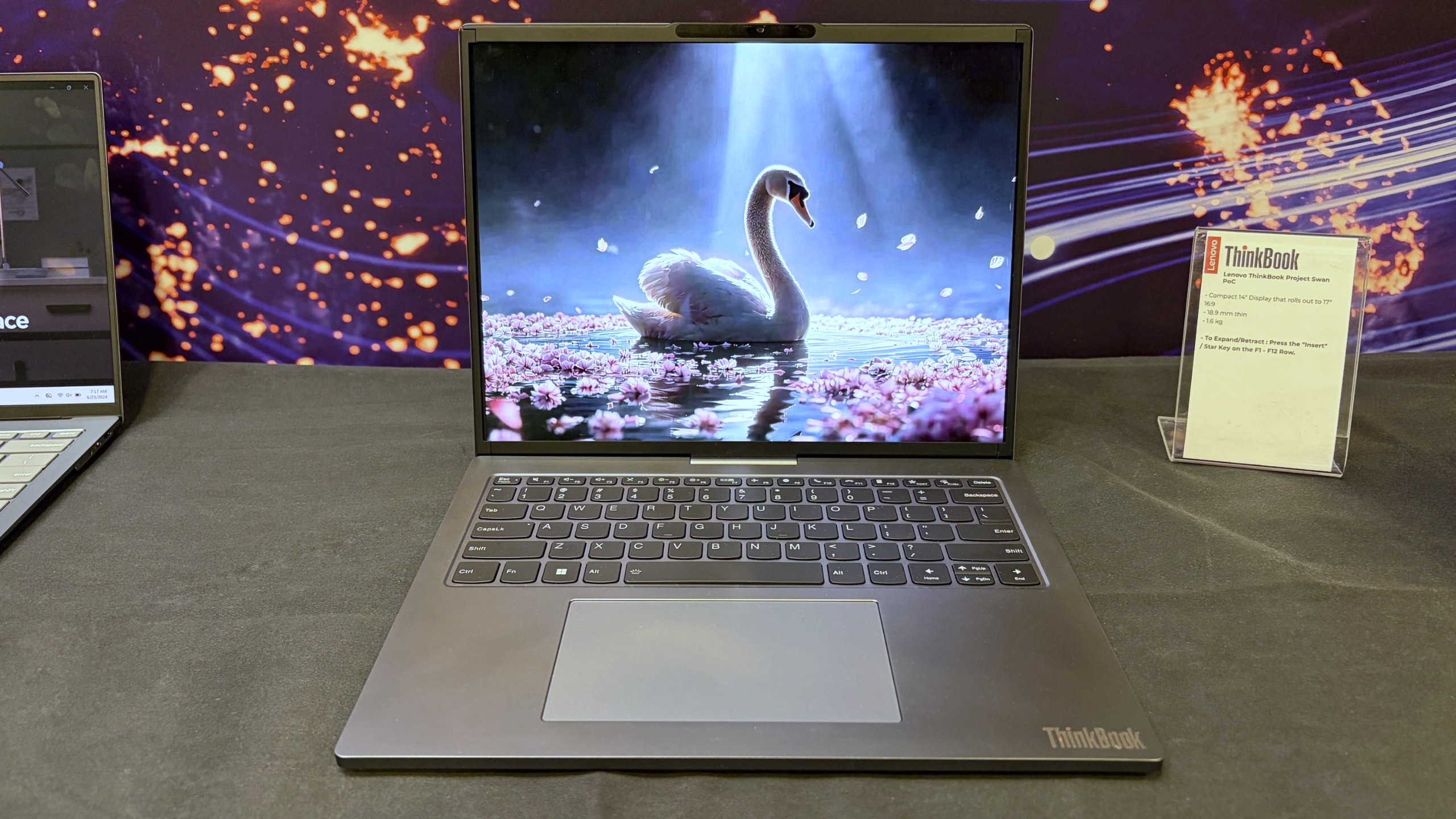
Lenovo ThinkBook Project Swan laptop on display, showing a vibrant swan with folded wings on a blue, starry lake scene at a tech exhibit.

Lenovo's Project Swan laptop in "normal" mode at 14-inches. (Image credit: Future)

Officially, it's another Lenovo proof-of-concept device, but after spending time with it in person, I came away thinking this may be the company's most practical display concept yet. Not because it's the most ambitious, but because it's arguably the least ambitious.

And that's exactly why it works.

Lenovo finally found a sensible use for a rollable display?

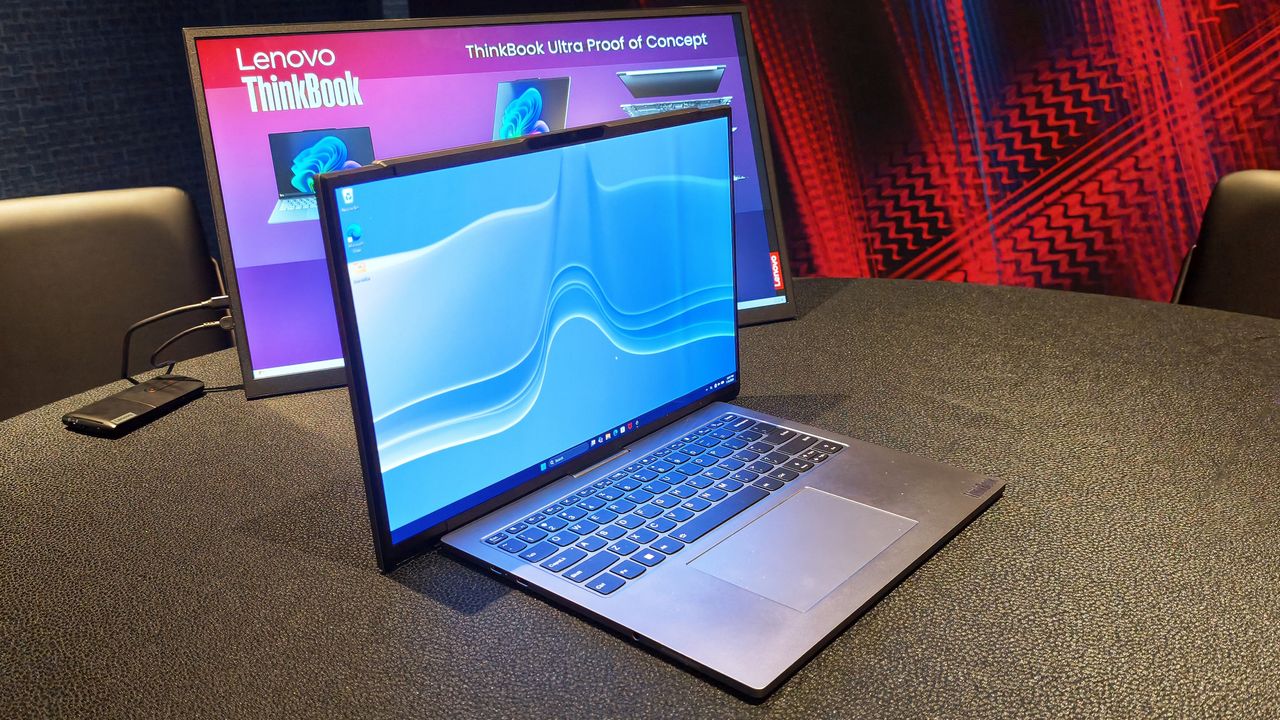
The Lenovo ThinkBook Project Swan begins life as a fairly normal-looking 14-inch laptop.

At 17.9mm thick and weighing 1.6kg (3.5lbs), it isn't trying to break weight records or compete with ultra-premium featherweight notebooks (like Lenovo's new AeroBlade concept). Instead, the focus is on creating a laptop that's comfortable to carry throughout the day while offering something extra when users return to their desk, settle into a hotel room, or need more space for serious work.

That "something extra" is a rollable display that expands horizontally into a 17-inch 16:9 workspace.

Unlike Lenovo's previous rollable designs, which generally expanded vertically, Project Swan widens itself by extending the display out to the sides. It's all done with a touch of a button (see my video below), and it only takes a few seconds.

The result feels much more like using a traditional external monitor than using an experimental form factor. You suddenly have enough room for side-by-side documents, large spreadsheets, dashboards, presentations, browser windows, Teams chats, and everything else that tends to compete for space on a 14-inch screen.
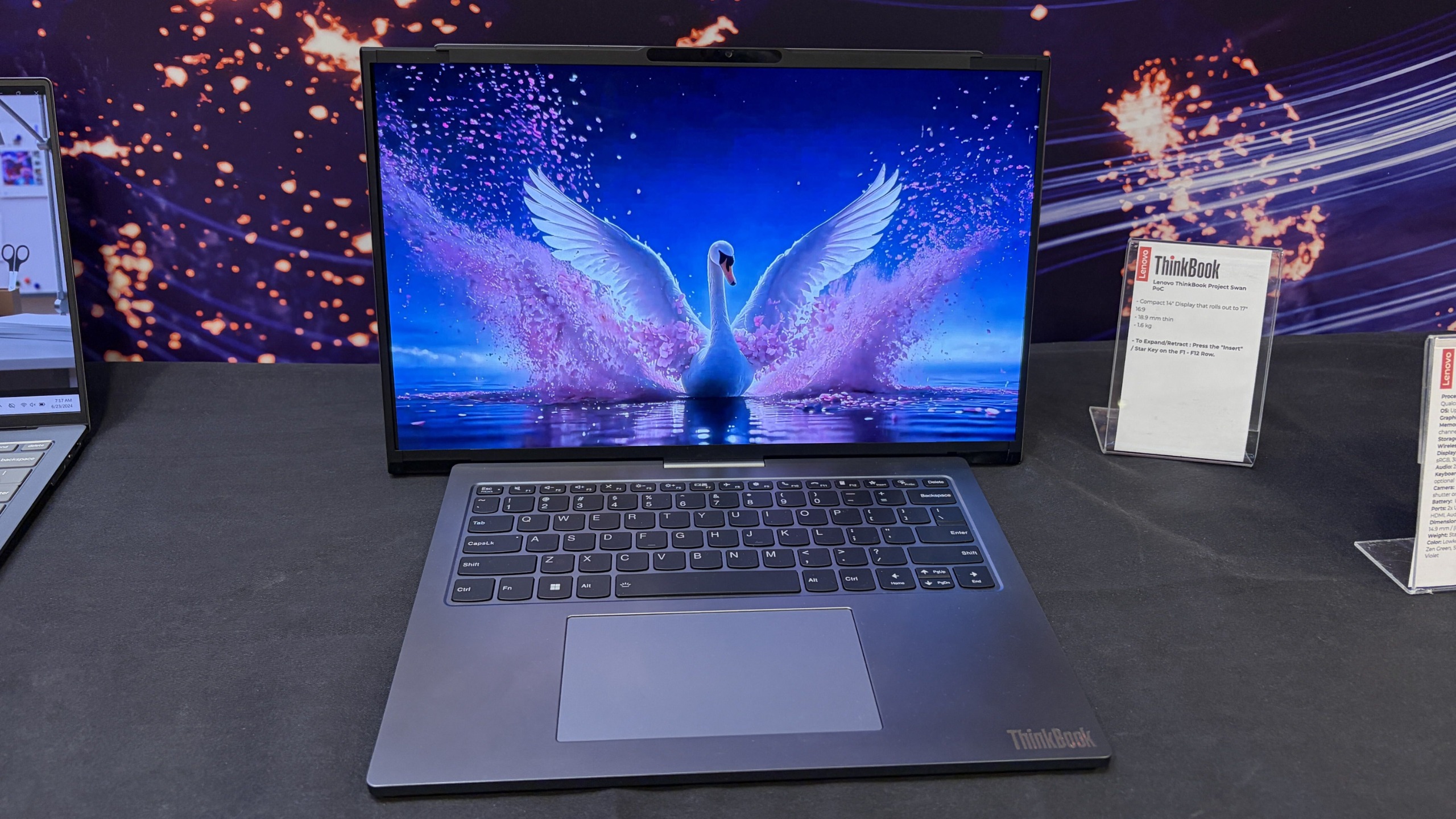
Lenovo Project Swan laptop on display, showing a vibrant swan with outstretched wings on a blue, starry lake scene at a tech exhibit.

Lenovo's Project Swan laptop in extended mode, where the display reaches 17 inches. (Image credit: Future)

The transformation is dramatic enough to get attention, but conservative enough to feel practical. During my hands-on session, that was the first thing that struck me about the device.

Many of Lenovo's earlier concepts felt designed to answer the question, "Can we do this?"

Project Swan feels far more interested in answering the question, "Would people actually want this?"

That's a subtle distinction, but it's an important one.

This feels like the next step in Lenovo's display experiments
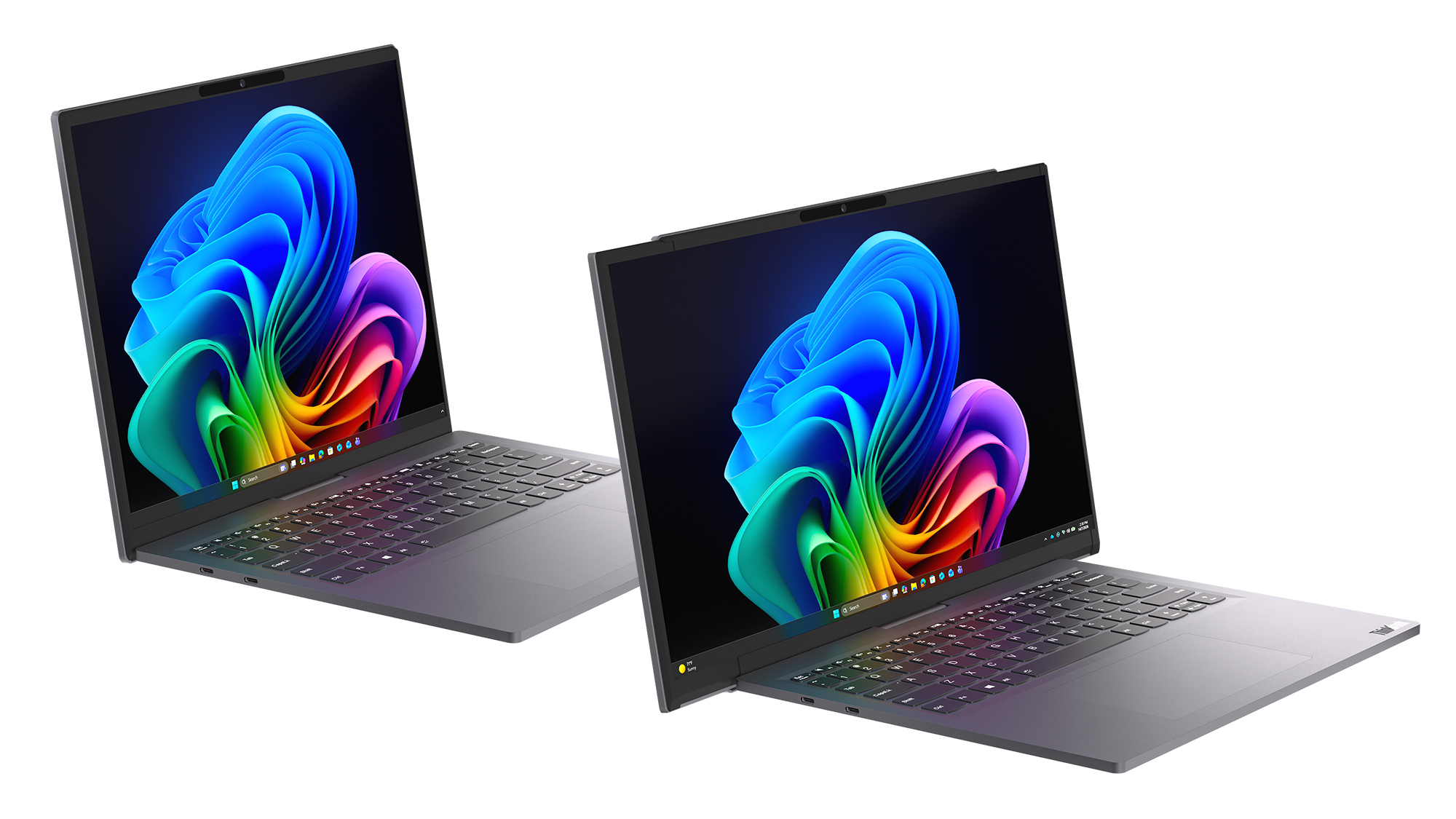
Two Lenovo Project Swan concept laptops side-by-side, demonstrating the screen in standard view versus expanded rollable view.

Lenovo Project Swan concept laptops side-by-side, demonstrating the screen in standard view versus expanded rollable view. (Image credit: Lenovo)

Project Swan didn't emerge in a vacuum. In many ways, it feels like the natural evolution of everything Lenovo has been experimenting with over the last few years.

The ThinkBook Plus Gen 6 Rollable demonstrated that expandable OLED displays could successfully transition from concept to commercial product. Lenovo's Legion rollable gaming laptop concept showed how flexible displays could create an ultrawide experience without requiring users to carry an enormous machine. Other projects explored foldable displays, secondary screens, and entirely new ways of interacting with PCs.

As impressive as many of those concepts were, some occasionally felt like technology showcases first and products second.

Project Swan reverses that equation.
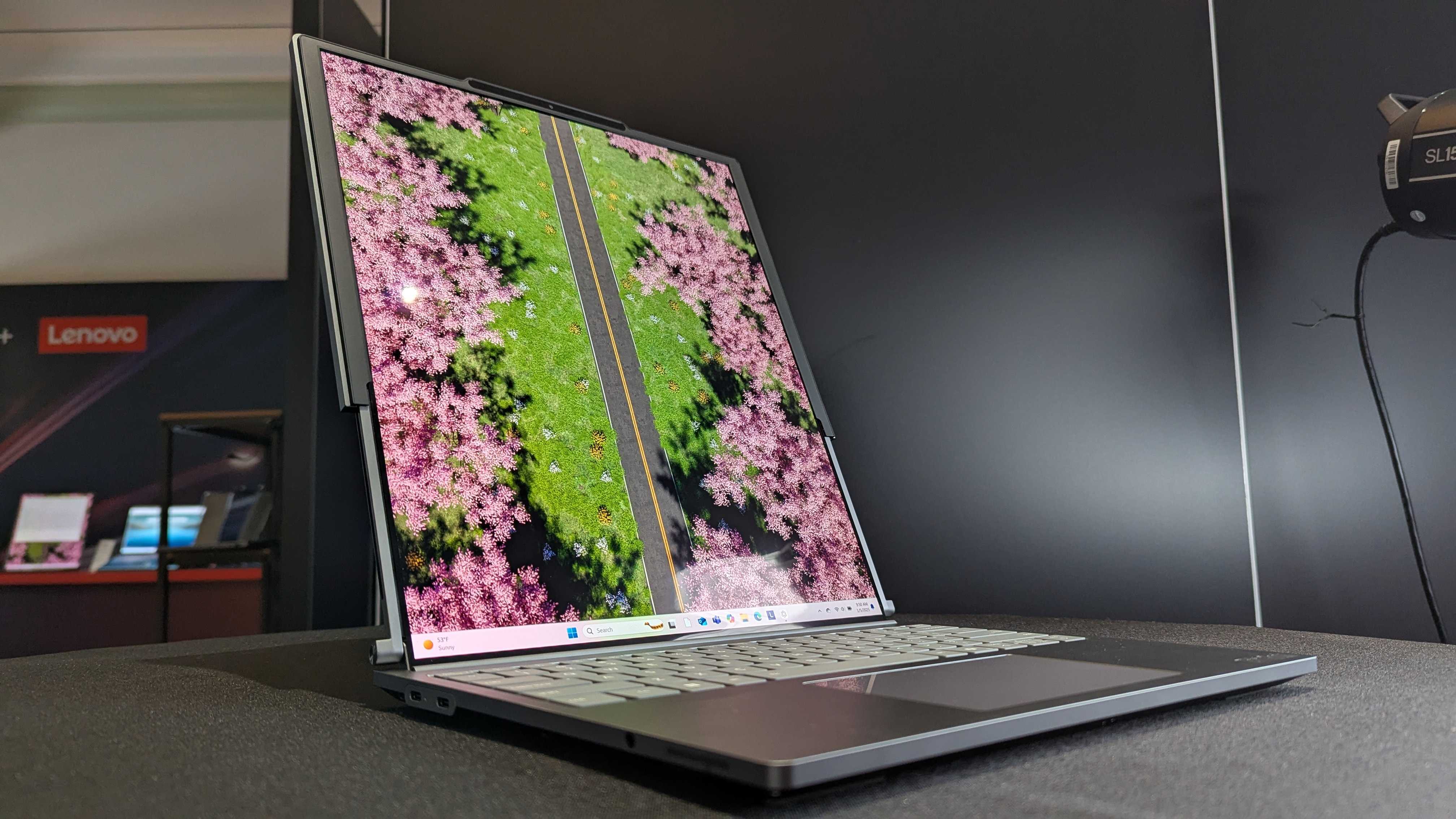
Lenovo ThinkBook Plus (Gen 6) laptop sample on display at CES 2025.

Lenovo ThinkBook Plus (Gen 6) laptop and its vertical rollable display at CES 2025. (Image credit: Windows Central | Zachary Boddy)

Rather than dramatically changing how people interact with a laptop, it simply gives them more screen real estate when they need it and gets out of the way when they don't. That's a much easier benefit for consumers to understand and, perhaps more importantly, a much easier benefit to justify paying for.

After all, most people already know the dilemma.

A 14-inch laptop is ideal for travel. A larger display is ideal for work.

Project Swan attempts to deliver both.

The idea makes sense. The challenges are obvious.
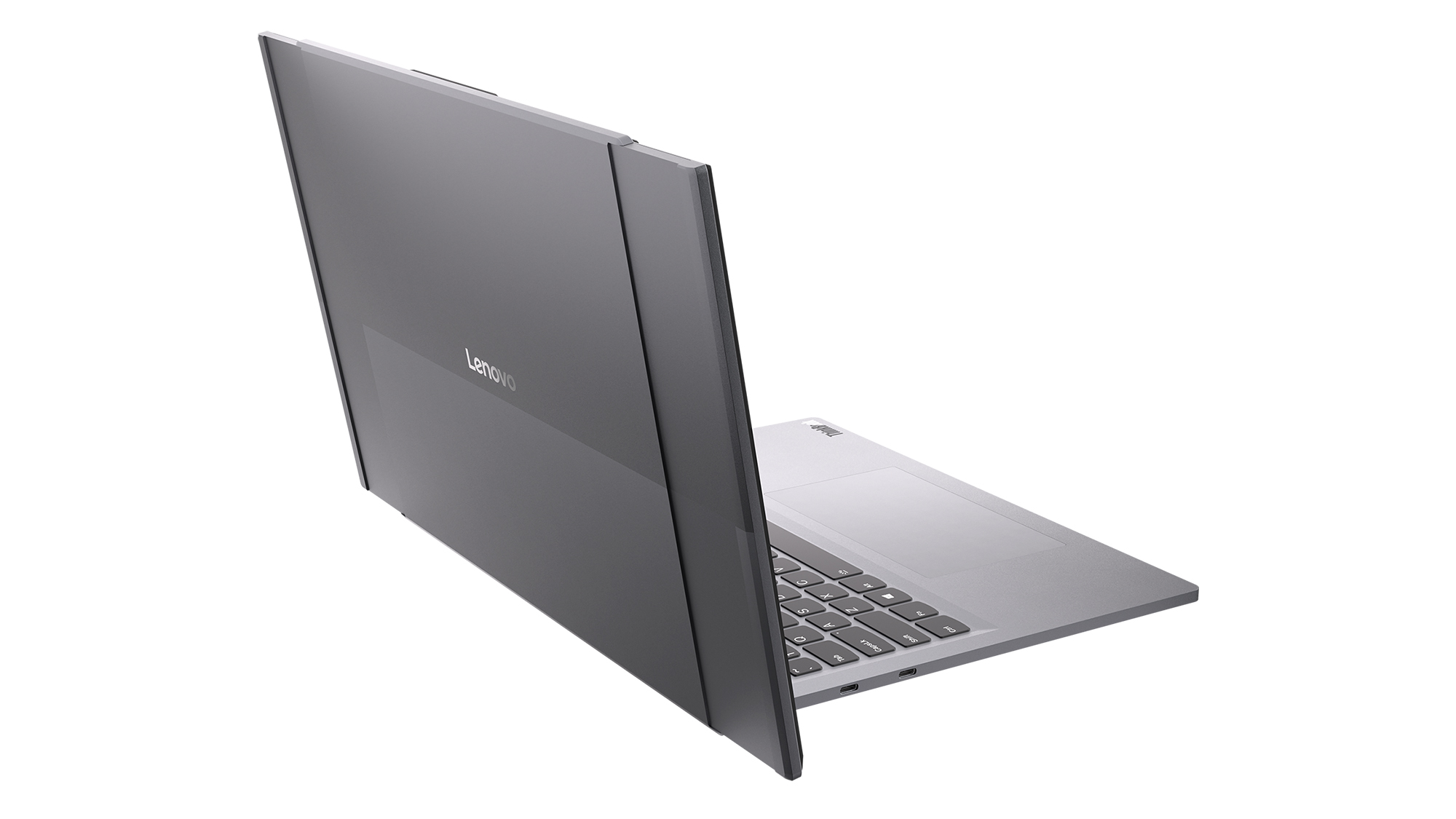
Rear angled view of the Lenovo Project Swan concept laptop, showcasing the back housing and mechanism of the horizontally expanding rollable screen.

Read image of the Project Swan laptop cover and its motorized rollable display. (Image credit: Lenovo)

That isn't to say there aren't trade-offs.

The first thing I noticed when using the expanded display was that the system becomes somewhat top-heavy. That's hardly surprising given the additional display hardware housed in the lid, but it was noticeable enough that I'd expect Lenovo's engineers to still be looking at ways to refine the balance.

Pricing is another obvious concern.

Rollable OLED displays aren't cheap (it's $3,499 for the ThinkBook Plus Gen 6 Rollable), and if Project Swan ever becomes a commercial product, it's almost certainly going to carry a premium compared to a traditional clamshell laptop. The value proposition may be easier to understand than some other concept devices, but consumers still need to be convinced that expandable screen space is worth the additional cost.

Then there's the question everyone asks whenever a company unveils a rollable or foldable display.

How durable is it?

Flexible OLED technology has improved dramatically over the last few years, but long-term reliability remains an important consideration. How will the mechanism hold up after years of daily use? What happens after thousands of expansion cycles? Will buyers trust a laptop that contains moving display components?

The technology may be ready, but consumer confidence isn't something that can be engineered overnight.

The bigger question is whether people want these new form factors

That's really the challenge facing every laptop manufacturer right now.

The industry has spent years experimenting with alternatives to the traditional clamshell design. Foldable PCs promised tablet-sized displays that fit inside a laptop footprint. Dual-screen systems like the Lenovo Yoga 9i attempted to replace physical keyboards with additional displays. Rollable devices have explored several different directions entirely.

Some enthusiasts love these ideas, but many consumers remain perfectly happy with the laptops they already own.

That's what makes Project Swan so interesting to me. It isn't asking users to learn a new workflow or completely rethink how they use a PC. Instead, it's enhancing something people already understand: bigger screens are often better, but bigger laptops are harder to carry.

Whether that argument ultimately resonates with buyers remains an open question, but it's certainly the clearest pitch Lenovo has made for a rollable display so far.

Lenovo deserves credit for keeping the experimentation alive
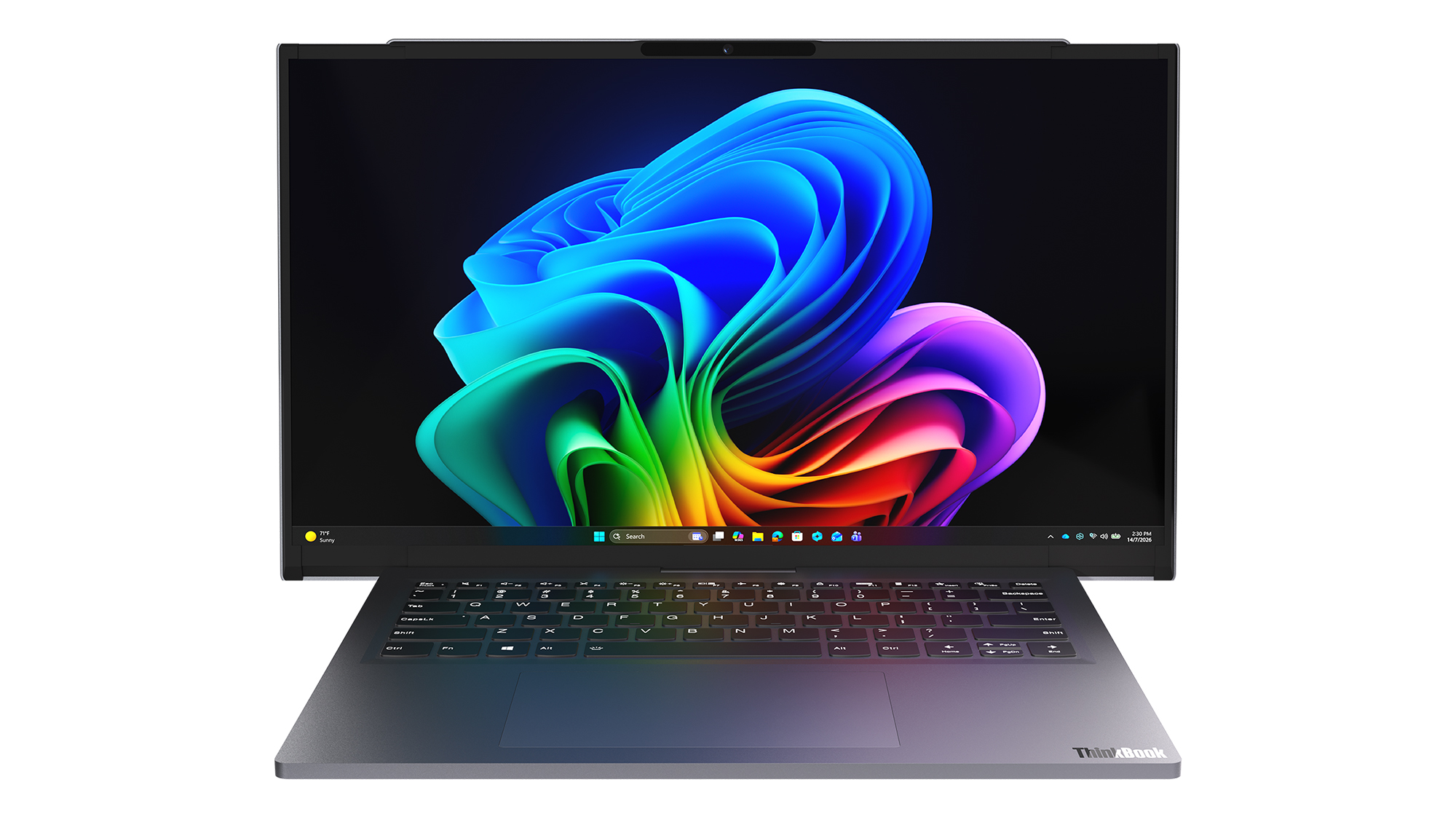
Front view of the open grey Lenovo Project Swan concept laptop with its rollable screen expanded horizontally beyond the keyboard base.

Front view of the open grey Lenovo Project Swan concept laptop with its rollable screen expanded horizontally beyond the keyboard base. (Image credit: Lenovo)

Even if Project Swan never reaches store shelves, I appreciate what Lenovo is doing here.

The PC industry can sometimes become obsessed with processor upgrades, AI features, and specification sheets while overlooking more fundamental questions about how people actually use their devices. Lenovo's concepts consistently ask those questions, even when the answers occasionally seem, well, strange.

What's refreshing about Project Swan is that it feels grounded in reality. The company isn't trying to reinvent personal computing or create an entirely new category. Instead, it's exploring a straightforward idea that almost everyone who has worked on a laptop can relate to.

Sometimes you want a compact machine for travel.

Sometimes you wish that same machine had a much larger screen.

Project Swan is the most convincing attempt I've seen yet to bridge that gap.

I still have concerns about durability, balance, pricing, and whether consumers are truly interested in another alternative laptop design. But after trying it for myself, I'm more optimistic about this concept than many of Lenovo's previous experiments.

Ironically, that's because it feels less ambitious. Rather than trying to change how we work, Project Swan simply gives us a little more room to do it.

And that may be exactly what makes it one of Lenovo's most promising concepts yet.

Let me know in the comments what you think about Project Swan. Should Lenovo continue to push this concept of an expanding display, or focus more on other ideas (and if so, which ones)?

Click to join us on r/WindowsCentral

Join us on Reddit at r/WindowsCentral to share your insights and discuss our latest news, reviews, and more.
I got hands-on with Lenovo's new $699 IdeaPad Vibe, which goes up against the MacBook Neo, and choosing a color may be harder than choosing a CPU

Competition for Apple's MacBook Neo is heating up.

Just days after Dell unveiled a new 14-inch laptop designed to take on Apple's latest mainstream notebook, Lenovo is entering the fight with something considerably more interesting: a laptop that lets you express your personality instead of forcing you to settle for silver, gray, or slightly darker gray.

I recently got to see Lenovo's new IdeaPad Vibe lineup in person in New York City, and while the company talked plenty about AI, processors, and battery life, the thing that immediately stood out to me was how different these laptops look compared to almost everything else on the market.

Most PC makers treat color options as an afterthought. Lenovo is making them the product.

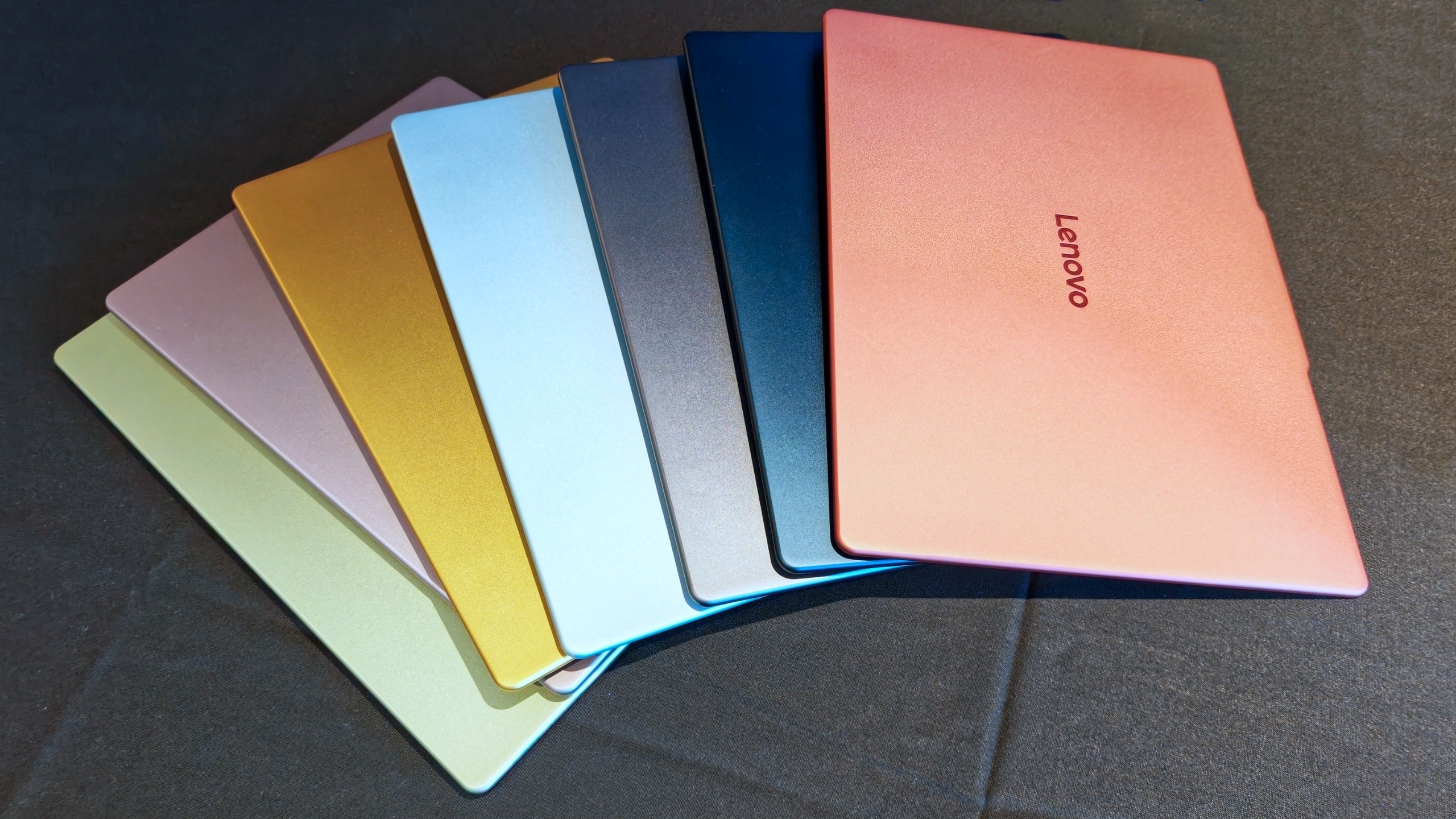
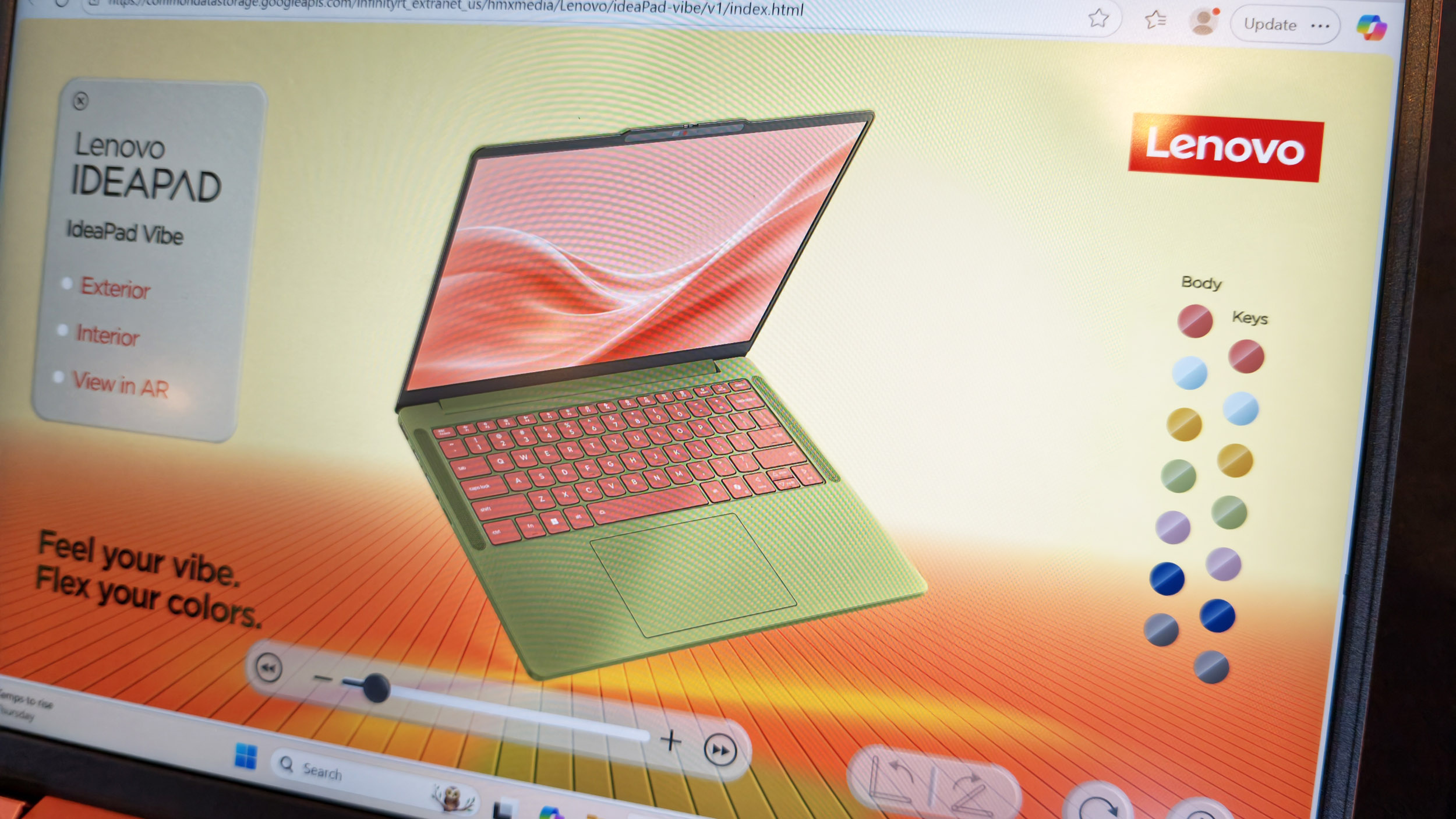
Fan-like arrangement of seven Lenovo IdeaPad Vibe laptop top lids displaying a full spectrum of color options.

(Image credit: Daniel Rubino)

The new IdeaPad Vibe will be available in seven Pantone-developed colors, including Chill Blue, Zen Green, Spicy Gold, Radiant Coral, Dreamy Violet, Lowkey Grey, and Moody Blue. Lenovo says the colors were developed alongside the Pantone Color Institute and are designed to reflect different moods, personalities, and lifestyles.

And that's just the beginning.

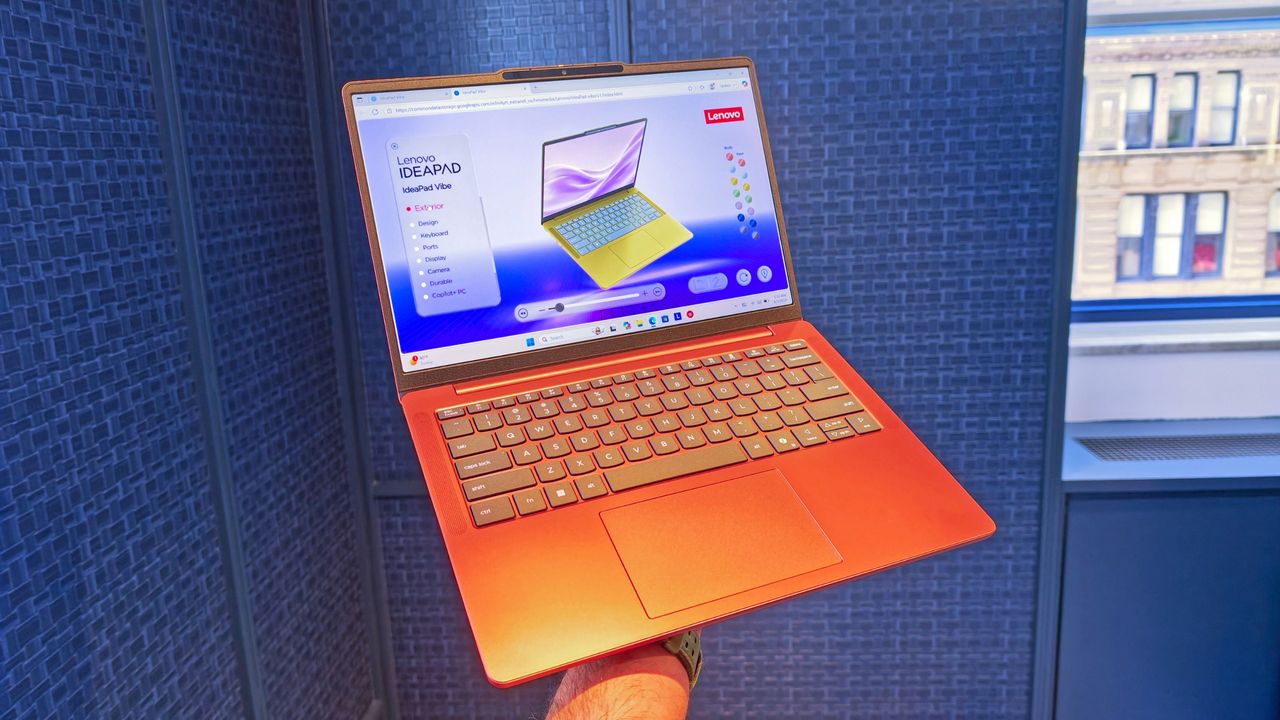
As shown in Lenovo's custom configurator (below), users will be able to mix and match chassis colors and keyboard colors to create something uniquely theirs. The company is also offering swappable custom keycaps, adding another layer of personalization that is virtually unheard of in the mainstream laptop space.

The configurator demo I saw almost felt like building a custom character in a video game rather than buying a laptop, and reminded me of the XBOX Design Lab for custom controllers.

Photo of a laptops display showing a customizer for laptop colors when ordering the Lenovo IdeaPad Vibe.

Demo of the web creation tool to let you customize the new IdeaPad Vibe. (Image credit: Daniel Rubino)

In fact, my biggest complaint about the IdeaPad Vibe is that there might be too much choice.

That's obviously a good problem to have, but after looking through the various color combinations, shell finishes, and processor options, I could already imagine spending far too much time trying to decide which configuration to order (I know because I tried).

That's not a sentence I ever expected to write about a Windows laptop.

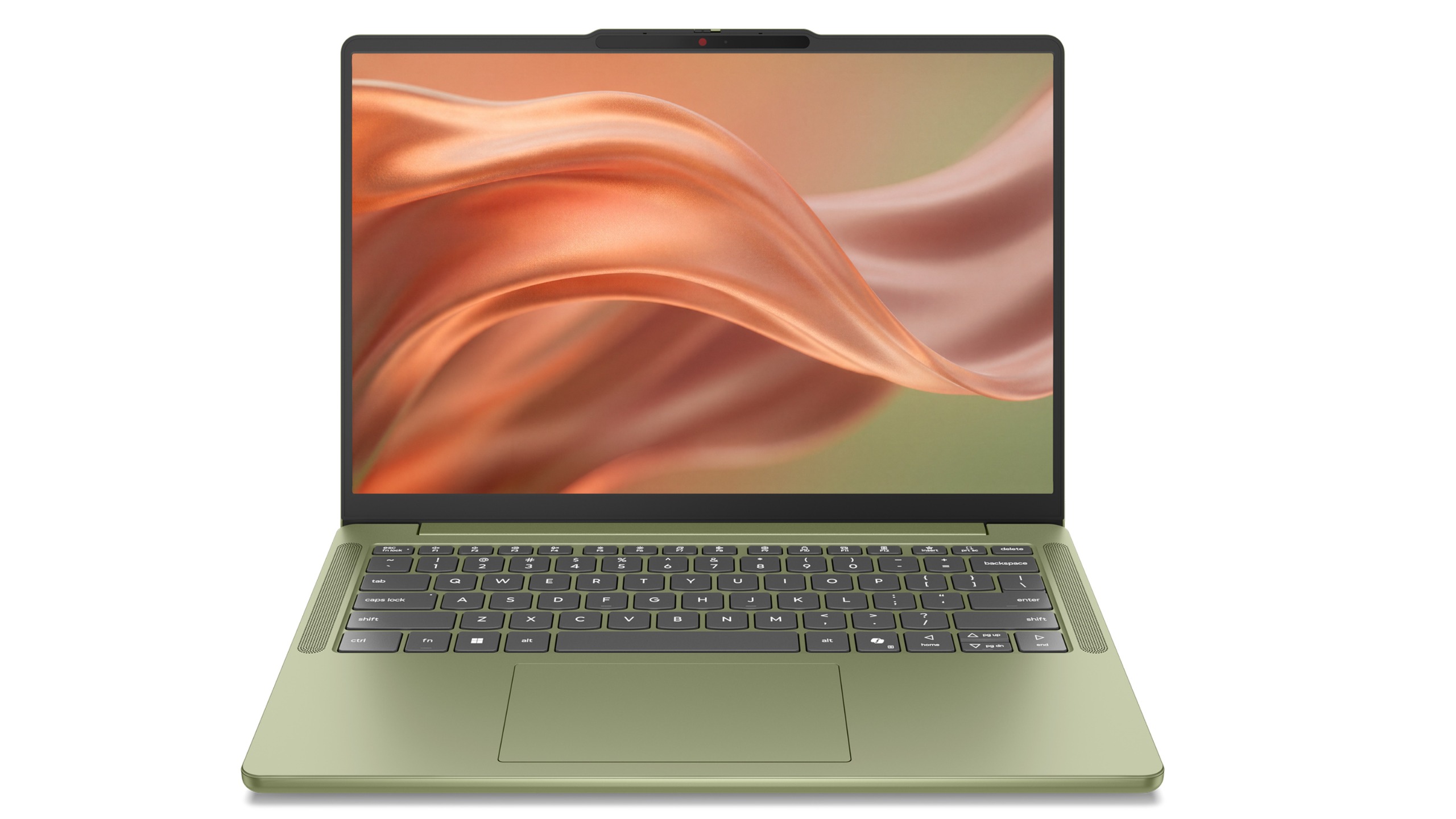
Straight-on front view of an open sage green Lenovo IdeaPad Vibe laptop displaying a warm metallic liquid wallpaper.

Lenovo IdeaPad Vibe in Zen Green and black keycaps. (Image credit: Lenovo)

Of course, a laptop can't survive on colors alone, and thankfully Lenovo seems to have put together a genuinely compelling package underneath all that personality.

The IdeaPad Vibe comes in both 14-inch and 15-inch sizes and starts at just 1.3kg (2.87 pounds) for the smaller model. OLED display options are available with up to 100% DCI-P3 color coverage, while IPS models can offer refresh rates up to 120Hz.

Lenovo is also packing in practical features including dual SSD slots, Wi-Fi 7, USB-A and USB-C ports, HDMI, a MicroSD card reader, and a 5MP IR webcam with a privacy shutter.

AMD, Qualcomm or Intel (eventually)

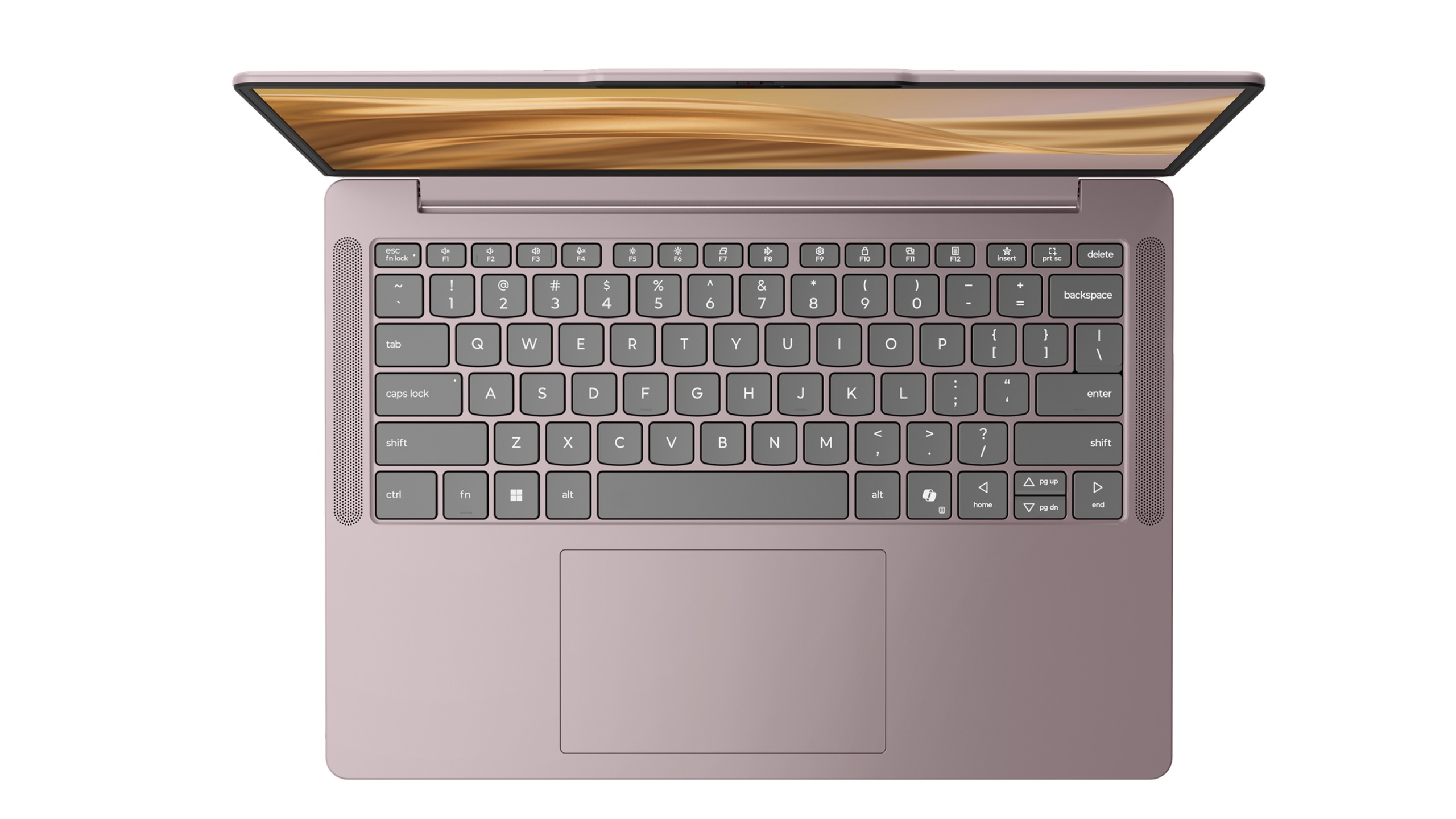
Top-down view of an open purple Lenovo IdeaPad Vibe laptop showing its keyboard, touchpad, and golden wallpaper on screen.

Lenovo IdeaPad Vibe in Dreamy Violet. (Image credit: Lenovo)

Then there's the processor selection.

For launch, buyers can choose between AMD Ryzen AI 400 series configurations and Qualcomm Snapdragon X models (we're not clear on exactly which Snapdragon X chip, or even if it's X2), while Intel-based versions will arrive later. AMD models support up to 32GB of upgradeable memory and up to 1TB of SSD storage, while Snapdragon versions offer up to 24GB of memory and the same dual-slot storage flexibility.

Personally, I'd go Qualcomm.

We've reached a point where Snapdragon X PCs consistently deliver excellent everyday performance while also offering some of the best battery life available in the Windows ecosystem. The combination of a lightweight chassis, Copilot+ PC capabilities on supported configurations, and Qualcomm's efficiency makes the Snapdragon version particularly appealing to me.

That isn't to say AMD isn't tempting. AMD's advantage here is flexibility. The Ryzen AI configurations support memory upgrades up to 32GB and offer optional 50Wh or 65Wh battery configurations, making them attractive for enthusiasts who want more control over their hardware.

What impressed me most during my hands-on time wasn't any single specification. It was how cohesive the overall package felt.

The laptops looked premium, felt solid in the hand, and didn't come across as budget systems despite their surprisingly aggressive pricing. That's important because Lenovo isn't positioning the IdeaPad Vibe as a niche fashion accessory. This is meant to be a mainstream Windows laptop that happens to have far more personality than its competitors.

And right now, that may be enough to help it stand out.

Final thoughts

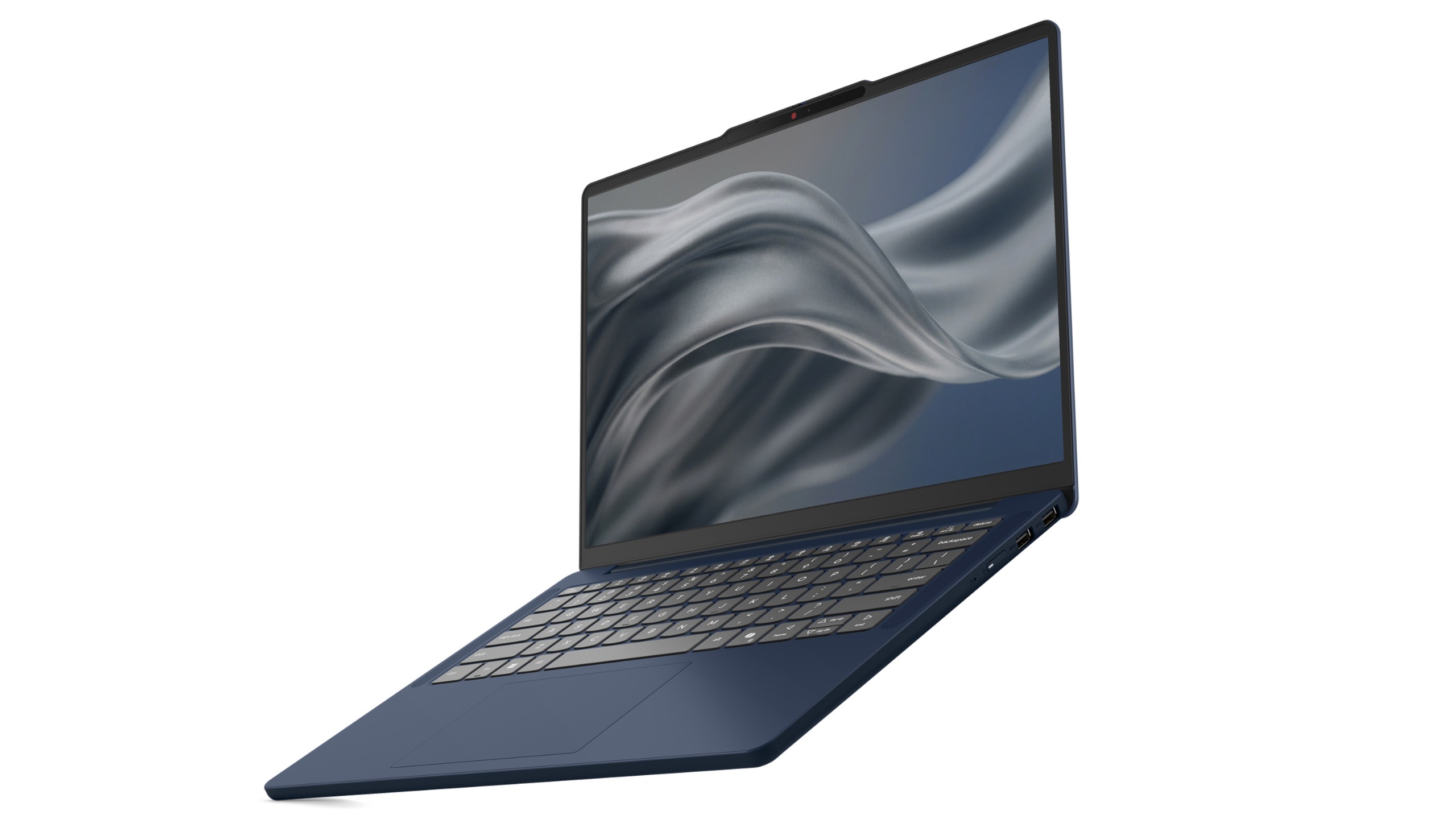
Angled front view of an open dark blue Lenovo IdeaPad Vibe laptop featuring a thin screen bezel and grey abstract wallpaper.

Lenovo IdeaPad Vibe in Chill Blue. (Image credit: Lenovo)

Apple's MacBook Neo has clearly encouraged PC makers to rethink the mainstream laptop category. Dell has already responded with its own fresh take on the formula with its just-announced Dell 14S, and now Lenovo is bringing something completely different to the table: customization.

Instead of asking buyers which shade of gray they prefer, Lenovo is asking what their "vibe" is.

That's a much more interesting question, even if a bit on the nose and a tad cringey.

The Lenovo IdeaPad Vibe with AMD processors launches in October 2026 starting at $699.99, while Qualcomm Snapdragon X models will follow in November 2026 with the same $699.99 starting price. Intel is only listed as coming later.

And after seeing them in person, I think Lenovo may have stumbled onto something other PC makers have forgotten: technology can be personal, but it can also be fun.

Click to join us on r/WindowsCentral

Join us on Reddit at r/WindowsCentral to share your insights and discuss our latest news, reviews, and more.
Lenovo's impossibly thin AeroBlade concept could be the future of laptops (and I think it's coming sooner than expected)

I've seen a lot of concept PCs over the years.

Most are fascinating engineering exercises that are never destined for store shelves. They're designed to spark conversation, generate headlines, and give us a glimpse into what might be possible someday. Some do come to market, like rollable display PCs.

Lenovo's new Project AeroBlade concept feels different.

Officially, it's one of the company's latest proof-of-concept devices, unveiled as part of its annual wave of experimental hardware at IFA 2026. Unofficially? I think there's a very good chance we're looking at Lenovo's next big premium laptop platform.

After getting hands-on with AeroBlade, I walked away convinced this isn't some far-future moonshot. If you told me a shipping version appears within the next year, I wouldn't be surprised in the slightest.

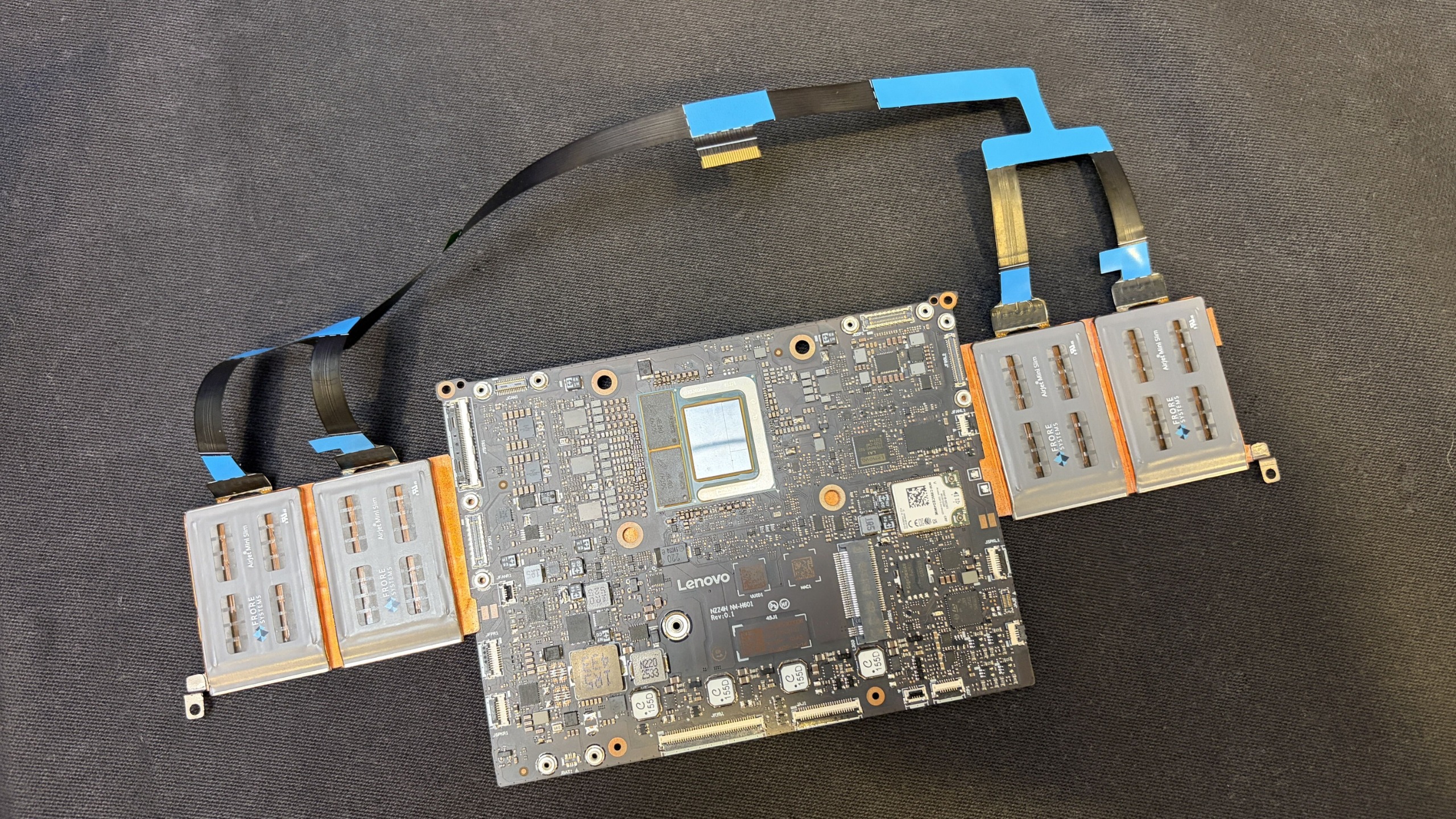
Disassembled Project Aeroblade motherboard with attached ribbon cables and side connector modules, displayed on dark fabric in a technical, instructional setting.

Motherboard and AeroJet cooling system. (Image credit: Future)

And it can't happen soon enough.

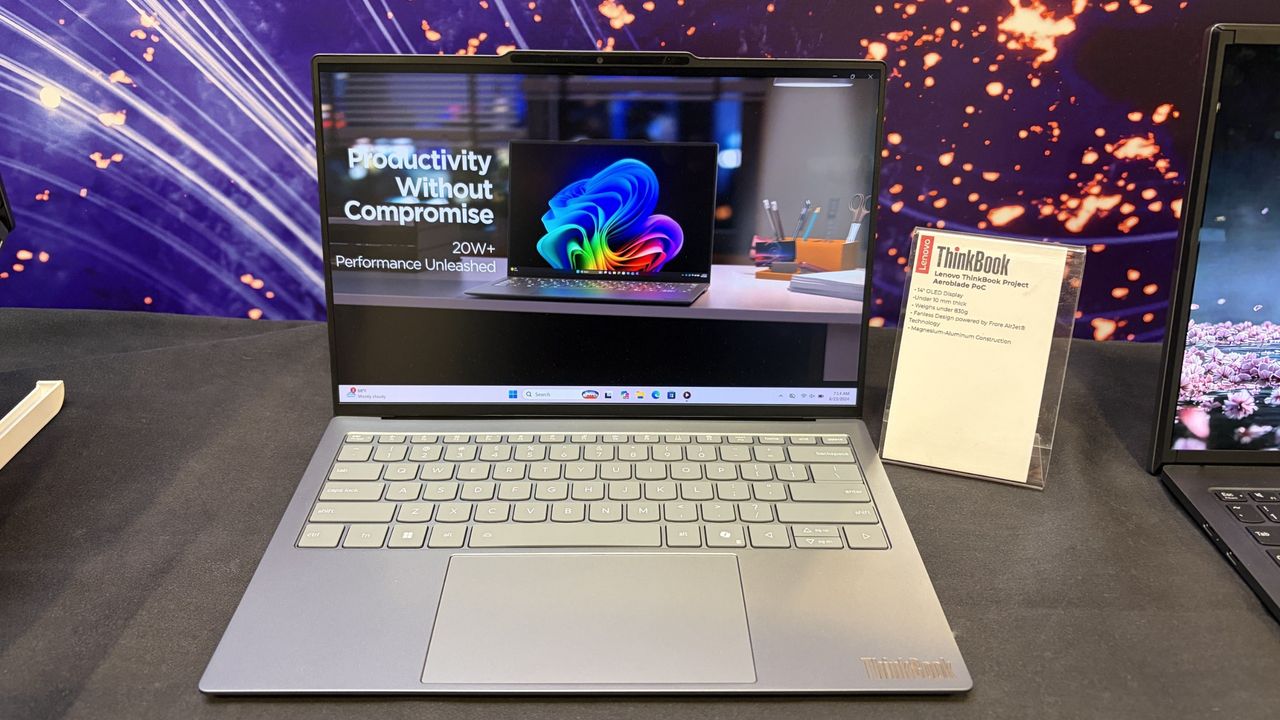
Project AeroBlade is a 14-inch laptop that measures under 10 mm thin and weighs less than 830 grams (1.8lbs). That's lighter than many tablets with keyboard covers attached, yet Lenovo claims performance remains comparable to today's ThinkPad X1 Carbon class of Intel-powered laptops. According to Lenovo, the system achieves this through a completely reimagined thermal design built around its Active Flow cooling architecture developed alongside Frore Systems.

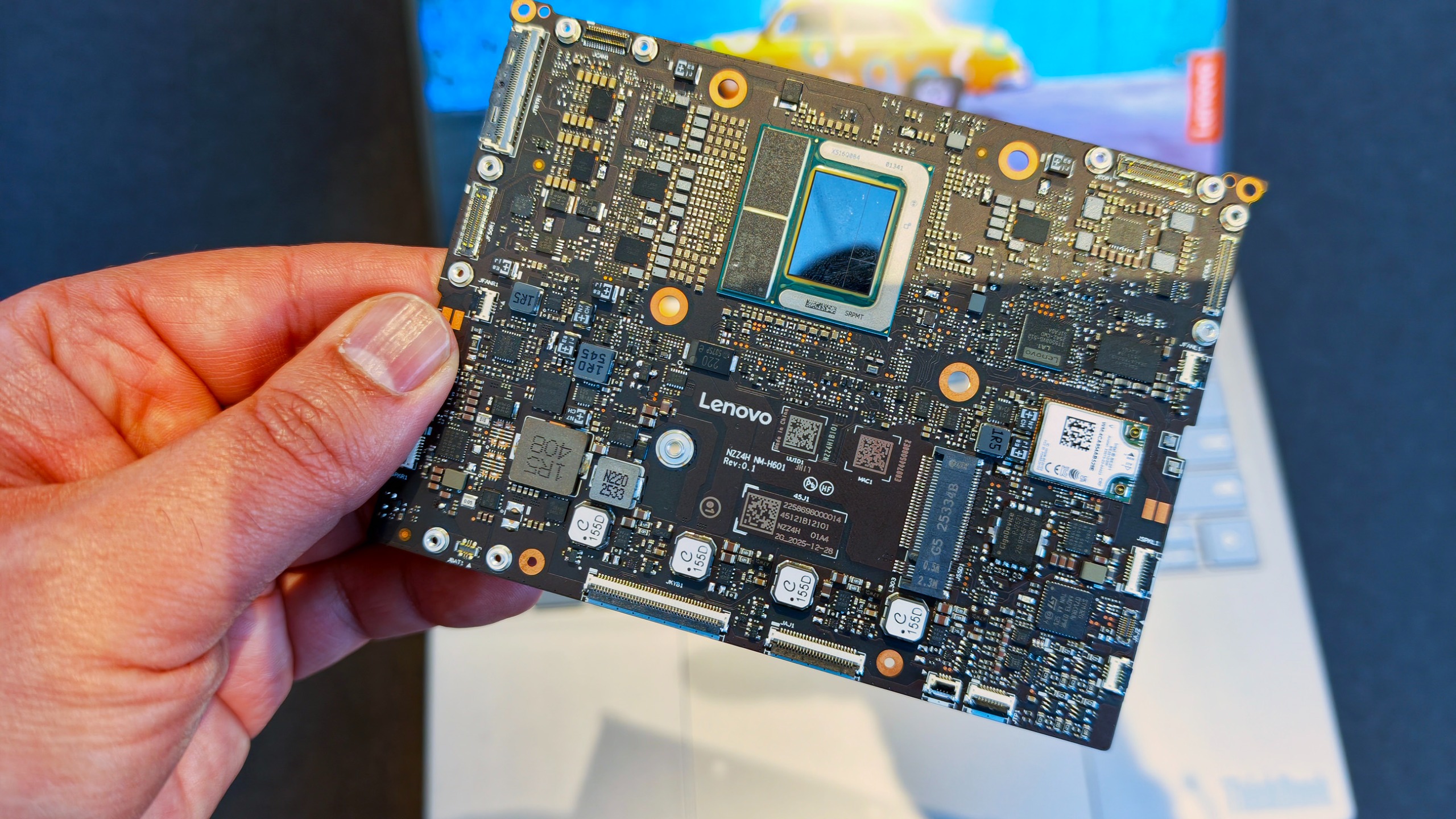
Hand holding a compact, highly integrated square laptop motherboard branded with the Lenovo logo.

That's the entire motherboad for this laptop👀! (Image credit: Daniel Rubino)

Those numbers don't really hit you until you pick it up.

The first thing that struck me wasn't the thickness. It was the weight. Or rather, the lack of it.

The AeroBlade almost feels unfinished when you lift it because your brain expects more mass. Premium laptops have gotten thinner over the last decade, but reducing weight has become increasingly difficult without introducing compromises. AeroBlade somehow manages to feel substantial and premium while remaining almost shockingly light.

Lenovo says the chassis uses a magnesium-aluminum construction paired with a high screen-to-body OLED display, Thunderbolt 4 connectivity, and Wi-Fi 7. On paper, it sounds like a modern flagship ultrabook. In person, it feels like somebody accidentally removed half the laptop. That's a compliment.

What makes AeroBlade truly interesting, however, isn't how thin it is; it's how Lenovo got there.

The fan is dead. Long live AirJet.

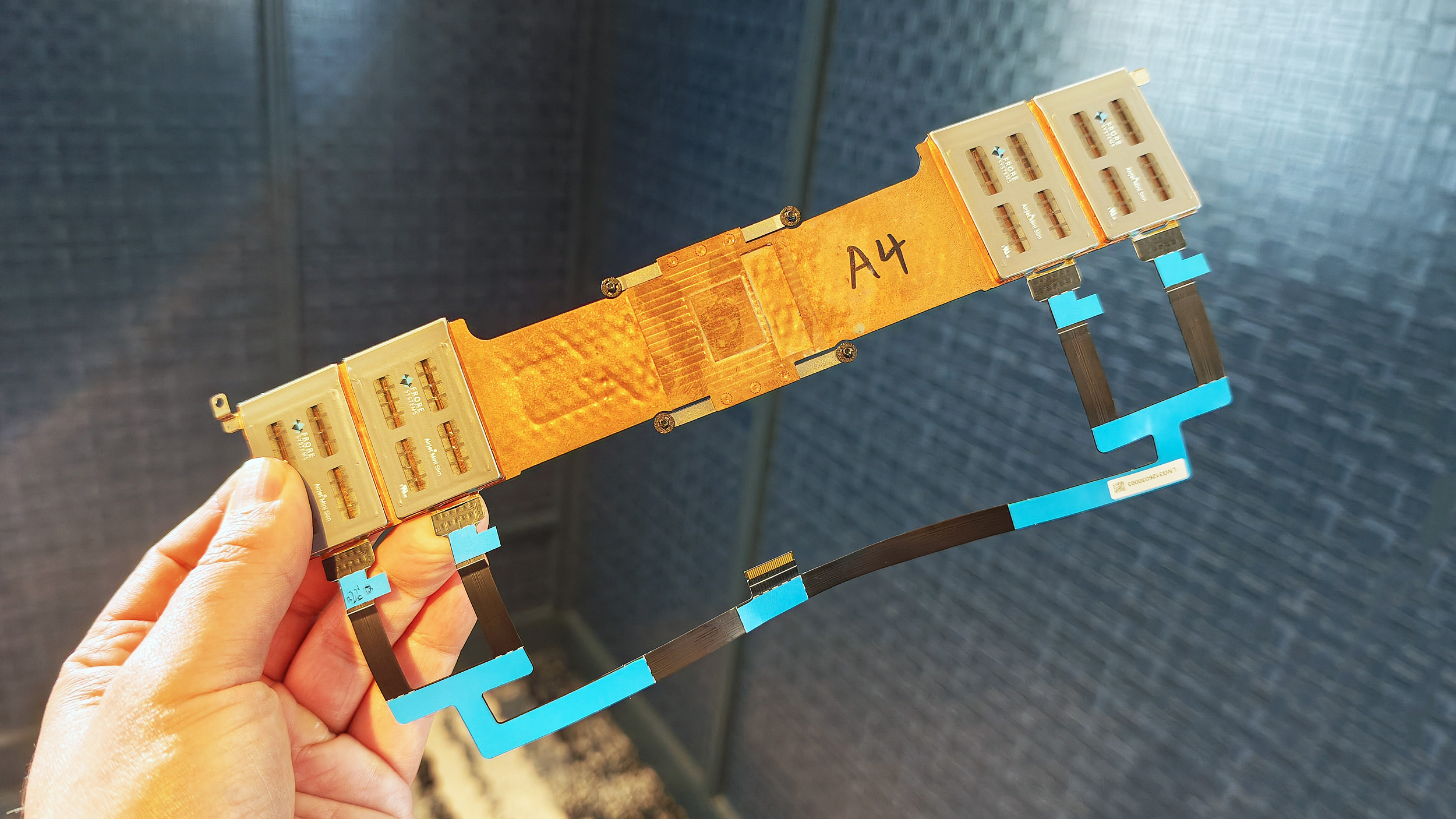
Hand holding a custom Frore AirJet solid-state cooling strip assembly with copper heat sinks and ribbon cables.

Entire Frore AirJet solid-state cooling strip assembly with copper heat sinks and ribbon cables. (Image credit: Daniel Rubino)

For decades, laptop cooling has largely followed the same formula.

A processor generates heat. Heat pipes move that heat toward a heatsink. One or more fans blow air through the system and out of vents.

The design has evolved, but the fundamentals haven't changed much.

Frore Systems wants to change that.

AirJet is a solid-state active cooling solution that replaces traditional laptop fans with tiny cooling chips that use vibrating membranes to generate airflow. Instead of spinning fan blades, AirJet creates high-velocity pulsating air jets that remove heat while operating at extremely low noise levels. Frore describes it as the world's first solid-state active cooling chip.

One AirJet Mini Slim module is only 2.65mm thick, consumes up to 1 watt of power, removes up to 5.25 watts of heat, and generates significantly higher back pressure than traditional fans. The technology was specifically designed for ultra-thin devices where conventional cooling becomes difficult or impossible.

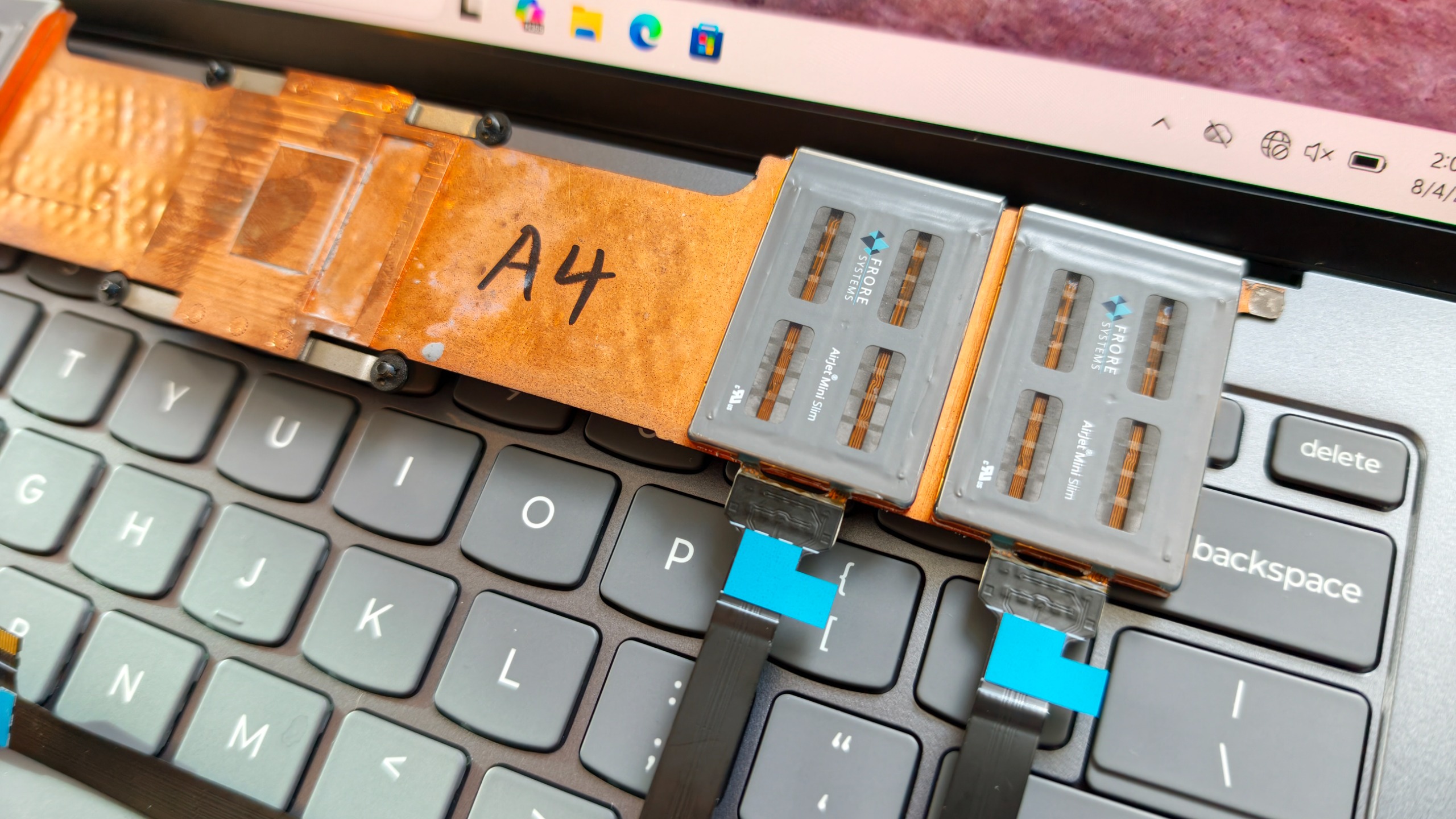
Close-up of two Frore AirJet Mini Slim solid-state cooling chips installed on a copper heat pipe strip above gray laptop keyboard keys.

Close-up of two Frore AirJet Mini Slim solid-state cooling chips installed on a copper heat pipe strip above gray laptop keyboard keys showing how they are placed in the laptop. (Image credit: Daniel Rubino)

The clever part is that these modules don't need the large internal spaces required by traditional fans.

Instead of designing a laptop around cooling hardware, manufacturers can distribute AirJet modules throughout the chassis in different locations.

That flexibility is both the technology's greatest strength and its biggest challenge.

During conversations at the event, it became clear why we've seen AirJet demonstrations for a few years but haven't yet seen a flood of mainstream laptops using it.

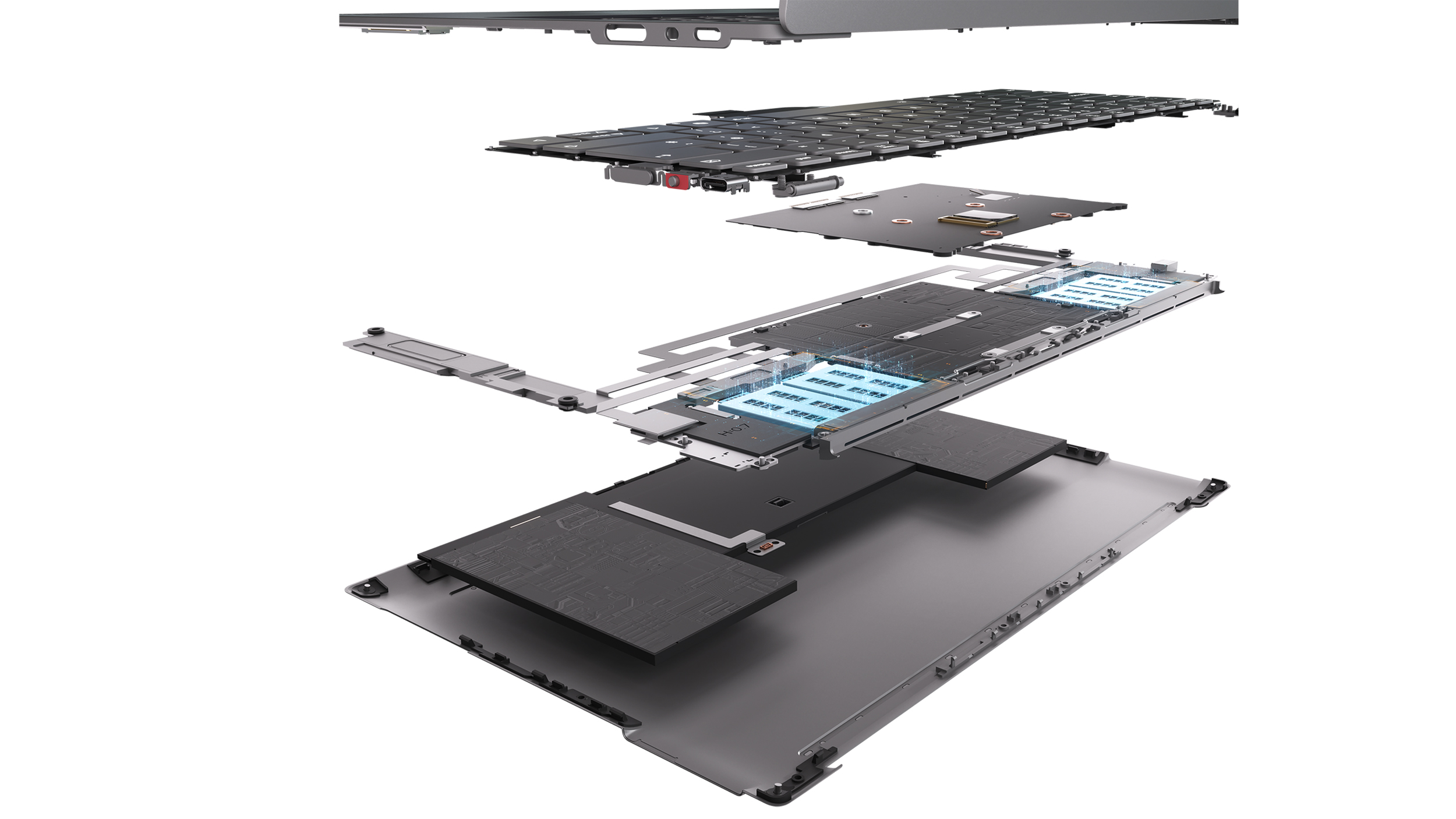
Exploded diagram revealing the internal layers, motherboard, and Frore AirJet solid-state cooling modules of a Lenovo AeroBlade concept laptop.

Exploded diagram revealing the internal layers, motherboard, and Frore AirJet solid-state cooling modules of a Lenovo AeroBlade concept laptop. (Image credit: Lenovo)

This isn't a simple parts swap.

OEMs have spent decades designing motherboards, thermal layouts, and internal structures around conventional fans. AirJet requires engineers to rethink much of that architecture. The cooling solution may be smaller, but integrating it properly involves substantial redesign work throughout the entire system.

That's a lot of engineering investment.

But judging by AeroBlade, the payoff might be worth it.

A laptop with almost no compromises

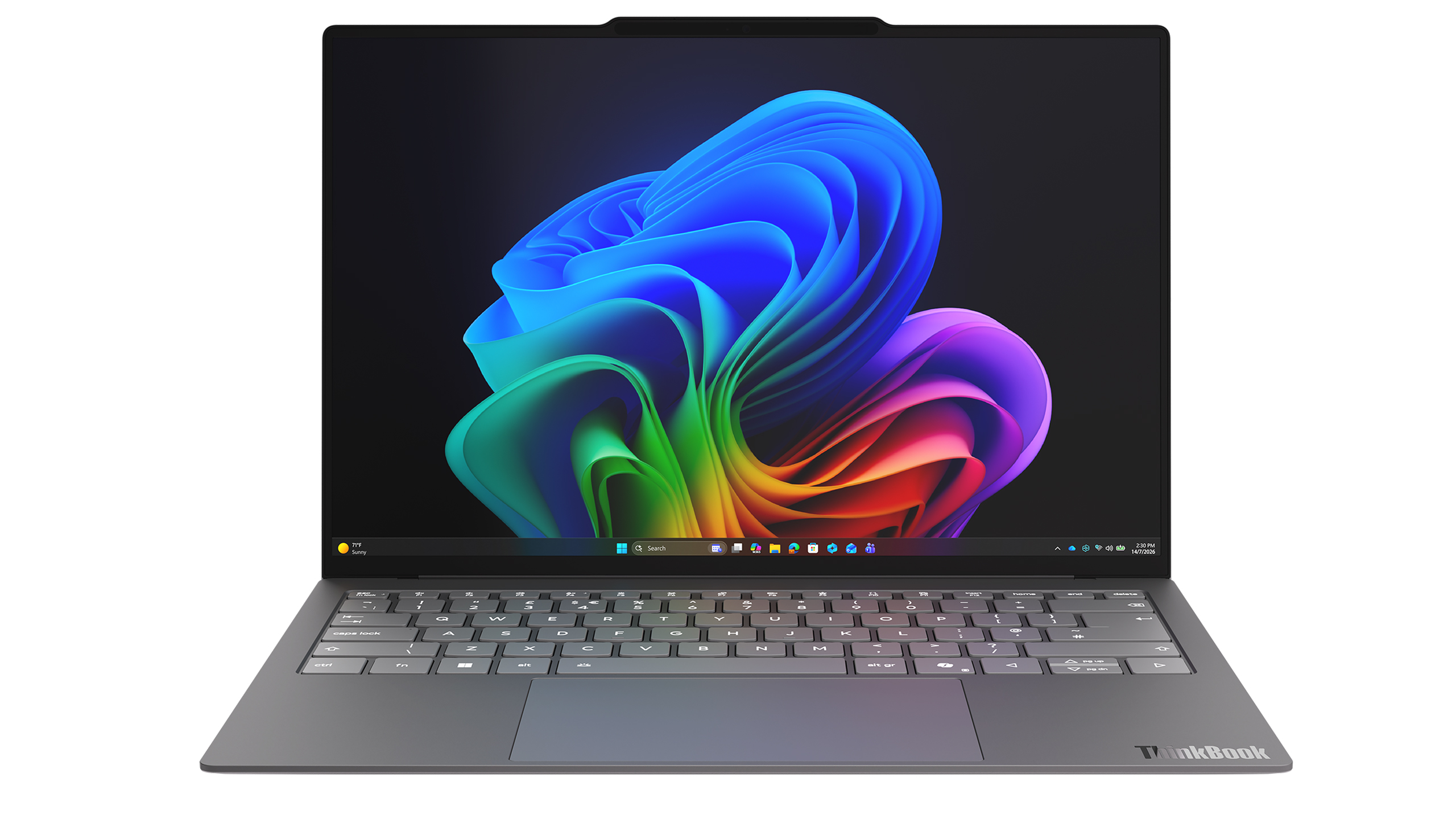
Front view of an open slim grey Lenovo ThinkBook AeroBlade laptop showcasing a colorful ribbon wallpaper on its display.

Rendering of the Lenovo ThinkBook AeroBlade laptop. (Image credit: Lenovo)

The most impressive thing about AeroBlade is that Lenovo doesn't appear to be treating fanless computing as a compromise.

Traditionally, when manufacturers build ultra-thin fanless systems, performance becomes the sacrifice. The device is quiet and portable, but sustained workloads eventually cause thermal throttling.

Lenovo's pitch is essentially the opposite.

Side view of an ultra-thin grey laptop standing open at a 90-degree angle, highlighting its extremely slender display and base.

Side view of an ultra-thin grey laptop standing open at a 90-degree angle, highlighting its extremely slender display and base. (Image credit: Lenovo)

The company believes Active Flow can deliver sustained AI and productivity performance without the compromises typically associated with fanless PCs. The only noise I noticed during my brief hands-on came under heavier workloads, where there was a faint whooshing sound from moving air. It was subtle enough that I had to actively listen for it.

What I didn't notice were intake vents covering the bottom of the chassis. Hooray!

That's because the cooling system works differently than traditional laptop designs. Air management has largely been pushed toward the rear of the system, creating a cleaner and more minimalist design.

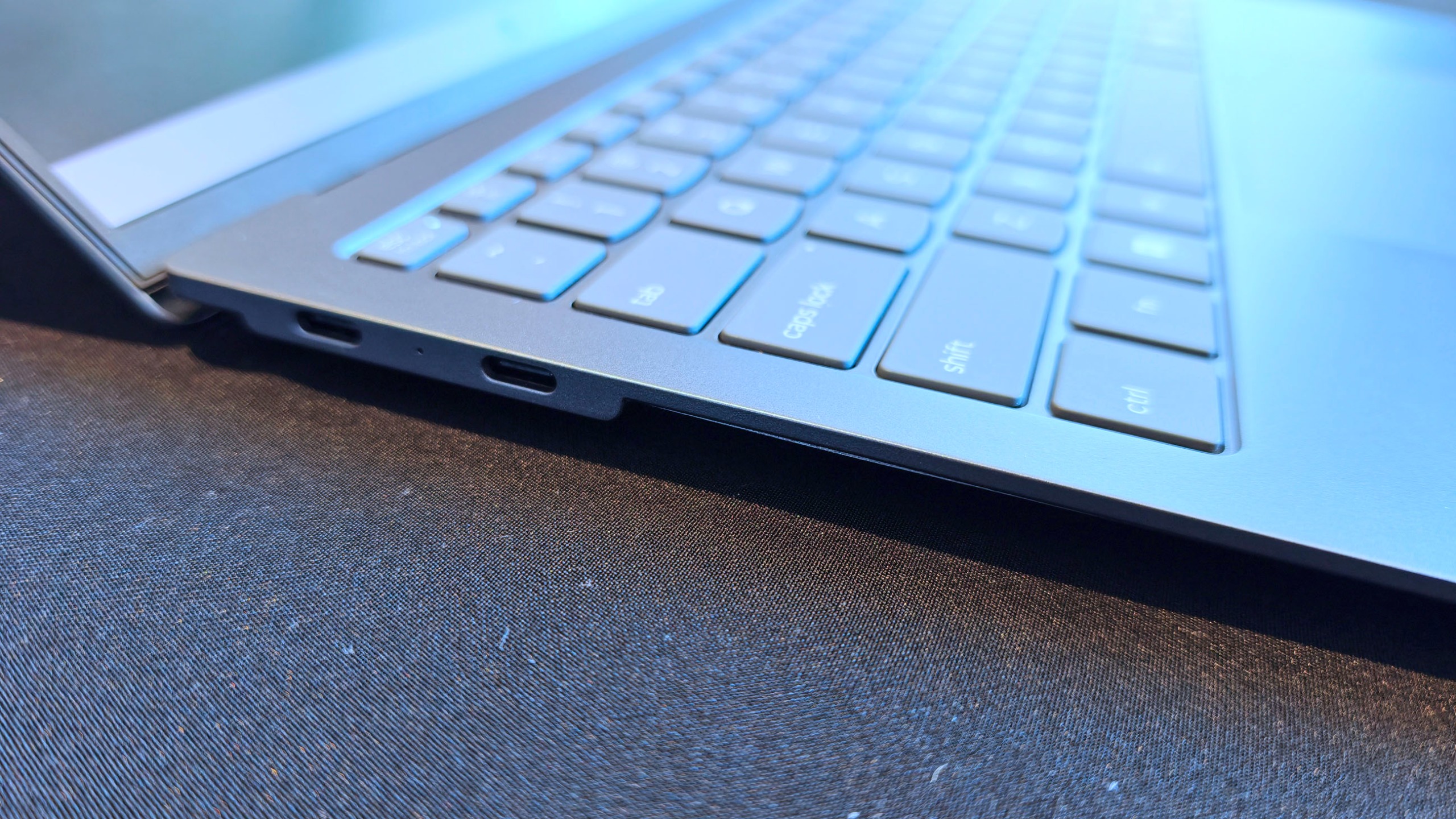
Angled close-up of the left side profile of a thin grey laptop, showing two USB-C ports along the slim edge.

Super thin, but still room for some Type-C ports. (Image credit: Daniel Rubino)

The result is a device that feels almost impossibly refined, and that's why I think AeroBlade is a big deal.

Most laptop innovation over the last few years has focused on AI accelerators, NPUs, display tech, and silicon improvements. Those things are important, but they're largely invisible to users (well, maybe not displays, but still).

Cooling isn't.

Cooling defines thickness, weight, acoustics, sustained performance, battery behavior, and overall design flexibility.

In many ways, cooling technology determines what kind of laptop manufacturers can build.

Lenovo could make impossibly thin and light (compared to what we are used to), or use that extra space for a larger battery for absurd laptop longevity. It opens a bunch of engineering doors and options.

The concept that doesn't feel like a concept

Lenovo loves showing proof-of-concept devices, and many never become products.

But the company's track record also shows that some of its most interesting concepts eventually make the jump to production after enough refinement (I'm hoping Lenovo's Legion handheld foldable concept is one of those).

AeroBlade feels like one of those projects. Indeed, this was my first question to Lenovo, as proof-of-concept is often wacky designs, rolling displays, dual displays ... things that look weird but could be useful.

Super thin and light laptop with no vents? Who wouldn't want this? I don't think we really need a focus group to see if it's a good idea!

The hardware already looks polished. The underlying technology exists. The user benefits are immediately obvious. And perhaps most importantly, the industry is constantly searching for ways to make laptops thinner, lighter, quieter, and more efficient.

AirJet checks every one of those boxes.

Will this technology replace fans in gaming laptops with RTX-class graphics anytime soon? Probably not.

But for premium ultraportables, enterprise notebooks, all-in-one desktops, handheld gaming PCs, and productivity-focused systems, I think we're looking at one of the most significant advances in PC design we've seen in years. (We've already openly wondered about Aerojet in a Steam Deck 2).

So, yeah, ironically, the biggest innovation at Lenovo's event wasn't AI.

It was airflow.

Click to join us on r/WindowsCentral

Join us on Reddit at r/WindowsCentral to share your insights and discuss our latest news, reviews, and more.
ThinkPads from 2008 are some of the hottest used laptops right now — Here's how (and why) they're being turned into Windows 11 PCs

If you asked me what the most exciting ThinkPad on the market is, I might say the latest T14 because it's highly upgradeable, or the latest X1 Carbon because it's so thin and light.

If you ask someone from the r/ThinkPad subreddit, you'd probably get an entirely different answer. Let me introduce you to the ThinkPad X210Ai.

X210Ai with custom keyboard-controller from r/thinkpad

If it looks odd, it's because it is indeed quite an oddity. For the ThinkPad savvy, yes, that's an X200 chassis dating from 2008 or so.

Notice the lack of a touchpad below the TrackPoint system's physical mouse buttons. The scissor-switch keyboard with high-topped keys and deep 2mm key travel. The chunky display surround with clasps to hold the screen closed while traveling.

Reddit user hektopuss posted this laptop a few months ago, and it's far from the only example of these modded ThinkPads on the subreddit.

Something like this shouldn't work. A ThinkPad chassis old enough to have shipped with Windows Vista, gutted and rebuilt with modern performance hardware. And yet, a small but increasingly visible corner of the ThinkPad community has been modding laptops that should cost less than a nice dinner into genuinely modern machines.

What's actually going on with the ThinkPad X210Ai?

The ThinkPad X210Ai is ultimately the result of the ThinkPad community's ingenuity and refusal to let old hardware die.

The X210Ai is a replacement mainboard from TP Art, which appears to be largely run by one person who goes by Franck Deng.

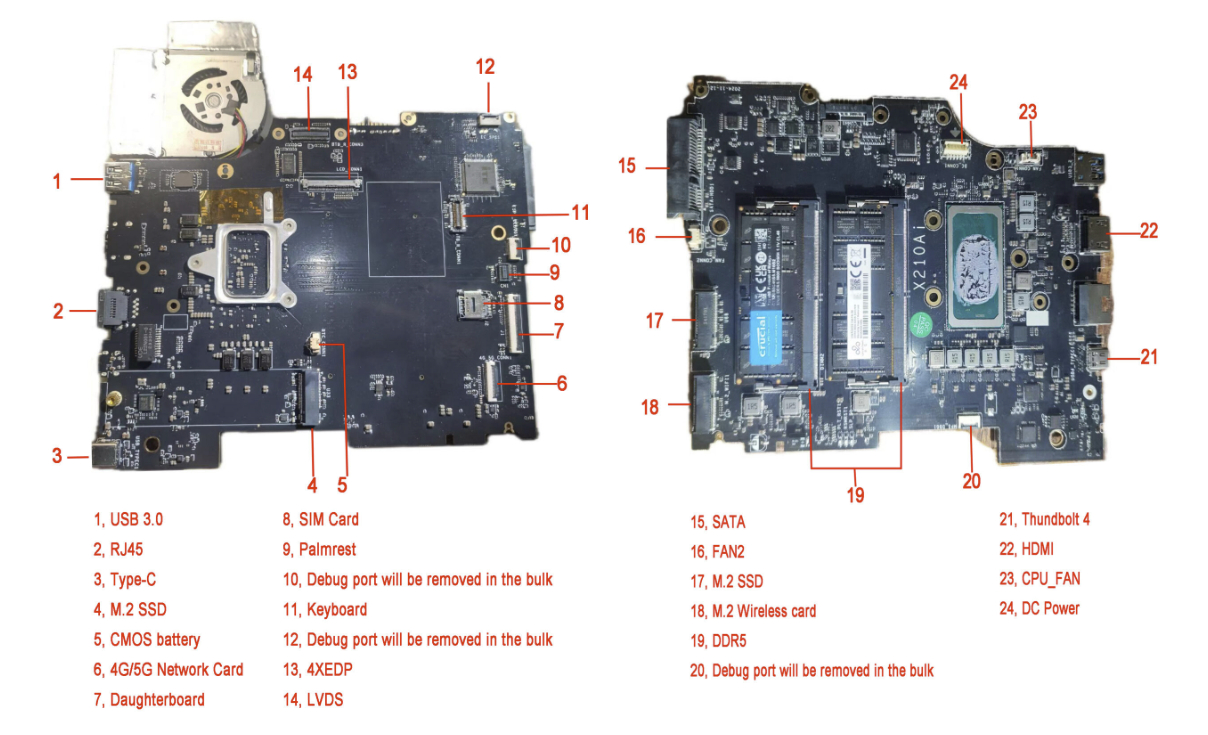
The mainboard is designed to drop into the X200 and X201 chassis; the best part is that it brings a modern Intel Core Ultra 7 165H or Core Ultra 9 185H to the table, as well as support for DDR5 RAM, dual M.2 SSD slots, Thunderbolt 4, and HDMI 2.1.

Image of two black printed circuit boards (PCBs) with various electronic components, connections, and labeled sections indicating ports and features.

A breakdown of the X210Ai custom motherboard's ports and expansion slots. (Image credit: TPArt.net (Franck Deng))

You can keep the X200/X201's original display, or you can upgrade it, while the keyboard and TrackPoint stay put.

Because of the modded mainboard's changes, the bottom chassis needs to be reworked with new holes punched for the ports and fans. Luckily, TP Art sells the full kit with mainboard, daughterboard, chassis, mylar, and 3D-printed accessories for as little as $1,299.

New displays with high resolutions start at $299, and extra custom fans cost $119.

TP Art also sells barebones builds with everything (including keyboard and display) except RAM, storage, CMOS battery, and main battery for $1,699.

This tradition isn't entirely new, and TP Art is a direct descendant of the efforts on forums like 51nb where modders have been retrofitting ThinkPad mainboards for years. TP Art simply recognized an opportunity to do what they love (and make a bit of money from it).

The used ThinkPad scene is thriving as RAM prices skyrocket

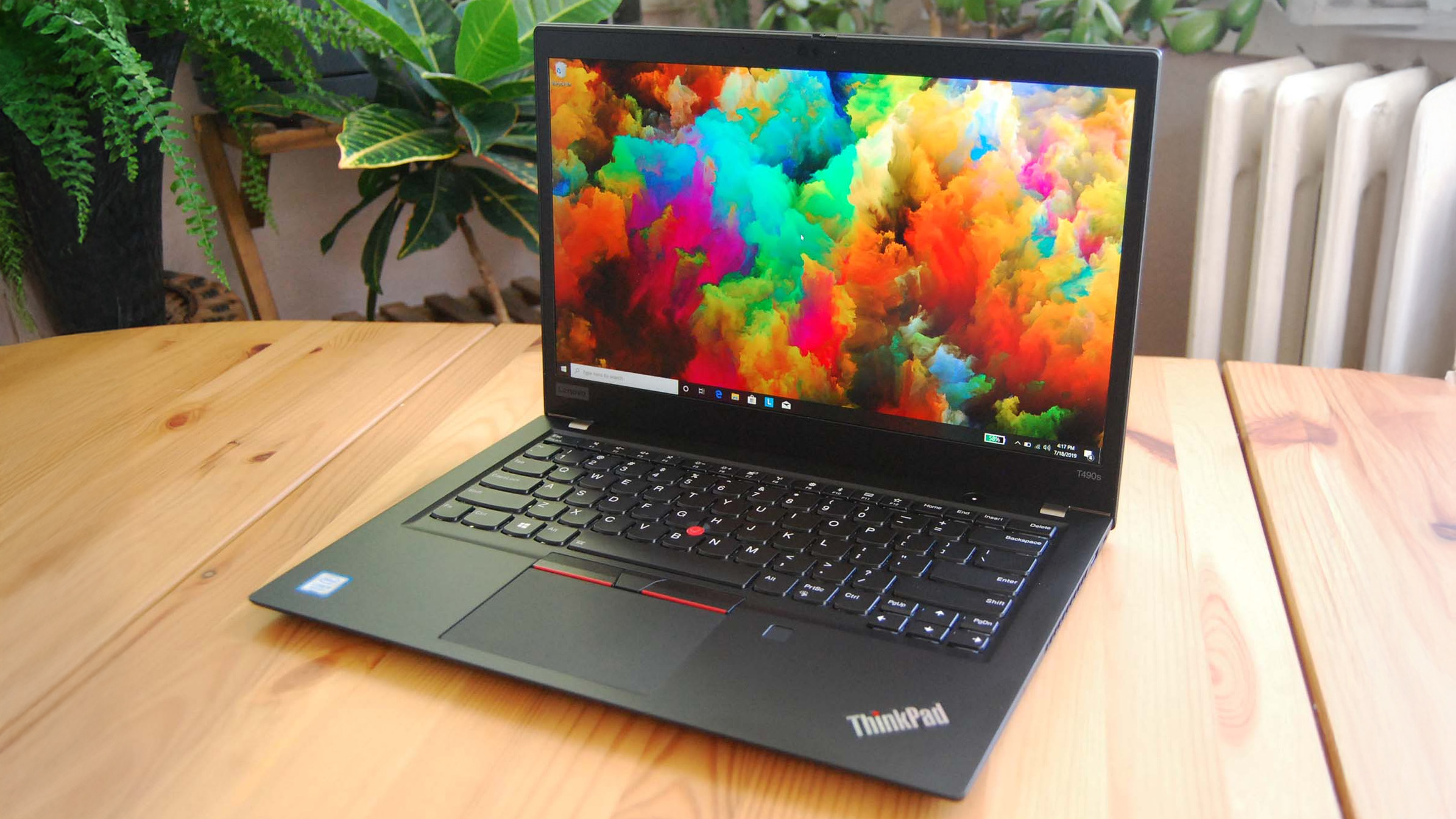
Lenovo ThinkPad T490s on a wooden desk, showing Windows 10 desktop

You can find more modern used ThinkPads for less than the X210Ai custom job, but they just don't have the same classic accoutrements. (Image credit: Cale Hunt | Windows Central)

I imagine this sort of extreme ThinkPad modding would be happening no matter what component prices looked like, but the ongoing RAM and storage crisis driving up the cost of new laptops is surely having an exaggerated effect.

Memory and storage markets are genuinely breaking down for consumers as AI firms gobble up hardware, and there's no relief expected until maybe 2030. Combine these effects with the ThinkPad community's love of classic hardware, and it becomes clear why the X210Ai is becoming such a hit.

Franck notes on the TP Art site that the "volume of pending orders and our team's limited modification capacity" is forcing order processing up to six months out. I'd say that's quite popular.

The math on a rebuild doesn't look too bad once you start digging into current laptop prices.

The math on a rebuild doesn't look too bad once you start digging into current laptop prices. Say you buy a full barebones kit at $1,699 and have to add RAM and storage (the two highest costs).

Add, say, $500 to the cost for everything else, and you're sitting at about $2,200 total for a retrofitted ThinkPad.

Sure, you can get a more modern used ThinkPad for less, but that's not the point. Many enthusiasts yearn for the ThinkPad reliability of years gone by, one of the best keyboards ever made, and a wide selection of ports. That's exactly what the X210Ai offers.

Reddit user hektopuss says they plan to use the modded ThinkPad X210Ai for 10 years, which makes the purchase price a lot more reasonable.

Old chassis, new OS dilemma

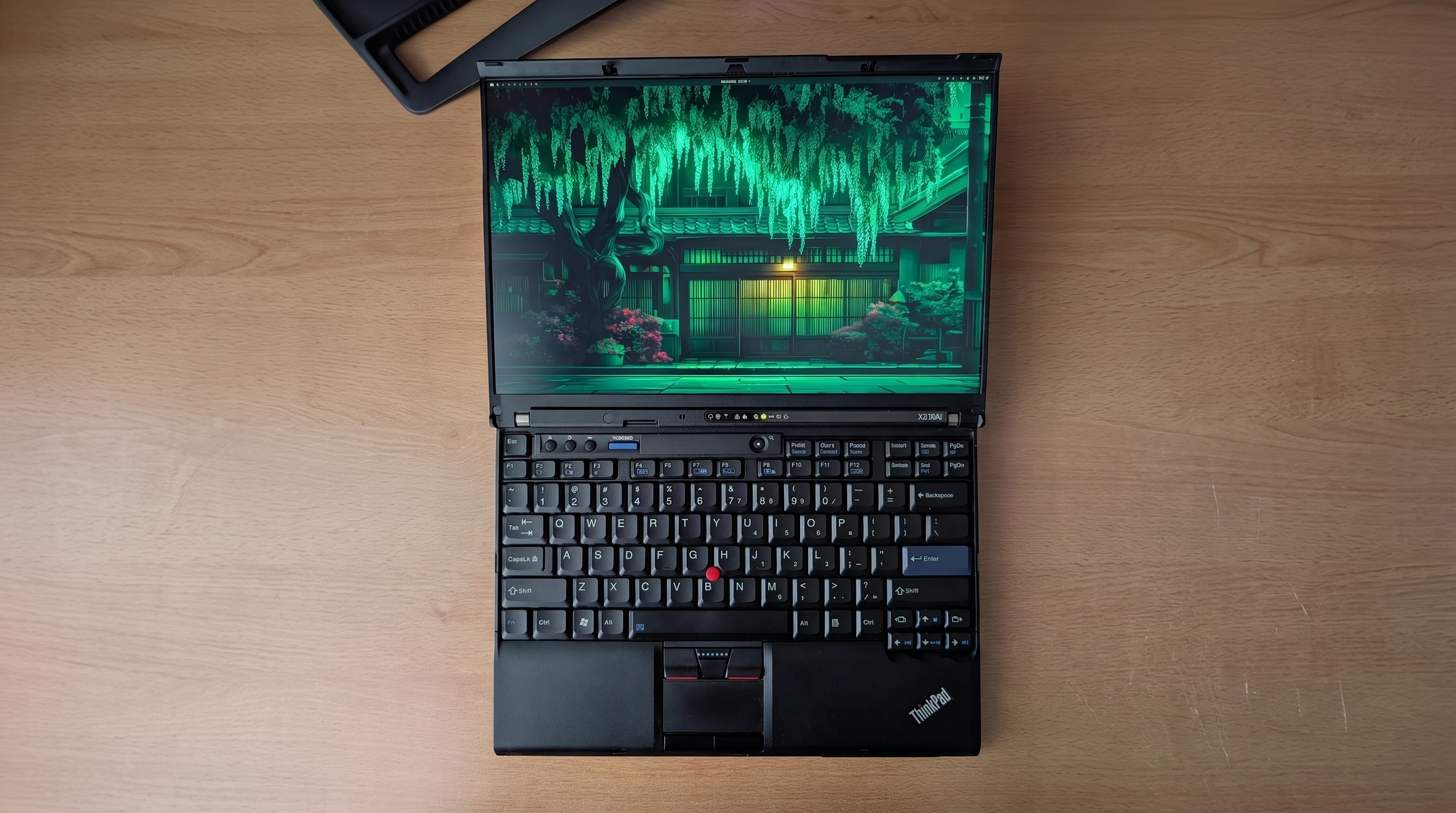
An open Lenovo ThinkPad laptop on a wooden surface, displaying a vibrant digital artwork of a Japanese garden at night, with a focus on lush greenery and traditional architecture.

Reddit user alvarikoke99 installed the Omarchy Linux config on their modded ThinkPad X210Ai. (Image credit: u/alvarikoke99 (Reddit))

Trying to run Windows on an unmodified ThinkPad X200 wouldn't go over well. It has no TPM 2.0 chip, no approved Windows 11 CPU, and shaky Secure Boot.

Windows 11 only works with a bypass tool, which would land with no driver support, and Windows 10 isn't going to be around forever (even though Microsoft recently extended its afterlife support).

Blank Pixel

The X210Ai's modified board with Intel Core Ultra Series 1 chips solves that problem. Windows 11 is fully supported, meaning you shouldn't have to worry about any deadlines on the horizon.

Does that mean X201Ai adopters are all using Windows 11? Far from it. It seems that most use some form of Linux, effectively sidestepping most of Microsoft's barriers. Reddit user hektopuss, for example, is using Windows, but there are plenty of examples of Linux to be found.

How you, too, can get started with a modified ThinkPad

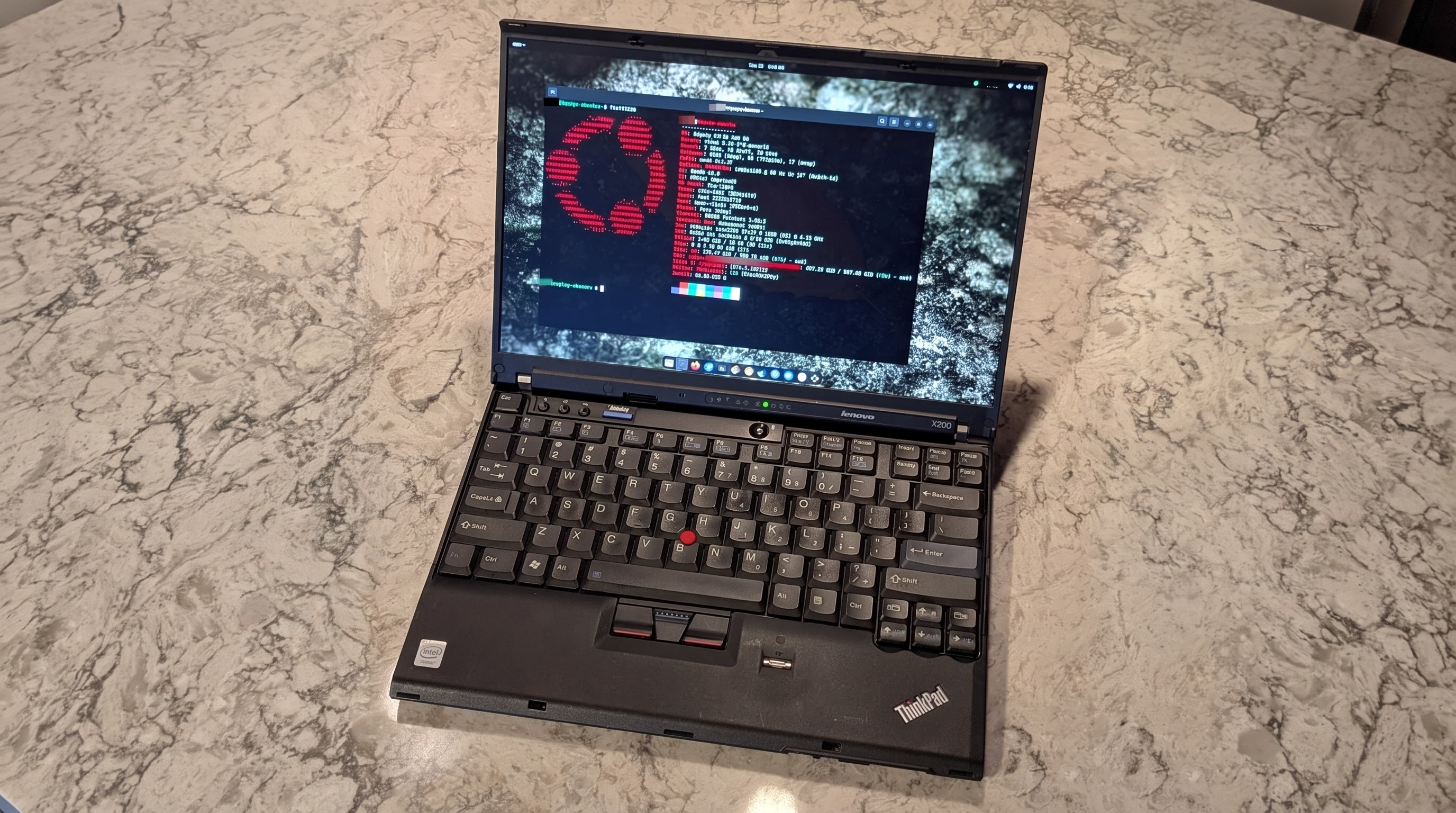
A Lenovo ThinkPad X200 laptop on a marbled surface, displaying code in various colors on its screen.

Another ThinkPad X210Ai dropped into an X200 chassis from Reddit user u/Retrocet. (Image credit: u/Retrocet (Reddit))

Buying a customized classic ThinkPad with new hardware under the hood surely isn't for everyone. If you do want a ThinkPad but want to spend less, I recommend checking out used markets that are currently thriving. It's hard to kill a ThinkPad, and that's a boon for buyers.

I recommend checking out the ThinkPad Blue Book buying guide on Reddit to get an idea of pricing. It needs to be updated for 2026, as most listed prices have gone up, but it's still relatively accurate.

If you do want to check out the X210Ai, you're free to do so as long as you don't mind waiting. As I mentioned, wait times are up to six months, and orders can't be canceled once placed.

Click to join us on r/WindowsCentral

Join us on Reddit at r/WindowsCentral to share your insights and discuss our latest news, reviews, and more.
❌