Connexion
L’Apple Pencil Pro baisse son prix avant la sortie de l’iPad Air M4

[Deal du jour] Le Pencil Pro d'Apple est un stylet précis et un accessoire indispensable si vous disposez d'un iPad. Il est disponible avec une ristourne de presque 30 € sur Amazon.

[Deal du jour] Le Pencil Pro d'Apple est un stylet précis et un accessoire indispensable si vous disposez d'un iPad. Il est disponible avec une ristourne de presque 30 € sur Amazon.
Alors que l'industrie de la tech subit de plein fouet l'explosion du coût des composants, Apple va en sens inverse avec le prix de ses derniers MacBook les plus puissants.
 Apple vient d’officialiser sa nouvelle génération de MacBook Pro 14 et 16 pouces, désormais animée par les puces M5 Pro et M5 Max.
Cet article MacBook Pro M5 (2026), Apple mise tout sur l’IA et transforme le “Pro” en produit élitiste a été publié en premier par GinjFo.
 Apple annonce deux nouveaux processeurs, les puces M5 Pro et M5 Max pour MacBook Pro. L'architecture Fusion entre en action
Cet article M5 Pro et M5 Max, Apple dévoile l’architecture “Fusion”, deux puces en un seul SoC a été publié en premier par GinjFo.
Quatre mois après le MacBook Pro M5, le seul à avoir reçu une nouvelle puce en octobre 2025, les MacBook Pro haut de gamme, qui se destinent aux créateurs, passent aux puces M5 Pro et M5 Max. Sans surprise, ces nouvelles puces promettent monts et merveilles en performances… ainsi que de jolis gains en IA.

Ces prochains jours, la PlayStation 5 Pro va recevoir une mise à jour qui pourrait bien tout changer. Le PSSR, technologie d'upscaling basée sur l'IA, passe à la seconde génération, et plein de jeux vont en profiter.
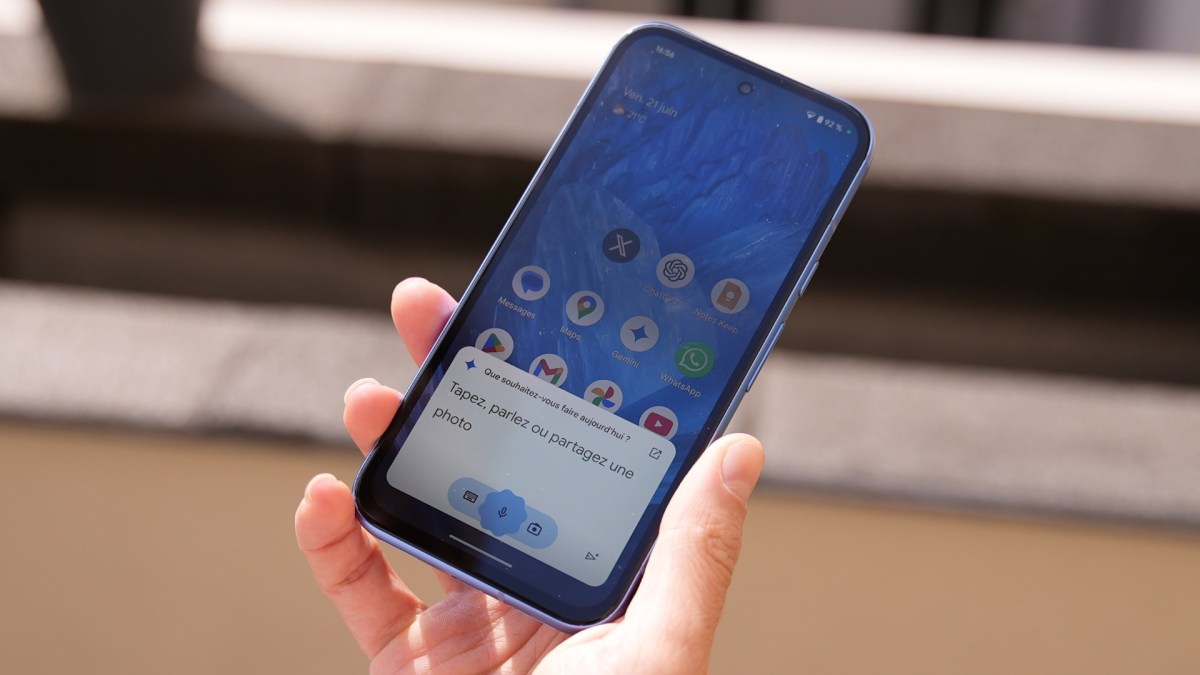
De nos jours, les smartphones les plus mis en avant côtoient bien souvent la barre des quatre chiffres. Heureusement, ces flagships ne sont finalement qu'un échantillon des modèles mis sur le marché. En 2026, plusieurs constructeurs proposent de très bons modèles sous la barre des 300 € -- dont certains héritent parfois de quelques raffinements du haut de gamme. Voici les références que l'on vous recommande chez Numerama.

Sony a officialisé l'arrivée d'une grosse mise à jour pour la PlayStation 5 Pro, plus spécifiquement son moteur de mise à l'échelle : le PSSR 2.0.

[Deal du jour] À peine Samsung a officialisé ses prochains écouteurs Galaxy Buds 4 Pro qu'ils se trouvent déjà moins chers en précommande.

Ugreen continue son offensive sur le marché des NAS avec un nouveau 4 baies ambitieux : UGREEN NASync DXP4800 Pro. Après le DXP4800 Plus de l’an dernier, nous avons pu passer plusieurs jours avec le modèle Pro, une version musclée pensée pour les usages avancés, le multitâches intensif et les environnements exigeants sans compromis sur la simplicité d’utilisation. Sur le papier, la promesse est solide. En pratique, tout n’est cependant pas parfait…

Là où le DXP4800 Plus s’appuie sur un Intel Pentium Gold 8505, le DXP4800 Pro passe sur un processeur Intel Core i3-1315U, offrant plus de puissance brute et une meilleure capacité de traitement pour des charges lourdes : virtualisation, transcodage multimédia, IA, Docker…
À l’ouverture, on retrouve :
Comme pour son grand frère, l’emballage reste soigné, avec plusieurs niveaux de protection. On note les efforts du fabricant…
Extérieurement, il ressemble comme 2 gouttes d »eau aux DXP4800 Plus. Nous avons un NAS bien lourd avec un boîtier en aluminium bleu-gris. Son poids sur la balance affiche 4,1 kg. À l’arrière, nous avons toujours un ventilateur de 140 mm. Seul le nom en façade (en bas) diffère…

Du côté de la connectique, ce NAS dispose de :
Une connectivité bien pensée et complète.
C’est là que les choses changent ! Le DXP4800 Pro est animé par un processeur Intel Core i3-1315U capable d’atteindre 4,50 GHz (6 cœurs, 8 threads) avec iGPU intégré. Il est épaulé par 8 Go de RAM DDR5 (extensibles à 96 Go). On aurait préféré voir 16 Go pour ce modèle Pro. Le score PassMark est de 11 183 points ! Pour ce tarif, il largue tous les concurrents…
Les disques durs 3,5 pouces s’installent assez facilement, sans outils. Les chariots sont différents de ceux de Synology ou QNAP, mais ils sont fonctionnels.

Pour installer un SSD SATA, il faut retirer une fixation en plastique (en bas à droite sur la photo ci-dessus) via un outil fourni. Attention à ne pas forcer trop fort au risque d’abimer la pièce. Le NAS dispose de 2 emplacements pour SSD NVMe, accessibles via une trappe sous l’appareil. C’est également ici que vous pourrez augmenter la RAM. L’ajout de pâte thermique (fournie) et le rôle de dissipateur thermique du capot en aluminium sont des points positifs.

De notre point de vue, le NAS n’est pas suffisamment surélevé. Les patins sous l’appareil ne sont peu assez haut, ce qui limite la circulation de l’air et favorise les vibrations. De nombreux utilisateurs recommandent l’ajout de petits amortisseurs en élastomère pour corriger ce léger défaut. Nous validons ce choix.
Nous vous avons déjà présenté le système embarqué UGOS précédemment. Nous avons bien conscience que Ugreen est encore jeune sur le marché et il faut savoir être indulgent. Le système évolue régulièrement sans rivaliser pour le moment avec les ténors du marché. Cependant, il n’a pas à rougir, car il sait déjà répondre à de nombreux usages.
L’utilisateur doit taper dans son navigateur find.ugnas.com pour trouver son NAS sur le réseau. L’installation se fait en 4 étapes (voire ci-dessous) :


Par rapport à notre précédent test, l’interface est désormais bien en français.
Une fois l’installation terminée, le NAS redémarre… il ne reste plus qu’à se connecter avec l’identifiant et le mot de passe saisis précédemment. Un nouveau guide se lance pour accompagner l’utilisateur dans les premières étapes :
Note importante : lors du test précédent, nous pensions avoir commis une erreur, mais non… le service SMB (partage réseau) est désactivé par défaut. Cela veut dire que si vous ne faites rien, le NAS n’est pas accessible par le réseau (Windows, macOS ou Linux).
UGOS est un système Linux optimisé pour le stockage en réseau. Il propose un ensemble de paramètres, auquel on peut ajouter des fonctionnalités via le Centre d’applications : Antivirus, Download Center, Text Edit, etc. Ugreen a fait le choix de privilégier Docker pour compléter son environnement applicatif.

Le fabricant propose une application mobile tout-en-un qui permet de profiter de son NAS à distance ou sur son réseau local. Il faut avouer qu’elle est complète et bien pensée. Ugreen propose également une application de bureau (Windows et macOS), ainsi qu’une adapté à Apple TV et Android TV. Elles permettent d’accéder aux fichiers, au statut du NAS, aux notifications… mais aussi au visionnage de vidéo, etc. Tout y est, un véritable couteau suisse !
Ugreen déploie fréquemment des mises à jour pour corriger des bugs et soucis de traductions, mais aussi pour améliorer les performances et ajouter des fonctionnalités. Un NAS, c’est un investissement sur le long terme. Aujourd’hui, les NAS sont régulièrement mis à jour… et surtout pendant de nombreuses années.
Ugreen est nouveau sur le marché des NAS, mais ce n’est pas un novice. L’entreprise possède une solide expérience industrielle et maîtrise déjà la conception matérielle et logicielle. Le fabricant connait également très bien ce secteur exigeant, dominé par des acteurs comme Synology et QNAP. Côté matériel, le produit tient la route…
Sur la partie logicielle, UGOS reste limité pour un usage avancé. S’il répond à 90% des particuliers, certains pourraient être déçus. La majorité des utilisateurs parient sur des mises à jour futures pour corriger le tir dans les prochains mois. Ugreen en a bien conscience… À noter qu’il propose également la possibilité d’installer de systèmes alternatifs comme OMV, TrueNAS, Unraid, etc. Une approche ouverte, que beaucoup apprécient.
L’essentiel est là : une base matérielle fiable et une volonté claire d’évoluer.
Dans la première partie des tests, nous allons évaluer les performances des transferts à travers un réseau 10 Gb/s (entre le NAS et des ordinateurs). Ensuite, nous regarderons les capacités du processeur, en analysant ses performances globales…
Depuis plusieurs années, nous avons mis en place un protocole de tests rigoureux fournissant des données fiables et comparables avec les performances des autres NAS. Pour cela, nous utilisons 4 applications de mesure différentes (2 sous macOS et 2 sous Windows) et réalisons en plus des transferts de fichiers de tailles variées dans les deux sens (NAS -> Ordinateur puis Ordinateur -> NAS) :
À la suite des tests, une moyenne des transferts est calculée et nous la représentons sous forme de graphiques exprimée en mégaoctets par seconde (Mo/s). Plus le nombre est élevé, plus le NAS est rapide. Pour notre évaluation du DXP4800 Plus, nous avons configuré un premier volume avec 2 SSD NVMe en RAID 0, puis un second volume avec 3 SSD SATA en RAID 5.

Le NAS propose d’excellentes performances en lecture. Le système est réactif et les transferts solides. On voit tout de suite le gain offert par le nouveau processeur. Si les performances en écriture progressent (par rapport au DXP 4800 Plus), nous restons un peu sur notre faim.

Les débits vous surprennent… nous aussi. En lecture, le RAID 5 SATA assure et nous sommes sur des performances proches du RAID 0 NVMe. En écriture, les SSD SATA font même mieux sur les petits fichiers et ceux de taille moyenne. Par contre, sur les gros fichiers, les choses sont différentes.
Avec son nouveau processeur, Ugreen propose un NAS offrant des capacités bien plus étendues. Comparons rapidement celui-ci
| UGREEN DXP4800 Pro |
UGREEN DXP4800 Plus |
ASUSTOR FS6806X |
Synology DS925+ |
|
|---|---|---|---|---|
| Processeur | Intel Core i3-1315U |
Intel Pentium Gold |
AMD Ryzen Embedded V3C14 | AMD Ryzen Embedded V1500B |
| iGPU intégré | Intel UHD Graphics (13th Gen) |
Intel UHD Graphics (12th Gen) |
 Aucun Aucun |
Aucun |
| Score Passmark (CPU) |
11 182 | 9 080 | 11 882 | 4 513 |
| Score Single Thread | 3 315 | 3 226 | 2 800 | 1 136 |
| TDP | 15 W (55 W burst) |
15 W | 15 W | 16 W |
| RAM max supportée | 96 Go DDR5 | 64 Go DDR5 | 64 Go DDR5 | 32 Go DDR4 ECC |
Vous l’aurez compris, le changement opéré par Ugreen n’est pas anodin. On se retrouve avec un processeur taillé pour les tâches complexes ou il n’aura pas de difficulté : chiffrement des données, virtualisation, conteneurisation ou encore le transcodage vidéo. Il sera difficile de le mettre en difficulté. Seul regret, la présence de seulement 8 Go de RAM par défaut. On ne va pas se mentir, c’est un peu juste pour exploiter pleinement le potentiel de ce NAS : 16 Go auraient été préférables.
Ugreen a été intégré ici et là quelques touches d’IA dans ses applications maisons (notamment dans son application pour les photos). Mais nous avons voulu aller plus loin et tenté l’expérience des modèles Qwen2.5:3B et Gemma2:2B avec Ollama. Ils fonctionnent très bien avec ce NAS et répondent en quelques secondes. Attention, l’IA consomme beaucoup de ressources : processeur et RAM. Aussi, nous avons constaté une certaine limitation dans la gestion des ressources avec Docker, certainement pour protéger les fonctions de base du NAS.
Le ventilateur arrière est relativement discret. Côté consommation électrique, le NAS affiche environ 27 W en usage normal (avec 2 SSD NVMe et 3 SSD SATA) et jusqu’à 45 W en charge plus soutenue.

Jouer en solo, c’est l’occasion de s’immerger pleinement dans une aventure. Jouer à plusieurs, c’est le moment où l’aventure devient collective, imprévisible et souvent encore plus mémorable. Peu importe votre préférence, il y a de quoi se faire plaisir gratuitement avec de nombreux Free-to-play. Nous avons réuni ici une sélection de jeux gratuits disponibles sur PS5, Xbox et PC. Il y en a pour tous les goûts.

[Deal du jour] Un design atypique, un jeu de lumière, le Nothing Phone (3a) Pro est un smartphone qui se remarque. C'est aussi et surtout un smartphone qui vaut le coup à moins de 400 € avec des écouteurs bluetooth de la marque en bonus.

En marge de la nouvelle gamme de smartphones Galaxy S26, Samsung lance deux nouvelles paires d'écouteurs : les Galaxy Buds 4 et Galaxy Buds 4 Pro. Avec le modèle le plus cher, l'objectif est clair : concurrencer les AirPods Pro 3 commercialisés par Apple.
The GL.iNet Comet 5G is a remote KVM built to provide keyboard, video, and mouse control of a connected computer from power on through BIOS, rather than relying on a working operating system like traditional remote desktop tools. It accepts HDMI input from the host and offers HDMI passthrough so a local display can remain connected, with support up to 4K at 30 fps or 1080p at 60 fps, plus 2 way audio. Connectivity is where the Comet 5G differentiates itself most clearly in this product line: it can be managed over Gigabit Ethernet and Wi-Fi 6, but it also includes a nano SIM slot for 5G RedCap with 4G LTE fallback, intended for out of band access when the site network is down, segmented, or simply not trusted. It also supports a local AP mode that broadcasts its own wireless network for nearby management sessions without joining the surrounding LAN. In day to day use, the device is mainly aimed at remote maintenance tasks such as OS installs, recovery and imaging, BIOS changes, and support work on machines that lack built in management like iDRAC or iLO. Compared with the Comet Pro, it keeps the same general platform and interface approach, but adds the cellular path, the AP mode, a larger 3.69 in touchscreen, and 64 GB of eMMC storage for ISO and file staging. The key questions for a review are less about raw compute, since the core platform is similar to the Comet Pro, and more about whether the extra connectivity options, storage capacity, and on device usability justify its higher price for the way it will actually be deployed.

The GL.iNet Comet 5G is essentially the Comet Pro style KVM experience with a stronger connectivity toolkit rather than a major jump in raw performance: you still get reliable BIOS level access, HDMI passthrough so a local screen can stay connected, and flexible access from a browser across different operating systems, but the main reason to choose it is the extra ways it can be reached when the local network is unavailable or not trusted. The nano SIM support (5G RedCap with 4G LTE fallback) gives an out of band route that can keep access available even when Ethernet or Wi-Fi are misconfigured, and the AP mode adds a direct nearby connection for quick point to point management without joining the site LAN, which can be genuinely useful in field work, segmented networks, or recovery situations. It also doubles the internal storage to 64 GB, which makes it easier to keep several ISO images and tools ready to mount remotely, and the larger 3.69 in touchscreen makes local setup and status checks less cramped. The trade offs are mostly about expectations: storage speeds remain modest, so uploading and copying large files is not fast; USB based storage expansion exists but is limited by USB 2.0, can require reboots, and drive compatibility is not always consistent; and while the device supports multiple paths and is marketed around failover, the current interface does not expose deep, router style controls for tuning how those paths behave. If you mostly run KVM over a stable wired or Wi-Fi network, the Comet Pro will usually cover the same core tasks for less money, but if you want a small KVM that gives you more options to regain access when networks are awkward or failing, the Comet 5G is the more complete tool as long as you accept the storage and configuration limitations.
 SOFTWARE - 9/10
HARDWARE - 9/10PERFORMANCE - 8/10PRICE - 8/10VALUE - 8/10
SOFTWARE - 9/10
HARDWARE - 9/10PERFORMANCE - 8/10PRICE - 8/10VALUE - 8/10

8.4
PROS
 Cellular out of band access via nano SIM (5G RedCap with 4G LTE fallback) adds a separate path when the site LAN is down or misconfiguredNearby Control via AP mode enables direct point to point access without joining the surrounding network, useful for local BIOS work and isolated environmentsHDMI passthrough plus capture keeps a local monitor active while still providing remote KVM access (up to 4K 30 fps, 1080p 60 fps)Browser based management and access works across Windows, macOS, and Linux without requiring a dedicated client64 GB eMMC provides more room for ISO images and utility files than the 32 GB model, reducing how often media needs to be rotated3.69 in touchscreen makes on device setup and status checks less cramped than smaller panel implementationsMultiple remote access approaches are available (LAN, relay, and VPN style options like Tailscale and ZeroTier), allowing different trust and routing modelsLow complexity deployment with passive cooling and a small footprint makes it viable as a 24/7 appliance when powered independently
CONS
Cellular out of band access via nano SIM (5G RedCap with 4G LTE fallback) adds a separate path when the site LAN is down or misconfiguredNearby Control via AP mode enables direct point to point access without joining the surrounding network, useful for local BIOS work and isolated environmentsHDMI passthrough plus capture keeps a local monitor active while still providing remote KVM access (up to 4K 30 fps, 1080p 60 fps)Browser based management and access works across Windows, macOS, and Linux without requiring a dedicated client64 GB eMMC provides more room for ISO images and utility files than the 32 GB model, reducing how often media needs to be rotated3.69 in touchscreen makes on device setup and status checks less cramped than smaller panel implementationsMultiple remote access approaches are available (LAN, relay, and VPN style options like Tailscale and ZeroTier), allowing different trust and routing modelsLow complexity deployment with passive cooling and a small footprint makes it viable as a 24/7 appliance when powered independently
CONS
 Storage performance is modest, and remains closer to mid range eMMC speeds than fast removable storageExternal storage expansion has caveats, including USB 2.0 limits, possible reboots, and inconsistent compatibility depending on the USB drive and power drawFailover and cellular controls are not deeply tunable in the current UI, so users expecting router grade policy controls may find configuration limited
| Buy the Gl.iNet KVM 5G from Amazon Below: | Buy the Gl.iNet Comet KVM ($219) from the Official Store Below: |
 |
 |
The Comet 5G follows the same general design language as the Comet Pro, but it is physically larger and more deployment focused. It measures 128 × 93 × 33 mm and weighs 285 g, which makes it more of a bag sized tool than something that disappears behind a monitor without planning. The casing relies on passive ventilation rather than active cooling, and in normal use it is intended to be left running continuously, provided it is powered independently rather than from the host machine.

A practical difference in the Comet 5G design is the addition of external antennas to support its wireless roles.

This includes cellular and Wi-Fi antennas, and the unit is clearly built around the expectation that it may be used away from a stable wired network, whether that is via the SIM slot or via a direct nearby wireless connection. In a fixed desk setup the antennas can feel like overkill, but for temporary installs and field support they suit the intended use case.

On the front, the Comet 5G uses a 3.69 in touchscreen, which is notably larger than the Comet Pro’s 2.22 in panel. In practice, that extra size does not materially change the experience of mirroring the host display on the device itself, since you remain limited by the source resolution and scaling.

Where it does help is in the local management interface, where menus and status screens have more room and are less cramped, particularly during setup or when checking network state and service toggles directly on the unit.

Storage is expanded to 64 GB eMMC, and the main advantage is capacity rather than speed. In use, the internal storage is primarily for keeping ISO images, recovery media, and utility files that can be mounted remotely as virtual media or exposed to the host as a remote drive.

File transfers to and from the internal storage typically sit in the same general performance range as the Comet Pro, which means it is functional for staging installers and smaller toolsets, but slow for moving large data sets.

A newer software feature available across the platform also allows external storage via a USB drive, but it comes with constraints that affect how usable it is in practice. Adding a drive can require a reboot, compatibility varies between drives, and the management interface tends to treat partitions individually rather than offering straightforward full disk handling.

Because the port involved is USB 2.0, external storage is more about adding space for additional ISOs than achieving a meaningful improvement in transfer speeds.

The Comet 5G keeps its I/O layout simple, with the core KVM connections built around full sized HDMI input and HDMI output for passthrough. This avoids adapter reliance and makes it easier to drop into existing setups where monitors and capture paths already use standard HDMI cabling. In a permanent install, passthrough is the more important part of that arrangement, since it allows a local user to keep working on the attached screen while remote access remains available in the background.

For host control, the unit presents USB based keyboard and mouse emulation over its USB-C connection, while power is also supplied via USB-C at 5V/3A with PD compatibility.

In practical terms, powering it from an independent adapter is the safer approach, because drawing power from the host machine can remove KVM access when the host is powered off, rebooting, or in a state where USB power is unstable.

Wired networking is provided by a 1 GbE RJ45 port, which is the most consistent option for image quality and responsiveness when the site network is stable. Alongside this, the Comet 5G supports Wi-Fi 6 on both 2.4 GHz and 5 GHz, and it also includes an AP mode that allows a direct nearby wireless connection without joining the surrounding LAN.

That AP mode is best understood as a local management path rather than a general purpose hotspot, and it is primarily useful when you want a quick point to point session for BIOS work or initial configuration.

The main connectivity addition over the Comet Pro is the nano SIM slot for cellular access, supporting 5G RedCap with 4G LTE fallback. This is positioned as an out of band route that can keep the management channel available when Ethernet and Wi-Fi are unavailable or misconfigured, and it also reduces dependence on VLAN routing rules and other site side constraints.

In the current software experience, the cellular side is exposed through its own configuration section, but it does not offer the same depth of policy and failover tuning found on GL.iNet’s router products.

Internally, the Comet 5G is built around a quad core ARM Cortex-A53 SoC paired with 1 GB of DDR3L memory, which is broadly the same class of platform used by the Comet Pro. In review terms, this means the Comet 5G is not trying to win on raw compute, but on connectivity and deployment options, because the core processing headroom is similar. The A53 class CPU is adequate for running the management services, handling multiple control sessions, and keeping the on device UI responsive, but it is not aimed at heavier workloads outside the core KVM functions. The OS is Linux 6.1, and the device behaves like a small embedded appliance rather than a general purpose system you would extend with additional packages and services.

The video path is designed around HDMI ingest and H.264 hardware encoding, with the remote stream adapting to available bandwidth and quality settings in the client interface. Support is listed up to 4K at 30 fps and 1080p at 60 fps, with HDMI passthrough keeping a local monitor active while the unit captures the same signal for remote viewing.

Audio is supported in 2 directions, but the device itself is not treated as a standalone audio endpoint, so the practical experience depends on how the host exposes audio over HDMI or USB and how the client session is configured. Input is handled via USB based HID emulation, which is why copy and paste and keystroke injection can sometimes behave differently between applications depending on how they interpret simulated typing versus clipboard shortcuts.

The storage subsystem uses 64 GB eMMC soldered to the board, and in practice it is tuned for predictable, mid range throughput rather than high performance. Real world transfer rates observed during ISO uploads and mounted storage tests typically sit around the mid 20s to mid 30s MB/s range, which aligns with the Comet Pro experience and reflects the limits of the flash and controller rather than a network bottleneck.

That makes it usable for staging installers, recovery media, and driver packs, but not ideal for repeated large image transfers or heavy file shuttling. Expansion is possible via a USB drive using the USB 2.0 Type-A port, but that is primarily a capacity extension, because USB 2.0 limits both bandwidth and available bus power, and drive compatibility can vary depending on the enclosure controller and power draw.

The Comet 5G uses the same GLKVM software family as the earlier Comet devices, with access provided through a browser interface, a desktop client, and a mobile app. In testing, the browser UI is the most straightforward for configuration and for working across different operating systems, and it also exposes most of the device settings without needing to install anything locally.

Firmware maturity differed slightly between units during side by side use, with the Comet Pro running a stable 1.8 release build while the Comet 5G was still presented as beta, though the overall layout and feature set were close enough that the differences felt tied to hardware options rather than a separate software branch.
#
Account and session security options are built into the platform, including 2 factor authentication and passkey support at the account level, plus the ability to apply an additional password gate per device before entering a remote session. Remote access can be handled locally over LAN, through GL.iNet’s relay service, or through peer to peer options. Tailscale support is part of the platform, and newer software revisions have also introduced ZeroTier support, which addresses earlier feedback around relying on a single remote access option.
For users who prefer not to use relay services, these VPN style paths can provide remote reachability without opening ports or depending on the vendor’s cloud beyond account management.

Where the Comet 5G differs in day to day software behavior is how cellular and nearby access are exposed. Cellular configuration appears as a dedicated section for SIM based connectivity, while the Wi-Fi settings include an AP mode that allows direct nearby connections without joining the site WLAN. In practice, these features improve the chances of reaching the device when the surrounding network is misconfigured or inaccessible, but the management interface does not currently provide the same depth of routing, policy control, or visible failover logic that GL.iNet includes in its router products. Multi path behavior is present at a feature level, but there is limited opportunity to tune it beyond selecting the available connection modes.

Performance during remote control sessions depends mainly on the network path and the host workload rather than differences between the Comet 5G and Comet Pro hardware. Video quality controls and stream settings allow the session to be made more stable on weaker links, and the general desktop experience remains usable for BIOS work, OS installs, and troubleshooting.

A copy and paste stress test with a large block of text showed both devices could transfer long input sequences, but the Comet 5G produced fewer odd spacing issues in the final pasted document during that run. On mobile, both devices provide touch mode and cursor mode plus access to a software keyboard, and external Bluetooth keyboards and mice can be used, but fluidity and compression artifacts were more noticeable when the phone was on cellular data compared with a local Wi-Fi or wired path.


The Comet 5G works as a continuation of the Comet Pro platform rather than a clean break. The remote session experience, general interface layout, and core feature set remain familiar, because the underlying compute and encoding approach is broadly the same, and both devices are aimed at the same type of work: BIOS access, OS installs, recovery tasks, and remote troubleshooting where standard remote desktop tools are not enough. The areas that do change the day to day ownership experience are mostly around how you can reach the device when things go wrong. The SIM based 5G RedCap and 4G LTE fallback adds a separate management path, and the AP mode provides a direct nearby connection that avoids relying on the site LAN. The larger 3.69 in screen also makes the on device menus easier to use, even if it does not transform the usefulness of live video mirroring on the panel itself.
On the positive side, the Comet 5G is more adaptable in awkward environments, such as networks with strict VLAN boundaries, unreliable Wi-Fi, or unknown cabling, and it gives you more ways to regain access without a site visit. The 64 GB eMMC storage is also easier to live with if you keep multiple ISO images or toolkits available, although transfer speed remains limited and does not materially improve over the 32 GB model. On the less positive side, the cellular and multi path story is currently presented more as a capability than as a deeply configurable system, so users expecting router style failover policies and detailed controls may find the options relatively basic. The external storage expansion feature helps with capacity, but it is constrained by USB 2.0, requires reboots in some situations, and drive compatibility can be inconsistent, which limits how predictable it is as a long term workflow.
Overall, the Comet 5G is easier to justify when you expect to use the cellular connection or the nearby AP mode regularly, because those are the main reasons it exists and the main differences you will notice. If the device will live on a stable wired network most of the time and you only need a straightforward remote KVM for routine maintenance, the Comet Pro will usually cover the same core tasks for less money. If your priority is having multiple ways to reach the box when the local network is down or not trusted, the Comet 5G is the more complete tool, but its value depends on those deployment realities rather than any large jump in raw performance.
| Buy the Gl.iNet KVM 5G from Amazon Below: | Buy the Gl.iNet Comet KVM ($219) from the Official Store Below: |
|
|

| Gl.iNet Comet 5G KVM Pros | Gl.iNet Comet 5G KVM CONs |
|
|
 SUBSCRIBE TO OUR NEWSLETTER
 Join Inner Circle Subscribe
This description contains links to Amazon. These links will take you to some of the products mentioned in today's content. As an Amazon Associate, I earn from qualifying purchases. Visit the NASCompares Deal Finder to find the best place to buy this device in your region, based on Service, Support and Reputation - Just Search for your NAS Drive in the Box Below
 Need Help?
Where possible (and where appropriate) please provide as much information about your requirements, as then I can arrange the best answer and solution to your needs. Do not worry about your e-mail address being required, it will NOT be used in a mailing list and will NOT be used in any way other than to respond to your enquiry.
[contact-form-7]
Need Help?
Where possible (and where appropriate) please provide as much information about your requirements, as then I can arrange the best answer and solution to your needs. Do not worry about your e-mail address being required, it will NOT be used in a mailing list and will NOT be used in any way other than to respond to your enquiry.
[contact-form-7]
 TRY CHAT
Terms and Conditions
TRY CHAT
Terms and Conditions
 Ko-fi or old school Paypal. Thanks!To find out more about how to support this advice service check HEREIf you need to fix or configure a NAS, check Fiver
Have you thought about helping others with your knowledge? Find Instructions Here
Ko-fi or old school Paypal. Thanks!To find out more about how to support this advice service check HEREIf you need to fix or configure a NAS, check Fiver
Have you thought about helping others with your knowledge? Find Instructions Here





|
 |
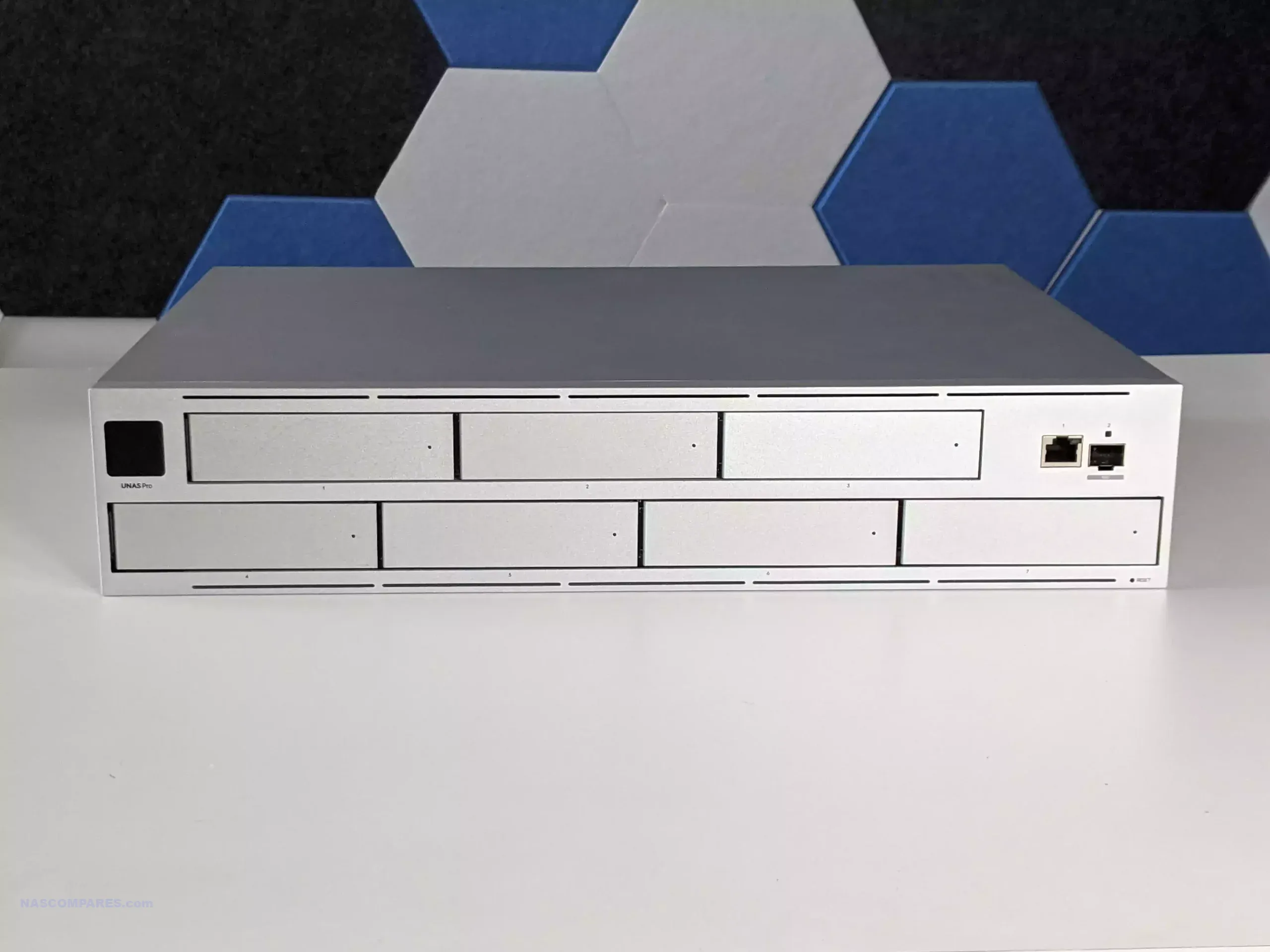
Within UniFi, the UNAS line is positioned as a straightforward, storage focused, turnkey NAS platform that fits into the same single pane management style as the rest of the ecosystem, prioritizing file storage, sharing, snapshots, and backup workflows over broader server style expandability. In this 3 way comparison, the UNAS Pro (7 bay, Nov 2024), UNAS Pro 8 (8 bay, Nov 2025), and UNAS Pro 4 (4 bay, Feb 2026) look similar on the surface, but they target different deployment constraints and ceiling limits in rack depth, storage scalability, cache options, memory headroom, network redundancy, and power design. Two of the units (Pro 4 and Pro 8) add M.2 NVMe cache support and higher availability 10GbE networking than the original Pro, while the Pro 8 also pushes furthest on RAM capacity and physical redundancy expectations for a rack install.
| UNAS Pro (7 Bay, $499)
|
UNAS Pro 4 (4 Bay, $499)
|
UNAS Pro 8 (8 Bay, $799)
|
|---|
| BUY |  |
 |
 |
|---|---|---|---|
 |
|
|
|
 |
|
|
|
| Pro | More 3.5 inch bays than UNAS Pro 4 at the same $499 price (7 vs 4) | 1U chassis (smallest height) | Most total bays (8) plus 2x NVMe cache slots |
| Shallower chassis depth than both (325 mm), easier fit in short depth racks | 2x 10G SFP+ instead of 1x 10G SFP+ on UNAS Pro | 16 GB memory (double UNAS Pro and UNAS Pro 4) | |
| Front 10G SFP+ and 1G RJ45 placement can suit front of rack cabling | NVMe cache support (absent on UNAS Pro) | 3 total 10 GbE ports (2x 10G SFP+ plus 10 GbE RJ45), most flexible networking | |
| 1.3 inch touchscreen (absent on UNAS Pro 4 and UNAS Pro 8) | Longer CPU clock than UNAS Pro (2.0 GHz vs 1.7 GHz) | Hot swappable power modules (only model with this design) | |
| Con | No NVMe cache support (both UNAS Pro 4 and UNAS Pro 8 have it) | Lowest bay ceiling and no official expansion path, so it fills up fastest | Highest price up front ($799) |
| Only 1x 10G SFP+ (UNAS Pro 4 has 2x, UNAS Pro 8 has 2x plus 10 GbE RJ45) | Deeper chassis than UNAS Pro (400 mm vs 325 mm) | Deepest chassis (480 mm), most demanding fit in shallow racks | |
| Lower CPU clock than UNAS Pro 4 and UNAS Pro 8 (1.7 GHz vs 2.0 GHz) | No hot swap PSU design (UNAS Pro 8 is the only one with hot swappable power modules) | No touchscreen (UNAS Pro includes a front touchscreen) | |
| Same 8 GB memory as UNAS Pro 4 and less than UNAS Pro 8 (16 GB) | Same 8 GB memory as UNAS Pro and less than UNAS Pro 8 (16 GB) | Higher power ceiling and max power consumption than the other 2 (250 W max) |
At the same time, the lineup is notable for pricing that stays lower than many established rackmount NAS competitors at comparable connectivity, with both the UNAS Pro and UNAS Pro 4 landing at $499, and the UNAS Pro 8 stepping up to $799 for more bays, more memory, and more network paths. The practical decision usually comes down to whether the priority is maximum bays at the lowest buy in, a tighter 1U footprint with newer cache and dual 10GbE links, or a higher ceiling platform with the strongest long term headroom in bays, RAM, and connectivity for users who expect growth rather than a fixed storage target.

IMPORTANT – It is worth highlighting that all three UNAS solutions include the same software and updates in the UniFi Drive and NAS OS services. Alongside the client tools (eg Identity Endpoint and File/Folder services remotely) and can be easily integrated into an existing Ubiquiti/UniFi network landscape. HOWEVER crucially, it is not ‘mandotory’ – you can run any of the UNAS Pro systems completely ‘offline’ (i.e LAN only) and there is no need to already have an existing UniFi network (existing 3rd party network landscapes work perfectly fine) and you also do not need to use/register any kind of UI.com/Ubiquiti account to setup the device.

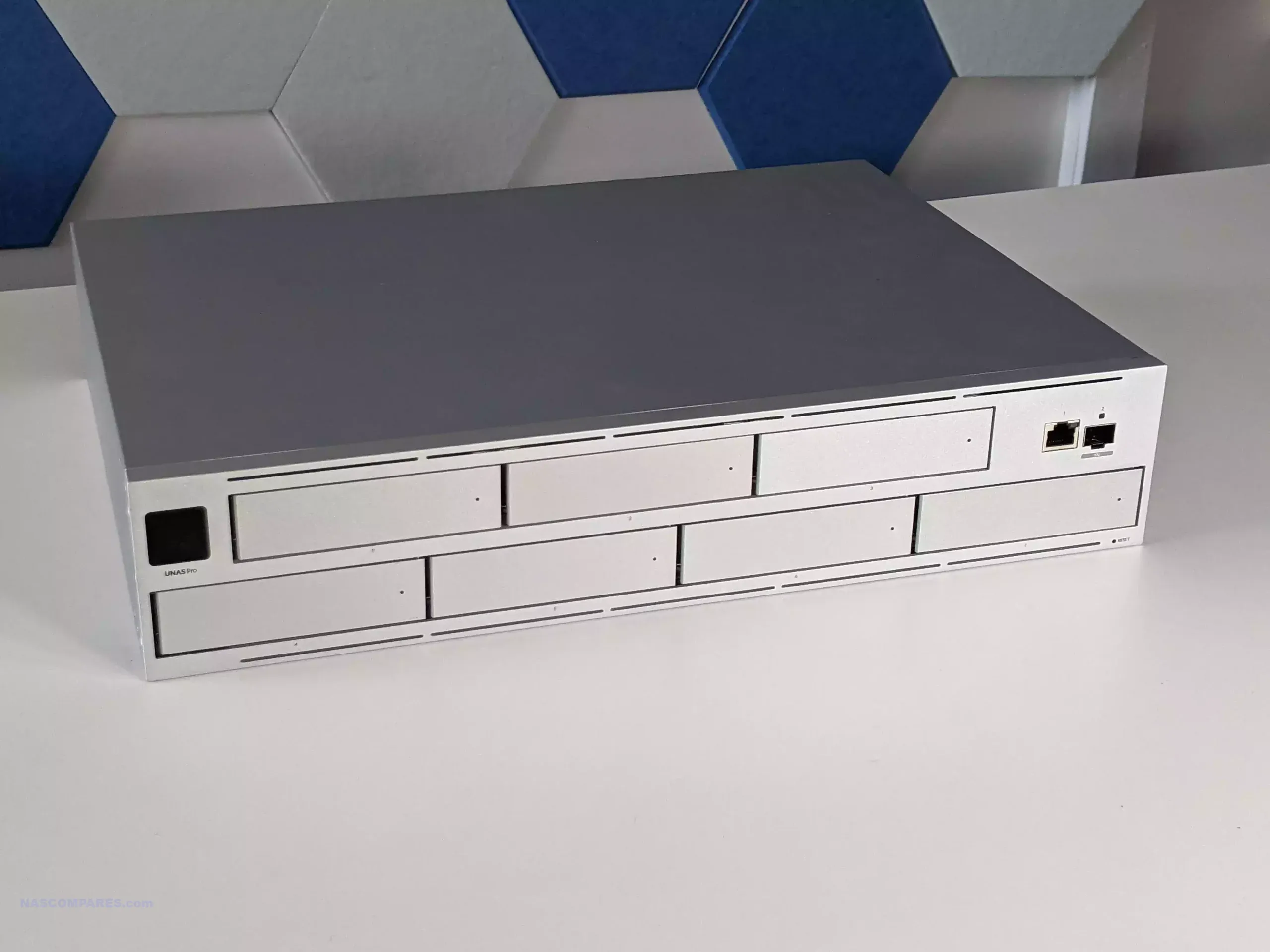
At a chassis level, the lineup splits into 2U and 1U designs, and that difference shapes how each unit fits into smaller racks and shallow cabinets.

The UNAS Pro is the shortest depth of the 3, while the UNAS Pro 4 and UNAS Pro 8 extend further back, which matters once you account for cable bend radius and rear clearance.

For compact wall racks and shorter cabinets, the older UNAS Pro tends to be easier to accommodate purely on physical depth, even before you consider anything about performance or features.
| UNAS PRO 8 480MM DEPTH
|
UNAS PRO 325MM DEPTH
|
| UNAS PRO 4 400MM DEPTH
|
DON’T FORGET RAILS!!!
|
The UNAS Pro also stands apart on the front panel experience, because it includes a 1.3″ touchscreen that can surface live status information without needing to log into the UI. That is not present on the UNAS Pro 4 or UNAS Pro 8, which lean into a more conventional rack appliance faceplate focused on bay access and basic indicators. In day to day use, the screen is mainly a convenience feature for quick checks and basic local interaction, rather than something that changes how the system is deployed.
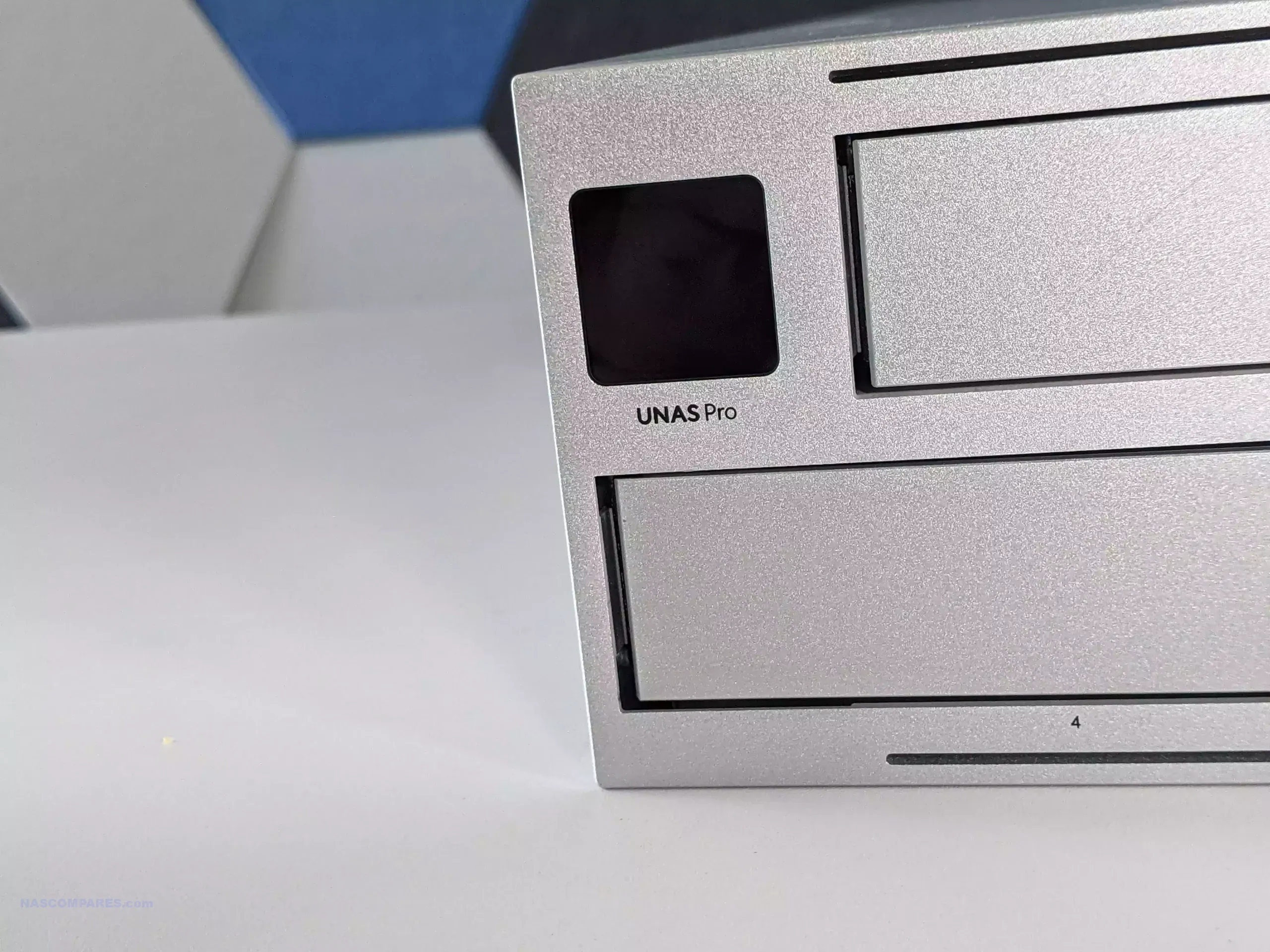
Another practical design difference is port placement philosophy. The UNAS Pro places its primary network connectivity on the front, while the UNAS Pro 4 and UNAS Pro 8 move connectivity to the rear, matching the typical layout most rackmount NAS systems follow. Front facing ports can reduce visible cabling in front of a rack and shorten patch runs in some UniFi heavy layouts, but rear mounted ports are generally easier to route cleanly in deeper cabinets with rear cable management.
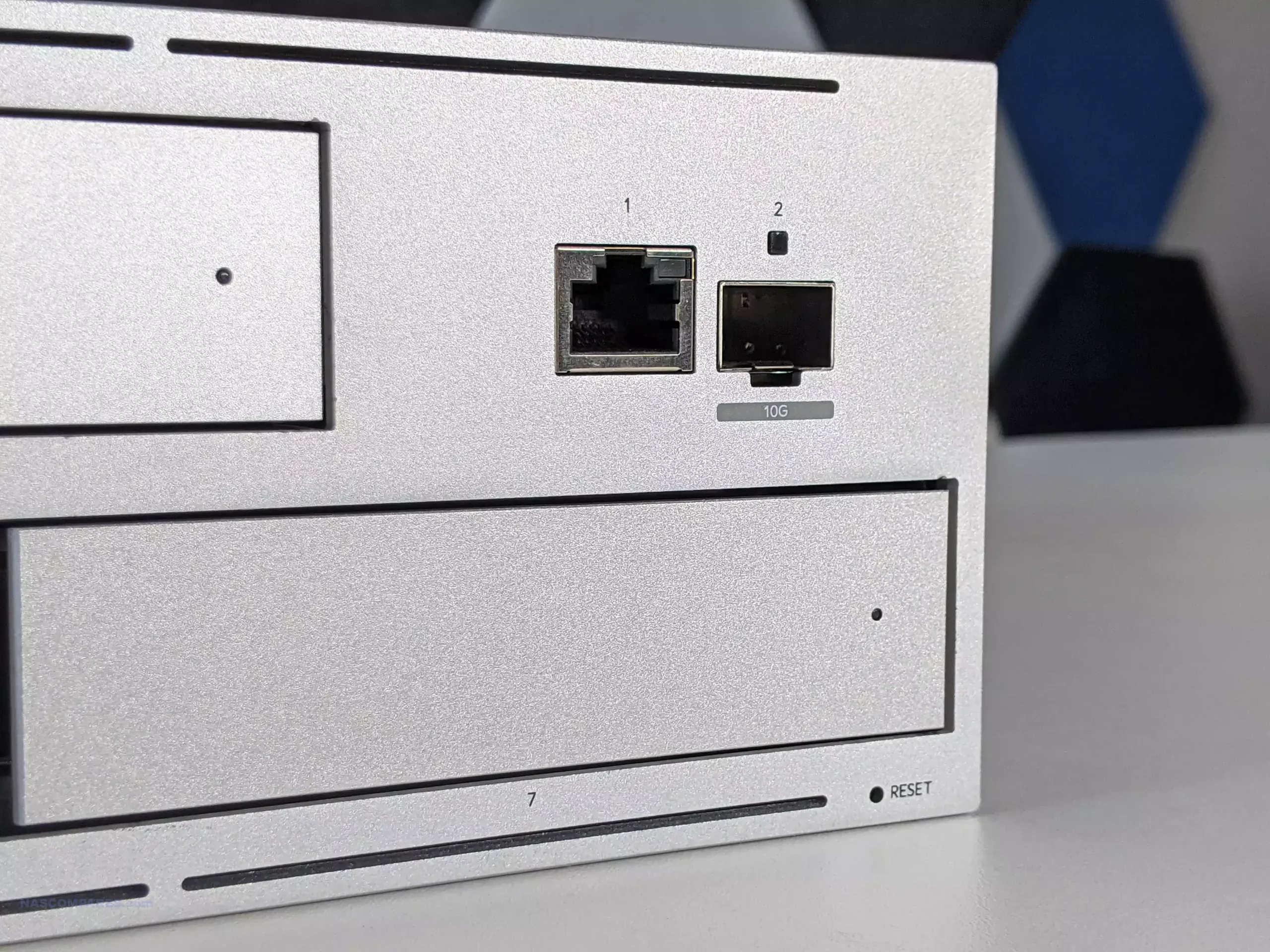
Power implementation also affects the physical serviceability profile of each unit. The UNAS Pro 8 uses hot swappable power modules, which changes how you handle failure or planned maintenance compared with the fixed internal power approach used by the UNAS Pro and UNAS Pro 4.
 |
 |
 |
|
All 3 use a steel enclosure and ship as purpose built rack devices rather than desktop conversions, but the UNAS Pro 8 is the one that most closely matches what many buyers expect from a higher end rack appliance in terms of field replacement for key physical components.

The most obvious storage difference is the bay count and what that does to capacity planning. The UNAS Pro provides 7 front accessible 2.5 inch or 3.5 inch bays in a 2U chassis, the UNAS Pro 4 offers 4 bays in a 1U chassis, and the UNAS Pro 8 increases that to 8 bays in 2U. If you expect to grow into larger pools over time, the 7 bay and 8 bay models give more headroom before you are forced into drive replacements, a second NAS, or a new storage tier. With no official expansion chassis support referenced here, the physical bay count is effectively the ceiling for each system.
 |
 |
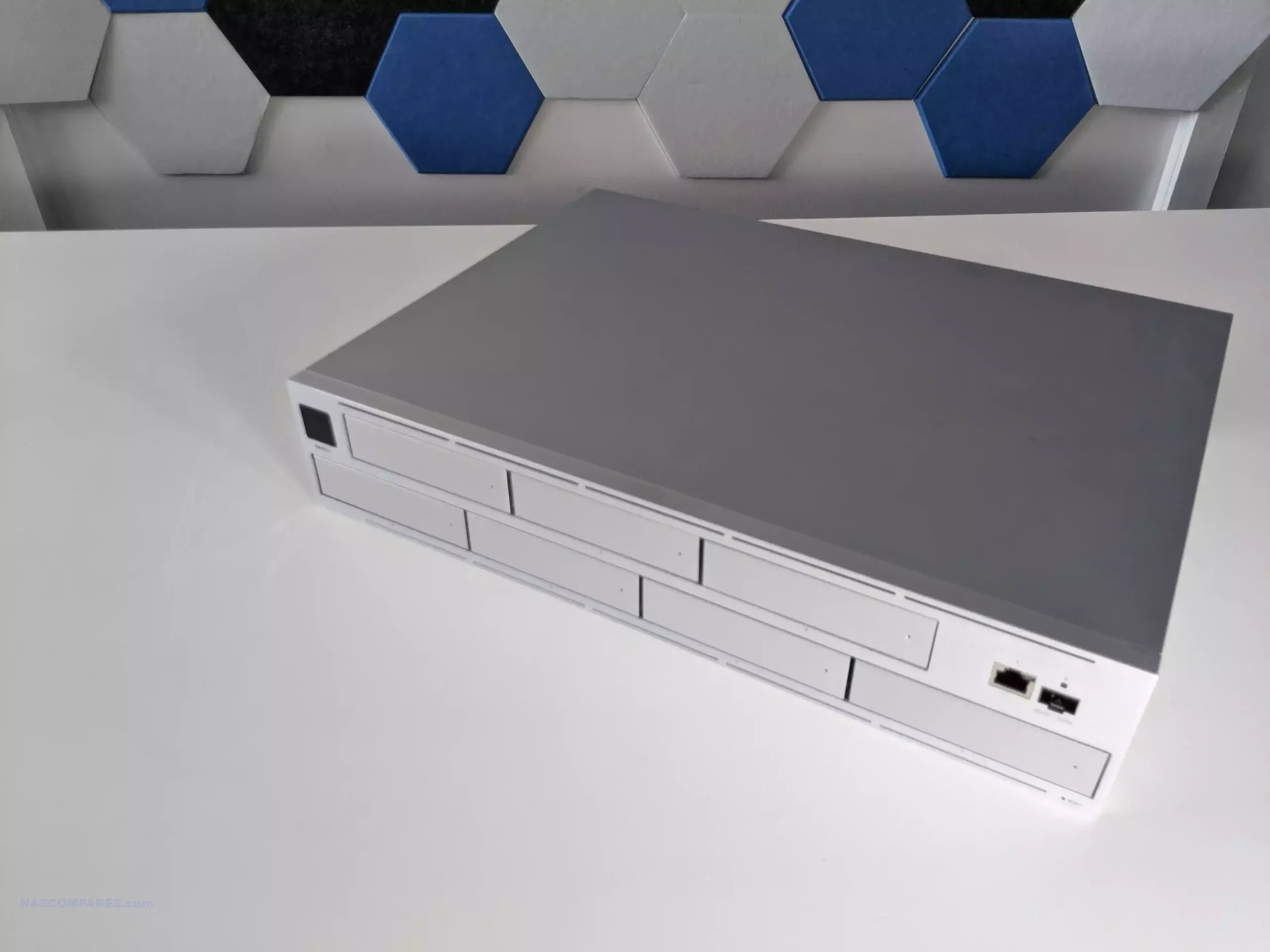 |
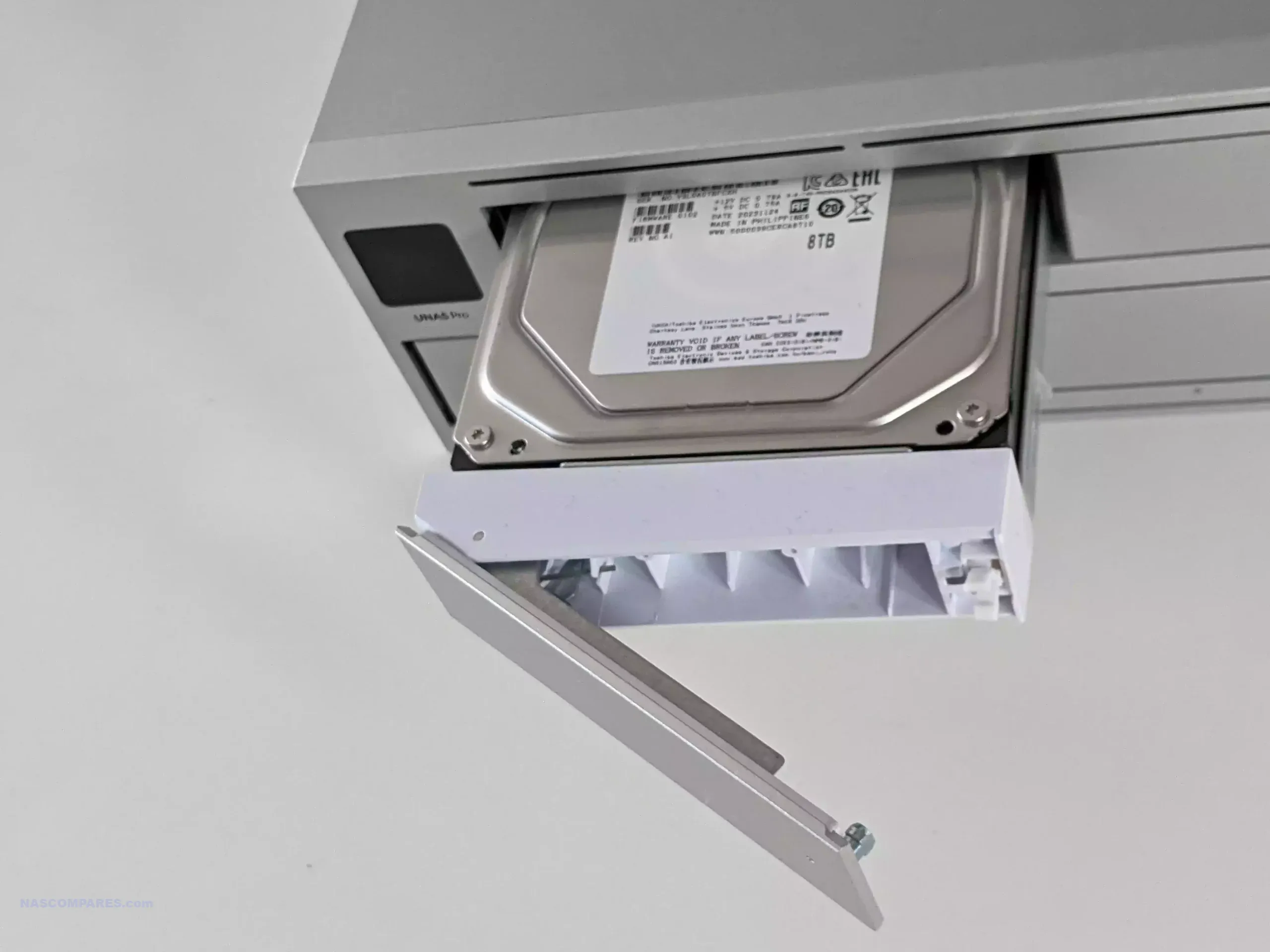 |
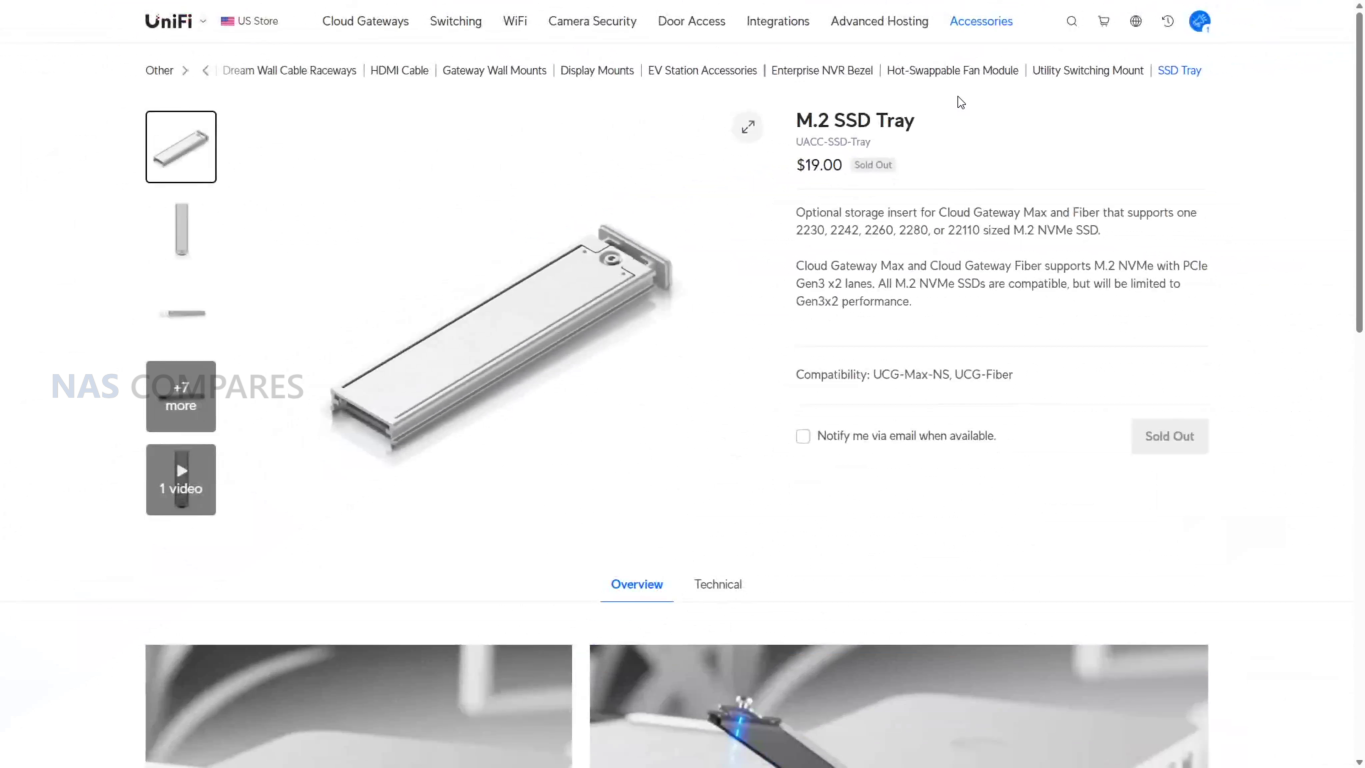
The UNAS Pro 4 and UNAS Pro 8 add 2 M.2 NVMe slots intended for SSD caching, while the UNAS Pro does not include NVMe slots. This changes how you can approach mixed workloads, because cache can reduce latency for repeated small file access and help smooth bursts of writes, depending on how the platform applies caching. It does not change the underlying reality that the main capacity tier is still the SATA bay set, but it gives the Pro 4 and Pro 8 a path to improve responsiveness for specific access patterns without committing to full SSD storage across all bays.
 |
 |
 |
 |
RAID flexibility also varies, not in the list of RAID levels available, but in how storage can be organized. All 3 units support RAID 5, RAID 6, and RAID 10, but the UNAS Pro 4 is listed as supporting a single RAID group, while the UNAS Pro and UNAS Pro 8 are listed with multiple RAID groups. In practice, the single group limitation matters if you prefer separating workloads or isolating different retention policies into distinct pools, rather than placing everything into 1 volume. On the larger models, multiple groups give more options for structuring storage around different priorities, such as performance versus redundancy, or shared storage versus dedicated project space.
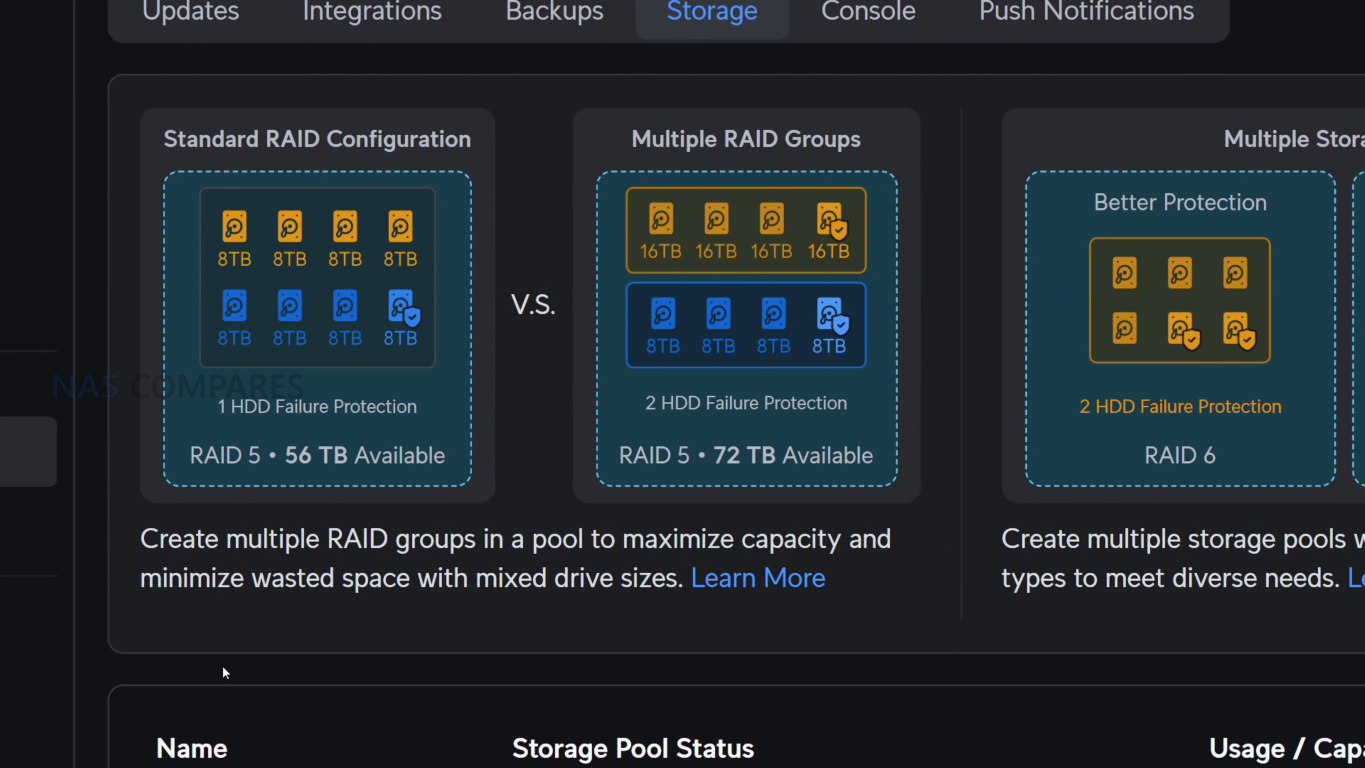
Operational features tied to storage protection are also not identical across the range. Hot spare support is listed on the UNAS Pro and UNAS Pro 8, but not on the UNAS Pro 4, which affects how you plan for unattended recovery after a drive failure. All 3 support snapshots, file encryption, share links, Time Machine backup, and cloud and network backup targets, which makes baseline data protection and recovery workflows broadly consistent regardless of bay count.
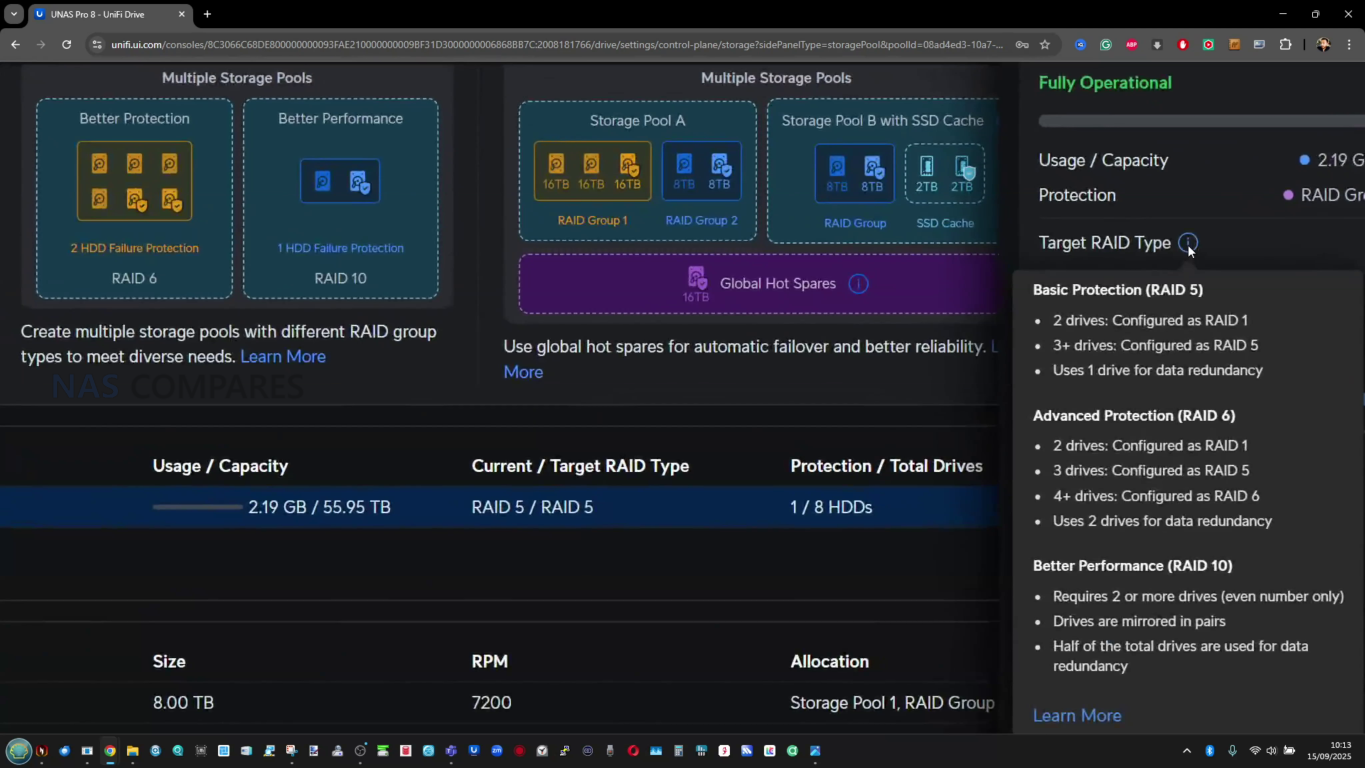
The larger differentiation is therefore less about whether core protection features exist and more about how much flexibility you have in pool layout and drive management within the limits of each chassis.
| Storage Feature | UNAS Pro
|
UNAS Pro 4
|
UNAS Pro 8
|
|---|---|---|---|
| Form factor | 2U rack | 1U rack | 2U rack |
| SATA bays | 7x 2.5/3.5 inch | 4x 2.5/3.5 inch | 8x 2.5/3.5 inch |
| M.2 NVMe slots | 0 | 2 | 2 |
| SSD cache support | No | Yes | Yes |
| Max NVMe capacity supported | N/A | 4 TiB | 4 TiB |
| RAID types listed | RAID 5, RAID 6, RAID 10 | RAID 5, RAID 6, RAID 10 | RAID 5, RAID 6, RAID 10 |
| RAID group support | Multiple | Single | Multiple |
| Hot spare support | Yes | No (not listed) | Yes |
| Snapshots | Yes | Yes | Yes |
| File encryption | Yes | Yes | Yes |
All 3 systems are built around a quad core ARM Cortex A57 platform, but they are not configured identically. The UNAS Pro runs the Cortex A57 at 1.7 GHz, while the UNAS Pro 4 and UNAS Pro 8 are listed at 2.0 GHz. In day to day use, this tends to show up less as a dramatic jump in peak throughput and more as extra headroom when the system is handling several background jobs at once, such as indexing, snapshots, and multi user access, while still servicing file activity. The architecture choice is aligned with lower draw compared with typical x86 NAS hardware, but it also sets a ceiling on heavier compute workloads that some buyers associate with higher end NAS platforms.Memory is where the split is clearer. The UNAS Pro and UNAS Pro 4 ship with 8 GB, while the UNAS Pro 8 steps up to 16 GB. The practical impact is less about basic file sharing and more about how much concurrent activity the system can absorb before responsiveness drops, particularly when you add more users, larger file operations, more snapshot activity, and cache related behavior on models that support it. None of these systems are positioned as memory expandable platforms in the provided specifications, so the installed capacity is effectively the long term limit.
 |
 |
 |
 |
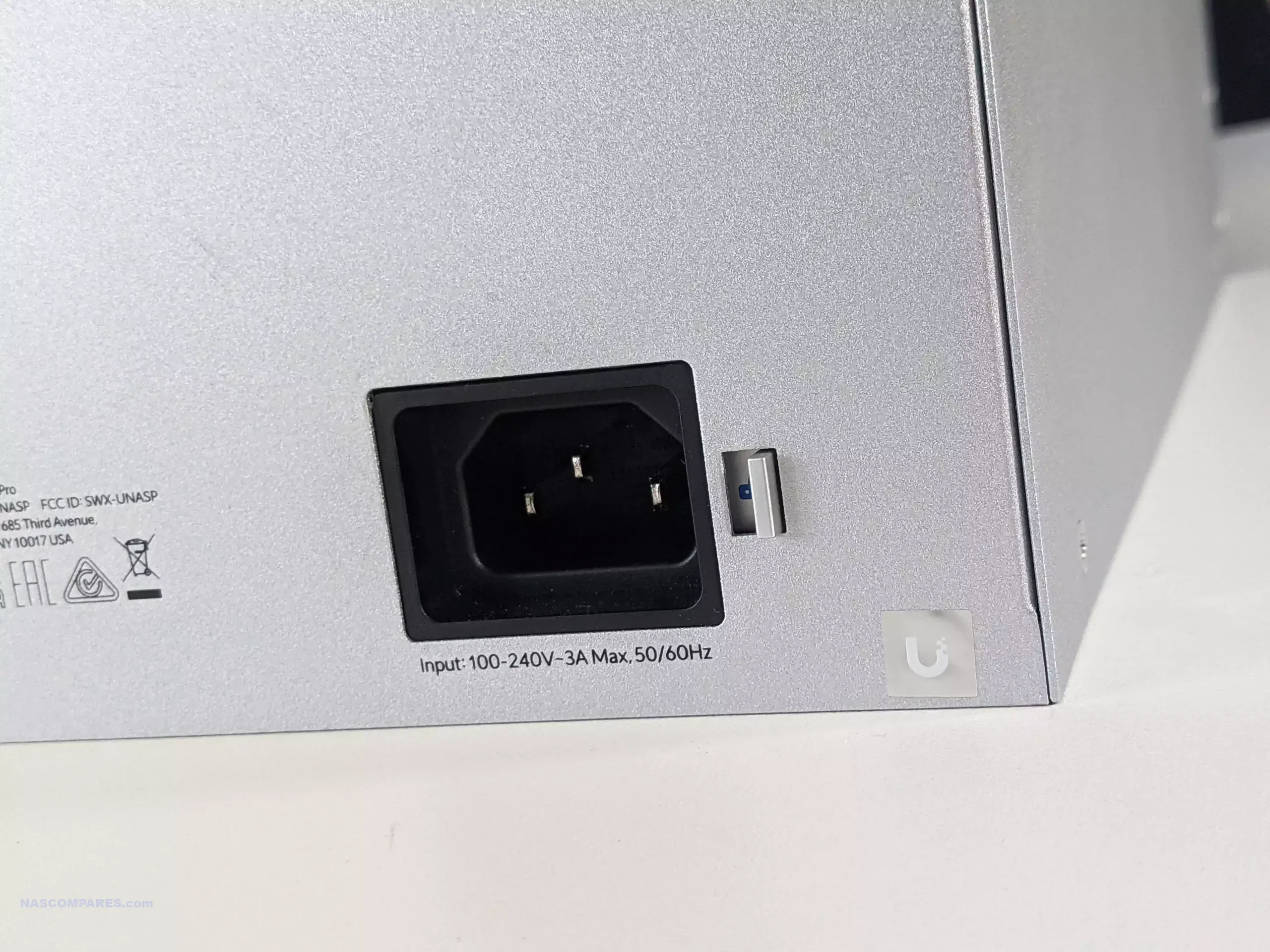
Power delivery and serviceability differ meaningfully between the range. The UNAS Pro and UNAS Pro 4 use internal AC to DC power supplies with an additional USP RPS DC input for redundancy, and their overall platform power limits are lower, matching their smaller scale.
 |
 |
The UNAS Pro 8 uses hot swappable power modules and is designed to support more demanding configurations, reflected in the higher maximum power consumption and the larger drive power budget. This does not automatically translate into higher idle power, but it does indicate how much overhead the chassis is designed to tolerate when fully populated and under sustained activity.
| Internal Hardware Detail | UNAS Pro
|
UNAS Pro 4
|
UNAS Pro 8
|
|---|---|---|---|
| Processor | Quad Core ARM Cortex A57 | Quad Core ARM Cortex A57 | Quad Core ARM Cortex A57 |
| CPU clock | 1.7 GHz | 2.0 GHz | 2.0 GHz |
| Memory | 8 GB | 8 GB | 16 GB |
| Power supply design | Internal AC DC, 200W | Internal AC DC, 150W | 2x hot swappable AC DC modules, 550W |
| Power inputs | 1x AC, 1x USP RPS DC input | 1x AC, 1x USP RPS DC input | 2x AC inputs via hot swap modules |
| Max power consumption | 160W | 150W | 250W |
| Max drive power budget | 135W | 125W | 225W |
| Management and setup radios | Bluetooth 4.1 | Bluetooth 4.1 | Bluetooth 4.1 |
| Display | 1.3 inch touchscreen | None listed | None listed |
| Operating environment | -5 to 40 C, 5 to 95 percent noncondensing | -5 to 40 C, 5 to 95 percent noncondensing | -5 to 40 C, 5 to 95 percent noncondensing |
| Weight | 9.2 kg without brackets, 9.5 kg with brackets | 6.7 kg | 11.5 kg |
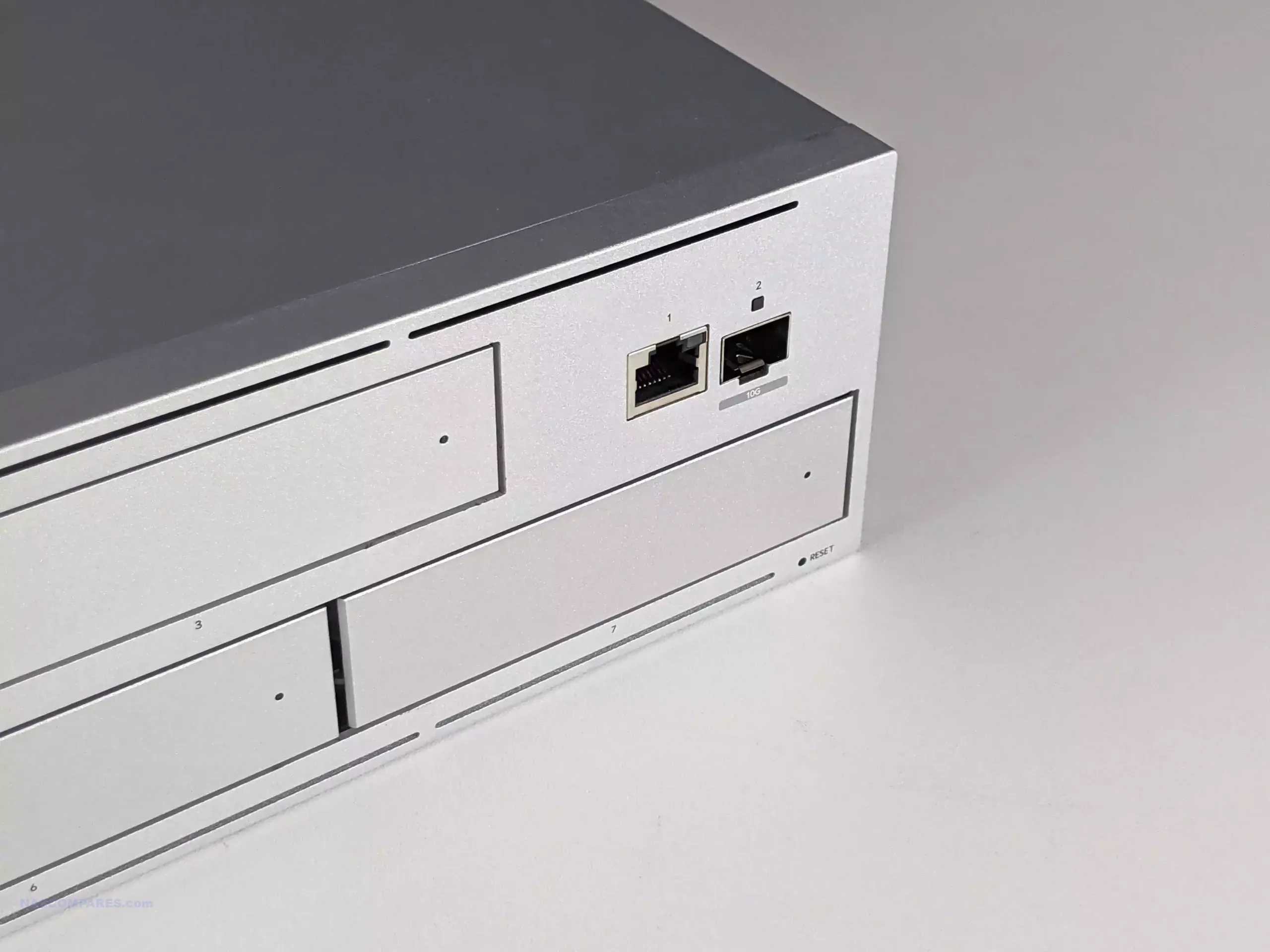
Across the 3 systems, the shared theme is 10 GbE as the primary path for file access, but the implementation differs. The UNAS Pro provides a single 10G SFP+ port plus a 1 GbE RJ45 port, which typically ends up used either for management traffic or as a slower access fallback. The UNAS Pro 4 shifts to a dual 10G SFP+ layout, giving more flexibility for link aggregation or failover planning, even if the practical benefit depends on the storage configuration and client support. The UNAS Pro 8 goes further with 2x 10G SFP+ and adds a 10 GbE RJ45 port that supports multi speed negotiation, which makes it easier to drop into networks that are already built around copper 10 GbE.
 |
 |
Port placement is also part of the decision, because the UNAS Pro uses front mounted networking, while the UNAS Pro 4 and UNAS Pro 8 keep network connections on the rear. Front mounted ports can simplify short patch runs in racks that are set up around front facing switching, while rear mounted ports follow the more common rack NAS convention and can be cleaner in racks that route cabling at the back. None of the 3 is positioned as a platform for network expansion cards, so what you buy is the long term connectivity ceiling.
 |
 |
In day to day operation, the multi port models are mainly about resiliency and network design options rather than guaranteeing linear scaling for a single user. You can plan for redundancy across switches, use bonding where your environment supports it, or segment traffic patterns in a more controlled way.
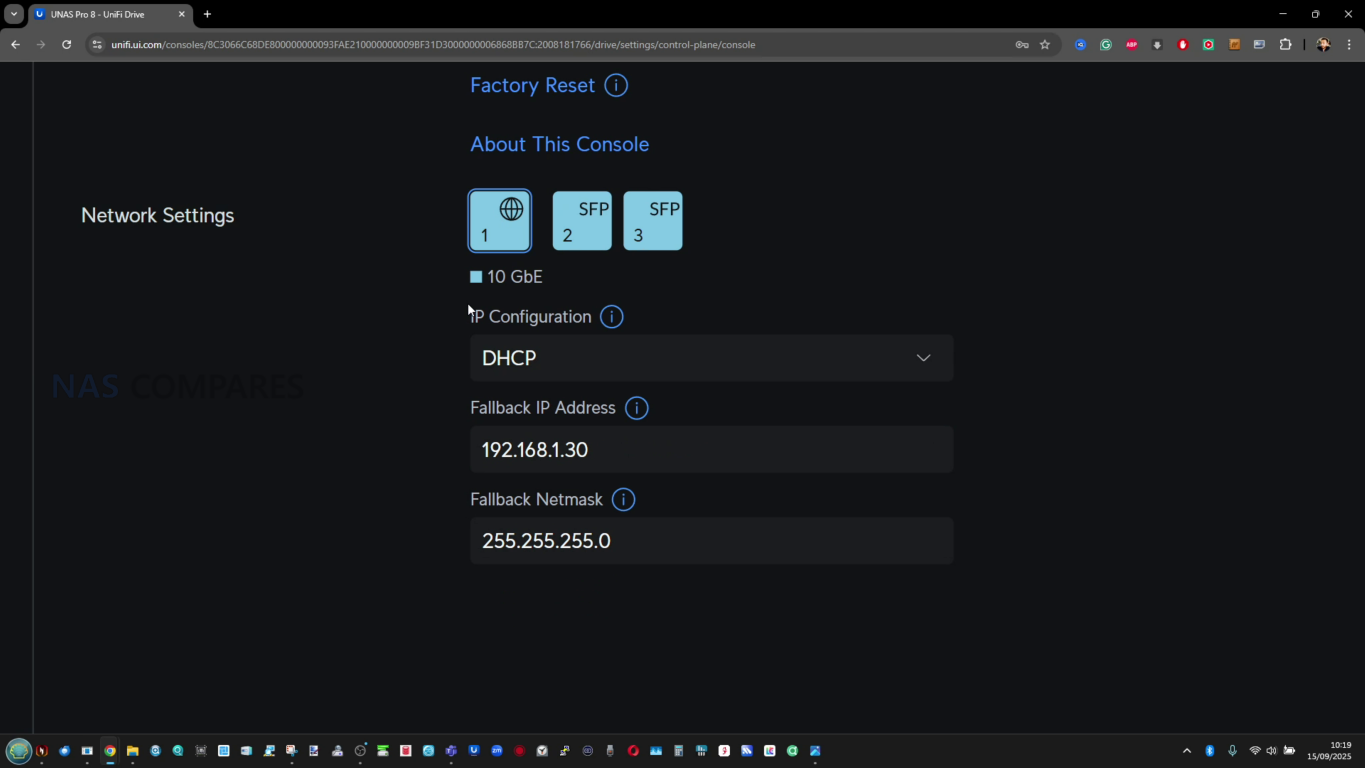
The UNAS Pro 8 is also the only model here with 10 GbE available on both SFP+ and RJ45 in the base hardware, which reduces the need for media converters or additional transceiver planning if your network is not SFP+ centric.
| Connectivity | UNAS Pro
|
UNAS Pro 4
|
UNAS Pro 8
|
|---|---|---|---|
| 10 GbE SFP+ | 1 (10G/1G) | 2 (10G only) | 2 (10G only) |
| 10 GbE RJ45 | 0 | 0 | 1 (10G/5G/2.5G/1G/100M) |
| 1 GbE RJ45 | 1 (1G/100M/10M) | 1 (1G/100M/10M) | 0 |
| Total high speed 10G ports | 1 | 2 | 3 |
| Network port location | Front | Rear | Rear |
At list pricing, the UNAS Pro and UNAS Pro 4 sit at the same $499, but they are selling different priorities. The UNAS Pro concentrates its value in raw bay count and a shorter 2U chassis, trading away NVMe cache support and additional 10 GbE links to keep the platform simple. The UNAS Pro 4 is priced the same while reducing the HDD bay count and moving to a 1U chassis, but it adds 2x NVMe cache slots and a second 10G SFP+ port, positioning it more as a “small but fast access” rack NAS rather than a capacity first box.

The UNAS Pro 8 steps up to $799 and is priced like a higher tier option, but the spec sheet shows where that uplift is meant to land: more drive bays than either $499 model, NVMe cache capability like the Pro 4, more total 10 GbE ports, and a jump to 16 GB memory. It is also the only one of the 3 with a 10 GbE RJ45 port alongside SFP+, which can reduce friction in mixed copper and fiber environments. If the goal is to keep the same platform longer term, the Pro 8 is the only one here with both the capacity headroom and the memory ceiling to match it.

Using the simplified “price per bay” and “price per element” approach, the headline result is that the Pro 8 looks strongest once you count all the included hardware features rather than only the number of drive bays. The UNAS Pro has the lowest cost per bay because it is a 7 bay system at the same price as the 4 bay model, but the Pro 4 catches up when the NVMe slots and dual 10 GbE are treated as part of the value calculation. The Pro 8 is not the cheapest upfront, but it ends up close to the Pro 4 on cost per bay and is the lowest on cost per element because it stacks more of the “platform” features in one chassis.
| Model | Price | Drive bays counted for price per bay | Price per bay | Elements counted | Price per element |
|---|---|---|---|---|---|
| UNAS Pro 4 | $499 | 4x SATA + 2x M.2 | $83 | 8 GB RAM + 4+2 bays + 2x 10 GbE | $14.60 |
| UNAS Pro | $499 | 7x SATA | $72 | 8 GB RAM + 7 bays + 1x 10 GbE | $22.60 |
| UNAS Pro 8 | $799 | 8x SATA + 2x M.2 | $79 | 16 GB RAM + 8+2 bays + 3x 10 GbE | $14.20 |
The UNAS Pro 4, UNAS Pro, and UNAS Pro 8 are close enough in naming to look like simple capacity steps, but they are positioned more like 3 different takes on the same UniFi Drive appliance idea. The UNAS Pro is the most capacity oriented at $499, giving 7 bays in a shorter depth 2U chassis with a built in 1.3 inch touchscreen and a straightforward port layout that suits some front of rack workflows. The UNAS Pro 4 shifts the emphasis away from bay count and toward “newer platform features” at the same $499 price, combining a 1U form factor with 2x 10G SFP+ and 2x NVMe cache slots, at the cost of a deeper chassis and fewer total drive bays. The UNAS Pro 8 is the most complete hardware package in the lineup, adding more bays, NVMe cache, more total 10 GbE connectivity including 10 GbE RJ45, and 16 GB memory, while also being the only one of the 3 to use hot swappable power modules. None of the 3 supports an official expansion shelf approach, so the bay count you buy on day 1 is effectively the long term ceiling unless you plan a separate NAS later.

Choosing between them mostly comes down to which ceiling matters first in your deployment: total bays, total network options, or overall platform headroom. If you want the most bays at $499 and the chassis depth is a priority, the UNAS Pro remains the obvious pick, with the tradeoffs being no NVMe cache path and a simpler network layout than the newer units. If you want the $499 option that aligns most with modern expectations for a small rack NAS, the UNAS Pro 4 has the cleanest argument, because dual 10G and NVMe cache can matter more than extra bays in smaller, faster working sets, even if those cache slots are not usable as standalone storage pools. If you are planning for longer retention cycles, heavier multi user access, or you simply want the most complete feature set in a single chassis, the UNAS Pro 8 is the one that most clearly justifies its higher price, particularly once memory, network flexibility, and the power module design are considered together. The main limitation across the lineup is that the ARM platform and fixed memory approach sets expectations about the long term performance ceiling, but within that constraint, the decision is primarily about how you want the hardware budget divided between capacity, connectivity, and overall platform resources.
| UNAS Pro (7 Bay, $499)
|
UNAS Pro 4 (4 Bay, $499)
|
UNAS Pro 8 (8 Bay, $799)
|
|
|---|---|---|---|
| BUY | |
|
|
| Pros | More 3.5 inch bays than UNAS Pro 4 at the same $499 price (7 vs 4) | 1U chassis (smallest height) | Most total bays (8) plus 2x NVMe cache slots |
| Shallower chassis depth than both (325 mm), easier fit in short depth racks | 2x 10G SFP+ instead of 1x 10G SFP+ on UNAS Pro | 16 GB memory (double UNAS Pro and UNAS Pro 4) | |
| Front 10G SFP+ and 1G RJ45 placement can suit front of rack cabling | NVMe cache support (absent on UNAS Pro) | 3 total 10 GbE ports (2x 10G SFP+ plus 10 GbE RJ45), most flexible networking | |
| 1.3 inch touchscreen (absent on UNAS Pro 4 and UNAS Pro 8) | Longer CPU clock than UNAS Pro (2.0 GHz vs 1.7 GHz) | Hot swappable power modules (only model with this design) | |
| Cons | No NVMe cache support (both UNAS Pro 4 and UNAS Pro 8 have it) | Lowest bay ceiling and no official expansion path, so it fills up fastest | Highest price up front ($799) |
| Only 1x 10G SFP+ (UNAS Pro 4 has 2x, UNAS Pro 8 has 2x plus 10 GbE RJ45) | Deeper chassis than UNAS Pro (400 mm vs 325 mm) | Deepest chassis (480 mm), most demanding fit in shallow racks | |
| Lower CPU clock than UNAS Pro 4 and UNAS Pro 8 (1.7 GHz vs 2.0 GHz) | No hot swap PSU design (UNAS Pro 8 is the only one with hot swappable power modules) | No touchscreen (UNAS Pro includes a front touchscreen) | |
| Same 8 GB memory as UNAS Pro 4 and less than UNAS Pro 8 (16 GB) | Same 8 GB memory as UNAS Pro and less than UNAS Pro 8 (16 GB) | Higher power ceiling and max power consumption than the other 2 (250 W max) |
SUBSCRIBE TO OUR NEWSLETTER Join Inner Circle Subscribe
This description contains links to Amazon. These links will take you to some of the products mentioned in today's content. As an Amazon Associate, I earn from qualifying purchases. Visit the NASCompares Deal Finder to find the best place to buy this device in your region, based on Service, Support and Reputation - Just Search for your NAS Drive in the Box Below
Need Help?
Where possible (and where appropriate) please provide as much information about your requirements, as then I can arrange the best answer and solution to your needs. Do not worry about your e-mail address being required, it will NOT be used in a mailing list and will NOT be used in any way other than to respond to your enquiry.
[contact-form-7]
TRY CHAT
Terms and Conditions
Ko-fi or old school Paypal. Thanks!To find out more about how to support this advice service check HEREIf you need to fix or configure a NAS, check Fiver
Have you thought about helping others with your knowledge? Find Instructions Here
|
|
|
Over the last 18-24 months, Ubiquiti has shifted the ‘UniFi’ label from being a networking and bridging ecosystem into a wider storage hardware and software platform that now includes a steadily expanding NAS line under UniFi Drive. Early UniFi UNAS storage products leaned heavily on simple file sharing and basic backup, but the pace of updates and the broader product rollout in 2025/2026 pushed the range closer to what small business buyers expect from an entry level NAS platform: clearer storage management, stronger snapshot and backup tooling, and tighter integration with the UniFi account and identity layer for remote access and user control (with the recent Drive 4.0 Update really uping their game considerably). The UniFi UNAS Pro 4 sits within that context as a compact 1U, 4 bay rack mount system designed mainly for file storage and sharing over SMB and NFS, rather than running third party applications, containers, or virtual machines. At $499, it is priced noticeably lower than many competing 1U rack NAS products at broadly comparable “headline” hardware, particularly where dual 10Gb networking and NVMe caching are concerned, which makes it hard to ignore if the goal is simple, high bandwidth storage in a rack footprint without moving into significantly higher spend.

The UniFi UNAS Pro 4 is a 1U, 4 bay rack mount NAS aimed at straightforward SMB and NFS file storage, and its main differentiator is value: at $499 it undercuts many comparable 1U rack units while still offering 2x 10Gb SFP+ plus a separate 1GbE management port, 4 hot swap bays for 3.5 inch or 2.5 inch drives, and 2 M.2 NVMe slots for read and write caching. In testing with 4 HDDs in RAID 5 over 10GbE, it delivered strong real-world file transfer results for a small SATA array, with synthetic benchmarks showing high peak throughput but some variability depending on the tool used, and the platform’s power draw and noise profile were heavily influenced by drive choice and fan mode, including very loud output if maximum cooling is forced. UniFi Drive covers the core fundamentals expected at this level, including snapshots, encrypted volumes, and a wide range of backup targets (NAS, SMB, and multiple cloud services, with Microsoft 365 direction evident in recent updates), but the interface still limits deeper tuning in places and the feature set remains focused on storage rather than apps. The main downsides are structural and easy to identify up front: NVMe can only be used for cache rather than storage pools, the NVMe carriers are an extra purchase, there are no USB ports for local copy tasks, the PSU is internal and not a hot swap module, and missing features like iSCSI, ECC, and RAM upgradability place a clear ceiling on more advanced workloads, though those trade-offs are broadly consistent with a $499 ‘turnkey’ NAS appliance in 2026 though and hard to criticise!
 BUILD QUALITY - 9/10
HARDWARE - 7/10PERFORMANCE - 7/10PRICE - 9/10VALUE - 10/10
BUILD QUALITY - 9/10
HARDWARE - 7/10PERFORMANCE - 7/10PRICE - 9/10VALUE - 10/10
8.4
PROS
Dual 10Gb SFP+ networking is unusual in a 1U 4 bay NAS at this price point + failover will not result in bandwidth throttleA separate 1GbE port is useful for management or fallback connectivity1U chassis with relatively short depth is easier to fit in smaller racks and cabinetsRails and rack hardware included, reducing extra setup cost and frictionUbiquiti and UniFi online/brand services are optional (i.e pure offline/LAN is possible)+ no need for a Ubiquiti/UniFi network setup to useNVMe read and write caching support can improve responsiveness in mixed workloadsUniFi Drive provides snapshots, encryption, and a broad set of backup targets (NAS, SMB, and multiple cloud providers)Setup and management are streamlined, especially for users already running UniFi infrastructureDrive 4.0 Update scales up the Business Utilities notably
CONS
NVMe is cache only, with no option to use M.2 drives as primary storage poolsNVMe trays or carriers are not included, adding extra cost and an extra purchase stepSingle PSU (no redundency) and non-slide removable SFX/ATX PSU (relies on propriatary UniFi Battery Backup rack module or external UPS)No NAS Expansion Support, so 4 HDDs are your limit
| Here are all the current UniFi NAS Solutions & Prices: |

You can buy the UniFi UNAS Pro 4 NAS via the link below – doing so will result in a small commission coming to me and Eddie at NASCompares, and allows us to keep doing what we do!

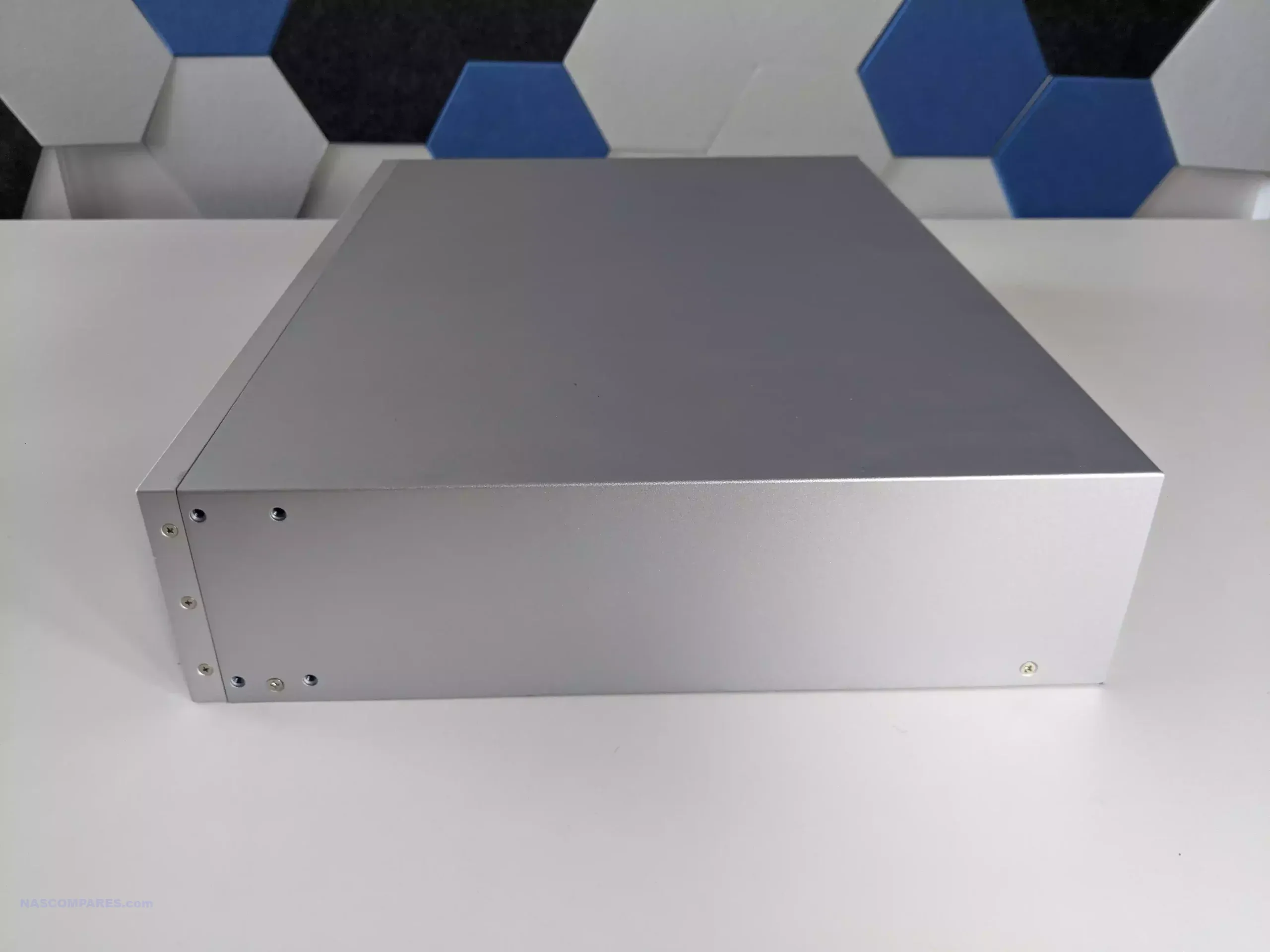
The UNAS Pro 4 uses a conventional 1U rack mount layout, with a plain, functional front panel and an all metal enclosure intended for permanent installation rather than desktop use. It ships with rails and rack handles, which removes the usual extra step of sourcing mounting hardware separately. The chassis depth is about 400 mm, so it is not in the “full depth server” category, and that helps in smaller cabinets where rear clearance and cable management space can be limited.
 |
 |
Across the front are 4 hot swap bays supporting both 3.5 inch and 2.5 inch SATA drives. The trays are set up for tool-less 3.5 inch HDD installation with a click-in fit, while 2.5 inch SSDs still require screws to secure them properly. Each bay has status lighting, and the front panel also provides system level indicators so you can identify basic state and drive activity at a glance without logging into the interface. The trays feel rigid and spring-loaded, but they are not lockable, which is a practical consideration if the unit is placed in a shared rack or anywhere physical access is not strictly controlled.
 |
 |
 |
 |
From a capacity and planning perspective, this system is defined by its fixed 4 bay layout. You can configure a conventional RAID group within those bays, but there is no built-in path to scale beyond the internal slots, and there is no supported external expansion shelf option to push the same chassis further later on. That means the decision on drive sizes and redundancy level matters upfront, because the ceiling is reached quickly compared with higher bay count rack units. In a small rack deployment, it also means the unit is either a compact standalone store or part of a broader multi-NAS approach rather than a single box that grows over time.

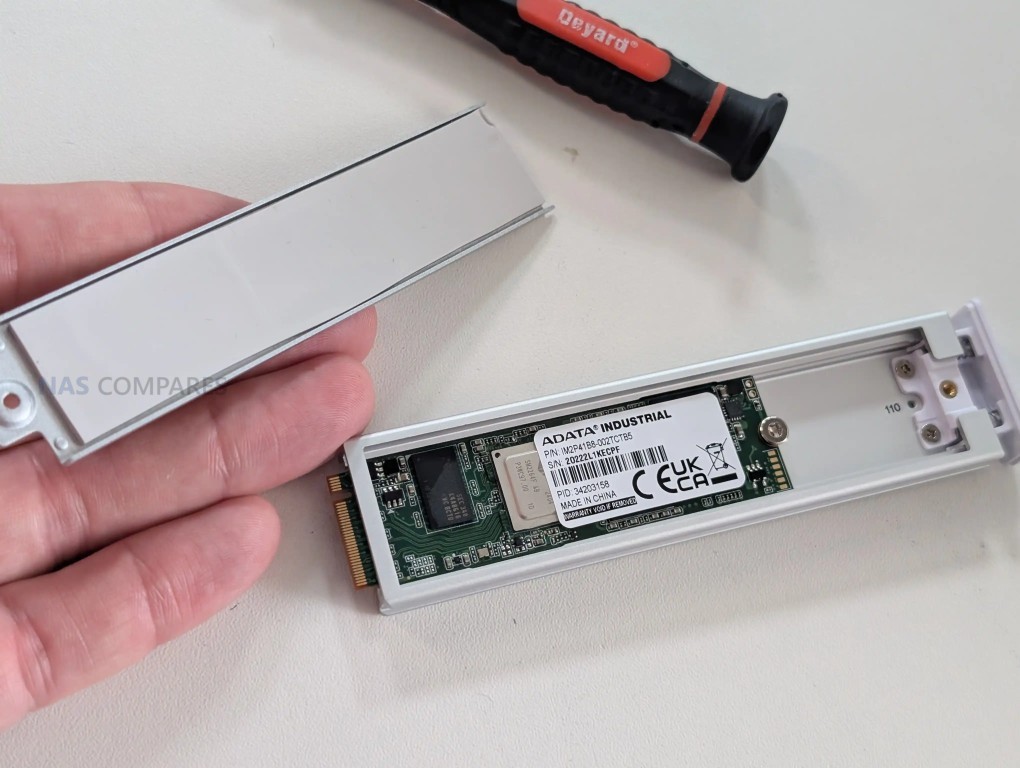
In addition to the SATA bays, the chassis supports 2 M.2 NVMe slots intended specifically for SSD caching. The caching model is designed to accelerate HDD-based storage by using SSDs as a performance layer, rather than allowing NVMe drives to become their own primary pool for general file storage. Practically, that positions the NVMe feature as a supplement for mixed workloads, such as improving responsiveness for frequently accessed data and smoothing write behavior, rather than a route to running the system as a small all flash NAS.
 |
 |
 |
|
A design detail that affects the storage experience is the physical NVMe mounting method. Instead of a simple screw-down slot on a board, the NVMe drives are installed via a tray or carrier mechanism, and that carrier is not included with the base unit. The carrier itself is neatly engineered with a clip-in style insertion and thermal padding, and it supports common M.2 lengths including 2280 and 22110, but requiring an additional part adds friction if caching is part of the plan from day 1. It is a small issue, but it is the kind of detail that can slow down an otherwise straightforward deployment.

The UNAS Pro 4 is built around a quad core ARM Cortex-A57 CPU clocked at 2.0 GHz and paired with 8 GB of memory, which sets expectations for the type of workloads it is designed to handle. This is not a platform aimed at heavyweight compute tasks, but for file services and scheduled backup activity it has enough headroom to keep the system responsive, particularly when multiple users are accessing shared folders and snapshots are being taken in the background.

The CPU choice also reflects a focus on predictable appliance behavior and lower overall platform complexity rather than maximum expandable performance.
 |
 |
 |
 |
Internally, the power system is a single 150 W unit mounted inside the chassis rather than a hot swap module, which influences servicing and downtime planning. If the PSU fails, replacement is more involved than swapping an external canister, and that is a meaningful difference compared with rack systems that use easily replaceable redundant modules.

The unit does, however, support UniFi’s USP-RPS DC input as an alternative redundancy method, which changes the redundancy approach from “dual PSU in the chassis” to “centralized redundant supply for multiple devices,” with different trade-offs in cost, cabling, and rack layout.
 |
|
A further internal design choice is how the system treats its software environment as a dedicated appliance rather than an OS sharing space with user storage. The system software runs on its own internal storage rather than living on the same disks that hold your data. In practical terms, that reduces the chance of the OS being affected by changes to the main array, and it can make maintenance tasks like drive replacement or pool rebuilds feel more self-contained, because the unit remains manageable even while the primary storage is under stress.

ARM-based NAS platforms typically bring some efficiency advantages, and this model follows that general pattern. The CPU class and memory configuration are aligned with lower baseline overhead than many x86 NAS designs, which can help keep idle draw and sustained power use in check relative to equivalent rack hardware, though drive choice still dominates the total. The trade-off is a lower performance ceiling compared with modern x86 systems for certain workloads, plus the usual limitations seen in this category: no practical RAM upgrade path, no ECC support, and fewer options for buyers who want to push beyond file services into heavier compute. At $499, those omissions are consistent with the target price bracket in 2026 rather than being unexpected corner cutting.

The rear connectivity is centered on 2x 10Gb SFP+ ports, and that is the defining hardware choice for this NAS in a 1U, 4 bay format. It allows the unit to be placed into a 10Gb environment without adapters, and it also opens up practical options beyond raw throughput, such as separating traffic types, connecting into different switches, or keeping a second path available for failover. The choice of SFP+ over 10GBase-T will suit users already running fiber or DAC links in a rack, but it can be less convenient for small setups built around copper RJ45.

Alongside the 10Gb ports is a separate 1GbE RJ45 port that can be used for management or for general connectivity in networks where 10Gb is not available everywhere. In a mixed UniFi environment, this is useful because it avoids tying basic onboarding and administration to a 10Gb port that might be better reserved for file traffic. It also gives a simple fallback path for access and troubleshooting if the 10Gb side is being reconfigured, moved between switches, or temporarily taken offline.
What is missing is just as relevant as what is included. There are no USB ports for quick ingest, offline copy tasks, or attaching temporary media, which some rack NAS platforms still provide for convenience even in 1U designs. Wireless is not a focus here, though Bluetooth is present for initial setup workflows, which fits the product’s “appliance onboarding” approach more than it does ongoing connectivity. The result is a port layout that prioritizes network-first storage and rack integration, while leaving out local expansion and quick-access I/O features that some users expect on a NAS.
However, (and I am sounding like a broken record at this point) at $499, these ports and connections are a notable degree more than most other turn-key NAS solutions from Synology, QNAP and even Terramaster (the more budget end of the NAS market already) are offering at under 500! So, what is presented here is a great value Day 1 solution in terms of base connectivity, but there is no denying that it might well feel the pinch in 5 years down the road when your storage is filling and your storage speeds begin to bottleneck vs your other equipment bandwidth.

Performance here needs to be framed around the physical limits of 4 SATA bays and the role of SSD caching. Even with dual 10Gb networking available, a 4 drive HDD array has a throughput ceiling that will be reached long before the network becomes the bottleneck in most single-client scenarios. The value of 10Gb in this context is less about hitting theoretical maximums and more about maintaining higher transfer rates consistently, handling multiple simultaneous users, and keeping latency lower when lots of smaller operations are happening alongside big file moves.
 |
 |
In testing with 4 HDDs in a RAID 5 configuration over a 10Gb link to a Windows 11 client, measured throughput landed in the range expected of a well-tuned 4 disk array. Using AJA with a repeated 1 GB test file, results sat around 680 to 730 MB/s for download and 520 to 600 MB/s for upload. A real-world Windows file transfer of 101 GB made up of 1,231 mixed files completed in 3 minutes and 57 seconds, which works out at an average of about 426 MB/s across the transfer, reflecting the usual drop from synthetic peak results when file variety and filesystem overhead are introduced.
 |
 |
Synthetic benchmarking results varied depending on the tool used, which is not unusual when caching behavior and test patterns differ. CrystalDiskMark with a 1 GB test file reported 353 MB/s read and 429 MB/s write in this run, with write coming out higher than read, which is atypical enough to treat as an outlier pending further retesting. ATTO produced stronger peak figures of 860 MB/s read and 570 MB/s write at the top end, which aligns more closely with the best-case behavior seen in sequential-focused tests on multi-drive arrays.
 |
 |
 |
 |
Noise, power draw, and thermal behavior were also measured because they affect rack placement and operating cost. With the fan profile set to auto and drives idle, noise sat around 42 to 44 dBA, dropping to roughly 38 to 40 dBA in the lowest RPM mode. Manually forcing maximum cooling pushed noise to around 56 to 57 dBA, and that level remained dominant even when drive activity increased, suggesting the cooling system prioritizes aggressive airflow when pushed. Power consumption with 4 enterprise HDDs measured roughly 49 to 50 W at idle and 60 to 62 W under activity, while swapping to 4 SATA SSDs reduced that to around 32 W during synchronization, underlining how drive choice can change the overall profile as much as the base platform.
 |
 |
 |
|
The UNAS Pro 4 runs UniFi Drive and is managed through the same style of web interface used across the broader UniFi portfolio, with system status, storage, backups, and user access presented in a single dashboard. For basic NAS use, the core functions are in place: creating storage pools, managing shares, enabling file services, and monitoring drive health. The interface is generally structured around doing common tasks quickly rather than exposing every possible tuning option, which keeps setup approachable but also limits deeper control in areas that some experienced NAS users look for.
|
 |
File access is centered on SMB and NFS, with browser-based file management available for basic upload, download, and folder navigation. The browser file manager covers the essentials and includes sharing link creation, but it is not positioned as a full productivity layer with advanced file handling or rich collaboration features. Remote access and identity-based access tools are tied into UniFi’s account and identity layer, and while local-only deployment is possible, the most integrated remote workflow is clearly designed around UniFi’s own services rather than third party remote networking tools.
 |
 |
Storage protection features include snapshot support, encrypted volumes, and configurable retention policies, which addresses most common rollback and recovery needs for file storage. Backup tooling covers several targets, including backing up to another UniFi NAS, to SMB targets, and to cloud services such as Google Drive, OneDrive, Dropbox, Amazon S3, Backblaze B2, and Wasabi, with Microsoft 365 backup support also part of the broader UniFi Drive direction. These features reflect the brand’s recent focus on strengthening data protection rather than expanding into application hosting or media server style functionality.
 |
 |
The gaps are consistent with the product’s current scope. There is no iSCSI target support, which limits certain virtualization and block-storage workflows, and there is no container or VM layer for running third party services directly on the NAS. NVMe usage remains limited to caching rather than becoming its own storage pool, which narrows the performance paths available if the goal is to build a small all-flash volume.
 |
 |
Client-side tooling is also still limited compared with platforms that provide a dedicated sync-and-pin application, with access leaning on standard network shares and UniFi’s identity-driven access methods rather than a full drive-style client experience.
 |
 |
The UNAS Pro 4 is a focused 1U, 4 bay NAS that prioritizes networked file storage and straightforward deployment over broader application support. The hardware choices align with that goal: dual 10Gb SFP+ connectivity, 4 hot swap bays, and optional NVMe caching provide a platform that can deliver strong file transfer rates for a small array, while the ARM-based design keeps the system positioned as an appliance rather than a general-purpose server. Its main compromises are largely structural rather than hidden: fixed bay count with no expansion path, NVMe limited to cache, no USB I/O for local tasks, and a single internal PSU rather than a hot swap redundant design.

At $499, the value case is driven by how much rack-oriented networking is included at a price that undercuts many comparable 1U NAS systems, especially those offering 10Gb as standard. The software is usable for core storage tasks and has clearly improved over the last year in areas like snapshots and backup targets, but it still leaves out features that matter to some buyers, including iSCSI and a fuller client sync experience. For users who want a compact rack NAS primarily for SMB or NFS file storage with modern backup and snapshot features, it fits its role well; for users expecting a broader NAS app ecosystem or more hardware serviceability, the limitations are likely to be decisive. But, as Delboy once said, at this price, “what do you want? Jam on it?”. This system is giving more at this price than anyone else right now and for its limitations, for many these will be paletable in the grand scheme of things. 1U 4Bay rackmounts has always been something that most turnkey NAS brands treat poorly, due to the low saturation point of four SATA drives and why waste more capable hardware on that? In that sense, Ubiquiti is really piling on the hardware here at this price – and I for one applaud this.
| Here are all the current UniFi NAS Solutions & Prices: |
You can buy the UniFi UNAS Pro 4 NAS via the link below – doing so will result in a small commission coming to me and Eddie at NASCompares, and allows us to keep doing what we do!
| PROs of the UniFi UNAS Pro 4 NAS | PROs of the UniFi UNAS Pro 4 NAS |
|
|
SUBSCRIBE TO OUR NEWSLETTER Join Inner Circle Subscribe
This description contains links to Amazon. These links will take you to some of the products mentioned in today's content. As an Amazon Associate, I earn from qualifying purchases. Visit the NASCompares Deal Finder to find the best place to buy this device in your region, based on Service, Support and Reputation - Just Search for your NAS Drive in the Box Below
Need Help?
Where possible (and where appropriate) please provide as much information about your requirements, as then I can arrange the best answer and solution to your needs. Do not worry about your e-mail address being required, it will NOT be used in a mailing list and will NOT be used in any way other than to respond to your enquiry.
[contact-form-7]
TRY CHAT
Terms and Conditions
Ko-fi or old school Paypal. Thanks!To find out more about how to support this advice service check HEREIf you need to fix or configure a NAS, check Fiver
Have you thought about helping others with your knowledge? Find Instructions Here
|
|
|
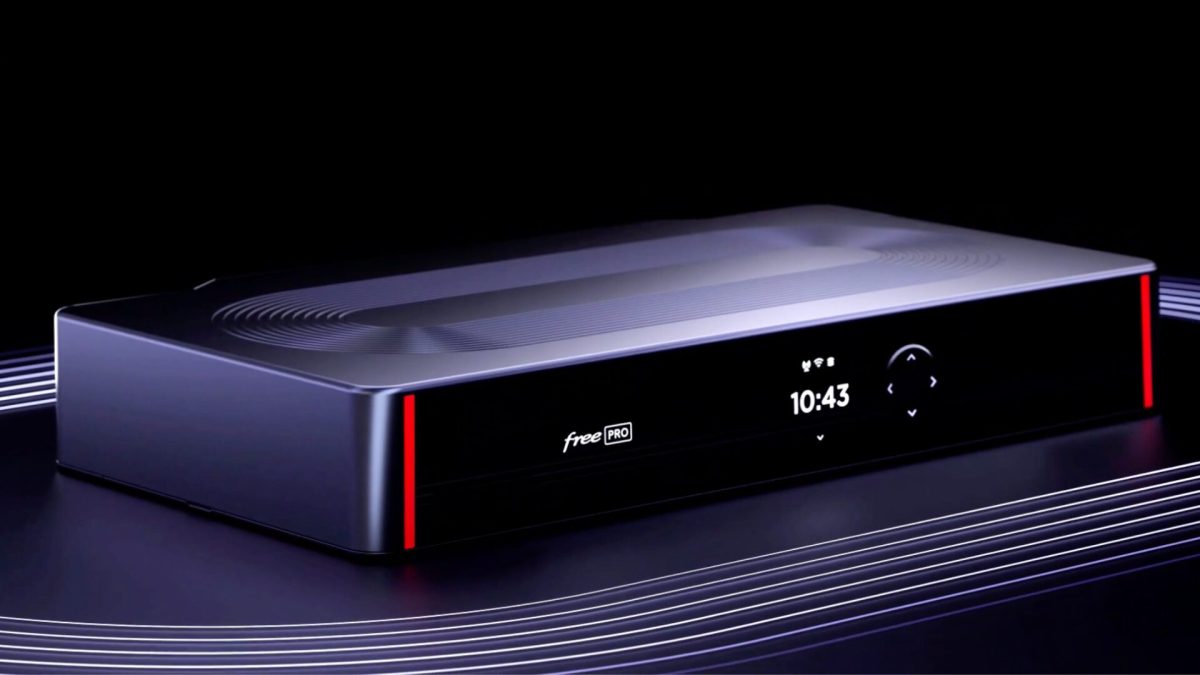
Le 17 février 2026, le fournisseur d'accès internet Free a annoncé offrir la fonctionnalité Cybersécurité Essentielle sans surcoût à tous ses clients Freebox Pro. Une offre déjà incluse pour les nouveaux abonnés, désormais accessible à l'ensemble des anciens clients.
– Article invité, rédigé par Vincent Lautier, contient des liens affiliés Amazon –
Tiens, et si on parlait de NAS aujourd’hui ? On va même parle d’une nouveauté qui est sortie il y a quelques jours, le UGREEN NASync DXP4800 Pro . On ne parle pas de la version "Plus", mais bien du modèle "Pro" qui commence à avoir de sérieux arguments pour lui.

Pour tout vous dire, j'ai profité du besoin d’un couple d'amis pour leur faire une installation propre, avec ce modèle, et c’est vraiment un super produit. Lui est sur PC, elle sur Mac, et ils bossent tout les deux dans la création audiovisuelle. Sauf que voilà, comme souvent dans ces métiers, avec des centaines de gigas de russes qui trainent un peu partout, la gestion des données devient vite un sujet sensible et d'inquiétude, avec plein de disques durs externes un peu partout, en vrac, rien de pratique.

Si on regarde dans les détails son équipement c'est vraiment pas mal du tout. Le bouzin est équipé d'un processeur Intel Core i3-1315U avec 6 cœurs, de 8 Go de RAM DDR5 (qu'on peut pousser jusqu'à 96 Go) et surtout d'un port 10GbE et d'un port 2,5GbE. On a aussi deux emplacements M.2 NVMe pour le cache, c'est complètement optionnel mais ça peut servir pour booster les accès aux petits fichiers. Alors oui, vous allez me dire que ce NAS est peut-être un peu surdimenssioné pour un usage à la maison, mais quand on a aussi un usage pro ou semi-pro, c'est quand même rassurant d'avoir une machine qui ne sera pas à genoux dans trois ans, et qui est évolutive.

Pour l'installation des disques, on a essayé d'être stratégiques en optimisant au mieux les 4 baies. On a monté les deux premiers disques en RAID 1 pour tout ce qui touche au boulot : sauvegarde des projets, rushs originaux et documents administratifs. C'est la ceinture et les bretelles, si un disque lâche, le travail est en sécurité. Pour les deux autres baies, on est partis sur du RAID 0 dédié à Plex. Pourquoi ? Parce que leur bibliothèque de films, on s'en fiche un peu de la perdre. Si un disque fini par décéder, ce n'est pas un drame national, on re-télécharge les fichiers et c'est reparti.

Ce qui m'a vraiment bluffé, c'est la rapidité de la mise en route. En quelques minutes, l'UGOS Pro, le système d'exploitation maison basé sur Debian, était opérationnel. UGREEN a fait un boulot assez dingue sur l'interface : c'est propre, c'est fluide et on n'est pas perdu dans des menus labyrinthiques. On sent que la marque veut venir chasser sur les terres de Synology en proposant une expérience utilisateur léchée tout en gardant une puissance matérielle brute supérieure. L’installation de Plex n’est pas encore proposée nativement sur l’OS de UGREEN (ça reste possible, en passant par Docker). Mais très franchement, même sur mon Synology je préfère avoir Plex qui tourne sur une machine déporté (en l’occurrence un Mac mini dans mon cas). Pour eux, ça sera sur le PC de la maison. Le NAS servant uniquement pour le stockage et le partage de données.

Ce NAS est disponible pour sa sortie à 699,99€ en promo (au lieu de 779,99€, il faut cocher le coupon sur Amazon) , ça n’est pas donné, mais c’est vraiment un NAS très solide, bien fini, et qui doit faire le job pendant au moins 7-8 ans. Puis quand on regarde la qualité de fabrication en aluminium et la connectivité réseau, le rapport performance-prix est vraiment bon. C'est une machine de guerre silencieuse qui s'intègre parfaitement dans un bureau ou un salon. Mes amis ont maintenant un système où le PC et le Mac communiquent sans friction, avec une vitesse de transfert qui permet de monter directement depuis le NAS.

Si vous voulez un NAS solide, qui tiendra dans le temps, et que vous n'avez pas à bidouiller dans tous les sens, c'est franchement un très bon choix, et pour tout vous dire j'ai même envie d'en prendre un pour moi ha ha.
Le NAS UGREEN DXP4800 Pro est disponible ici sur Amazon , et n’oubliez pas de cocher le coupon pour avoir la promo !
Article invité publié par Vincent Lautier . Vous pouvez aussi faire un saut sur mon blog , ma page de recommandations Amazon , ou lire tous les tests que je publie dans la catégorie "Gadgets Tech" , comme cette liseuse Android de dingue ou ces AirTags pour Android !

 Un acheteur pensait avoir fait une bonne affaire en s’offrant un SSD Samsung 990 PRO de 2 To. Attention aux prix alléchants !
Cet article SSD 990 Pro 2 To à petit prix, attention aux arnaques a été publié en premier par GinjFo.